Now that we have everything set up, let's create our first component! For our Register form, we need to have a form element, inside of which are two input fields, one Register button, and an area to display errors. In React, we can create a new React element using the createElement() method, which takes three arguments:
React.createElement(type, [props], [...children])
The type can be an HTML tag name (for example, div, span, form), a React component class, or a React fragment type (more on the latter two later).
props are properties that we can pass into a React element and may alter it in some ways. This is similar to how you can specify attributes on an HTML element. In fact, if the element being created is a native HTML element, these props are used as tag attributes. props should be specified as an object.
children is a list of React elements that nest within this component. In our case, we would create a form element, and nest our input and button elements inside the form.
<body>
  <script>
    const emailInput = React.createElement('input', { type: 'email' });
    const passwordInput = React.createElement('input', { type: 'password' });
    const registerButton = React.createElement('button', null, 'Register');
    const registrationForm = React.createElement('form', null, emailInput, passwordInput, registerButton);
  </script>
</body>
Note how we passed in { type: 'email' } as the props for emailInput; this will be rendered on the DOM as <input type="email">. We also passed in the string 'Register' into the registerButton element; this will cause the text to be rendered inside the button element, like <button>Register</button>.
To display the registerForm element onto the page, we need to use the ReactDOM.render() method, which takes two arguments:
- The component to render
- The DOM element to render it into
Therefore, we should create a new HTML element inside our body and use ReactDOM.render to render our React component into it.
<body>
  <div id="renderTarget"></div>
  <script>
    ,,,
    const registrationForm = React.createElement(...);
    ReactDOM.render(registrationForm, document.getElementById('renderTarget'));
  </script>
</body>
If you open index.html in the browser, you'll see the input boxes and button displayed.

And upon a closer inspection of the HTML output, you'll see the props turning into HTML tag attributes, and that the children passed into createElement() are nested inside.
<div id="renderTarget">
  <form>
    <input type="email">
    <input type="password">
    <button>Register</button>
  </form>
</div>
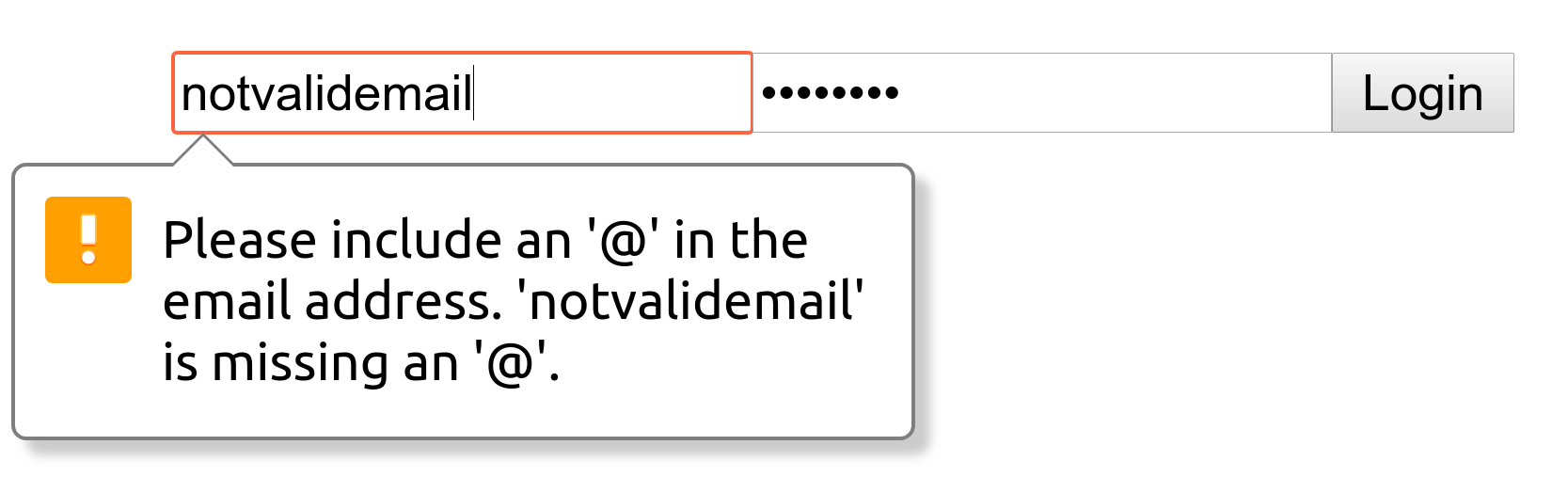
And because we have specified a type of email, most browsers will automatically validate the field for us.