
Lastly, we should configure all our servers to use the UTC time zone. Using a single time zone prevents us from having to keep track of which server is on which time zone when accessing multiple servers at the same time:
hobnob@hobnob:$ sudo dpkg-reconfigure tzdata
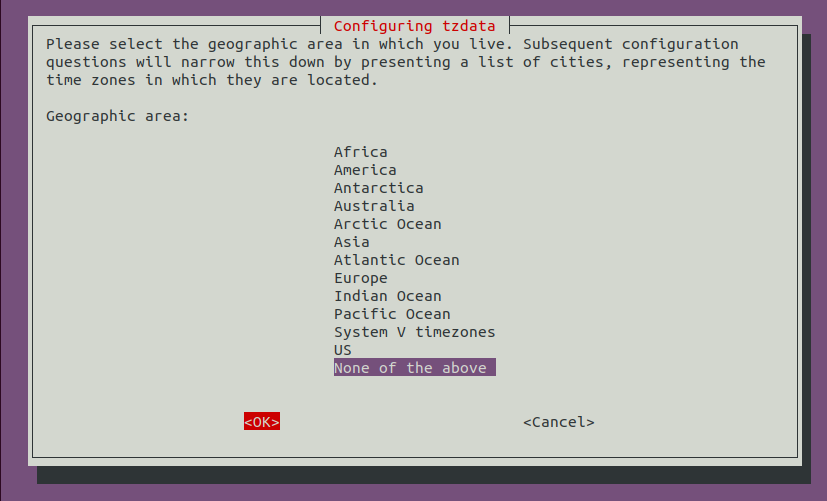
After you have run the command, you'll be presented with the following screen. Use your up/down arrow keys to select None of the above. Then, use your left/right arrow keys to select OK and press Return:
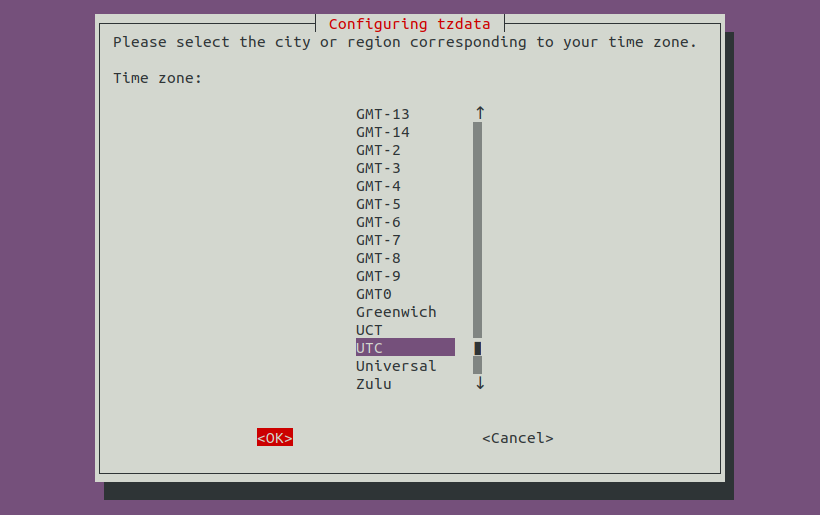
On the next screen, select UTC, which stands for Universal Time Coordinated:
You should get a confirmation on your Terminal:
Current default time zone: 'Etc/UTC'
Local time is now:      Wed Sep 12 18:54:39 UTC 2018.
Universal Time is now:  Wed Sep 12 18:54:39 UTC 2018.
We have now set our time zone, but to ensure the clock is accurate, we need to perform an additional step to keep it in sync with the global NTP servers:
hobnob@hobnob:$ sudo apt update
hobnob@hobnob:$ sudo apt install ntp
This will install and run the ntp daemon, which will automatically start when booting up, synchronize with these global NTP servers, and update the system's time if necessary.
Congratulations! You have now successfully set up and secured a VPS! We can now move on to deploying our API on it.