
With an understanding of virtual memory, let us focus our attention on a part of the virtual memory called process memory. Process memory is the memory used by user applications. The following screenshot shows two processes and gives a high-level overview of the components which reside in the process memory. In the following screenshot, the kernel space is deliberately left blank for simplicity (we will fill in that blank in the next section). Keep in mind that processes share the same kernel space:
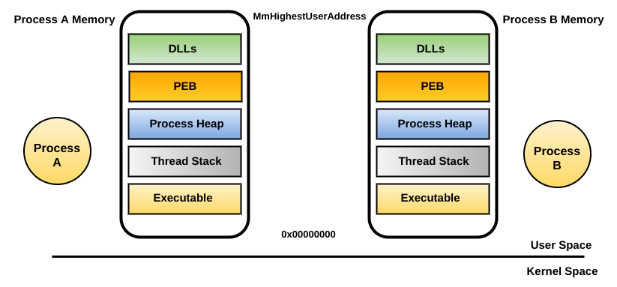
Process memory consists of the following major components:
- Process executable: This region contains the executable associated with the application. When a program on the disk is double-clicked, a process is created, and the executable associated with the program is loaded into the process memory.
- Dynamic Linked Libraries (DLLs): When a process is created, all its associated DLLs get loaded into the process memory. This region represents all DLLs associated with a process.
- Process environment variables: This memory region stores the process's environment variables, such as the temporary directories, home directory, AppData directory, and so on.
- Process heap(s): This region specifies the process heap. Each process has a single heap and can create additional heaps as required. This region specifies the dynamic input that the process receives.
- Thread stack(s): This region represents the dedicated range of process memory allocated to each thread, called its runtime stack. Each thread gets its own stack, and this is where function arguments, local variables, and return addresses can be found.
- Process Environment Block (PEB): This region represents the PEB structure, which contains information about where the executable is loaded, its full path on the disk, and where to find the DLLs in memory.
You can examine the contents of a process memory by using the Process Hacker (https://processhacker.sourceforge.io/) tool. To do that, launch Process Hacker, right-click on the desired process, select Properties, and choose the Memory tab.