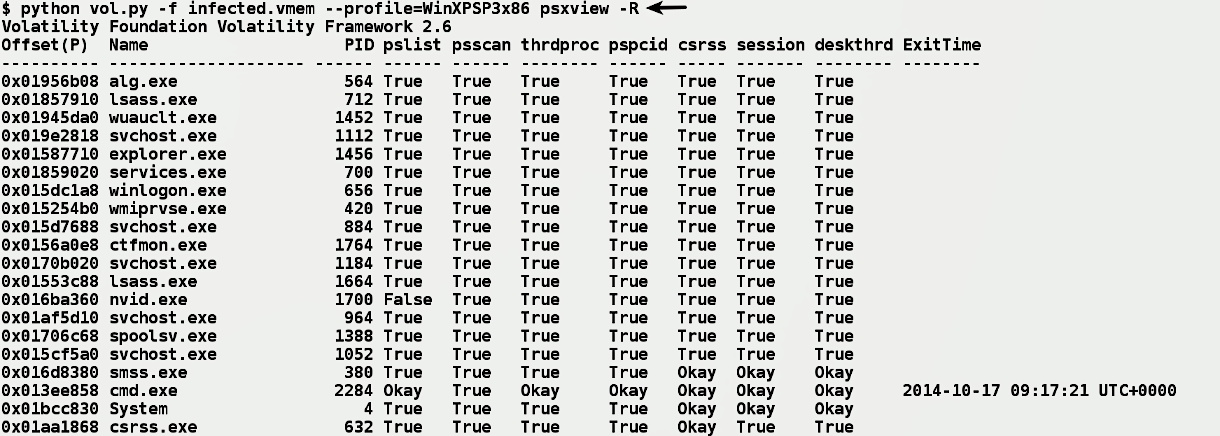
Previously, you saw how process listing could be manipulated to hide a process; you also understood how psscan uses pool tag scanning to detect the hidden process. It turns out that _POOL_HEADER (which psscan relies on) is only used for debugging purposes, and it does not affect the stability of the operating system. This means an attacker can install a kernel driver to run in the kernel space and modify the pool tags or any other field in the _POOL_HEADER. By modifying the pool tag, an attacker can prevent the plugins that rely on pool tag scanning from working properly. In other words, by modifying the pool tag, it is possible to hide the process from the psscan. To overcome this problem, The psxview plugin relies on extracting process information from different sources. It enumerates the process in seven different ways. By comparing the output from different sources, it is possible to detect discrepancies caused by the malware. In the following screenshot, psxview enumerates the processes using seven different techniques. Each process' information is displayed as a single row, and the techniques it uses are displayed as columns containing True or False. A False value under a particular column indicates that the process was not found using the respective method. In the following output, psxview detected the hidden process nvid.exe (pid 1700) using all the methods except the pslist method:
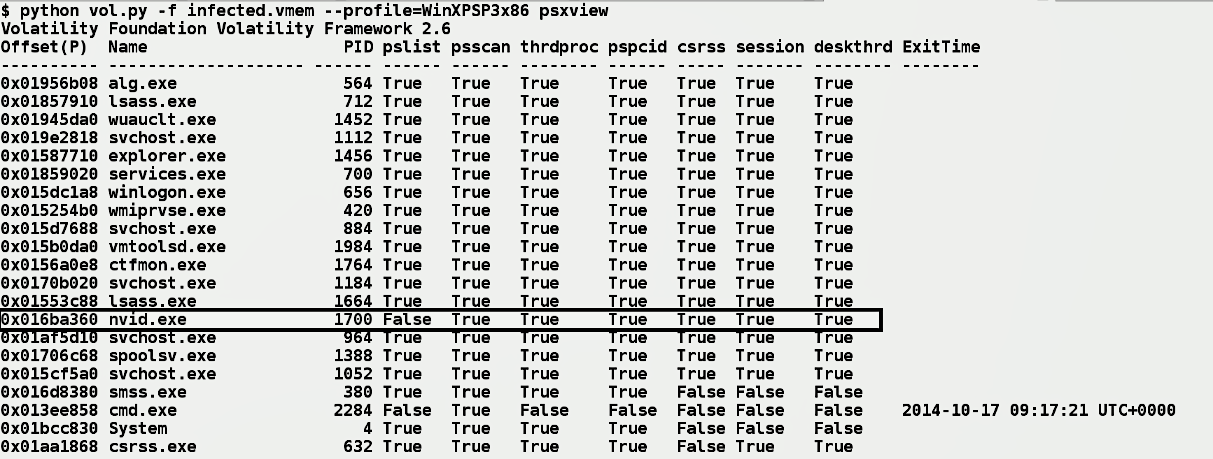
In the preceding screenshot, you will notice false values for a few processes. For example, the cmd.exe process is not present in any of the methods except the psscan method. You might think that cmd.exe is hidden, but that is not true; the reason why you see False is that cmd.exe is terminated (you can tell that from the ExitTime column). As a result, all other techniques were not able to find it where psscan was able to find it, because pool tag scanning can detect terminated process. In other words, a False value in a column does not necessarily mean that the process is hidden from that method; it can also mean that it is expected (depending on how and from where that method is getting the process information). To know whether it is expected or not, you can use the -R (--apply-rules) option as follows. In the following screenshot, notice how the False values are replaced with Okay. An Okay means False, but it is an expected behavior. After running the psxview plugin with -R (--apply-rules), if you still see a False value (such as nvid.exe with pid 1700 in the following screenshot), then it is a strong indication that the process is hidden from that method: