
With an understanding of debugging features, let's look at how debugging can help us to understand malware behavior. Consider a code excerpt from a malware sample, where the malware calls the CreateFileA function to create a file. To determine the name of the file that it creates, you can set a breakpoint at the call to the CreateFileA function and execute the program until it reaches the breakpoint. When it reaches the breakpoint (that is, before calling CreateFileA), all of the parameters to the function will be pushed onto the stack; we can then examine the first parameter on the stack to determine the name of the file. In the following screenshot, when the execution is paused at the breakpoint, x64dbg adds a comment (if it's a string) next to the instruction and next to the argument on the stack, to indicate what parameter is being passed to the function. From the screenshot, you can tell that the malware creates an executable file, winlogdate.exe, in the %Appdata%\Microsoft directory. You can also get this information by right-clicking on the first argument in the stack window and selecting the follow DWORD in dump option, which displays the contents in the hex window:

After creating the executable file, the malware passes the handle value (0x54) returned by the CreateFile as the first parameter to the WriteFile, and writes the executable content (which is passed as the second parameter), as shown here:
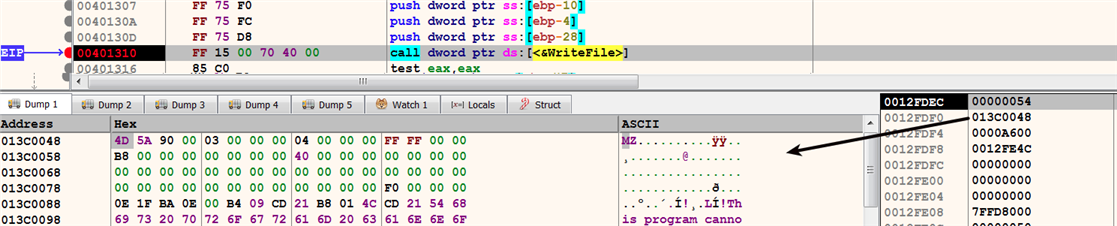
Let's assume that you do not know which object is associated with the handle 0x54, probably because you set a breakpoint directly on WriteFile without initially setting a breakpoint on CreateFile. To determine the object that is associated with a handle value, you can look it up in the Handles window. In this case, the handle value 0x54, passed as the first parameter to the WriteFile, is associated with winlogdate.exe, as shown here:
