
During your investigation, once you pin down a malicious process, you may want to know which objects (such as processes, files, registry keys, and so on) the process is accessing. This will give you an idea of the components associated with the malware and an insight into their operation, for example, a keylogger may be accessing a log file to log captured keystrokes, or malware might have an open handle to the configuration file.
To access an object, a process needs to first open a handle to that object by calling an API such as CreateFile or CreateMutex. Once it opens a handle to an object, it uses that handle to perform subsequent operations such as writing to a file or reading from a file. A handle is an indirect reference to an object; think of a handle as something that represents an object (the handle is not the object itself). The objects reside in the kernel memory, whereas the process runs in the user space, because of which a process cannot access the objects directly, hence it uses a handle which represents that object.
Each process is given a private handle table that resides in the kernel memory. This table contains all the kernel objects such as files, processes, and network sockets that are associated with the process. The question is, how does this table get populated? When the kernel gets the request from a process to create an object (via an API such as CreateFile), the object is created in the kernel memory. The pointer to the object is placed in the first available slot in the process handle table, and the corresponding index value is returned to the process. The index value is the handle which represents the object, and the handle is used by the process to perform subsequent operations.
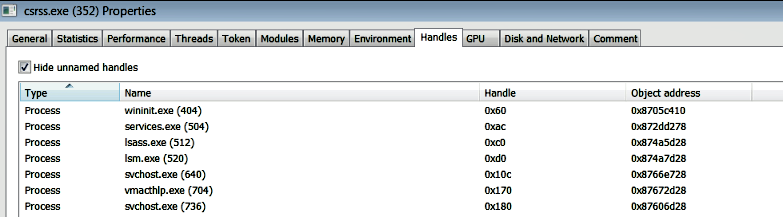
On a live system, you can inspect the kernel objects accessed by a particular process using the Process Hacker tool. To do that, launch Process Hacker as an Administrator, right-click on any process, and then select the Handles tab. The following screenshot shows the process handles of the csrss.exe process. csrss.exe is a legitimate operating system process that plays a role in the creation of every process and thread. For this reason, you will see csrss.exe having open handles to most of the processes (except itself and its parent processes) running on the system. In the following screenshot, the third column is the handle value, and the fourth column shows the address of the object in the kernel memory. For example, the first process, wininit.exe, is located at address 0x8705c410 (the address of its _EPROCESS structure) in the kernel memory, and the handle value representing this object is 0x60:
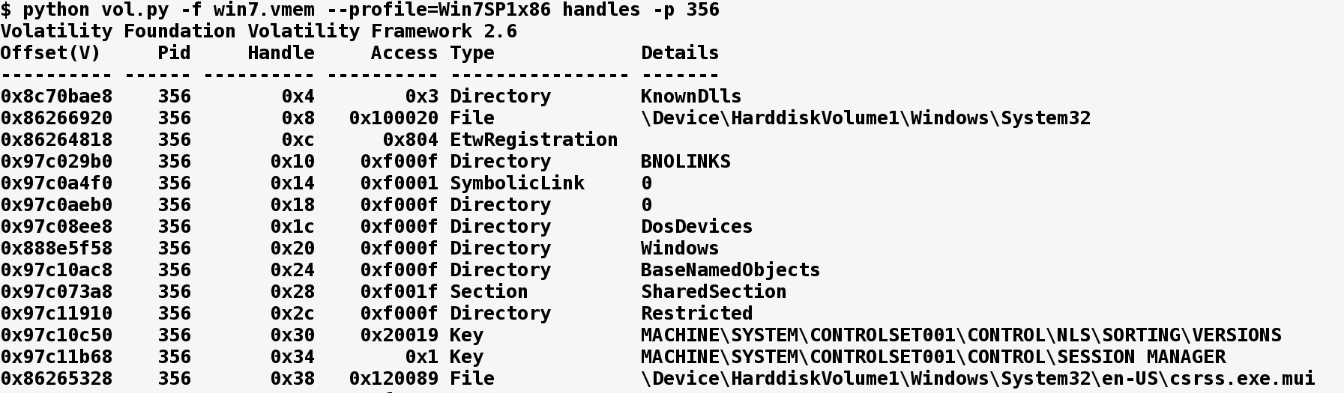
From the memory image, you can get a list of all the kernel objects that were accessed by a process using the handles plugin. The following screenshot displays the handles of the process with pid 356. If you run the handles plugin without -p options, it will display handle information for all the processes:
You can also filter the results for a specific object type (File, Key, Process, Mutant, and so on) using the -t option. In the following example, the handles plugin was run against the memory image infected with Xtreme RAT. The handles plugin was used to list the mutexes opened by the malicious process (with pid 1772). From the following output, you can see that Xtreme RAT creates a mutex called oZ694XMhk6yxgbTA0 to mark its presence on the system. A mutex such as the one created by Xtreme RAT can make a good host-based indicator to use in host-based monitoring:
$ python vol.py -f xrat.vmem --profile=Win7SP1x86 handles -p 1772 -t Mutant
Volatility Foundation Volatility Framework 2.6
Offset(V)  Pid  Handle Access   Type    Details
---------- ---- ------ -------- ------ -----------------------------
0x86f0a450 1772 0x104  0x1f0001 Mutant oZ694XMhk6yxgbTA0
0x86f3ca58 1772 0x208  0x1f0001 Mutant _!MSFTHISTORY!_
0x863ef410 1772 0x280  0x1f0001 Mutant WininetStartupMutex
0x86d50ca8 1772 0x29c  0x1f0001 Mutant WininetConnectionMutex
0x8510b8f0 1772 0x2a0  0x1f0001 Mutant WininetProxyRegistryMutex
0x861e1720 1772 0x2a8  0x100000 Mutant RasPbFile
0x86eec520 1772 0x364  0x1f0001 Mutant ZonesCounterMutex
0x86eedb18 1772 0x374  0x1f0001 Mutant ZoneAttributeCacheCounterMutex
In the following example of a memory image that's been infected with the TDL3 rootkit, the svchost.exe process (pid 880) has open file handles to the malicious DLL and the kernel driver associated with the rootkit:
$ python vol.py -f tdl3.vmem handles -p 880 -t File
Volatility Foundation Volatility Framework 2.6
Offset(V)  Pid Handle Access   Type  Details
---------- --- ------ -------- ---- ----------------------------
0x89406028 880 0x50   0x100001 File  \Device\KsecDD
0x895fdd18 880 0x100  0x100000 File  \Device\Dfs
[REMOVED]
0x8927b9b8 880 0x344  0x120089 File [REMOVED]\system32\TDSSoiqh.dll
0x89285ef8 880 0x34c  0x120089 File [REMOVED]\system32\drivers\TDSSpqxt.sys