
The actual content of the PE file is divided into sections. The sections are immediately followed by the PE header. These sections represent either code or data and they have in-memory attributes such as read/write. The section representing code contains instructions that will be executed by the processor, whereas the section containing data can represent different types of data, such as read/write program data (global variables), import/export tables, resources, and so on. Each section has a distinct name that conveys the purpose of the section. For example, a section with name .text indicates code and has an attribute of read-execute; a section with name .data indicates global data and has an attribute of read-write.
During the compilation of the executable, consistent section names are added by the compilers. The following table outlines some of the common sections in a PE file:
| Section Name | Description |
| .text or CODE | Contains executable code. |
| .data or DATA | Typically Contains read/write data and global variables. |
| .rdata |
Contains read-only data. Sometimes it also contains import and export information. |
| .idata | If present, contains the import table. If not present, then the import information is stored in .rdata section. |
| .edata | If present, contains export information. If not present, then the export information is found in .rdata section. |
| .rsrc | This section contains the resources used by the executable such as icons, dialogs, menus, strings, and so on. |
These section names are mainly for humans and are not used by the operating system, which means it is possible for an attacker or an obfuscation software to create sections with different names. If you come across section names that are not common, then you should treat them with suspicion, and further analysis is required to confirm maliciousness.
Information about these sections (such as section name, where to find the section, and its characteristics) is present in the section table in the PE header. Examining a section table will give information about the section and its characteristics.
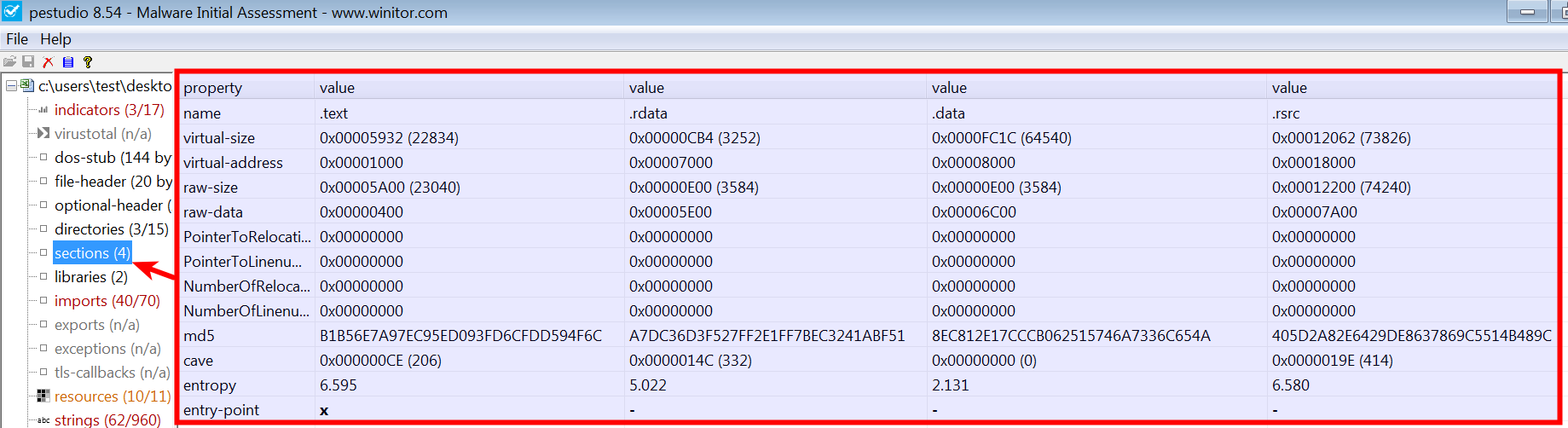
When you load an executable in pestudio and click on sections, it displays the section information extracted from the section table and its attributes (read/write and so on). The next screenshot from pestudio shows the section information for an executable, and some relevant fields from the screenshot are explained here:
| Field | Description |
| Names | Displays section names. In this case, the executable contains four sections (.text, .data, .rdata and .rsrc). |
| Virtual-Size | Indicates the size of the section when loaded into memory. |
| Virtual-Address | This is the relative virtual address (that is, offset from the base address of the executable) where the section can be found in memory. |
| Raw-size | Indicates the size of the section on the disk. |
| Raw-data | Indicates the offset in the file where the section can be found. |
| Entry-point | This is the RVA (relative virtual address) where the code starts executing. In this case, the entry point is in the .text section, which is normal. |
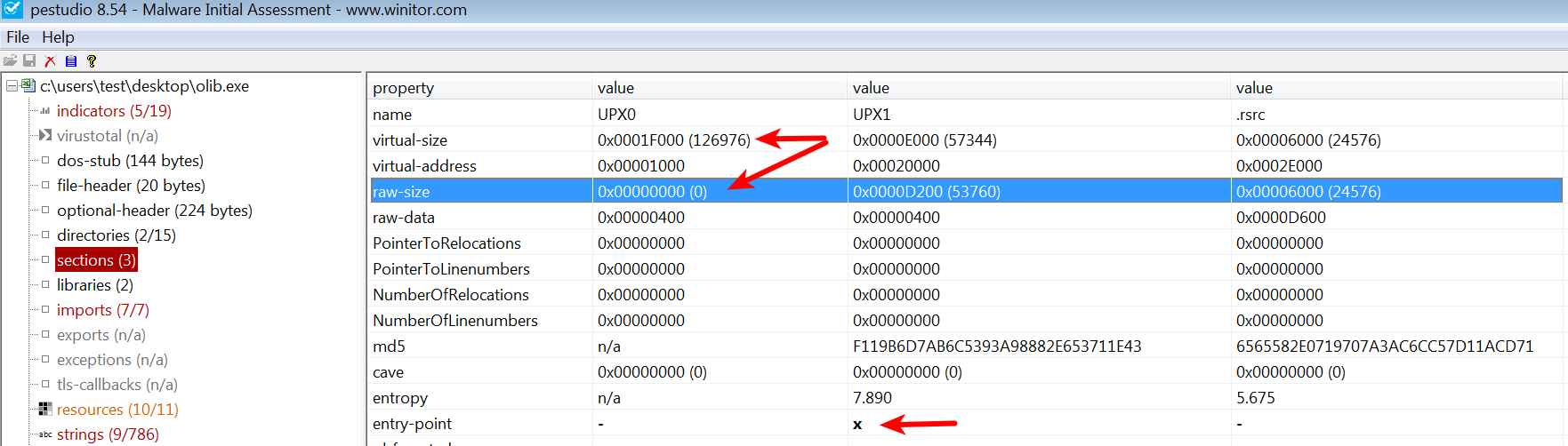
Examining the section table can also help in identifying any anomaly in the PE file. The following screenshot shows the section names of a malware packed with UPX; the malware sample contains the following discrepancies:
- The section names do not contain common sections added by the compiler (such as .text, .data, and so on) but contain section names UPX0 and UPX1.
- The entry point is in the UPX1 section, indicating that execution will start in this section (decompression routine).
- Typically, raw-size and the virtual-size should be almost equal, but small differences are normal due to section alignment. In this case, raw-size is 0, indicating that this section will not take up space on the disk, but virtual-size specifies that, in memory, it takes up more space (around 127 kb). This is a strong indication of a packed binary. The reason for this discrepancy is that when a packed binary is executed, the decompression routine of the packer will copy decompressed data or instructions into the memory during runtime.
The following Python script demonstrates the use of the pefile module to display the section and its characteristics:
import pefile
import sys

pe = pefile.PE(sys.argv[1])
for section in pe.sections:
    print "%s %s %s %s" % (section.Name,
                           hex(section.VirtualAddress),
                           hex(section.Misc_VirtualSize),
                           section.SizeOfRawData)
print "\n"
The following is the output after running the preceding Python script:
$ python display_sections.py olib.exe
UPX0 0x1000 0x1f000 0
UPX1 0x20000 0xe000 53760
.rsrc 0x2e000 0x6000 24576