Table of Contents for
Python Geospatial Development - Third Edition
 Python Geospatial Development - Third Edition
Published by
Packt Publishing, 2016
Python Geospatial Development - Third Edition
Published by
Packt Publishing, 2016
- Cover
- Table of Contents
- Python Geospatial Development Third Edition
- Python Geospatial Development Third Edition
- Credits
- About the Author
- About the Reviewer
- www.PacktPub.com
- Preface
- What you need for this book
- Who this book is for
- Conventions
- Reader feedback
- Customer support
- 1. Geospatial Development Using Python
- Geospatial development
- Applications of geospatial development
- Recent developments
- Summary
- 2. GIS
- GIS data formats
- Working with GIS data manually
- Summary
- 3. Python Libraries for Geospatial Development
- Dealing with projections
- Analyzing and manipulating Geospatial data
- Visualizing geospatial data
- Summary
- 4. Sources of Geospatial Data
- Sources of geospatial data in raster format
- Sources of other types of geospatial data
- Choosing your geospatial data source
- Summary
- 5. Working with Geospatial Data in Python
- Working with geospatial data
- Changing datums and projections
- Performing geospatial calculations
- Converting and standardizing units of geometry and distance
- Exercises
- Summary
- 6. Spatial Databases
- Spatial indexes
- Introducing PostGIS
- Setting up a database
- Using PostGIS
- Recommended best practices
- Summary
- 7. Using Python and Mapnik to Generate Maps
- Creating an example map
- Mapnik concepts
- Summary
- 8. Working with Spatial Data
- Designing and building the database
- Downloading and importing the data
- Implementing the DISTAL application
- Using DISTAL
- Summary
- 9. Improving the DISTAL Application
- Dealing with the scale problem
- Performance
- Summary
- 10. Tools for Web-based Geospatial Development
- A closer look at three specific tools and techniques
- Summary
- 11. Putting It All Together – a Complete Mapping System
- Designing the ShapeEditor
- Prerequisites
- Setting up the database
- Setting up the ShapeEditor project
- Defining the ShapeEditor's applications
- Creating the shared application
- Defining the data models
- Playing with the admin system
- Summary
- 12. ShapeEditor – Importing and Exporting Shapefiles
- Importing shapefiles
- Exporting shapefiles
- Summary
- 13. ShapeEditor – Selecting and Editing Features
- Editing features
- Adding features
- Deleting features
- Deleting shapefiles
- Using the ShapeEditor
- Further improvements and enhancements
- Summary
- Index
In these final three chapters of this book, we will bring together all the topics discussed in previous chapters to implement a sophisticated web-based mapping application called ShapeEditor.
In this chapter, we will:
- Look at the ShapeEditor system from the user's point of view in order to see how it will work
- Look at the various parts of the ShapeEditor in depth and see how they will be implemented in terms of data structures and functionality
- Set up a PostGIS database for the ShapeEditor to use
- Create the GeoDjango project and applications for the ShapeEditor system
- Define the ShapeEditor's database models
- Configure the GeoDjango admin interface for the ShapeEditor
- Use the admin interface to view and edit geospatial data within the ShapeEditor's database
As we have seen, shapefiles are commonly used to store, make available, and transfer geospatial data. We have worked with shapefiles extensively in this book, obtaining freely available geospatial data in Shapefile format, writing programs to load data from a shapefile, and creating shapefiles programmatically.
While it is easy enough to edit the attributes associated with a shapefile's features, editing the features themselves is a lot more complicated. One approach is to install a GIS system and use it to import the data, make changes, and then export the data into another shapefile. While this works, it is hardly convenient if all you want to do is make a few changes to a shapefile's features. It would be much easier if we had a web application specifically designed for editing shapefiles.
This is precisely what we are going to implement: a web-based shapefile editor. Rather unimaginatively, we'll call this program ShapeEditor.
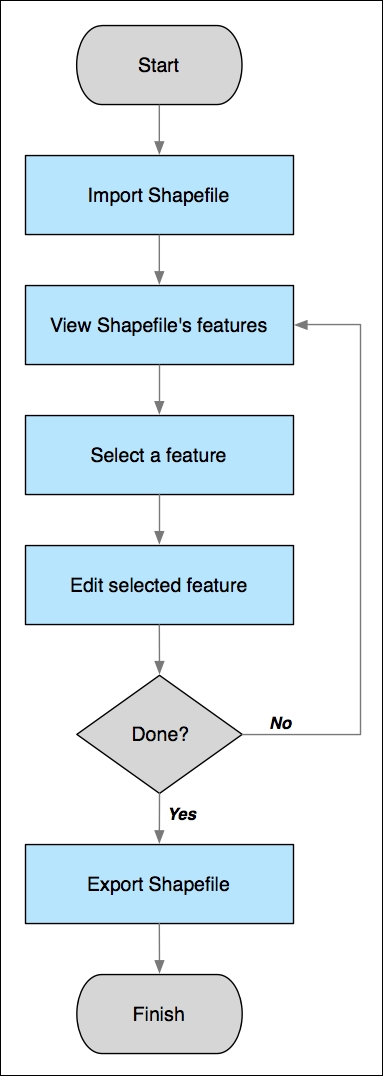
The following flowchart depicts the ShapeEditor's basic workflow:
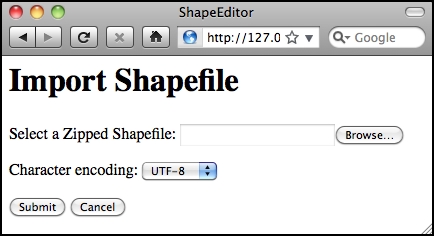
The user starts by importing a shapefile using the ShapeEditor's web interface, as shown in the following screen snapshot:
Tip
Our ShapeEditor implementation wasn't chosen for its good looks; instead, it concentrates on getting the features working. It would be easy to add stylesheets and edit the HTML templates to improve the appearance of the application, but doing so would make the code harder to understand. This is why we've taken such a minimalist approach to the user interface. Making it pretty is an exercise left to the reader.
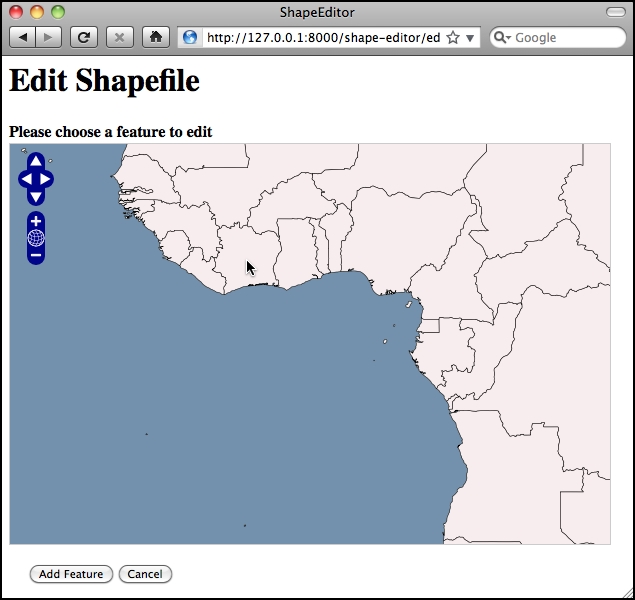
Once the shapefile has been imported, the user can view the shapefile's features on a map and can select a feature by clicking on it. In this case, we have imported the World Borders Dataset, used several times in this book:
The user can then edit the selected feature's geometry as well as see a list of the attributes associated with that feature:
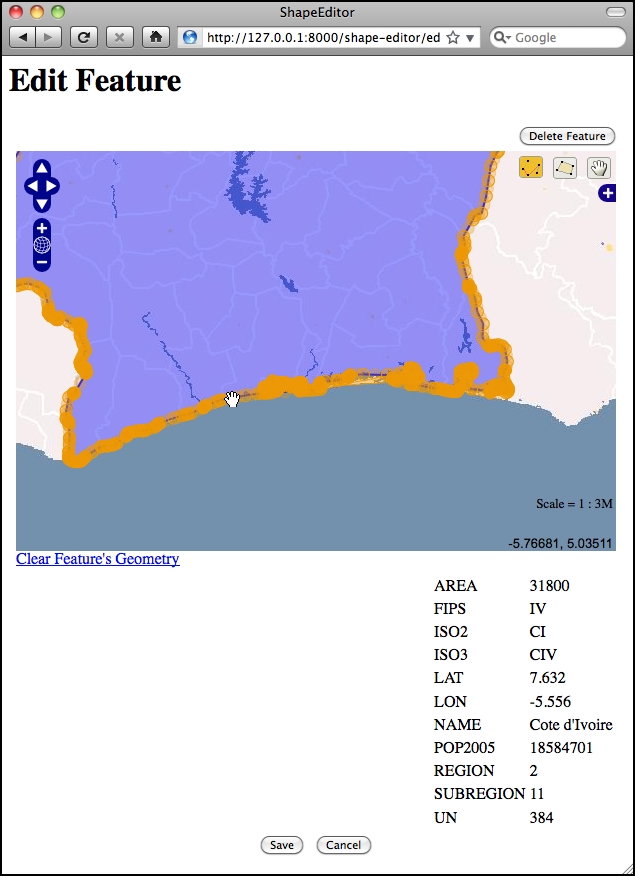
Once the user has finished making changes to the shapefile, he or she can export the shapefile again by clicking on the Export hyperlink on the main page:
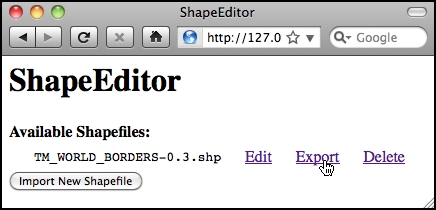
That pretty much covers the ShapeEditor's functionality. It is a comparatively straightforward system, but it can be very useful if you need to work with geospatial data in shapefile format. And, of course, through the process of implementing the ShapeEditor, you will learn how to implement your own complex geospatial web applications using GeoDjango.