Table of Contents for
Python Geospatial Development - Third Edition
 Python Geospatial Development - Third Edition
Published by
Packt Publishing, 2016
Python Geospatial Development - Third Edition
Published by
Packt Publishing, 2016
- Cover
- Table of Contents
- Python Geospatial Development Third Edition
- Python Geospatial Development Third Edition
- Credits
- About the Author
- About the Reviewer
- www.PacktPub.com
- Preface
- What you need for this book
- Who this book is for
- Conventions
- Reader feedback
- Customer support
- 1. Geospatial Development Using Python
- Geospatial development
- Applications of geospatial development
- Recent developments
- Summary
- 2. GIS
- GIS data formats
- Working with GIS data manually
- Summary
- 3. Python Libraries for Geospatial Development
- Dealing with projections
- Analyzing and manipulating Geospatial data
- Visualizing geospatial data
- Summary
- 4. Sources of Geospatial Data
- Sources of geospatial data in raster format
- Sources of other types of geospatial data
- Choosing your geospatial data source
- Summary
- 5. Working with Geospatial Data in Python
- Working with geospatial data
- Changing datums and projections
- Performing geospatial calculations
- Converting and standardizing units of geometry and distance
- Exercises
- Summary
- 6. Spatial Databases
- Spatial indexes
- Introducing PostGIS
- Setting up a database
- Using PostGIS
- Recommended best practices
- Summary
- 7. Using Python and Mapnik to Generate Maps
- Creating an example map
- Mapnik concepts
- Summary
- 8. Working with Spatial Data
- Designing and building the database
- Downloading and importing the data
- Implementing the DISTAL application
- Using DISTAL
- Summary
- 9. Improving the DISTAL Application
- Dealing with the scale problem
- Performance
- Summary
- 10. Tools for Web-based Geospatial Development
- A closer look at three specific tools and techniques
- Summary
- 11. Putting It All Together – a Complete Mapping System
- Designing the ShapeEditor
- Prerequisites
- Setting up the database
- Setting up the ShapeEditor project
- Defining the ShapeEditor's applications
- Creating the shared application
- Defining the data models
- Playing with the admin system
- Summary
- 12. ShapeEditor – Importing and Exporting Shapefiles
- Importing shapefiles
- Exporting shapefiles
- Summary
- 13. ShapeEditor – Selecting and Editing Features
- Editing features
- Adding features
- Deleting features
- Deleting shapefiles
- Using the ShapeEditor
- Further improvements and enhancements
- Summary
- Index
Let's take a brief look at some of the more common geospatial development tasks you might encounter.
Imagine that you have a database containing a range of geospatial data for San Francisco. This database might include geographical features, roads, the location of prominent buildings, and other man-made features such as bridges, airports, and so on.
Such a database can be a valuable resource for answering various questions such as the following:
- What's the longest road in Sausalito?
- How many bridges are there in Oakland?
- What is the total area of Golden Gate Park?
- How far is it from Pier 39 to Coit Tower?
Many of these types of problems can be solved using tools such as the PostGIS spatially-enabled database toolkit. For example, to calculate the total area of Golden Gate Park, you might use the following SQL query:
select ST_Area(geometry) from features
  where name = "Golden Gate Park";
To calculate the distance between two locations, you first have to geocode the locations to obtain their latitude and longitude values. There are various ways to do this; one simple approach is to use a free geocoding web service such as the following:
http://nominatim.openstreetmap.org/search?format=json&q=Pier 39,San Francisco, CA
This returns (among other things) a latitude value of 37.8101274 and a longitude value of -122.4104622 for Pier 39 in San Francisco.
Note
These latitude and longitude values are in decimal degrees. If you don't know what these are, don't worry; we'll talk about decimal degrees in Chapter 2, GIS.
Similarly, we can find the location of Coit Tower in San Francisco using this query:
http://nominatim.openstreetmap.org/search?format=json&q=Coit Tower, San Francisco, CA
This returns a latitude value of 37.80237485 and a longitude value of -122.405832766082.
Now that we have the coordinates for the two desired locations, we can calculate the distance between them using the pyproj Python library:
Tip
If you want to run this example, you will need to install the pyproj library. We will look at how to do this in Chapter 3, Python Libraries for Geospatial Development.
import pyproj

lat1,long1 = (37.8101274,-122.4104622)
lat2,long2 = (37.80237485,-122.405832766082)

geod = pyproj.Geod(ellps="WGS84")
angle1,angle2,distance = geod.inv(long1, lat1, long2, lat2)

print("Distance is {:0.2f} meters".format(distance))
This prints the distance between the two points:
Distance is 952.17 meters
Note
Don't worry about the WGS84 reference at this stage; we'll look at what this means in Chapter 2, GIS.
Of course, you wouldn't normally do this sort of analysis on a one-off basis like this—it's much more common to create a Python program that will answer these sorts of questions for any desired set of data. You might, for example, create a web application that displays a menu of available calculations. One of the options in this menu might be to calculate the distance between two points; when this option is selected, the web application would prompt the user to enter the two locations, attempt to geocode them by calling an appropriate web service (and display an error message if a location couldn't be geocoded), then calculate the distance between the two points using pyproj, and finally display the results to the user.
Alternatively, if you have a database containing useful geospatial data, you could let the user select the two locations from the database rather than having them type in arbitrary location names or street addresses.
However you choose to structure it, performing calculations like this will often be a major part of your geospatial application.
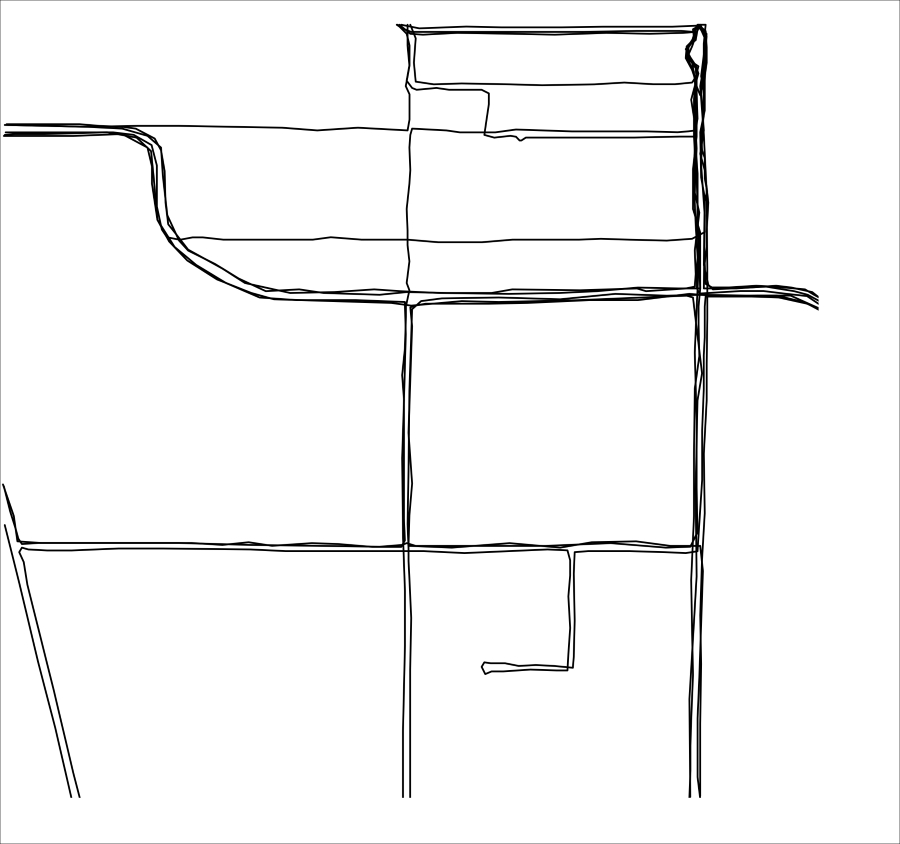
Imagine you wanted to see which areas of a city are typically covered by a taxi during an average working day. You might place a GPS recorder in a taxi and leave it to record the taxi's position over several days. The result would be a series of timestamps and latitude and longitude values, like this:
2010-03-21 9:15:23  -38.16614499  176.2336626
2010-03-21 9:15:27  -38.16608632  176.2335635
2010-03-21 9:15:34  -38.16604198  176.2334771
2010-03-21 9:15:39  -38.16601507  176.2333958
...
By themselves, these raw numbers tell you almost nothing. But when you display this data visually, the numbers start to make sense:
Tip
Detailed steps to download the code bundle are mentioned in the Preface of this book. Please have a look.
The code bundle for the book is also hosted on GitHub at https://github.com/PacktPublishing/Python-Geospatial-Development-Third-Edition. We also have other code bundles from our rich catalog of books and videos available at https://github.com/PacktPublishing/. Check them out!
You can immediately see that the taxi tends to go along the same streets again and again, and if you draw this data as an overlay on top of a street map, you can see exactly where the taxi has been:
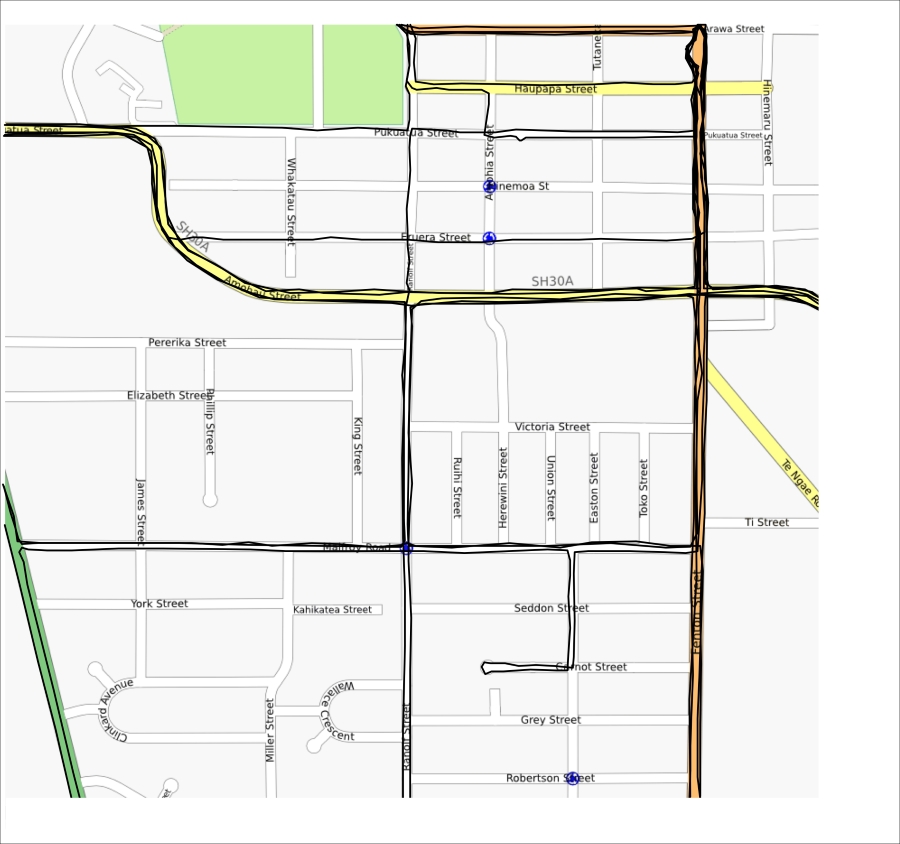
Street map courtesy of http://openstreetmap.org
While this is a simple example, visualization is a crucial aspect of working with geospatial data. How data is displayed visually, how different data sets are overlaid, and how the user can manipulate data directly in a visual format are all going to be major topics in this book.
The concept of a mash-up has become popular in recent years. Mash-ups are applications that combine data and functionality from more than one source. For example, a typical mash-up might collect details of houses for rent in a given city and plot the location of each rental on a map, like this:
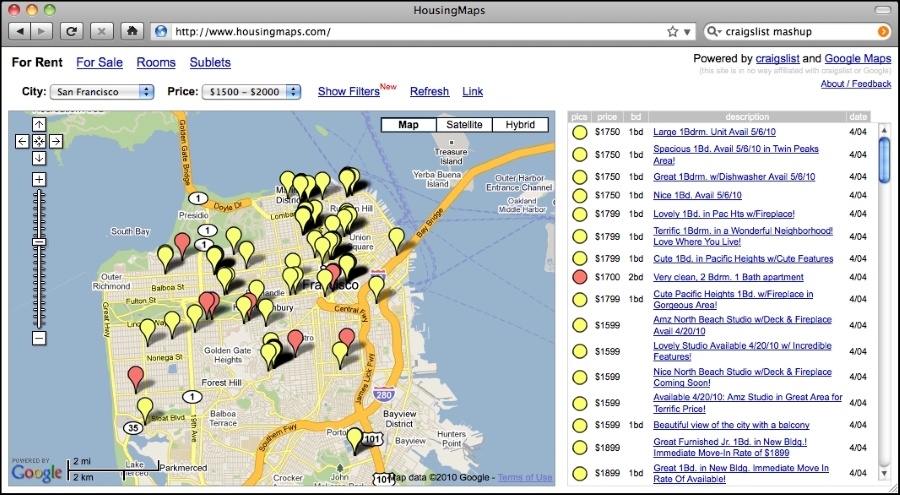
Image courtesy of http://housingmaps.com
The Google Maps API has been immensely popular in creating these types of mash-ups. However, Google Maps has some serious licensing and other limitations. It is not the only option, however tools such as Mapnik, OpenLayers, and MapServer, to name a few, also allow you to create mash-ups that overlay your own data onto a map.
Most of these mash-ups run as web applications across the Internet, running on a server that can be accessed by anyone who has a web browser. Sometimes, the mash-ups are private, requiring password access, but usually, they are publicly available and can be used by anyone. Indeed, many businesses (such as the housing maps site shown in the previous screen snapshot) are based on freely-available geospatial mash-ups.