Table of Contents for
Python Geospatial Development - Third Edition
 Python Geospatial Development - Third Edition
Published by
Packt Publishing, 2016
Python Geospatial Development - Third Edition
Published by
Packt Publishing, 2016
- Cover
- Table of Contents
- Python Geospatial Development Third Edition
- Python Geospatial Development Third Edition
- Credits
- About the Author
- About the Reviewer
- www.PacktPub.com
- Preface
- What you need for this book
- Who this book is for
- Conventions
- Reader feedback
- Customer support
- 1. Geospatial Development Using Python
- Geospatial development
- Applications of geospatial development
- Recent developments
- Summary
- 2. GIS
- GIS data formats
- Working with GIS data manually
- Summary
- 3. Python Libraries for Geospatial Development
- Dealing with projections
- Analyzing and manipulating Geospatial data
- Visualizing geospatial data
- Summary
- 4. Sources of Geospatial Data
- Sources of geospatial data in raster format
- Sources of other types of geospatial data
- Choosing your geospatial data source
- Summary
- 5. Working with Geospatial Data in Python
- Working with geospatial data
- Changing datums and projections
- Performing geospatial calculations
- Converting and standardizing units of geometry and distance
- Exercises
- Summary
- 6. Spatial Databases
- Spatial indexes
- Introducing PostGIS
- Setting up a database
- Using PostGIS
- Recommended best practices
- Summary
- 7. Using Python and Mapnik to Generate Maps
- Creating an example map
- Mapnik concepts
- Summary
- 8. Working with Spatial Data
- Designing and building the database
- Downloading and importing the data
- Implementing the DISTAL application
- Using DISTAL
- Summary
- 9. Improving the DISTAL Application
- Dealing with the scale problem
- Performance
- Summary
- 10. Tools for Web-based Geospatial Development
- A closer look at three specific tools and techniques
- Summary
- 11. Putting It All Together – a Complete Mapping System
- Designing the ShapeEditor
- Prerequisites
- Setting up the database
- Setting up the ShapeEditor project
- Defining the ShapeEditor's applications
- Creating the shared application
- Defining the data models
- Playing with the admin system
- Summary
- 12. ShapeEditor – Importing and Exporting Shapefiles
- Importing shapefiles
- Exporting shapefiles
- Summary
- 13. ShapeEditor – Selecting and Editing Features
- Editing features
- Adding features
- Deleting features
- Deleting shapefiles
- Using the ShapeEditor
- Further improvements and enhancements
- Summary
- Index
Imagine that you have two points on the earth's surface, with a straight line drawn between them:
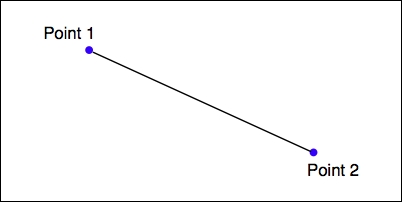
Each of these points can be described as a coordinate using some arbitrary coordinate system (for example, using latitude and longitude values), while the length of the straight line could be considered to be the distance between the two points.
Given any two coordinates, it is possible to calculate the distance between them. Conversely, you can start with one coordinate, a desired distance and direction, and then calculate the coordinates for the other point.
The pyproj Python library allows you to perform these types of calculations for any given datum. You can also use pyproj to convert from projected coordinates back to geographic coordinates and vice versa, allowing you to perform these sorts of calculations for any desired datum, coordinate system, and projection.
Ultimately, a geometry such as a line or a polygon consists of nothing more than a list of connected points. This means that using the process we described earlier, you can calculate the geodetic distance between each connected pair of points in a polygon or LineString and sum the results to get the actual length for any geometry. Let's use this knowledge to solve a real-world problem.
To solve this problem, we will make use of the common-border/border.shp shapefile we created earlier. This shapefile contains a single feature, which is a LineString defining the border between these two countries. Let's start by taking a look at the individual line segments that make up this feature's geometry:
import os.path
from osgeo import ogr

def getLineSegmentsFromGeometry(geometry):
    segments = []
    if geometry.GetPointCount() > 0:
        segment = []
        for i in range(geometry.GetPointCount()):
            segment.append(geometry.GetPoint_2D(i))
        segments.append(segment)
    for i in range(geometry.GetGeometryCount()):
        subGeometry = geometry.GetGeometryRef(i)
        segments.extend(
            getLineSegmentsFromGeometry(subGeometry))
    return segments

filename = os.path.join("common-border", "border.shp")
shapefile = ogr.Open(filename)
layer = shapefile.GetLayer(0)
feature = layer.GetFeature(0)
geometry = feature.GetGeometryRef()

segments = getLineSegmentsFromGeometry(geometry)

print(segments)Note that we use a recursive function, getLineSegmentsFromGeometry(), to pull the individual coordinates for each line segment out of the geometry. Because geometries are recursive data structures, we have to pull out the individual line segments before we can work with them.
Running this program produces a long list of points that make up the various line segments defining the border between these two countries:
% python calcBorderLength.py
[[(100.081322, 20.348841), (100.089432, 20.347218)],
[(100.089432, 20.347218), (100.09137, 20.348606)],
[(98.742752, 10.348608), (98.748871, 10.378054)], ...]
Each line segment consists of a list of points—in this case, you'll notice that each segment has only two points—and if you look closely, you will notice that each segment starts at the same point as the previous segment ended. There are a total of 459 segments defining the border between Thailand and Myanmar, that is, 459 point pairs that we can calculate the geodetic distance for.
Let's see how we can use pyproj to calculate the geodetic distance between any two points. We first create a Geod instance:
geod = pyproj.Geod(ellps='WGS84')
Geod is the pyproj class that performs geodetic calculations. Notice that we have to provide it with details of the datum used to describe the shape of the earth. Once our Geod instance has been set up, we can calculate the geodetic distance between any two points by calling geod.inv(), the inverse geodetic transformation method:
angle1,angle2,distance = geod.inv(long1, lat1, long2, lat2)
angle1 will be the angle from the first point to the second measured in decimal degrees, angle2 will be the angle from the second point back to the first (again in degrees), and distance will be the great-circle distance between the two points in meters.
Using this, we can iterate over the line segments, calculate the distance from one point to the next, and total up all the distances to obtain the total length of the border:
geod = pyproj.Geod(ellps='WGS84')

totLength = 0.0
for segment in segments:
    for i in range(len(segment)-1):
        pt1 = segment[i]
        pt2 = segment[i+1]

    long1,lat1 = pt1
    long2,lat2 = pt2

    angle1,angle2,distance = geod.inv(long1, lat1,
                                      long2, lat2)
    totLength += distance
Upon completion, totLength will be the total length of the border in meters.
Putting all this together, we end up with a complete Python program to read the border.shp shapefile and calculate and display the total length of the common border:
# calcBorderLength.py

import os.path
from osgeo import ogr
import pyproj

def getLineSegmentsFromGeometry(geometry):
    segments = []
    if geometry.GetPointCount() > 0:
        segment = []
        for i in range(geometry.GetPointCount()):
            segment.append(geometry.GetPoint_2D(i))
        segments.append(segment)
    for i in range(geometry.GetGeometryCount()):
        subGeometry = geometry.GetGeometryRef(i)
        segments.extend(
            getLineSegmentsFromGeometry(subGeometry))
    return segments

filename = os.path.join("common-border", "border.shp")
shapefile = ogr.Open(filename)
layer = shapefile.GetLayer(0)
feature = layer.GetFeature(0)
geometry = feature.GetGeometryRef()
segments = getLineSegmentsFromGeometry(geometry)

geod = pyproj.Geod(ellps='WGS84')

totLength = 0.0
for segment in segments:
    for i in range(len(segment)-1):
        pt1 = segment[i]
        pt2 = segment[i+1]

        long1,lat1 = pt1
        long2,lat2 = pt2

        angle1,angle2,distance = geod.inv(long1, lat1,
                                          long2, lat2)
        totLength += distance

print("Total border length = {:.2f} km".format(totLength/1000))
Running this program tells us the total calculated length of the Thai-Myanmar border:
% python calcBorderLength.py
Total border length = 1730.55 km
In this program, we have assumed that the shapefile is in geographic coordinates using the WGS84 ellipsoid and only contains a single feature. Let's extend our program to deal with any supplied projection and datum and at the same time, process all the features in the shapefile rather than just the first. This will make our program more flexible and allow it to work with any arbitrary shapefile rather than just the common-border shapefile we created earlier.
Let's deal with the projection and datum first. We could change the projection and datum for our shapefile before we process it, just as we did with the LULC and roads shapefiles earlier in this chapter. That would work, but it would require us to create a temporary shapefile just to calculate the length, which isn't very efficient. Instead, let's make use of pyproj directly to reproject the shapefile back into geographic coordinates if necessary. We can do this by querying the shapefile's spatial reference:
shapefile = ogr.Open(filename)
layer = shapefile.GetLayer(0)
spatialRef = layer.GetSpatialRef()
if spatialRef == None:
    print("Shapefile has no spatial reference, using WGS84.")
    spatialRef = osr.SpatialReference()
    spatialRef.SetWellKnownGeogCS('WGS84')
Once we have the spatial reference, we can see whether the spatial reference is projected and if so, use pyproj to turn the projected coordinates back into lat/long values again, like this:
if spatialRef.IsProjected():
    # Convert projected coordinates back to lat/long values.
    srcProj = pyproj.Proj(spatialRef.ExportToProj4())
    dstProj = pyproj.Proj(proj='longlat', ellps='WGS84',
                          datum='WGS84')
    ...
    long,lat = pyproj.transform(srcProj, dstProj, x, y)
Using this, we can rewrite our program to accept data using any projection and datum. At the same time, we'll change it to calculate the overall length of every feature in the file rather than just the first, and also to accept the name of the shapefile from the command line. Finally, we'll add some error checking. Let's call our new program calcFeatureLengths.py.
We'll start by copying the getLineSegmentsFromGeometry() function we used earlier:
import sys
from osgeo import ogr, osr
import pyproj

def getLineSegmentsFromGeometry(geometry):
    segments = []
    if geometry.GetPointCount() > 0:
        segment = []
        for i in range(geometry.GetPointCount()):
            segment.append(geometry.GetPoint_2D(i))
        segments.append(segment)
    for i in range(geometry.GetGeometryCount()):
        subGeometry = geometry.GetGeometryRef(i)
        segments.extend(
            getLineSegmentsFromGeometry(subGeometry))
    return segments
Next, we'll get the name of the shapefile to open from the command line:
if len(sys.argv) != 2:
    print("Usage: calcFeatureLengths.py <shapefile>")
    sys.exit(1)

filename = sys.argv[1]
We'll then open the shapefile and obtain its spatial reference, using the code we wrote earlier:
shapefile = ogr.Open(filename)
layer = shapefile.GetLayer(0)
spatialRef = layer.GetSpatialRef()
if spatialRef == None:
    print("Shapefile lacks a spatial reference, using WGS84.")
    spatialRef = osr.SpatialReference()
    spatialRef.SetWellKnownGeogCS('WGS84')
We'll then get the source and destination projections, again using the code we wrote earlier. Note that we only need to do this if we're using projected coordinates:
if spatialRef.IsProjected():
    srcProj = pyproj.Proj(spatialRef.ExportToProj4())
    dstProj = pyproj.Proj(proj='longlat', ellps='WGS84',
                          datum='WGS84')
We are now ready to start processing the shapefile's features:
for i in range(layer.GetFeatureCount()):
    feature = layer.GetFeature(i)
Now that we have the feature, we can borrow the code we used earlier to calculate the total length of that feature's line segments:
    geometry = feature.GetGeometryRef()
    segments = getLineSegmentsFromGeometry(geometry)

    geod = pyproj.Geod(ellps='WGS84')

    totLength = 0.0
    for segment in segments:
        for j in range(len(segment)-1):
            pt1 = segment[j]
            pt2 = segment[j+1]

            long1,lat1 = pt1
            long2,lat2 = pt2
The only difference is that we need to transform the coordinates back to WGS84 if we are using a projected coordinate system:
            if spatialRef.IsProjected():
                long1,lat1 = pyproj.transform(srcProj,
                                              dstProj,
                                              long1, lat1)
                long2,lat2 = pyproj.transform(srcProj,
                                              dstProj,
                                              long2, lat2)
We can then use pyproj to calculate the distance between the two points, as we did in our earlier example. This time, though, we'll wrap it in a try...except statement so that any failure to calculate the distance won't crash the program:
            try:
                angle1,angle2,distance = geod.inv(long1, lat1,
                                                  long2, lat2)
            except ValueError:
                print("Unable to calculate distance from "
                      + "{:.4f},{:.4f} to {:.4f},{:.4f}"
                        .format(long1, lat1, long2, lat2))
                distance = 0.0

totLength += distanceAnd finally, we can print out the feature's total length, in kilometers:
    print("Total length of feature {} is {:.2f} km"
          .format(i, totLength/1000))
This program can be run over any shapefile, regardless of the projection and datum. For example, you could use it to calculate the border length for every country in the world by running it over the World Borders Dataset:
% python calcFeatureLengths.py TM_WORLD_BORDERS-0.3.shp
Total length of feature 0 is 127.28 km
Total length of feature 1 is 7264.69 km
Total length of feature 2 is 2514.76 km
Total length of feature 3 is 968.86 km
Total length of feature 4 is 1158.92 km
Total length of feature 5 is 6549.53 km
...
This program is a good example of converting geometry coordinates to distances. Let's now take a look at the inverse calculation: using distances to calculate new geometry coordinates.
Using the CA_Features_XXX.txt file we downloaded earlier, it is possible to find the latitude and longitude of Shoshone, a small town in California west of Las Vegas:
f = open("CA_Features_XXXX.txt", "r")
for line in f.readlines():
    chunks = line.rstrip().split("|")
    if chunks[1] == "Shoshone" and \
       chunks[2] == "Populated Place" and \
       chunks[3] == "CA":
        latitude = float(chunks[9])
        longitude = float(chunks[10])
Given this coordinate, we can use pyproj to calculate the coordinate of a point a given distance away and at a given angle:
geod = pyproj.Geod(ellps="WGS84")
newLong,newLat,invAngle = geod.fwd(latitude, longitude,
                                   angle, distance)
For this task, we are given the desired distance and we know that desired point will be "due west" of Shoshone. pyproj uses azimuth angles, which are measured clockwise from the north. Thus, due west would correspond to an angle of 270 degrees.
Putting all this together, we can calculate the coordinates of the desired point:
# findShoshone.py

import pyproj

distance = 132.7 * 1000
angle    = 270.0

f = open("CA_Features_XXX.txt", "r")
for line in f.readlines():
    chunks = line.rstrip().split("|")
    if chunks[1] == "Shoshone" and \
       chunks[2] == "Populated Place" and \
       chunks[3] == "CA":
        latitude = float(chunks[9])
        longitude = float(chunks[10])

        geod = pyproj.Geod(ellps='WGS84')
        newLong,newLat,invAngle = geod.fwd(longitude,
                                           latitude,
                                           angle, distance)

        print("Shoshone is at {:.4f},{:.4f}"
              .format(latitude, longitude))
        print("The point {:.2f} km west of Shoshone "
              .format(distance/1000.0) +
              "is at {:.4f}, {:.4f}".format(newLat, newLong))

f.close()
Running this program gives us the answer we want:
% python findShoshone.py
Shoshone is at 35.9730,-116.2711
The point 132.70 km west of Shoshone is at 35.9640,
-117.7423