Table of Contents for
Python Geospatial Development - Third Edition
 Python Geospatial Development - Third Edition
Published by
Packt Publishing, 2016
Python Geospatial Development - Third Edition
Published by
Packt Publishing, 2016
- Cover
- Table of Contents
- Python Geospatial Development Third Edition
- Python Geospatial Development Third Edition
- Credits
- About the Author
- About the Reviewer
- www.PacktPub.com
- Preface
- What you need for this book
- Who this book is for
- Conventions
- Reader feedback
- Customer support
- 1. Geospatial Development Using Python
- Geospatial development
- Applications of geospatial development
- Recent developments
- Summary
- 2. GIS
- GIS data formats
- Working with GIS data manually
- Summary
- 3. Python Libraries for Geospatial Development
- Dealing with projections
- Analyzing and manipulating Geospatial data
- Visualizing geospatial data
- Summary
- 4. Sources of Geospatial Data
- Sources of geospatial data in raster format
- Sources of other types of geospatial data
- Choosing your geospatial data source
- Summary
- 5. Working with Geospatial Data in Python
- Working with geospatial data
- Changing datums and projections
- Performing geospatial calculations
- Converting and standardizing units of geometry and distance
- Exercises
- Summary
- 6. Spatial Databases
- Spatial indexes
- Introducing PostGIS
- Setting up a database
- Using PostGIS
- Recommended best practices
- Summary
- 7. Using Python and Mapnik to Generate Maps
- Creating an example map
- Mapnik concepts
- Summary
- 8. Working with Spatial Data
- Designing and building the database
- Downloading and importing the data
- Implementing the DISTAL application
- Using DISTAL
- Summary
- 9. Improving the DISTAL Application
- Dealing with the scale problem
- Performance
- Summary
- 10. Tools for Web-based Geospatial Development
- A closer look at three specific tools and techniques
- Summary
- 11. Putting It All Together – a Complete Mapping System
- Designing the ShapeEditor
- Prerequisites
- Setting up the database
- Setting up the ShapeEditor project
- Defining the ShapeEditor's applications
- Creating the shared application
- Defining the data models
- Playing with the admin system
- Summary
- 12. ShapeEditor – Importing and Exporting Shapefiles
- Importing shapefiles
- Exporting shapefiles
- Summary
- 13. ShapeEditor – Selecting and Editing Features
- Editing features
- Adding features
- Deleting features
- Deleting shapefiles
- Using the ShapeEditor
- Further improvements and enhancements
- Summary
- Index
Because geospatial data works with geometrical features such as points, lines, and polygons, you often need to perform various calculations using these geometrical features. Fortunately, there are some very powerful tools for doing exactly this. For reasons we will describe shortly, the library of choice for performing this type of computational geometry in Python is Shapely.
Shapely is a Python package for the manipulation and analysis of two-dimensional geospatial geometries. It is based on the GEOS library, which implements a wide range of geospatial data manipulations in C++. GEOS is itself based on a library called the Java Topology Suite, which provides the same functionality for Java programmers. Shapely provides a Pythonic interface to GEOS, which makes it easy to use these manipulations directly from your Python programs.
Shapely will run on all major operating systems, including MS Windows, Mac OS X, and Linux. Shapely's main web site can be found at https://github.com/Toblerity/Shapely. The Python Package Index page for Shapely also includes lots of useful information, and can be found at https://pypi.python.org/pypi/Shapely.
How you install Shapely depends on which operating system your computer is using:
- For Microsoft Windows, you can install a prebuilt Python Wheel file that includes Shapely as well as the underlying GEOS library. To do this, go to http://www.lfd.uci.edu/~gohlke/pythonlibs/#shapely and download the appropriate Python Wheel (
.whl) file for the version of Python you are using. You can then follow the instructions at https://pip.pypa.io/en/latest/user_guide.html#installing-from-wheels to install the Wheel file onto your computer. - For Mac OS X, you need to install the GEOS library before you can install Shapely. To do this, go to http://www.kyngchaos.com/software/frameworks, download the GEOS framework, and install it. Once this has been done, you can use pip, the Python package manager, to install Shapely itself. To ensure that Shapely will recognize the GEOS library, you should install Shapely by typing the following into a Terminal window:
export LDFLAGS=`/Library/Frameworks/GEOS.framework/Versions/3/unix/bin/geos-config --libs`
export CFLAGS=`/Library/Frameworks/GEOS.framework/Versions/3/unix/bin/geos-config --cflags`
pip install shapely
- For a Linux-based computer, you should use your computer's package manager to first install the GEOS library and then install Shapely itself. If you need more information on installing GEOS, the web site for GEOS can be found at http://trac.osgeo.org/geos.
Once you have installed Shapely, start up your Python interpreter and try typing the following:
import shapely
import shapely.speedups
print(shapely.__version__)
print(shapely.speedups.available)
This will print the version of Shapely you have installed and whether or not the shapely.speedups module is available. If speedups are available, then Shapely will use the underlying GEOS library to do all the hard work; without speedups, Shapely will still mostly work but will be very slow.
The Shapely library is split up into a number of separate modules, which you import as required. The most commonly used Shapely modules include:
shapely.geometry: This defines all the core geometric shape classes used by Shapelyshapely.wkt: This provides functions to convert between Shapely geometry objects and well-known text (WKT)-formatted stringsshapely.wkb: This provides functions for converting between Shapely geometry objects and well-known binary (WKB)-formatted binary datashapely.ops: This module provides functions for performing operations on a number of geometry objects at once
While you will almost always import the shapely.geometry module into your program, you would normally import the other modules only if you need them.
Let's take a closer look at the various geometry objects defined in the shapely.geometry module. There are eight fundamental geometry types supported by Shapely:
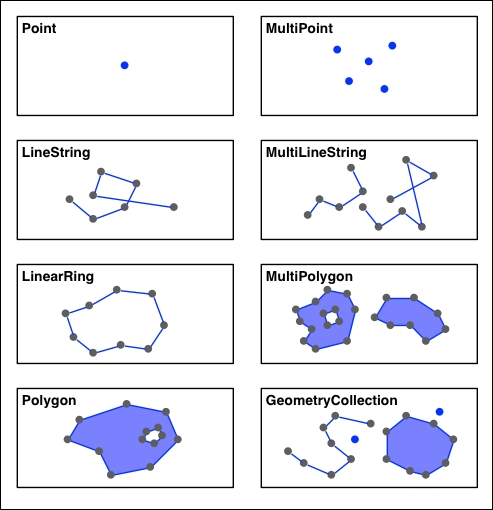
Each of these geometry types is implemented as a class within the shapely.geometry module:
shapely.geometry.Pointrepresents a single point in space. Points can be two-dimensional (x,y), or three-dimensional (x,y,z).shapely.geometry.LineStringrepresents a sequence of points joined together to form a line. LineStrings can be simple (no crossing line segments) or complex (where two line segments within the LineString cross).shapely.geometry.LinearRingrepresents a LineString where the first and last coordinates are the same. The line segments within a LinearRing cannot cross or touch.shapely.geometry.Polygonrepresents a filled area, optionally with one or more "holes" inside it.shapely.geometry.MultiPointrepresents a collection of Points.shapely.geometry.MultiLineStringrepresents a collection of LineStrings.shapely.geometry.MultiPolygonrepresents a collection of Polygons.- Finally,
shapely.geometry.GeometryCollectionrepresents a collection of any combination of Points, Lines, LinearRings, and Polygons.
As well as being able to represent these various types of geometries, Shapely provides a number of methods and attributes for manipulating and analyzing them. For example, the LineString class provides a length attribute that equals the length of all the line segments that make up the LineString, and a crosses() method that returns True if two LineStrings cross. Other methods allow you to calculate the intersection of two polygons, dilate or erode geometries, simplify a geometry, calculate the distance between two geometries, and build a polygon that encloses all the points within a given list of geometries (called a convex hull).
Note that Shapely is a spatial manipulation library rather than a geospatial manipulation library. It has no concept of geographical coordinates. Instead, it assumes that the geospatial data has been projected onto a two-dimensional Cartesian plane before it is manipulated, and the results can then be converted back into geographic coordinates if desired.
The following program creates two Shapely geometry objects, a circle and a square, and calculates their intersection. The intersection will be a polygon in the shape of a semicircle, as shown in the following diagram:
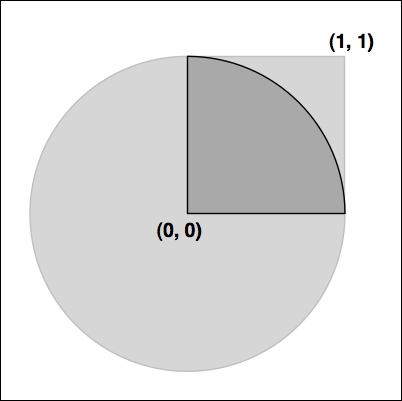
Here is the source code for our program:
import shapely.geometry
import shapely.wkt

pt = shapely.geometry.Point(0, 0)
circle = pt.buffer(1.0)

square = shapely.geometry.Polygon([(0, 0), (1, 0),
                                   (1, 1), (0, 1),
                                   (0, 0)])

intersect = circle.intersection(square)
for x,y in intersect.exterior.coords:
    print(x,y)
print(shapely.wkt.dumps(intersect))Notice how the circle is constructed by taking a Point geometry and using the buffer() method to create a Polygon representing the outline of a circle.
Complete and comprehensive documentation for the Shapely library can be found at http://toblerity.org/shapely/manual.html. It is well worth reading this manual, and if you are unsure about anything to do with Shapely, this web page should be your first port of call.