Table of Contents for
Python Geospatial Development - Third Edition
 Python Geospatial Development - Third Edition
Published by
Packt Publishing, 2016
Python Geospatial Development - Third Edition
Published by
Packt Publishing, 2016
- Cover
- Table of Contents
- Python Geospatial Development Third Edition
- Python Geospatial Development Third Edition
- Credits
- About the Author
- About the Reviewer
- www.PacktPub.com
- Preface
- What you need for this book
- Who this book is for
- Conventions
- Reader feedback
- Customer support
- 1. Geospatial Development Using Python
- Geospatial development
- Applications of geospatial development
- Recent developments
- Summary
- 2. GIS
- GIS data formats
- Working with GIS data manually
- Summary
- 3. Python Libraries for Geospatial Development
- Dealing with projections
- Analyzing and manipulating Geospatial data
- Visualizing geospatial data
- Summary
- 4. Sources of Geospatial Data
- Sources of geospatial data in raster format
- Sources of other types of geospatial data
- Choosing your geospatial data source
- Summary
- 5. Working with Geospatial Data in Python
- Working with geospatial data
- Changing datums and projections
- Performing geospatial calculations
- Converting and standardizing units of geometry and distance
- Exercises
- Summary
- 6. Spatial Databases
- Spatial indexes
- Introducing PostGIS
- Setting up a database
- Using PostGIS
- Recommended best practices
- Summary
- 7. Using Python and Mapnik to Generate Maps
- Creating an example map
- Mapnik concepts
- Summary
- 8. Working with Spatial Data
- Designing and building the database
- Downloading and importing the data
- Implementing the DISTAL application
- Using DISTAL
- Summary
- 9. Improving the DISTAL Application
- Dealing with the scale problem
- Performance
- Summary
- 10. Tools for Web-based Geospatial Development
- A closer look at three specific tools and techniques
- Summary
- 11. Putting It All Together – a Complete Mapping System
- Designing the ShapeEditor
- Prerequisites
- Setting up the database
- Setting up the ShapeEditor project
- Defining the ShapeEditor's applications
- Creating the shared application
- Defining the data models
- Playing with the admin system
- Summary
- 12. ShapeEditor – Importing and Exporting Shapefiles
- Importing shapefiles
- Exporting shapefiles
- Summary
- 13. ShapeEditor – Selecting and Editing Features
- Editing features
- Adding features
- Deleting features
- Deleting shapefiles
- Using the ShapeEditor
- Further improvements and enhancements
- Summary
- Index
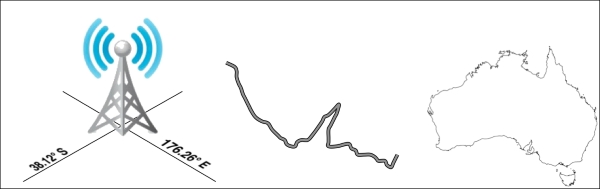
The term geospatial refers to finding information that is located on the earth's surface. This can include, for example, the position of a cellphone tower, the shape of a road, or the outline of a country:
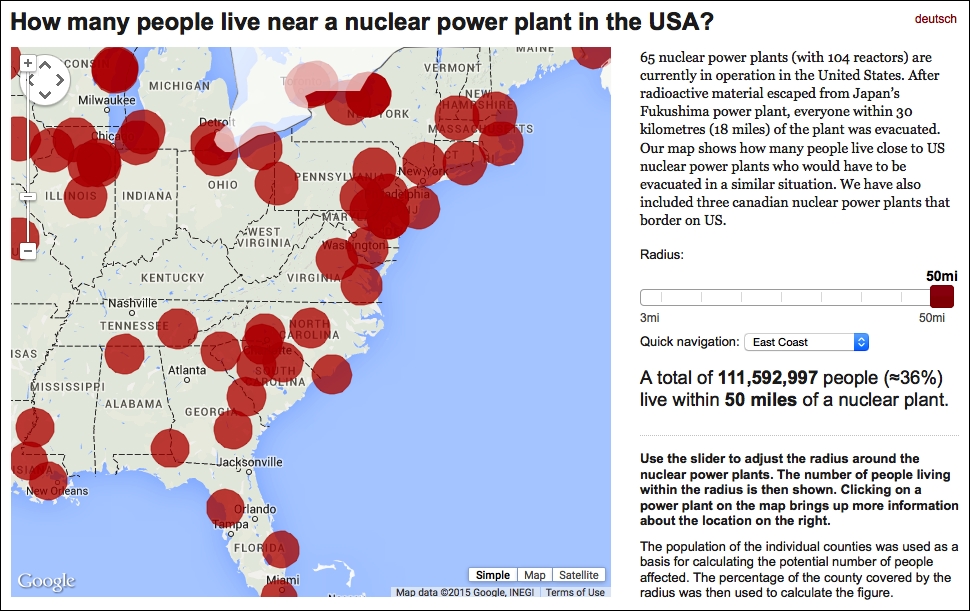
Geospatial data often associates some piece of information with a particular location. For example, the following map, taken from http://opendata.zeit.de/nuclear-reactors-usa, shows how many people live within 50 miles of a nuclear reactor within the eastern United States:
Geospatial development is the process of writing computer programs that can access, manipulate, and display this type of information.
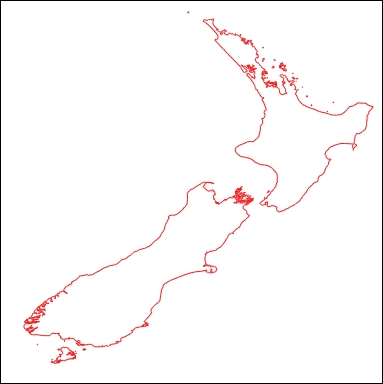
Internally, geospatial data is represented as a series of coordinates, often in the form of latitude and longitude values. Additional attributes, such as temperature, soil type, height, or the name of a landmark, are also often present. There can be many thousands (or even millions) of data points for a single set of geospatial data. For example, the following outline of New Zealand consists of almost 12,000 individual data points:
Because so much data is involved, it is common to store geospatial information within a database. A large part of this book will be concerned with how to store your geospatial information in a database and access it efficiently.
Geospatial data comes in many different forms. Different Geographical Information Systems vendors have produced their own file formats over the years, and various organizations have also defined their own standards. It is often necessary to use a Python library to read files in the correct format when importing geospatial data into your database.
Unfortunately, not all geospatial data points are compatible. Just like a distance value of 2.8 can have very different meanings depending on whether you are using kilometers or miles, a given coordinate value can represent any number of different points on the curved surface of the earth, depending on which projection has been used.
A projection is a way of representing the earth's surface in two dimensions. We will look at projections in more detail in Chapter 2, GIS, but for now, just keep in mind that every piece of geospatial data has a projection associated with it. To compare or combine two sets of geospatial data, it is often necessary to convert the data from one projection to another.
In addition to the prosaic tasks of importing geospatial data from various external file formats and translating data from one projection to another, geospatial data can also be manipulated to solve various interesting problems. Obvious examples include the task of calculating the distance between two points, calculating the length of a road, or finding all data points within a given radius of a selected point. We will be using Python libraries to solve all of these problems and more.
Finally, geospatial data by itself is not very interesting. A long list of coordinates tells you almost nothing; it isn't until those numbers are used to draw a picture that you can make sense of it. Drawing maps, placing data points onto a map, and allowing users to interact with maps are all important aspects of geospatial development. We will be looking at all of these in later chapters.