Table of Contents for
Python Geospatial Development - Third Edition
 Python Geospatial Development - Third Edition
Published by
Packt Publishing, 2016
Python Geospatial Development - Third Edition
Published by
Packt Publishing, 2016
- Cover
- Table of Contents
- Python Geospatial Development Third Edition
- Python Geospatial Development Third Edition
- Credits
- About the Author
- About the Reviewer
- www.PacktPub.com
- Preface
- What you need for this book
- Who this book is for
- Conventions
- Reader feedback
- Customer support
- 1. Geospatial Development Using Python
- Geospatial development
- Applications of geospatial development
- Recent developments
- Summary
- 2. GIS
- GIS data formats
- Working with GIS data manually
- Summary
- 3. Python Libraries for Geospatial Development
- Dealing with projections
- Analyzing and manipulating Geospatial data
- Visualizing geospatial data
- Summary
- 4. Sources of Geospatial Data
- Sources of geospatial data in raster format
- Sources of other types of geospatial data
- Choosing your geospatial data source
- Summary
- 5. Working with Geospatial Data in Python
- Working with geospatial data
- Changing datums and projections
- Performing geospatial calculations
- Converting and standardizing units of geometry and distance
- Exercises
- Summary
- 6. Spatial Databases
- Spatial indexes
- Introducing PostGIS
- Setting up a database
- Using PostGIS
- Recommended best practices
- Summary
- 7. Using Python and Mapnik to Generate Maps
- Creating an example map
- Mapnik concepts
- Summary
- 8. Working with Spatial Data
- Designing and building the database
- Downloading and importing the data
- Implementing the DISTAL application
- Using DISTAL
- Summary
- 9. Improving the DISTAL Application
- Dealing with the scale problem
- Performance
- Summary
- 10. Tools for Web-based Geospatial Development
- A closer look at three specific tools and techniques
- Summary
- 11. Putting It All Together – a Complete Mapping System
- Designing the ShapeEditor
- Prerequisites
- Setting up the database
- Setting up the ShapeEditor project
- Defining the ShapeEditor's applications
- Creating the shared application
- Defining the data models
- Playing with the admin system
- Summary
- 12. ShapeEditor – Importing and Exporting Shapefiles
- Importing shapefiles
- Exporting shapefiles
- Summary
- 13. ShapeEditor – Selecting and Editing Features
- Editing features
- Adding features
- Deleting features
- Deleting shapefiles
- Using the ShapeEditor
- Further improvements and enhancements
- Summary
- Index
One of the defining characteristics of a spatial database is the ability to create and use "spatial" indexes to speed up geometry-based searches. These indexes are used to perform spatial operations, such as identifying all the features that lie within a given bounding box, identifying all the features within a certain distance of a given point, or identifying all the features that intersect with a given polygon.
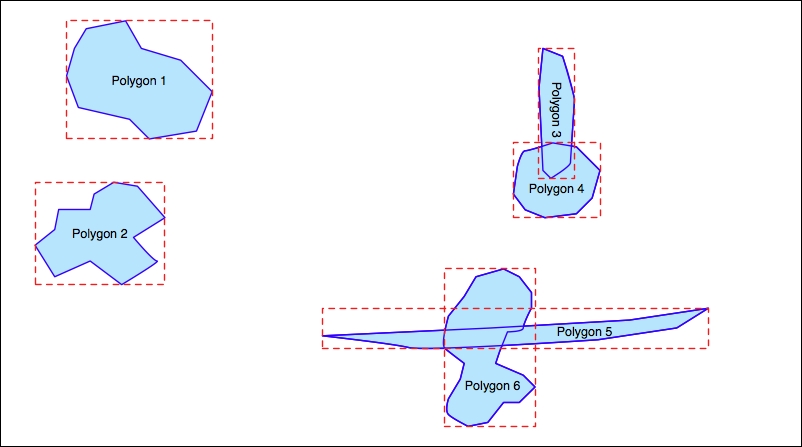
Spatial indexes are one of the most powerful features of spatial databases, and it is worth spending a moment becoming familiar with how they work. Spatial indexes don't store the geometry directly; instead, they calculate the bounding box for each geometry and then index the geometries based on their bounding boxes. This allows the database to quickly search through the geometries based on their position in space:
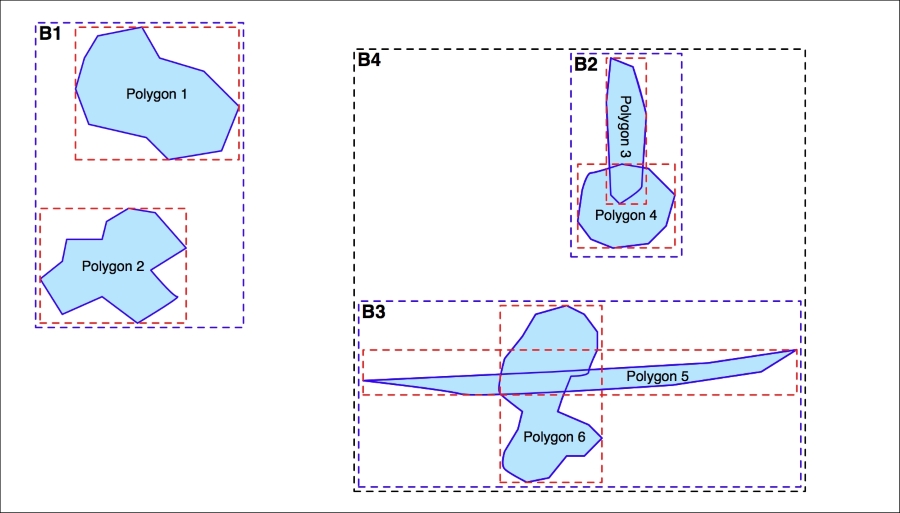
The bounding boxes are grouped into a nested hierarchy based on how close together they are, as shown in the following illustration:
The hierarchy of nested bounding boxes is then represented using a tree-like data structure, as follows:
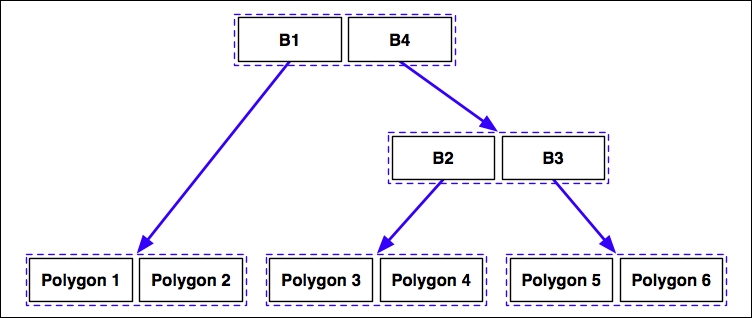
The computer can quickly scan through this tree to find a particular geometry or compare the positions or sizes of the various geometries. For example, the geometry containing the point represented by the X in the preceding diagram can be quickly found by traversing the tree and comparing the bounding boxes at each level. The spatial index will be searched in the following manner:
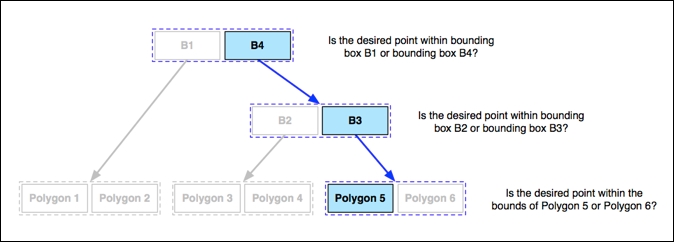
Using the spatial index, it only took three comparisons to find the desired polygon.
Because of their hierarchical nature, spatial indexes scale extremely well and can search through many tens of thousands of features using only a handful of bounding-box comparisons. And, because every geometry is reduced to a simple bounding box, spatial indexes can support any type of geometry, not just polygons.
Spatial indexes are not limited to only searching for enclosed coordinates; they can be used for all sorts of spatial comparisons and for spatial joins. We will be working with spatial indexes extensively throughout this book.