Table of Contents for
Practical UNIX and Internet Security, 3rd Edition
 Practical UNIX and Internet Security, 3rd Edition
Published by
O'Reilly Media, Inc., 2003
Practical UNIX and Internet Security, 3rd Edition
Published by
O'Reilly Media, Inc., 2003
- Cover
- Practical Unix & Internet Security, 3rd Edition
- A Note Regarding Supplemental Files
- Preface
- Unix “Security”?
- Scope of This Book
- Which Unix System?
- Conventions Used in This Book
- Comments and Questions
- Acknowledgments
- A Note to Would-Be Attackers
- I. Computer Security Basics
- 1. Introduction: Some Fundamental Questions
- What Is Computer Security?
- What Is an Operating System?
- What Is a Deployment Environment?
- Summary
- 2. Unix History and Lineage
- History of Unix
- Security and Unix
- Role of This Book
- Summary
- 3. Policies and Guidelines
- Planning Your Security Needs
- Risk Assessment
- Cost-Benefit Analysis and Best Practices
- Policy
- Compliance Audits
- Outsourcing Options
- The Problem with Security Through Obscurity
- Summary
- II. Security Building Blocks
- 4. Users, Passwords, and Authentication
- Logging in with Usernames and Passwords
- The Care and Feeding of Passwords
- How Unix Implements Passwords
- Network Account and Authorization Systems
- Pluggable Authentication Modules (PAM)
- Summary
- 5. Users, Groups, and the Superuser
- Users and Groups
- The Superuser (root)
- The su Command: Changing Who You Claim to Be
- Restrictions on the Superuser
- Summary
- 6. Filesystems and Security
- Understanding Filesystems
- File Attributes and Permissions
- chmod: Changing a File’s Permissions
- The umask
- SUID and SGID
- Device Files
- Changing a File’s Owner or Group
- Summary
- 7. Cryptography Basics
- Understanding Cryptography
- Symmetric Key Algorithms
- Public Key Algorithms
- Message Digest Functions
- Summary
- 8. Physical Security for Servers
- Planning for the Forgotten Threats
- Protecting Computer Hardware
- Preventing Theft
- Protecting Your Data
- Story: A Failed Site Inspection
- Summary
- 9. Personnel Security
- Background Checks
- On the Job
- Departure
- Other People
- Summary
- III. Network and Internet Security
- 10. Modems and Dialup Security
- Modems: Theory of Operation
- Modems and Security
- Modems and Unix
- Additional Security for Modems
- Summary
- 11. TCP/IP Networks
- Networking
- IP: The Internet Protocol
- IP Security
- Summary
- 12. Securing TCP and UDP Services
- Understanding Unix Internet Servers and Services
- Controlling Access to Servers
- Primary Unix Network Services
- Managing Services Securely
- Putting It All Together: An Example
- Summary
- 13. Sun RPC
- Remote Procedure Call (RPC)
- Secure RPC (AUTH_DES)
- Summary
- 14. Network-Based Authentication Systems
- Sun’s Network Information Service (NIS)
- Sun’s NIS+
- Kerberos
- LDAP
- Other Network Authentication Systems
- Summary
- 15. Network Filesystems
- Understanding NFS
- Server-Side NFS Security
- Client-Side NFS Security
- Improving NFS Security
- Some Last Comments on NFS
- Understanding SMB
- Summary
- 16. Secure Programming Techniques
- One Bug Can Ruin Your Whole Day . . .
- Tips on Avoiding Security-Related Bugs
- Tips on Writing Network Programs
- Tips on Writing SUID/SGID Programs
- Using chroot( )
- Tips on Using Passwords
- Tips on Generating Random Numbers
- Summary
- IV. Secure Operations
- 17. Keeping Up to Date
- Software Management Systems
- Updating System Software
- Summary
- 18. Backups
- Why Make Backups?
- Backing Up System Files
- Software for Backups
- Summary
- 19. Defending Accounts
- Dangerous Accounts
- Monitoring File Format
- Restricting Logins
- Managing Dormant Accounts
- Protecting the root Account
- One-Time Passwords
- Administrative Techniques for Conventional Passwords
- Intrusion Detection Systems
- Summary
- 20. Integrity Management
- The Need for Integrity
- Protecting Integrity
- Detecting Changes After the Fact
- Integrity-Checking Tools
- Summary
- 21. Auditing, Logging, and Forensics
- Unix Log File Utilities
- Process Accounting: The acct/pacct File
- Program-Specific Log Files
- Designing a Site-Wide Log Policy
- Handwritten Logs
- Managing Log Files
- Unix Forensics
- Summary
- V. Handling Security Incidents
- 22. Discovering a Break-in
- Prelude
- Discovering an Intruder
- Cleaning Up After the Intruder
- Case Studies
- Summary
- 23. Protecting Against Programmed Threats
- Programmed Threats: Definitions
- Damage
- Authors
- Entry
- Protecting Yourself
- Preventing Attacks
- Summary
- 24. Denial of Service Attacks and Solutions
- Types of Attacks
- Destructive Attacks
- Overload Attacks
- Network Denial of Service Attacks
- Summary
- 25. Computer Crime
- Your Legal Options After a Break-in
- Criminal Hazards
- Criminal Subject Matter
- Summary
- 26. Who Do You Trust?
- Can You Trust Your Computer?
- Can You Trust Your Suppliers?
- Can You Trust People?
- Summary
- VI. Appendixes
- A. Unix Security Checklist
- Preface
- Chapter 1: Introduction: Some Fundamental Questions
- Chapter 2: Unix History and Lineage
- Chapter 3: Policies and Guidelines
- Chapter 4: Users, Passwords, and Authentication
- Chapter 5: Users, Groups, and the Superuser
- Chapter 6: Filesystems and Security
- Chapter 7: Cryptography Basics
- Chapter 8: Physical Security for Servers
- Chapter 9: Personnel Security
- Chapter 10: Modems and Dialup Security
- Chapter 11: TCP/IP Networks
- Chapter 12: Securing TCP and UDP Services
- Chapter 13: Sun RPC
- Chapter 14: Network-Based Authentication Systems
- Chapter 15: Network Filesystems
- Chapter 16: Secure Programming Techniques
- Chapter 17: Keeping Up to Date
- Chapter 18: Backups
- Chapter 19: Defending Accounts
- Chapter 20: Integrity Management
- Chapter 21: Auditing, Logging, and Forensics
- Chapter 22: Discovering a Break-In
- Chapter 23: Protecting Against Programmed Threats
- Chapter 24: Denial of Service Attacks and Solutions
- Chapter 25: Computer Crime
- Chapter 26: Who Do You Trust?
- Appendix A: Unix Security Checklist
- Appendix B: Unix Processes
- Appendixes C, D, and E: Paper Sources, Electronic Sources, and Organizations
- B. Unix Processes
- About Processes
- Signals
- Controlling and Examining Processes
- Starting Up Unix and Logging In
- C. Paper Sources
- Unix Security References
- Other Computer References
- D. Electronic Resources
- Mailing Lists
- Web Sites
- Usenet Groups
- Software Resources
- E. Organizations
- Professional Organizations
- U.S. Government Organizations
- Emergency Response Organizations
- Index
- Index
- Index
- Index
- Index
- Index
- Index
- Index
- Index
- Index
- Index
- Index
- Index
- Index
- Index
- Index
- Index
- Index
- Index
- Index
- Index
- Index
- Index
- Index
- Index
- Index
- Index
- About the Authors
- Colophon
- Copyright
In 1983 the Massachusetts Institute of Technology, working with IBM and Digital Equipment Corporation, embarked on an eight-year project designed to integrate computers into the university’s undergraduate curriculum. The project was called Project Athena.
Athena began operation with nearly 50 time-sharing minicomputers: Digital Equipment Corporation’s VAX 11/750 systems running Berkeley 4.2 Unix. Each VAX had a few terminals; when a student or faculty member wanted to use a computer, he sat down at one of its terminals.
Within a few years, Athena began moving away from the 750s. The project received hundreds of high-performance workstations with big screens, fast (for the time) processors, small disks, and Ethernet interfaces. The project’s goal was to allow any user to sit down at any computer and enjoy full access to his files and to the network.
Of course there were problems. As soon as the workstations were deployed, the problems of network eavesdropping became painfully obvious; with the network accessible from all over campus, nothing prevented students (or outside intruders) from running network spy programs. It was nearly impossible to prevent the students from learning the superuser password of the workstations or simply rebooting them in single-user mode. To further complicate matters, many of the computers on the network were IBM PC/ATs running software that didn’t have even rudimentary computer security. Something had to be done to protect student files in the networked environment to the same degree that they were protected in the time-sharing environment.
Athena’s ultimate solution to this security problem was Kerberos, an authentication system that uses DES cryptography to protect sensitive information such as passwords on an open network. When the user logs into a workstation running Kerberos, that user is issued a ticket from the Kerberos server. The user’s ticket can be decrypted only with the user’s password; it contains information necessary to obtain additional tickets. From that point on, whenever the user wishes to access a network service, an appropriate ticket for that service must be presented. As all of the information in the Kerberos tickets is encrypted before it is sent over the network, the information is not susceptible to eavesdropping or misappropriation.
Windows 2000 includes a Kerberos Server, allowing Windows 2000 servers to act as authentication servers for Unix clients.
Kerberos authentication is based entirely on the knowledge of passwords that are stored on the Kerberos Server. Unlike Unix passwords, which are encrypted with a one-way algorithm that cannot be reversed, Kerberos passwords are stored on the server encrypted with a conventional encryption algorithm—in most cases, DES—so that they can be decrypted by the server when needed. A user proves her identity to the Kerberos Server by demonstrating knowledge of her key.
The fact that the Kerberos Server has access to the user’s decrypted password is a result of the fact that Kerberos does not use public key cryptography.[195] This is a serious disadvantage of the Kerberos system. It means that the Kerberos Server must be both physically secure and “computationally secure.” The server must be physically secure to prevent an attacker from stealing the Kerberos Server and learning all of the users’ passwords. The server must also be immune to login attacks: if an attacker could log onto the server and become root, that attacker could, once again, steal all of the passwords.
Kerberos was designed so that the server can be stateless. (The server actually has a lot of permanent, sensitive state—the user passwords—but this is kept on the hard disk, rather than in RAM, and does not need to be updated during the course of Kerberos transactions.) The Kerberos Server simply answers requests from users and issues tickets (when appropriate). This design makes it relatively simple to create replicated, secondary servers that can handle authentication requests when the primary server is down or otherwise unavailable. Unfortunately, these secondary servers need complete copies of the entire Kerberos database, which means that they must also be physically and computationally secure.
Logging
into a Unix workstation that is using Kerberos looks the same to a
user as logging into a regular Unix computer. Sitting at the
workstation, you see the traditional login: and
password: prompts. You type your username and
password, and if they are correct, you get logged in. Accessing
files, electronic mail, printers, and other resources all work as
expected.
What happens behind the scenes is far more complicated. When the workstation’s login, sshd,[196] or other network daemon (or, more commonly these days, the PAM library that performs authentication for these programs) knows about Kerberos, it uses the Kerberos system to authenticate the user. The details differ between the two different versions of Kerberos that are commonly available: Kerberos Version 4 and Kerberos Version 5.
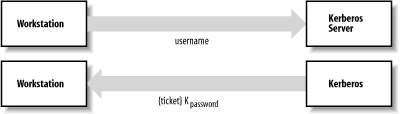
With Kerberos 4, the workstation sends a message to the Kerberos Authentication Server[197] after you type your username. This message contains your username and indicates that you are trying to log in. The Kerberos Server checks its database and, if you are a valid user, sends back a ticket-granting ticket that is encrypted with your password. The workstation then asks you to type in your password and finally attempts to decrypt the encrypted ticket using the password that you’ve supplied. If the decryption is successful, the workstation then forgets your password and uses the ticket-granting ticket exclusively. If the decryption fails, the workstation knows that you supplied the wrong password and gives you a chance to try again.[198]
With Kerberos 5, the workstation waits until after you have typed your password before contacting the server. It then sends the Kerberos Authentication Server a message consisting of your username and the current time encrypted with your password. The Authentication Server looks up your username, determines your password, and attempts to decrypt the encrypted time. If the server can decrypt the current time (and the value is indeed current), it then creates a ticket-granting ticket, encrypts it with your password, and sends to you.[199]
Figure 14-3 shows a schematic of the initial Kerberos authentication.
What is this ticket-granting ticket? It is a block of data that contains two pieces of information:
The session key
A ticket for the Kerberos Ticket Granting Service, encrypted with both the session key and the Ticket Granting Service’s key
The user’s workstation can now contact the Kerberos Ticket Granting Service to obtain tickets for any principal within the Kerberos realm—that is, the set of servers and users that are known to the Kerberos Server. Note that:
Passwords are stored on the Kerberos Server, not on the individual workstations.
The user’s password is never transmitted on the network—encrypted or otherwise.
The Kerberos Authentication Server can authenticate the user’s identity because the user knows the user’s password.
The user can authenticate the Kerberos Server’s identity because the Kerberos Authentication Server knows the user’s password.
An eavesdropper who intercepts the ticket sent to you from the Kerberos Server will not benefit from the message because it is encrypted using a key (your password) that the eavesdropper doesn’t know. Likewise, an eavesdropper who intercepts the ticket sent from the Kerberos Server to the Ticket Granting Service will not be able to make use of the ticket because it is encrypted with the Ticket Granting Service’s key.
Once you have obtained a ticket-granting ticket, you will likely want to do something that requires the use of an authenticated service. For example, you will probably want to read the files in your home directory.
Under Sun Microsystems’ regular version of NFS, once a file server exports its filesystem to a workstation, the server implicitly trusts whatever the workstation wants to do. If george is logged into the workstation, the server lets george access the files in his home directory. But if george becomes the superuser on his workstation, changes his UID to that of bill, and starts accessing bill’s files, the vanilla NFS server has no mechanism to detect this trickery or to take evasive action.
The scenario is very different when NFS has been modified to use Kerberos.
When the user first tries to access his files from a Kerberos workstation, system software on the workstation contacts the Ticket Granting Service and asks for a ticket for the File Server Service. The Ticket Granting Service sends the user back a ticket for the File Server Service. This ticket contains another ticket, encrypted with the File Server Service’s password, that the user’s workstation can present to the File Server Service to request files. The contained ticket includes the user’s authenticated name, the expiration time, and the Internet address of the user’s workstation. The user’s workstation then presents this ticket to the File Server Service. The File Server Service decrypts the ticket using its own password, then builds a mapping between the (UID, IP address) of the user’s workstation and a UID on the file server. Figure 14-4 shows these operations.
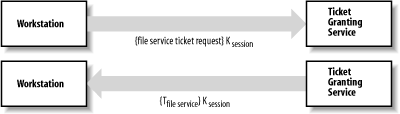
As before, all of the requests and tickets exchanged between the workstation and the Ticket Granting Service are encrypted, protecting them from eavesdroppers.
The Ticket Granting Service was able to establish the user’s identity when the user asked for a ticket for the File Server Service because:
The user’s File Server Service Ticket request was encrypted using the session key.
The only way the user could have learned the session key was by decrypting the original Ticket Granting Ticket that the user received from the Kerberos Authentication Server.
To decrypt that original ticket, the user’s workstation had to know the user’s password. (Note again that this password was never transmitted over the network.)
The File Server Service was able to establish the user’s identity because:
The ticket that it receives requesting service from the user is encrypted with the File Server Service’s own key.
Inside that ticket is the IP address and username of the user.
The only way for that information to have gotten inside the ticket was for the Ticket Granting Service to have put it there.
Therefore, the Ticket Granting Service is sure of the user’s identity.
And that’s good enough for the File Server Service.
After authentication takes place, the workstation uses the network service as usual. Other Kerberized network services operate in a similar manner.
Kerberos is a general-purpose system for sharing secret keys between principals on the network. Normally, Kerberos is used solely for authentication. However, the ability to exchange keys can also be used to ensure data integrity and secrecy.
If eavesdropping is an ongoing concern, all information transmitted between the workstation and the service can be encrypted using a key that is exchanged between the two principals. Unfortunately, encryption carries a performance penalty. At MIT’s Project Athena, encryption was used for transmitting highly sensitive information such as passwords but was not used for most data transfer, such as files and electronic mail.
Warning
For single-user workstations, Kerberos provides significant additional security beyond that of regular passwords. However, if two people are logged into the workstation at the same time, then the workstation will be authenticated for both users. These users can then pose as each other. This threat is so significant that at MIT’s Project Athena, remote login services were disabled on workstations to prevent an attacker from logging in while a legitimate user was being authenticated. It is also possible for someone to subvert the local software to capture the user’s password as it is typed (as with other systems).
In early 1996, graduate students with the COAST Laboratory[200] at Purdue University discovered a long-standing weakness in the key generation for Kerberos 4. The weakness allows an attacker to guess session keys in a matter of seconds. A patch has been widely distributed; be sure to install it if you are using Kerberos 4.
Kerberos has gone through five major revisions during its history. Both Kerberos 4 and Kerberos 5 are now in use.
Kerberos 4 is more efficient than Kerberos 5, but more limited. For example, Kerberos 4 can work only over TCP/IP networks. Kerberos 4 has not been updated in many years and is currently deprecated. In fact, some Kerberos 4 implementations are vulnerable to buffer-overflow attacks, and no patches have been posted.
Kerberos 5 fixes minor problems with the Kerberos protocol, making it more resistant to determined attacks over the network. Kerberos 5 is also more flexible: it can work with different kinds of networks. It also has provisions for working with encryption schemes other than DES. Although algorithms such as Triple-DES have been implemented, their use is not widespread largely because of legacy applications that expect DES encryption.
Finally, Kerberos 5 supports delegation of authentication, ticket expirations longer than 21 hours, renewable tickets, tickets that will work sometime in the future, and many more options. If you are going to use Kerberos, you should definitely use Version 5. IETF is working to revise and clarify RFC 1510, which defines Kerberos 5, and major protocol extensions are expected to follow.
Installing Kerberos is a complicated process that depends on the version of Kerberos you have, the kind of computer, and the version of your computer’s operating system. It’s a difficult task that requires you to have the source code for your computer system or the source code for replacement programs. It is not a task to be undertaken lightly.
Fortunately, you don’t have to go through this arduous process. Kerberos or Kerberos-like security systems are now available from several companies, and they are a standard part of several operating systems, including Solaris, Mac OS X, and many Linux and BSD distributions. These days, there is no reason to be running anything but secure network services.
As an additional benefit, a version of Kerberos 5 has been included in Microsoft Windows from the Windows 2000 release onwards. Thus, with some effort, it is possible to make Kerberos interoperable between all your various Unix machines and Windows platforms.[201]
The MIT Kerberos source code is available from http://web.mit.edu/kerberos/www/.[202] This is also the site where you can find official updates, patches, and bug announcements. There is also a free software implementation of Kerberos called Heimdal that is under active development; it is largely compatible with MIT’s Kerberos, so most of what we discuss below should apply to Heimdal as well. You can get Heimdal at http://www.pdc.kth.se/heimdal/.
As the changes required to your system’s software are substantial if you need to do them yourself, the actual installation process will not be described here. See the documentation provided with Kerberos for details.
Using a workstation equipped with Kerberos is only slightly different from using an ordinary workstation. In most implementations, all of the special Kerberos housekeeping functions are performed automatically. When the user logs in, the password typed is used to acquire a Kerberos ticket, which in turn grants access to the services on the network. Additional tickets are automatically requested as they are needed. Tickets for services are automatically cached. All of a user’s tickets are automatically destroyed when the user logs out.
Of course, the Kerberos client needs to know where to find Kerberos servers. This can be configured manually on each client (traditionally in the krb5.conf file), or Kerberos servers can be advertised through DNS SRV records. IETF Internet Draft draft-ietf-krb-wg-krb-dns-locate describes this approach.
Kerberos isn’t entirely transparent. If you are logged into a Kerberos workstation for more than eight hours,[203] something odd happens: network services suddenly stop working properly. The reason for this is that tickets issued by Kerberos expire after eight hours, a technique designed to prevent a replay attack. (In such an attack, somebody capturing one of your tickets sits down at your workstation after you leave, using the captured ticket to gain access to your files.) Thus, after eight hours, you must run the kinit program, and provide your username and password a second time, to be issued a new ticket for the Kerberos Ticket Granting Service.
Although Kerberos is an excellent solution to a difficult problem, it has several shortcomings:
- Every network service must be individually modified for use with Kerberos
Because of the Kerberos design, every program that uses Kerberos must be modified. The process of performing these modifications is often called “Kerberizing” the application. The amount of work that this entails depends entirely on the application program. Typically, to Kerberize an application, you must have the application’s source code.
You might recognize this problem as similar to making a service recognize PAM, and you’d be right. In fact, because PAM offers several Kerberos modules, any service that can use PAM for authentication can, through PAM, use Kerberos. This is probably the most flexible and convenient way to Kerberize a service. See Chapter 4 for more information about PAM.
- Kerberos doesn’t work well in a time-sharing environment
Kerberos is designed for an environment in which there is one user per workstation. Because of the difficulty of sharing data between different processes running on the same Unix computer, Kerberos keeps tickets in the /tmp directory. If a user is sharing the computer with several other people, it is possible that the user’s tickets can be stolen (copied by an attacker). Stolen tickets can then be used to obtain fraudulent service.
- Kerberos requires a secure Kerberos Server
By design, Kerberos requires that there be a secure central server that maintains the master password database. To ensure security, a site should use the Kerberos Server for absolutely nothing beyond running the Kerberos Server program. The Kerberos Server must be kept under lock and key in a physically secure area. In some environments, maintaining such a server is an administrative and/or financial burden.
- Kerberos requires a continuously available Kerberos Server
If the Kerberos Server goes down and is not replicated, the Kerberos network is unusable.
- Kerberos stores all passwords encrypted with a single key
Adding to the difficulty of running a secure server is the fact that the Kerberos Server stores all passwords encrypted with the server’s master key, which happens to be located on the same hard disk as the encrypted passwords. This means that, in the event that the Kerberos Server or its backups are compromised, all user passwords must be changed.
- Kerberos does not protect against modifications to system software (Trojan horses)
Kerberos does not have the computer authenticate itself to the user—that is, there is no way for a user sitting at a computer to determine whether the computer has been compromised. This failing is easily exploited by a knowledgable attacker.[204]
For example, an intruder can modify the workstation’s system software so every username/password combination typed is recorded automatically or sent electronically to another machine controlled by the attacker. Alternatively, a malicious attacker can simply modify the workstation’s software to spuriously delete the user’s files after the user has logged in and authenticated himself to the File Server Service. Both of these problems are consequences of the fact that, even in a networked environment, many workstations contain local copies of the programs that they run.
- Kerberos may result in a cascading loss of trust
Another problem with Kerberos is that if a server password or a user password is broken or otherwise disclosed, it is possible for an eavesdropper to use that password to decrypt other tickets and use this information to spoof servers and users.
Kerberos is a workable system for network security, and it is widely used. But more importantly, the principles behind Kerberos are increasingly available in network security systems that are available directly from vendors.
[195] Public key cryptography was not used because it was still under patent protection at the time that Kerberos was developed. There is a current IETF Internet-Draft entitled “Public Key Cryptography for Initial Authentication in Kerberos” that proposes methods for combining public key smart cards with Kerberos. This draft has been implemented in Microsoft’s Kerberos.
[196] Patches for OpenSSH to use Kerberos 5 for authentication are available at http://www.sxw.org.uk/computing/patches/openssh.html. Although Kerberos 4 has also been used with SSH, it’s much more difficult to make the two systems interoperate. Fortunately, the SSH protocol Version 2 can use the same security layer (GSSAPI) as Kerberos 5, which simplifies things considerably. The IETF Internet-Draft that covers the combination of these systems is draft-ietf-secsh-gsskeyex.
[197] According to the Kerberos papers and documentation, there are two logical Kerberos Servers: the Authentication Server and the Ticket Granting Service. Some commentators think that this is disingenuous because all Kerberos systems employ a single physical server: the Kerberos Server, or Key Server.
[198] Actually, the initial ticket that the Kerberos Server sends your workstation is encrypted with a 56-bit number that is derived from your password using a one-way cryptographic function.
[199] Why the change in protocol between Kerberos 4 and Kerberos 5? Under Kerberos 4, the objective of the designer was to minimize the amount of time that the user’s password was stored on the workstation. Unfortunately, this made Kerberos 4 susceptible to offline password-guessing attacks. An attacker could simply ask a Kerberos Authentication Server for a ticket-granting ticket for a particular user, then try to decrypt that ticket with every word in the dictionary. With Kerberos 5, the workstation must demonstrate to the Kerberos Authentication Server that the user knows the correct password. This is a more secure approach, although the user’s encrypted ticket-granting ticket can still be intercepted as it is sent from the server to the workstation by an attacker and attacked with an exhaustive key search.
[200] Incorporated into the CERIAS research center in 1998.
[201] Note, however, that Microsoft has made proprietary modifications to the Kerberos protocol that force Windows clients to use Kerberos servers running on Windows servers. Microsoft’s support of Kerberos merely allows Unix Kerberos clients to interoperate with Windows servers as well.
[202] Despite a weakening of U.S. export restrictions, MIT was, at the time of this writing, only willing to allow download by U.S. and Canadian citizens on advice from its legal counsel. An alternative source for MIT’s Kerberos is http://www.crypto-publish.org/.
[203] A different window may be chosen at some sites.
[204] In fact, Trojan horses were a continuous problem at MIT’s Project Athena.