Table of Contents for
Practical UNIX and Internet Security, 3rd Edition
 Practical UNIX and Internet Security, 3rd Edition
Published by
O'Reilly Media, Inc., 2003
Practical UNIX and Internet Security, 3rd Edition
Published by
O'Reilly Media, Inc., 2003
- Cover
- Practical Unix & Internet Security, 3rd Edition
- A Note Regarding Supplemental Files
- Preface
- Unix “Security”?
- Scope of This Book
- Which Unix System?
- Conventions Used in This Book
- Comments and Questions
- Acknowledgments
- A Note to Would-Be Attackers
- I. Computer Security Basics
- 1. Introduction: Some Fundamental Questions
- What Is Computer Security?
- What Is an Operating System?
- What Is a Deployment Environment?
- Summary
- 2. Unix History and Lineage
- History of Unix
- Security and Unix
- Role of This Book
- Summary
- 3. Policies and Guidelines
- Planning Your Security Needs
- Risk Assessment
- Cost-Benefit Analysis and Best Practices
- Policy
- Compliance Audits
- Outsourcing Options
- The Problem with Security Through Obscurity
- Summary
- II. Security Building Blocks
- 4. Users, Passwords, and Authentication
- Logging in with Usernames and Passwords
- The Care and Feeding of Passwords
- How Unix Implements Passwords
- Network Account and Authorization Systems
- Pluggable Authentication Modules (PAM)
- Summary
- 5. Users, Groups, and the Superuser
- Users and Groups
- The Superuser (root)
- The su Command: Changing Who You Claim to Be
- Restrictions on the Superuser
- Summary
- 6. Filesystems and Security
- Understanding Filesystems
- File Attributes and Permissions
- chmod: Changing a File’s Permissions
- The umask
- SUID and SGID
- Device Files
- Changing a File’s Owner or Group
- Summary
- 7. Cryptography Basics
- Understanding Cryptography
- Symmetric Key Algorithms
- Public Key Algorithms
- Message Digest Functions
- Summary
- 8. Physical Security for Servers
- Planning for the Forgotten Threats
- Protecting Computer Hardware
- Preventing Theft
- Protecting Your Data
- Story: A Failed Site Inspection
- Summary
- 9. Personnel Security
- Background Checks
- On the Job
- Departure
- Other People
- Summary
- III. Network and Internet Security
- 10. Modems and Dialup Security
- Modems: Theory of Operation
- Modems and Security
- Modems and Unix
- Additional Security for Modems
- Summary
- 11. TCP/IP Networks
- Networking
- IP: The Internet Protocol
- IP Security
- Summary
- 12. Securing TCP and UDP Services
- Understanding Unix Internet Servers and Services
- Controlling Access to Servers
- Primary Unix Network Services
- Managing Services Securely
- Putting It All Together: An Example
- Summary
- 13. Sun RPC
- Remote Procedure Call (RPC)
- Secure RPC (AUTH_DES)
- Summary
- 14. Network-Based Authentication Systems
- Sun’s Network Information Service (NIS)
- Sun’s NIS+
- Kerberos
- LDAP
- Other Network Authentication Systems
- Summary
- 15. Network Filesystems
- Understanding NFS
- Server-Side NFS Security
- Client-Side NFS Security
- Improving NFS Security
- Some Last Comments on NFS
- Understanding SMB
- Summary
- 16. Secure Programming Techniques
- One Bug Can Ruin Your Whole Day . . .
- Tips on Avoiding Security-Related Bugs
- Tips on Writing Network Programs
- Tips on Writing SUID/SGID Programs
- Using chroot( )
- Tips on Using Passwords
- Tips on Generating Random Numbers
- Summary
- IV. Secure Operations
- 17. Keeping Up to Date
- Software Management Systems
- Updating System Software
- Summary
- 18. Backups
- Why Make Backups?
- Backing Up System Files
- Software for Backups
- Summary
- 19. Defending Accounts
- Dangerous Accounts
- Monitoring File Format
- Restricting Logins
- Managing Dormant Accounts
- Protecting the root Account
- One-Time Passwords
- Administrative Techniques for Conventional Passwords
- Intrusion Detection Systems
- Summary
- 20. Integrity Management
- The Need for Integrity
- Protecting Integrity
- Detecting Changes After the Fact
- Integrity-Checking Tools
- Summary
- 21. Auditing, Logging, and Forensics
- Unix Log File Utilities
- Process Accounting: The acct/pacct File
- Program-Specific Log Files
- Designing a Site-Wide Log Policy
- Handwritten Logs
- Managing Log Files
- Unix Forensics
- Summary
- V. Handling Security Incidents
- 22. Discovering a Break-in
- Prelude
- Discovering an Intruder
- Cleaning Up After the Intruder
- Case Studies
- Summary
- 23. Protecting Against Programmed Threats
- Programmed Threats: Definitions
- Damage
- Authors
- Entry
- Protecting Yourself
- Preventing Attacks
- Summary
- 24. Denial of Service Attacks and Solutions
- Types of Attacks
- Destructive Attacks
- Overload Attacks
- Network Denial of Service Attacks
- Summary
- 25. Computer Crime
- Your Legal Options After a Break-in
- Criminal Hazards
- Criminal Subject Matter
- Summary
- 26. Who Do You Trust?
- Can You Trust Your Computer?
- Can You Trust Your Suppliers?
- Can You Trust People?
- Summary
- VI. Appendixes
- A. Unix Security Checklist
- Preface
- Chapter 1: Introduction: Some Fundamental Questions
- Chapter 2: Unix History and Lineage
- Chapter 3: Policies and Guidelines
- Chapter 4: Users, Passwords, and Authentication
- Chapter 5: Users, Groups, and the Superuser
- Chapter 6: Filesystems and Security
- Chapter 7: Cryptography Basics
- Chapter 8: Physical Security for Servers
- Chapter 9: Personnel Security
- Chapter 10: Modems and Dialup Security
- Chapter 11: TCP/IP Networks
- Chapter 12: Securing TCP and UDP Services
- Chapter 13: Sun RPC
- Chapter 14: Network-Based Authentication Systems
- Chapter 15: Network Filesystems
- Chapter 16: Secure Programming Techniques
- Chapter 17: Keeping Up to Date
- Chapter 18: Backups
- Chapter 19: Defending Accounts
- Chapter 20: Integrity Management
- Chapter 21: Auditing, Logging, and Forensics
- Chapter 22: Discovering a Break-In
- Chapter 23: Protecting Against Programmed Threats
- Chapter 24: Denial of Service Attacks and Solutions
- Chapter 25: Computer Crime
- Chapter 26: Who Do You Trust?
- Appendix A: Unix Security Checklist
- Appendix B: Unix Processes
- Appendixes C, D, and E: Paper Sources, Electronic Sources, and Organizations
- B. Unix Processes
- About Processes
- Signals
- Controlling and Examining Processes
- Starting Up Unix and Logging In
- C. Paper Sources
- Unix Security References
- Other Computer References
- D. Electronic Resources
- Mailing Lists
- Web Sites
- Usenet Groups
- Software Resources
- E. Organizations
- Professional Organizations
- U.S. Government Organizations
- Emergency Response Organizations
- Index
- Index
- Index
- Index
- Index
- Index
- Index
- Index
- Index
- Index
- Index
- Index
- Index
- Index
- Index
- Index
- Index
- Index
- Index
- Index
- Index
- Index
- Index
- Index
- Index
- Index
- Index
- About the Authors
- Colophon
- Copyright
Throughout the last few decades, computers on the Internet have been subject to many different attacks:
- Password-guessing attacks
With password-guessing attacks, attackers repeatedly try to guess user passwords.
- Social-engineering attacks
With attacks of this kind, attackers send email or some other message in an attempt to get users to reveal their passwords or set the passwords to a new value specified by the attacker.
- Server vulnerability attacks
With these, attackers exploit a flaw or undocumented command in a server and use the exploit to gain privileged access to the computer on which the server was running.
In the 1990s, the actual infrastructure of the Internet came under attack as well. (See Chapter 24 for more details.)
- Network sniffers
Using network sniffers, attackers capture passwords and other sensitive pieces of information passing through the network as they are transmitted.
- IP spoofing attacks
Attackers use such attacks to break into hosts on the Internet.
- Connection hijacking
Connection hijacking is used by attackers to seize control of existing interactive sessions (e.g., telnet).
- Data spoofing
Data spoofing is used by attackers on a rogue computer on a network to insert data into an ongoing communication between two other hosts. This type of attack has been demonstrated as an effective means of compromising the integrity of programs executed over the network from NFS servers.
In the first years of the 21st century, network security was complicated further still:
- Denial-of-service attacks
DOS attacks have became much more common. Even when attackers could not gain access to the host, they could prevent it from doing anything useful for anyone else by overloading its CPU, hard drive, or network bandwidth.
- Distributed denial-of-service attacks
DDOS attacks took denial of service to new levels by executing attacks on a host from dozens or hundreds of other hosts under the attacker’s control, making it difficult to defend against the attack by blocking traffic from a single-attack host.
Many of these attacks were anticipated years before they arose in the wild. Yet the IP protocols and the Internet itself are not well-protected against them. There are several reasons for this apparent failure:
- IP is not sufficiently resilient to attack
IP was designed for use in a hostile environment, but its designers did not thoroughly appreciate how hostile the network itself might one day become.
IP was designed to allow computers to continue communicating after some communication lines had been cut. This concept is the genesis of packet communications: by using packets, you can route communications around points of failure. But the IP designers appear not to have anticipated wide-scale covert attacks from “legitimate” users. As a result, while IP is quite resilient when subjected to hardware failure, it is less resistant to purposeful attack.
- IP was not designed to provide security
IP was designed to transmit packets from one computer to another. It was not designed to provide a system for authenticating hosts, or for allowing users to send communications on the network in absolute secrecy. For these purposes, IP’s creators assumed that other techniques would be used.
- IP is an evolving protocol
IP is always improving. Future versions of IP may provide greater degrees of network security. However, IP is still, in many senses, an experimental protocol. It is being employed for uses for which it was never designed.
Today there are several techniques that have been used to add security to IP networks. Roughly in order of popularity, they are:
Using encryption to protect against eavesdropping.
Hardening operating systems and applications against attacks.
Physically isolating vulnerable systems from attackers.
Employing systems in the path of potentially hostile network traffic to screen connections to deny or redirect malicious traffic. These are known as firewalls.[123]
Deploying advanced systems for authentication that do not rely on IP address or hostname.
Deploying decoy systems to detect attacks that are in progress and to distract attackers from more valuable systems.
IP is designed to get packets from one computer to another computer; the protocol makes no promise as to whether other computers on the same network will be able to intercept and read those packets in real time. Such interception is called eavesdropping or packet sniffing.
Different ways of transmitting packets have different susceptibility to eavesdropping. Table 11-4 lists several different network technologies and, for each, notes the eavesdropping potential.
Table 11-4. Eavesdropping potential for different data links
|
Network technology |
Potential for eavesdropping |
Comments |
|---|---|---|
|
Ethernet and unswitched twisted-pair networks |
High |
Ethernet is a broadcast network. Many incidents of packet sniffing are made possible because multiple computers share the same Ethernet or are plugged into an unswitched 10BaseT or 100BaseT hub. |
|
Switched twisted pair |
Medium |
Using an Ethernet switch can dramatically reduce the potential for eavesdropping. A switch is a special-purpose device that transmits packets only to the computers for which they are destined. However, it is still possible to monitor a switched network by programming the switch to create a mirror or monitor port, or to attack a switch to attempt to confuse its internal table associating computers and addresses. |
|
FDDIToken-ring |
High |
Although ring networks are not inherently broadcast, in practice all packets that are transmitted on the ring pass through, on average, one-half of the interfaces that are on thenetwork. |
|
Telephone lines |
Medium |
Telephones can be wiretapped by someone who has the cooperation of the telephone company or who has physical access to telephone lines. Calls that traverse microwave links can also be intercepted. In practice, high-speed modems are somewhat more difficult to wiretap than low-speed modems because of the many frequencies involved. |
|
IP over cable TV |
Medium |
Most systems that have been developed for sending IP over cable TV rely on RF modems, which use one TV channel as an uplink and another TV channel as a downlink. Both packet streams can be intercepted by anyone who has physical access to the TV cable. |
|
IP over power lines |
High |
Most systems that have been developed for sending IP over power lines treat the power line as a broadcast medium. In some cases, the power lines have been observed to act as RF antennas, and packets can be detected with a specially tuned radio. |
|
Wireless networks, including microwave links and wireless LANs |
High |
Radio is inherently a broadcast medium. Anyone with a radio receiver can intercept your transmissions. |
With most network technologies it is impossible to prevent or even detect eavesdropping. The only thing you can do is assume that your network traffic is in fact being eavesdropped and use encryption so that the recorded network traffic will not be useful to an attacker.
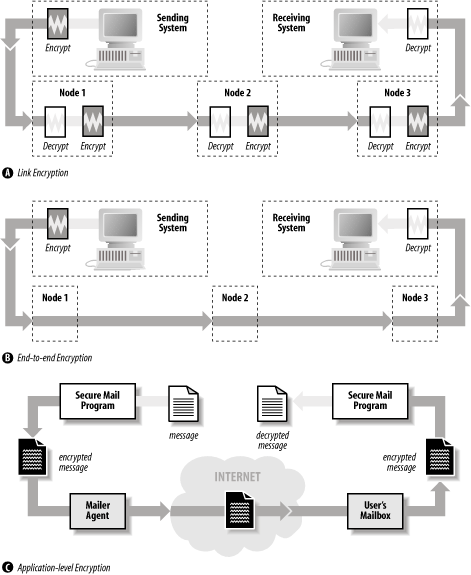
There are several places where encryption can be used to improve the security of IP networking protocols:[124]
- Link-level encryption
With link-level encryption, packets are automatically encrypted when they are transmitted over an unsecure data link and decrypted when they are received. Eavesdropping is defeated because an eavesdropper does not know how to decrypt packets that are intercepted. Link-level encryption is available on many radio-networking products, but is harder to find for other broadcast network technologies such as Ethernet or FDDI. Special link encryptors are available for modems and leased-line links.
- End-to-end encryption
With end-to-end encryption, the host transmitting the packet encrypts the packet’s data; the packet’s contents are automatically decrypted when they are received at the other end. Some organizations that have more than one physical location use encrypting routers for connecting to the Internet. These routers automatically encrypt packets that are sent from one corporate location to the other to prevent eavesdropping by attackers on the Internet (these are known as VPNs); however, the routers do not encrypt packets that are sent from the organization to third-party sites on the network.
Today, this kind of packet-level encryption is typically implemented using the IPsec protocol (described in RFC 2401). IPsec can be used to transparently encrypt all communications between two hosts, between a host and a network, or between two networks. Using IPsec is a powerful way to automatically add encryption to systems that otherwise do not provide it.
- Application-level encryption
Instead of relying on hardware to encrypt data, encryption can be done at the application level. For example, the Kerberos version of the telnet command can automatically encrypt the contents of the telnet data stream in both directions. The Secure Shell protocol (ssh) automatically provides for encryption of the data stream.
Application-level encryption can also be provided by tunneling or wrapping an existing application-level protocol using a second protocol. For example, the Secure Shell protocol provides for TCP/IP ports and connections to be “forwarded” from one host to another over a cryptographically-protected tunnel. Individual application servers and clients can also be wrapped using the SSL and TLS protocols.
These three encryption techniques are shown in Figure 11-9.
Simply using encryption is not enough: the encryption must be properly implemented for it to provide protection. For example, the original encryption standard for 802.11(b) wireless LANs was named WEP, an acronym that stood for “Wired Equivalent Privacy.” But despite using encryption, WEP does not provide any true privacy at all: the encryption implementation is flawed, and it is trivial to determine the encryption keys used by WEP systems.
It is also the case that encryption only protects against eavesdropping. Many denial of service attacks can still succeed against hosts using encryption.
Another way to protect networked computers is to harden the systems against network-based attacks. This process involves inspecting, testing, and frequently modifying the network stack, clients, and servers so that they are:
Resistant to nonstandard data, including malformed packets, nonsensical arguments, and implausible data
Resistant to attacks that attempt to exhaust limited resources
Resistant to sudden delays in interactive protocols
Although considerable hardening can be performed by inspection, hardening often comes only as a response to an attack that is demonstrated in the wild. Let’s look at three such attacks:
- X Window attack
Early implementations of the X Window server would freeze for 30 seconds if an attacker opened a TCP/IP connection to port 6000 and sent no data.
The hardening fix was to modify the X server so that it did not block other clients while waiting for initial authentication data from new clients.
- Ping of death
The so-called ping-of-death involved an ICMP Echo packet that contained 65,535 bytes. In the process of creating the corresponding ICMP Echo reply packet, many operating systems failed.[125]
The hardening fix was to fix the code so that internal buffers in the ICMP implementations would not overflow during ICMP Echo requests.
- SYN flood attack
With the so-called SYN flood attack, an attacking machine transmitted thousands of TCP SYN packets to a target machine. Each SYN packet was sent with a randomly generated source address. The target machine attempted to open thousands of connections to those remote machines, and in the process filled up internal tables and could no longer accept legitimate incoming TCP/IP connections.
The hardening fix was to modify the TCP/IP stack so that, when the internal table was filled, entries in the table were randomly dropped. With the entry dropped, the new SYN packet could be serviced. If it were legitimate, the connection would proceed to completion. If it were not legitimate, there would be no problem: it too would be randomly dropped at some later point in time.
Note that all of these fixes require that someone understand the attack, understand an appropriate way to harden the system without causing unwanted side-effects, and correctly code the change. Because hardening fixes almost always require access to the source code, most fixes are beyond the typical user, who must instead rely on some distribution of patches to the current system. Getting authentic, working patches in a timely fashion is itself a security problem. We will address this problem in Chapter 17.
A common technique for protecting computers that are vulnerable to a network-based attack is to physically isolate them from networks that can contain attackers. For example, it is common practice in many organizations to protect Windows-based servers from attackers on the Internet using a network firewall to mediate all data sent between the Internet and the vulnerable machines.
In some high-security applications, even firewalls do not provide sufficient isolation. In these cases, the network that needs to be secure can be completely isolated, with no firewalls, modems, or other forms of remote access allowed.
Firewall design is a complex and evolving topic. For more information about firewalls, see the references in the appendices.
Most IP services do not provide a strong system for positive authentication. As a result, an attacker can transmit information and claim that it comes from another source.
The lack of positive authentication presents problems, especially for services such as DNS, electronic mail, and Netnews (Usenet). In all of these services, the recipient of a message, be it a machine or a person, is likely to take positive action based on the content of a message, whether or not the message sender is properly authenticated.
Authentication systems have been developed for each of these services. DNS supports the cryptographic signing of zone data and authentication between nameservers using a shared secret key, mail servers can authenticate valid senders against a database, and Usenet messages can be cryptographically signed with PGP. However, adoption of these systems has not been widespread to date. We’ll describe each in greater detail in the following sections.
DNS was not designed to be a secure protocol. The protocol contains no means by which the information returned by a DNS query can be verified as correct or incorrect. Thus, if DNS tells you that a particular host has a particular IP address, there is no way that you can be certain that the information returned is correct.
Because IP addresses and hostnames were designed as a system for moving data, and not as a system for providing authentication, DNS was developed in the absence of requirements for security and authentication.
Unfortunately, hostnames and IP addresses are commonly used for authentication on the Internet. The Berkeley Unix “r” commands (rsh and rlogin) use the hostname for authentication. Many programs examine the IP address of an incoming TCP connection, perform a reverse lookup DNS operation, and trust that the resulting hostname is correct. More sophisticated programs perform a double reverse lookup, in which the network client performs an IP address lookup with the resulting hostname to see if the looked-up IP address matches the IP address of the incoming TCP connection.[126]
An attacker has more trouble spoofing a double reverse lookup, but the possibility still exists. Some typical attacks on DNS are:
- Client flooding
As DNS uses UDP, an attacker can easily flood the host with thousands of forged DNS responses. These can be constructed so as to appear to come from the DNS server. The client performing a DNS lookup will most likely accept the attacker’s response, rather than the legitimate response from the authentic nameserver.
- Bogus nameserver cache poisoning
Some nameservers will cache any response that they receive, whether it was requested or not. You can load these nameservers with incorrect IP address translations as part of a response to some other request.
- Rogue DNS servers
The fact that someone runs a nameserver on her machine doesn’t mean you can trust the results. By appropriately modifying the responses of a nameserver for one domain to respond to requests with inappropriate information, the maintainer of a real DNS server can taint the responses to clients.
Firewalls can provide some (small) degree of protection against a few DNS attacks. Nevertheless, the real safety relies on not using IP addresses or hostnames for authentication. This is now possible on a limited basis with DNS extensions for cryptographically signing DNS queries, responses, and zone files.
By design, servers that implement the Simple Mail Transfer Protocol (SMTP) accept mail messages from any client on the Internet. These mail messages may contain any combination of senders and recipients. It is the duty of the SMTP server to deliver the message to local users or, if the destination mailboxes are not local, to send the message to the intended destination.
This design for SMTP worked well for many years, but in the early 1990s the open nature of SMTP was hijacked by individuals and organizations sending large amounts of bulk email for commercial and political purposes. Such mail, sometimes called spam, is a growing problem for Internet users and providers alike. According to some estimates, between 50% and 90% of the email now traveling on the Internet is spam.
Spam exists because the SMTP protocol has not historically had strong authentication for the senders of messages. If the sender of each message were authenticated, then unwanted mail could be blocked by refusing email from senders who had a history of sending spam. As the sender is not usually authenticated, people who send spam can change in the From: header at will. As a result, blacklisting “known spammers” has not proven to be an effective anti-spam solution.[127]
Netnews messages also lack sender authentication. In part, this is because Netnews messages are essentially email sent to special network-based message archives.
One of the best-known cases of a fraudulently published Netnews message appears below. It was not, in fact, written by Gene Spafford; instead, it was created and posted to the Usenet by his friend, Chuq von Rospach.
Path:purdue!umd5!ames!mailrus!umix!uunet!seismo!sundc!pitstop!sun!moscvax!perdue!spaf
From: spaf@cs.purdue.EDU (Gene Spafford)
Newsgroups: news.announce.important
Subject: Warning: April Fools Time again (forged messages on loose)
Message-ID: <35111-F@medusa.cs.purdue.edu>
Date: 1 Apr 88 00:00:00 GMT
Expires: 1 May 88 00:00:00 GMT
Followup-To: news.admin
Organization: Dept. of Computer Sciences, Purdue Univ.
Lines: 25
Approved: spaf@cs.purdue.EDU

Warning: April 1 is rapidly approaching, and with it comes a USENET
tradition. On April Fools day comes a series of forged, tongue-in-cheek
messages, either from non-existent sites or using the name of a Well
Known USENET person. In general, these messages are harmless and meant
as a joke, and people who respond to these messages without thinking,
either by flaming or otherwise responding, generally end up looking
rather silly when the forgery is exposed.

So, for the next couple of weeks, if you see a message that seems
completely out of line or is otherwise unusual, think twice before
posting a followup or responding to it; it's very likely a forgery.

There are a few ways of checking to see if a message is a forgery.
These aren't foolproof, but since most forgery posters want people to
figure it out, they will allow you to track down the vast majority of
forgeries:

* Russian computers. For historic reasons most forged messages
have as part of their Path: a non-existent (we think!) russian
computer, either kremvax or moscvax. Other possibilities are nsacyber
or wobegon. Please note, however, that walldrug is a real site and
isn't a forgery.

* Posted dates. Almost invariably, the date of the posting is forged
to be April 1.

* Funky Message-ID. Subtle hints are often lodged into the
Message-Id, as that field is more or less an unparsed text string and
can contain random information. Common values include pi, the phone
number of the red phone in the white house, and the name of the
forger's parrot.

* Subtle mispellings. Look for subtle misspellings of the host names
in the Path: field when a message is forged in the name of a Big Name
USENET person. This is done so that the person being forged actually
gets a chance to see the message and wonder when he actually posted it.

Forged messages, of course, are not to be condoned. But they happen,
and it's important for people on the net not to over-react. They happen
at this time every year, and the forger
generally gets their kick from watching the novice users take the
posting seriously and try to flame their tails off. If we can keep a
level head and not react to these postings, they'll taper off rather
quickly and we can return to the normal state of affairs: chaos.

Thanks for your support.

Gene Spafford, Spokeman, The Backbone Cabal.
The April 1 post is funny because it contains all of the signs of a forged message that it claims to warn the reader about.[128] But other forged messages are not quite so obvious or friendly. Beware.
Many of the authentication problems discussed in the preceding sections arise because the TCP/IP protocol is a system for creating communication channels between computers, and not between users. When a server receives a TCP/IP connection from a client, it knows the IP address of the client—without that IP address, the server cannot complete the three-way TCP handshake and engage in two-way communications. However, the server has no way to readily ascertain the name of the person who initiated the TCP/IP connection.
When the TCP/IP protocol suite was developed, there was no need for a general-purpose approach for learning the names of people initiating TCP/IP connections. Protocols that required usernames (e.g., SMTP and FTP) provided them.
As the Internet has grown, network managers have discovered a very important reason for knowing the name of a person initiating a TCP/IP connection: accountability. If a remote system administrator discovers that her computer was attacked at 5:00 p.m. by a user at a computer named fas.harvard.edu, it is important to be able to trace that attack back to the specific user and account that was responsible for the attack so that either the user can be punished or the compromised account can be terminated. If only a single person was using fas.harvard.edu at 5:00 p.m., this may be a relatively easy matter to accomplish. But if fas.harvard.edu is a multiuser computer with hundreds of simultaneous users, finding the particular guilty party may be quite difficult.
The identification protocol gives you a way of addressing this problem with a simple callback scheme. When a server wants to know the “real name” of a person initiating a TCP/IP connection, it simply opens a connection to the client machine’s ident daemon (identd) and sends a description of the TCP/IP connection in progress; the remote machine sends a human-readable representation of the user who is initiating the connection.
Tip
Traditionally, the information sent back to the requesting system was the user’s username from the /etc/passwd file. More recent implementations of the ident daemon provide for an encrypted token to be sent back; the token can later be decrypted by the remote site with the cooperation of the site running the ident daemon. This prevents identd lookups from being used to get username information on a remote host without its cooperation.
The identification protocol depends on the honesty of the computer that is originating the TCP/IP connection. If your system is under attack from a multiuser system that has not been otherwise compromised, identd may be valuable. On the other hand, if your system is under attack from a single-user Linux computer that is not running identd or is running an identd that has been gimmicked to give untrue or misleading information, the response may be worthless. Because major IRC networks require clients to run an ident daemon, there are many free Windows-based ident daemons that return false responses.
In general, the responses of identd queries are more useful to the administrators of the site that sends the response than they are to the site that receives it. Thus, logging ident queries may not help you, but can be a courtesy to others—it lets the remote site know which account was involved in the attack. That’s especially useful if the attacker went on to erase log files or otherwise damage the originating site.
Not surprisingly, identd has been most useful in tracking down attackers originating at universities and other organizations with large multiuser Unix systems. Sites that have nonprivileged interactive Unix users should run ident to help track down accounts that have been compromised during an incident.
To make use of the identification protocol on the server side, you need to have a server program that understands the protocol and knows to place the callback. sendmail Version 8 and above will do so, for instance, as will tcpwrapper.
A final approach to handling attackers is to set up decoy systems for the attackers to attack. Decoy systems are closely monitored; often these systems are built with known vulnerabilities to increase their likelihood of attack.
Decoy systems, sometimes called honeypots,[131] have two primary advantages:
Because they are closely monitored, decoy systems can be used to learn about attackers. Decoy systems can reveal attacker locations, techniques, motivations, skill levels, objectives, and many other pieces of information.
If a decoy system is sufficiently rich and compelling, exploring that system might consume so much of the attacker’s time that the attacker will not have the time to attack systems that you actually care about. For example, Brad Spencer has championed the use of honeypot open relays to monitor and distract email spammers (for some details, see http://fightrelayspam.homestead.com/files/antispam06132002.htm).
Decoy systems are not without their risks. The first risk is that the attacker will find something of value in the system. You must make absolutely certain that there is nothing on the decoy system that an attacker could use to harm you. Specifically, the decoy system should contain no information about your organization. One way to accomplish this goal is to use only new computers for your decoy system, rather than computers repurposed from other projects. Furthermore, if your organization has a firewall, the decoy system should be outside the firewall.
A second risk of decoy systems is that they can become platforms for attacking other computers on the Internet—possibly making you liable for third-party civil damages or even for charges of criminal conspiracy!
For both of these reasons, you should think carefully—and possibly consult with an attorney—before setting up a decoy or honeypot system.
[123] Trivia: we appear to have been among the first authors to use the term “firewall” in print, in the first edition of this book. Gene Spafford coined the term based on some of his knowledge of building safety issues.
[124] Although encryption protects the data in the packets, it does not prevent someone from determining the source and destination addresses and ports of the packets. After all, this information must be visible to any Internet router that receives the packets to enable it to route them correctly. Accordingly, an attacker can still learn which computers (or which networks) are communicating and which ports they are using. In some cases, this might be valuable information.
[125] This description is a bit of an oversimplification, as one of this book’s reviewers pointed out. For the more technically minded, packets can get fragmented when they are transmitted, so an offset value is placed in each fragment to help the receiving system combine the fragments into a whole. It’s really the combination of the packet size and its offset value that overflowed the internal buffers of early implementations.
[126] A double reverse lookup involves looking up the hostname that corresponds to an incoming IP connection, then doing a lookup on that hostname to verify that it has the same IP address. This process is non-trivial, as Internet computers can have more than one IP address, and IP addresses can resolve to more than one Internet hostname. Although the double reverse lookup is designed to detect primitive nameserver attacks, the process frequently instead detects sites that have not properly configured their nameserver files or programmers who do not know how to properly implement the algorithm.
[127] The SMTP AUTH protocol extension (RFC 2554) defines a method for authenticating SMTP clients to restrict who can relay mail through an SMTP server. This doesn’t prevent the sender from forging any of the messages headers, but makes such forgery far more likely to be detected.
[128] Nonetheless, when the message was first posted, dozens of people were fooled and sent “Thank you” messages to Spafford, or sent corrections to the misspelled words.
[129] The “Internet” that appears in the name of Novell’s protocol is not the same Internet that is generally thought of as today’s Internet. Novell’s Internet is instead literally a network between other networks.
[130] RFC 1234 describes a system for connecting IPX networks together using IP networks and a technique known as tunneling .
[131] Or the more ambitious honeynets, discussed at http://project.honeynet.org/papers/honeynet/.