Table of Contents for
Practical UNIX and Internet Security, 3rd Edition
 Practical UNIX and Internet Security, 3rd Edition
Published by
O'Reilly Media, Inc., 2003
Practical UNIX and Internet Security, 3rd Edition
Published by
O'Reilly Media, Inc., 2003
- Cover
- Practical Unix & Internet Security, 3rd Edition
- A Note Regarding Supplemental Files
- Preface
- Unix “Security”?
- Scope of This Book
- Which Unix System?
- Conventions Used in This Book
- Comments and Questions
- Acknowledgments
- A Note to Would-Be Attackers
- I. Computer Security Basics
- 1. Introduction: Some Fundamental Questions
- What Is Computer Security?
- What Is an Operating System?
- What Is a Deployment Environment?
- Summary
- 2. Unix History and Lineage
- History of Unix
- Security and Unix
- Role of This Book
- Summary
- 3. Policies and Guidelines
- Planning Your Security Needs
- Risk Assessment
- Cost-Benefit Analysis and Best Practices
- Policy
- Compliance Audits
- Outsourcing Options
- The Problem with Security Through Obscurity
- Summary
- II. Security Building Blocks
- 4. Users, Passwords, and Authentication
- Logging in with Usernames and Passwords
- The Care and Feeding of Passwords
- How Unix Implements Passwords
- Network Account and Authorization Systems
- Pluggable Authentication Modules (PAM)
- Summary
- 5. Users, Groups, and the Superuser
- Users and Groups
- The Superuser (root)
- The su Command: Changing Who You Claim to Be
- Restrictions on the Superuser
- Summary
- 6. Filesystems and Security
- Understanding Filesystems
- File Attributes and Permissions
- chmod: Changing a File’s Permissions
- The umask
- SUID and SGID
- Device Files
- Changing a File’s Owner or Group
- Summary
- 7. Cryptography Basics
- Understanding Cryptography
- Symmetric Key Algorithms
- Public Key Algorithms
- Message Digest Functions
- Summary
- 8. Physical Security for Servers
- Planning for the Forgotten Threats
- Protecting Computer Hardware
- Preventing Theft
- Protecting Your Data
- Story: A Failed Site Inspection
- Summary
- 9. Personnel Security
- Background Checks
- On the Job
- Departure
- Other People
- Summary
- III. Network and Internet Security
- 10. Modems and Dialup Security
- Modems: Theory of Operation
- Modems and Security
- Modems and Unix
- Additional Security for Modems
- Summary
- 11. TCP/IP Networks
- Networking
- IP: The Internet Protocol
- IP Security
- Summary
- 12. Securing TCP and UDP Services
- Understanding Unix Internet Servers and Services
- Controlling Access to Servers
- Primary Unix Network Services
- Managing Services Securely
- Putting It All Together: An Example
- Summary
- 13. Sun RPC
- Remote Procedure Call (RPC)
- Secure RPC (AUTH_DES)
- Summary
- 14. Network-Based Authentication Systems
- Sun’s Network Information Service (NIS)
- Sun’s NIS+
- Kerberos
- LDAP
- Other Network Authentication Systems
- Summary
- 15. Network Filesystems
- Understanding NFS
- Server-Side NFS Security
- Client-Side NFS Security
- Improving NFS Security
- Some Last Comments on NFS
- Understanding SMB
- Summary
- 16. Secure Programming Techniques
- One Bug Can Ruin Your Whole Day . . .
- Tips on Avoiding Security-Related Bugs
- Tips on Writing Network Programs
- Tips on Writing SUID/SGID Programs
- Using chroot( )
- Tips on Using Passwords
- Tips on Generating Random Numbers
- Summary
- IV. Secure Operations
- 17. Keeping Up to Date
- Software Management Systems
- Updating System Software
- Summary
- 18. Backups
- Why Make Backups?
- Backing Up System Files
- Software for Backups
- Summary
- 19. Defending Accounts
- Dangerous Accounts
- Monitoring File Format
- Restricting Logins
- Managing Dormant Accounts
- Protecting the root Account
- One-Time Passwords
- Administrative Techniques for Conventional Passwords
- Intrusion Detection Systems
- Summary
- 20. Integrity Management
- The Need for Integrity
- Protecting Integrity
- Detecting Changes After the Fact
- Integrity-Checking Tools
- Summary
- 21. Auditing, Logging, and Forensics
- Unix Log File Utilities
- Process Accounting: The acct/pacct File
- Program-Specific Log Files
- Designing a Site-Wide Log Policy
- Handwritten Logs
- Managing Log Files
- Unix Forensics
- Summary
- V. Handling Security Incidents
- 22. Discovering a Break-in
- Prelude
- Discovering an Intruder
- Cleaning Up After the Intruder
- Case Studies
- Summary
- 23. Protecting Against Programmed Threats
- Programmed Threats: Definitions
- Damage
- Authors
- Entry
- Protecting Yourself
- Preventing Attacks
- Summary
- 24. Denial of Service Attacks and Solutions
- Types of Attacks
- Destructive Attacks
- Overload Attacks
- Network Denial of Service Attacks
- Summary
- 25. Computer Crime
- Your Legal Options After a Break-in
- Criminal Hazards
- Criminal Subject Matter
- Summary
- 26. Who Do You Trust?
- Can You Trust Your Computer?
- Can You Trust Your Suppliers?
- Can You Trust People?
- Summary
- VI. Appendixes
- A. Unix Security Checklist
- Preface
- Chapter 1: Introduction: Some Fundamental Questions
- Chapter 2: Unix History and Lineage
- Chapter 3: Policies and Guidelines
- Chapter 4: Users, Passwords, and Authentication
- Chapter 5: Users, Groups, and the Superuser
- Chapter 6: Filesystems and Security
- Chapter 7: Cryptography Basics
- Chapter 8: Physical Security for Servers
- Chapter 9: Personnel Security
- Chapter 10: Modems and Dialup Security
- Chapter 11: TCP/IP Networks
- Chapter 12: Securing TCP and UDP Services
- Chapter 13: Sun RPC
- Chapter 14: Network-Based Authentication Systems
- Chapter 15: Network Filesystems
- Chapter 16: Secure Programming Techniques
- Chapter 17: Keeping Up to Date
- Chapter 18: Backups
- Chapter 19: Defending Accounts
- Chapter 20: Integrity Management
- Chapter 21: Auditing, Logging, and Forensics
- Chapter 22: Discovering a Break-In
- Chapter 23: Protecting Against Programmed Threats
- Chapter 24: Denial of Service Attacks and Solutions
- Chapter 25: Computer Crime
- Chapter 26: Who Do You Trust?
- Appendix A: Unix Security Checklist
- Appendix B: Unix Processes
- Appendixes C, D, and E: Paper Sources, Electronic Sources, and Organizations
- B. Unix Processes
- About Processes
- Signals
- Controlling and Examining Processes
- Starting Up Unix and Logging In
- C. Paper Sources
- Unix Security References
- Other Computer References
- D. Electronic Resources
- Mailing Lists
- Web Sites
- Usenet Groups
- Software Resources
- E. Organizations
- Professional Organizations
- U.S. Government Organizations
- Emergency Response Organizations
- Index
- Index
- Index
- Index
- Index
- Index
- Index
- Index
- Index
- Index
- Index
- Index
- Index
- Index
- Index
- Index
- Index
- Index
- Index
- Index
- Index
- Index
- Index
- Index
- Index
- Index
- Index
- About the Authors
- Colophon
- Copyright
NIS was designed for a small, friendly computing environment. As Sun Microsystems’ customers began to build networks with thousands or tens of thousands of workstations, NIS started to show its weaknesses:
NIS maps could be updated only by logging onto the server and editing files.
NIS servers could be updated only in a single batch operation. Updates could take many minutes, or even hours, to complete.
All information transmitted by NIS was transmitted without encryption, making it subject to eavesdropping.
NIS updates themselves were authenticated with AUTH_UNIX RPC authentication, making them subject to spoofing.
To respond to these complaints, Sun started working on an NIS replacement in 1990. That system was released a few years later as NIS+.
NIS+ quickly earned a bad reputation. By all accounts, the early releases were virtually untested and rarely operated as promised. Furthermore, the documentation was confusing and incomplete. Sun sent engineers into the field to debug their software at customer sites. Eventually, Sun worked the bugs out of NIS+, and today it is a more reliable system for secure network management and control.
An excellent reference for people using NIS+ is Rick Ramsey’s book, All About Administrating NIS+ (SunSoft Press, Prentice Hall, 1994).
NIS+ creates network databases that are used to store information about computers and users within an organization. NIS+ calls these databases tables; they are functionally similar to NIS maps. Unlike NIS, NIS+ allows for incremental updates of the information stored on replicated database servers throughout the network.
Each NIS+ domain has one and only one NIS+ root domain server. This is a computer that contains the master copy of the information stored in the NIS+ root domain. The information stored on this server can be replicated, allowing the network to remain usable even when the root server is down or unavailable. There may also be NIS+ servers for subdomains.
Entities that communicate using NIS+ are called NIS+ principals . An NIS+ principal may be a host or an authenticated user. Each NIS+ principal has a public key and a secret key, which are stored on an NIS+ server in the domain. (As this is Secure RPC, the secret key is stored encrypted; see Section 13.2.1.)
All communication between NIS+ servers and NIS+ principals take place through Secure RPC. This makes the communication resistant to both eavesdropping and spoofing attacks. NIS+ also oversees the creation and management of Secure RPC keys. By virtue of using NIS+, every member of the organization is enabled to use Secure RPC.
All information stored on an NIS+ server is stored in the form of objects. NIS+ supports three fundamental types of objects:[194]
- Table objects
Store configuration information.
- Group objects
Used for NIS+ authorization. NIS+ groups give you a way to collectively refer to a set of NIS+ principals (users or machines) at a single time.
- Directory objects
Provide structure to an NIS+ server. Directories can store tables, groups, or other directories, creating a tree structure on the NIS+ server that’s similar to the Unix filesystem.
Information stored in NIS+ tables can be retrieved using any table column as a key; NIS+ thus eliminates the need to have multiple NIS maps (such as group.bygid and group.byname) under NIS. NIS+ predefines 16 tables (see Table 14-1); users are free to create additional tables of their own.
Table 14-1. Predefined NIS+ tables
|
Table |
Equivalent Unix files |
Stores |
|---|---|---|
|
/etc/hosts |
IP address and hostname of every workstation in the NIS+ domain | |
|
/etc/bootparams |
Configuration information for diskless clients, including location of root, swap, and dump partitions | |
|
/etc/passwd |
User account information (password, full name, home directory, etc.) | |
|
n/a |
Secure RPC credentials for users in the domain | |
|
/etc/group |
Groupnames, passwords, and members of every Unix group | |
|
/etc/netgroup |
Netgroups to which workstations and users belong | |
|
/usr/lib/aliases/etc/aliases/etc/mail/aliases |
Electronic mail aliases | |
|
/etc/timezone |
Time zone of each workstation in the domain | |
|
/etc/networks |
Networks in the domain and their canonical names | |
|
/etc/inet/netmasks/etc/netmasks |
Name of each network in the domain and its associated netmask | |
|
/etc/ethers |
Ethernet address of every workstation in the domain | |
|
/etc/services |
Port number for every Internet service used in the domain | |
|
/etc/protocols |
IP protocols used in the domain | |
|
n/a |
RPC program numbers for RPC servers in the domain | |
|
n/a |
Location of home directories for users in the domain | |
|
n/a |
Information for Sun’s Automounter |
Using an NIS+ domain can be remarkably pleasant. When a user logs into a workstation, the /bin/login command automatically acquires the user’s NIS+ security credentials and attempts to decrypt them with the user’s login password.
If the account password and the NIS+ credentials password are the same (and they usually are), the NIS+ keyserv process will cache the user’s secret key, and the user will have transparent access to all Secure RPC services. If the account password and the NIS+ credentials password are not the same, then the user will need to manually log in to the NIS+ domain by using the keylogin command.
NIS+ users should change their passwords with the NIS+ nispasswd command, which works in much the same way as the standard Unix passwd command.
NIS+ security is implemented by providing a means for authenticating users, and by establishing access control lists that control the ways that those authenticated users can interact with the information stored in NIS+ tables. NIS+ provides for two authentication types:
- LOCAL
Authentication based on the UID of the Unix process executing the NIS+ command. LOCAL authentication is used largely for administrating the root NIS+ server.
- DES
Authentication based on Secure RPC. Users must have their public key and encrypted secret key stored in the NIS+ Cred table to use DES authentication.
Like Unix files, each NIS+ object has an owner, which is usually the object’s creator. (An object’s owner can be changed with the nischown command.) NIS+ objects also have access control lists, which are used to control which principals have which kind of access to the object.
NIS+ allows four types of access to objects:
|
Access right |
Meaning |
|---|---|
|
Read |
Ability to read the contents of the object |
|
Modify |
Ability to modify the contents of the object |
|
Create |
Ability to create new objects within the table |
|
Destroy |
Ability to destroy objects contained within the table |
NIS+ maintains a list of these access rights for four different types of principals:
The way that NIS+ commands display access rights is similar to the way that the Unix ls command displays file permissions. The key difference is that NIS+ access rights are displayed as a list of 16 characters, and the first 4 characters represent the rights for “nobody”, rather than “owner”, as shown in Figure 14-2.
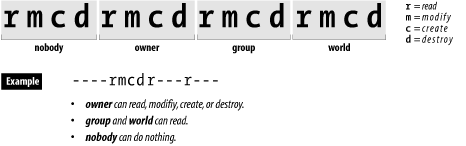
NIS+ tables may provide additional access privileges for individual rows, columns, or entries that they contain. Thus, all authenticated users may have read access to an entire table, but each user may have the additional ability of modifying the row of the table associated with the user’s own account. Note that while individual rows, columns, or entries can broaden the access control list, they cannot impose more restrictive rules.
Once a user has her NIS+ account set up, she should use the nispasswd command to change the password:
% nispasswd
Changing password for simsong on NIS+ server.
Old login password: fj39=3-f

New login password: fj43fadf

Re-enter new  password:fj43fadf

        NIS+ password information changed for simsong
        NIS+ credential information changed for simsong
%If a user has a different password stored on his workstation and on the Secure RPC server, he will see the following message when he logs in:
login: simsong
Password: fj39=3-f

Password does not decrypt secret key for unix.237@cpg.com.
Last login: Sun Nov 19 18:03:42 from sun.vineyard.net
Sun Microsystems Inc.   SunOS 5.4       Generic July 1994
%
In this case, the user has a problem because the password that the user knows and uses to log in does not, for some reason, match the password that was used to encrypt the password on the Secure RPC server. The user can’t change his password with the nispasswd program because he doesn’t know his NIS password:
% nispasswd
Changing password for simsong on NIS+ server.
Old login password:fj39=4-f

Sorry.
%
Likewise, the superuser can’t run the nispasswd program for the user. The only solution is for the system administrator to become the superuser and give the user a new key:
# newkey -u simsong
Updating nisplus publickey database.
Adding new key for unix.237@cpg.com.
Enter simsong's login password: fj39=3-f

#
This procedure sets the user’s Secure RPC password to be the same as his login password. Note that you must know the user’s login password. If you don’t, you’ll get this error:
# newkey -u simsong
Updating nisplus publickey database.
Adding new key for unix.237@cpg.com.
Enter simsong's login password: nosmis

newkey: ERROR, password differs from login password.
#
After the user has a new key, he can then use the nispasswd command to change his password, as shown above.
If properly configured, NIS+ can be a very secure system for network management and authentication. However, as with all security systems, it is possible to make a mistake in the configuration or management of NIS+ that would render a network that it protects somewhat less than secure.
Here are some things to be aware of:
- Do not run NIS+ in NIS compatibility mode
NIS+ has an NIS compatibility mode that allows the NIS+ server to interoperate with NIS clients. If you run NIS+ in this mode, then any NIS server on your network (and possibly other networks as well) will have the ability to access any piece of information stored within your NIS+ server. Typically, NIS access is used by attackers to obtain a copy of your domain’s encrypted password file, which is then used to probe for weaknesses.
- Manually inspect the permissions of your NIS+ objects on a regular basis
System integrity-checking software such as Tripwire does not exist (yet) for NIS+. In its absence, you must manually inspect the NIS+ tables, directories, and groups on a regular basis. Be on the lookout for objects that can be modified by nobody or by world; also be on the lookout for tables in which new objects can be created by these principal classes.
- Secure the computers on which your NIS+ servers are running
Your NIS+ server is only as secure as the computer on which it is running. If attackers can obtain root access on your NIS+ server, they can make any change that they wish to your NIS+ domain, including creating new users, changing user passwords, and even changing your NIS+ server’s master password.
- NIS+ servers operate at one of three security levels
These levels are described in Table 14-2. Make sure that your server is operating at level 2, which is the default level.
Table 14-2. NIS+ server security levels
[194] Other types of objects are supported, but they aren’t really important to this discussion. Interested readers should consult the manpages.