Table of Contents for
Practical UNIX and Internet Security, 3rd Edition
 Practical UNIX and Internet Security, 3rd Edition
Published by
O'Reilly Media, Inc., 2003
Practical UNIX and Internet Security, 3rd Edition
Published by
O'Reilly Media, Inc., 2003
- Cover
- Practical Unix & Internet Security, 3rd Edition
- A Note Regarding Supplemental Files
- Preface
- Unix “Security”?
- Scope of This Book
- Which Unix System?
- Conventions Used in This Book
- Comments and Questions
- Acknowledgments
- A Note to Would-Be Attackers
- I. Computer Security Basics
- 1. Introduction: Some Fundamental Questions
- What Is Computer Security?
- What Is an Operating System?
- What Is a Deployment Environment?
- Summary
- 2. Unix History and Lineage
- History of Unix
- Security and Unix
- Role of This Book
- Summary
- 3. Policies and Guidelines
- Planning Your Security Needs
- Risk Assessment
- Cost-Benefit Analysis and Best Practices
- Policy
- Compliance Audits
- Outsourcing Options
- The Problem with Security Through Obscurity
- Summary
- II. Security Building Blocks
- 4. Users, Passwords, and Authentication
- Logging in with Usernames and Passwords
- The Care and Feeding of Passwords
- How Unix Implements Passwords
- Network Account and Authorization Systems
- Pluggable Authentication Modules (PAM)
- Summary
- 5. Users, Groups, and the Superuser
- Users and Groups
- The Superuser (root)
- The su Command: Changing Who You Claim to Be
- Restrictions on the Superuser
- Summary
- 6. Filesystems and Security
- Understanding Filesystems
- File Attributes and Permissions
- chmod: Changing a File’s Permissions
- The umask
- SUID and SGID
- Device Files
- Changing a File’s Owner or Group
- Summary
- 7. Cryptography Basics
- Understanding Cryptography
- Symmetric Key Algorithms
- Public Key Algorithms
- Message Digest Functions
- Summary
- 8. Physical Security for Servers
- Planning for the Forgotten Threats
- Protecting Computer Hardware
- Preventing Theft
- Protecting Your Data
- Story: A Failed Site Inspection
- Summary
- 9. Personnel Security
- Background Checks
- On the Job
- Departure
- Other People
- Summary
- III. Network and Internet Security
- 10. Modems and Dialup Security
- Modems: Theory of Operation
- Modems and Security
- Modems and Unix
- Additional Security for Modems
- Summary
- 11. TCP/IP Networks
- Networking
- IP: The Internet Protocol
- IP Security
- Summary
- 12. Securing TCP and UDP Services
- Understanding Unix Internet Servers and Services
- Controlling Access to Servers
- Primary Unix Network Services
- Managing Services Securely
- Putting It All Together: An Example
- Summary
- 13. Sun RPC
- Remote Procedure Call (RPC)
- Secure RPC (AUTH_DES)
- Summary
- 14. Network-Based Authentication Systems
- Sun’s Network Information Service (NIS)
- Sun’s NIS+
- Kerberos
- LDAP
- Other Network Authentication Systems
- Summary
- 15. Network Filesystems
- Understanding NFS
- Server-Side NFS Security
- Client-Side NFS Security
- Improving NFS Security
- Some Last Comments on NFS
- Understanding SMB
- Summary
- 16. Secure Programming Techniques
- One Bug Can Ruin Your Whole Day . . .
- Tips on Avoiding Security-Related Bugs
- Tips on Writing Network Programs
- Tips on Writing SUID/SGID Programs
- Using chroot( )
- Tips on Using Passwords
- Tips on Generating Random Numbers
- Summary
- IV. Secure Operations
- 17. Keeping Up to Date
- Software Management Systems
- Updating System Software
- Summary
- 18. Backups
- Why Make Backups?
- Backing Up System Files
- Software for Backups
- Summary
- 19. Defending Accounts
- Dangerous Accounts
- Monitoring File Format
- Restricting Logins
- Managing Dormant Accounts
- Protecting the root Account
- One-Time Passwords
- Administrative Techniques for Conventional Passwords
- Intrusion Detection Systems
- Summary
- 20. Integrity Management
- The Need for Integrity
- Protecting Integrity
- Detecting Changes After the Fact
- Integrity-Checking Tools
- Summary
- 21. Auditing, Logging, and Forensics
- Unix Log File Utilities
- Process Accounting: The acct/pacct File
- Program-Specific Log Files
- Designing a Site-Wide Log Policy
- Handwritten Logs
- Managing Log Files
- Unix Forensics
- Summary
- V. Handling Security Incidents
- 22. Discovering a Break-in
- Prelude
- Discovering an Intruder
- Cleaning Up After the Intruder
- Case Studies
- Summary
- 23. Protecting Against Programmed Threats
- Programmed Threats: Definitions
- Damage
- Authors
- Entry
- Protecting Yourself
- Preventing Attacks
- Summary
- 24. Denial of Service Attacks and Solutions
- Types of Attacks
- Destructive Attacks
- Overload Attacks
- Network Denial of Service Attacks
- Summary
- 25. Computer Crime
- Your Legal Options After a Break-in
- Criminal Hazards
- Criminal Subject Matter
- Summary
- 26. Who Do You Trust?
- Can You Trust Your Computer?
- Can You Trust Your Suppliers?
- Can You Trust People?
- Summary
- VI. Appendixes
- A. Unix Security Checklist
- Preface
- Chapter 1: Introduction: Some Fundamental Questions
- Chapter 2: Unix History and Lineage
- Chapter 3: Policies and Guidelines
- Chapter 4: Users, Passwords, and Authentication
- Chapter 5: Users, Groups, and the Superuser
- Chapter 6: Filesystems and Security
- Chapter 7: Cryptography Basics
- Chapter 8: Physical Security for Servers
- Chapter 9: Personnel Security
- Chapter 10: Modems and Dialup Security
- Chapter 11: TCP/IP Networks
- Chapter 12: Securing TCP and UDP Services
- Chapter 13: Sun RPC
- Chapter 14: Network-Based Authentication Systems
- Chapter 15: Network Filesystems
- Chapter 16: Secure Programming Techniques
- Chapter 17: Keeping Up to Date
- Chapter 18: Backups
- Chapter 19: Defending Accounts
- Chapter 20: Integrity Management
- Chapter 21: Auditing, Logging, and Forensics
- Chapter 22: Discovering a Break-In
- Chapter 23: Protecting Against Programmed Threats
- Chapter 24: Denial of Service Attacks and Solutions
- Chapter 25: Computer Crime
- Chapter 26: Who Do You Trust?
- Appendix A: Unix Security Checklist
- Appendix B: Unix Processes
- Appendixes C, D, and E: Paper Sources, Electronic Sources, and Organizations
- B. Unix Processes
- About Processes
- Signals
- Controlling and Examining Processes
- Starting Up Unix and Logging In
- C. Paper Sources
- Unix Security References
- Other Computer References
- D. Electronic Resources
- Mailing Lists
- Web Sites
- Usenet Groups
- Software Resources
- E. Organizations
- Professional Organizations
- U.S. Government Organizations
- Emergency Response Organizations
- Index
- Index
- Index
- Index
- Index
- Index
- Index
- Index
- Index
- Index
- Index
- Index
- Index
- Index
- Index
- Index
- Index
- Index
- Index
- Index
- Index
- Index
- Index
- Index
- Index
- Index
- Index
- About the Authors
- Colophon
- Copyright
Although every Unix user has a username consisting of one or more characters, inside the computer Unix represents the identity of each user by a single number: the user identifier (UID). Under most circumstances, each user is assigned his own unique ID.
Unix also uses special usernames for a variety of system functions. As with usernames associated with human users, system usernames usually have their own UIDs as well. Here are some common “users” on various versions of Unix:
- root
Superuser account. Performs accounting and low-level system functions.
- bin
Binary owner. Has ownership of system files on some systems but doesn’t typically execute programs.
- daemon
Handles some aspects of the network. This username is also associated with other utility systems, such as the print spoolers, on some versions of Unix.
Handles aspects of electronic mail. On many systems there is no mail user, and daemon is used instead.
- guest
Used (infrequently) for site visitors to access the system.
- ftp
Used for anonymous FTP access.
- uucp
Controls ownership of the Unix serial ports. (uucp traditionally managed the UUCP system, which is now deprecated.)
- news
Used for Usenet news.
- lp
Used for the printer system.[49]
- nobody
Owns no files and is sometimes used as a default user for unprivileged operations.
- www or http
Runs the web server.
- named
Runs the BIND name server.
- sshd
Performs unprivileged operations for the OpenSSH Secure Shell daemon.
- operator
Used for creating backups and (sometimes) for printer operation.
- games
Allowed to access high-score files.
- amanda
Used for the Amanda remote backup system.
On most Unix systems the user accounts are listed in the database file /etc/passwd; the corresponding passwords for these accounts are kept in a file named /etc/shadow, /etc/security/passwd, or /etc/master.passwd. To improve lookup speed, some systems compile the password file into a compact index file named something like /etc/pwd.db, which is used instead.
Here is an example of an /etc/passwd file from a Linux system containing a variety of system and ordinary users:
$ more /etc/passwd
root:x:0:0:Mr. Root:/root:/bin/bash
bin:x:1:1:Binary Installation User:/bin:/sbin/nologin
daemon:x:2:2:daemon:/sbin:/sbin/nologin
adm:x:3:4:adm:/var/adm:/sbin/nologin
lp:x:4:7:lp:/var/spool/lpd:/sbin/nologin
sync:x:5:0:sync:/sbin:/bin/sync
shutdown:x:6:0:shutdown:/sbin:/sbin/shutdown
halt:x:7:0:halt:/sbin:/sbin/halt
mail:x:8:12:mail:/var/spool/mail:/sbin/nologin
news:x:9:13:news:/var/spool/news:
uucp:x:10:14:uucp:/var/spool/uucp:/sbin/nologin
operator:x:11:0:operator:/root:/sbin/nologin
games:x:12:100:games:/usr/games:/sbin/nologin
gopher:x:13:30:gopher:/var/gopher:/sbin/nologin
ftp:x:14:50:FTP User:/var/ftp:/sbin/nologin
nobody:x:99:99:Nobody:/:/sbin/nologin
mailnull:x:47:47::/var/spool/mqueue:/dev/null
rpm:x:37:37::/var/lib/rpm:/bin/bash
xfs:x:43:43:X Font Server:/etc/X11/fs:/bin/false
ntp:x:38:38::/etc/ntp:/sbin/nologin
rpc:x:32:32:Portmapper RPC user:/:/bin/false
gdm:x:42:42::/var/gdm:/sbin/nologin
rpcuser:x:29:29:RPC Service User:/var/lib/nfs:/sbin/nologin
nfsnobody:x:65534:65534:Anonymous NFS User:/var/lib/nfs:/sbin/nologin
nscd:x:28:28:NSCD Daemon:/:/bin/false
ident:x:98:98:pident user:/:/sbin/nologin
rachel:x:181:181:Rachel Cohen:/u/rachel:/bin/ksh
ralph:x:182:182:Ralph Knox:/u/ralph:/bin/tcsh
mortimer:x:183:183:Mortimer Merkle:/u/mortimer:/bin/sh
Notice that most of these accounts do not have “people names,” and that all have a password field of “x”. In the old days of Unix, the second field was used to hold the user’s encrypted password. This information is now stored in a second file, the shadow password file.
The /etc/passwd file can be thought of as a directory[50] that lists all of the users on the system. As we saw in the last chapter, it is possible to configure a Unix system to use other directory services, such as NIS, NIS+, LDAP, and Kerberos. (We’ll discuss directory services in detail in Chapter 14.) When these systems are used, the Unix operating system is often modified so that the utility programs still respond as if all of the accounts actually reside in a single /etc/passwd file.
UIDs are historically unsigned 16-bit integers, which means they can range from 0 to 65535. UIDs between 0 and 99 are typically used for system functions; UIDs for humans usually begin at 100 or 1000. Many versions of Unix now support 32-bit UIDs. A few older versions of Unix have UIDs that are signed 16-bit integers, ranging from -32768 to 32767.
There is one special UID, which is UID 0. This is the UID that is reserved for the Unix superuser. The Unix kernel disables most security checks when a process is being run by a user with the UID of 0.
Note
There is generally nothing special about any Unix account name. All Unix privileges are determined by the UID (and sometimes the group ID, or GID), and not directly by the account name. Thus, an account with name root and UID 1005 would have no special privileges, but an account named mortimer with UID 0 would be a superuser.
In general, you should avoid creating users with a UID of 0 other than root, and you should avoid using the name root for a regular user account. In this book, we will use the terms “root” and “superuser” interchangeably to mean a UID of 0.
Unix keeps the mapping between usernames and UIDs in the file /etc/passwd. Each user’s UID is stored in the field after the one containing the user’s encrypted password. For example, consider the sample /etc/passwd entry presented in Chapter 4:
rachel:x:181:181:Rachel Cohen:/u/rachel:/bin/ksh
In this example, Rachel’s username is rachel and her UID is 181.
The UID is the actual information that the operating system uses to identify the user; usernames are provided merely as a convenience for humans. If two users are assigned the same UID, Unix views them as the same user, even if they have different usernames and passwords. Two users with the same UID can freely read and delete each other’s files and can kill each other’s running programs. Giving two users the same UID is almost always a bad idea; it is better to create multiple users and put them in the same group, as we will see later.
Conversely, files can be owned by a UID that is not listed in /etc/passwd as having an associated username. This is also a bad idea. If a user is added to /etc/passwd in the future with that UID, that user will suddenly become the owner of the files.
Every Unix user belongs to one or more groups. As with user accounts, groups have both a group name and a group identification number (GID). GID values are also historically 16-bit integers, but many systems now use 32-bit integers for these, too.
As the name implies, Unix groups are used to group users together. As with usernames, group names and numbers are assigned by the system administrator when each user’s account is created. Groups can be used by the system administrator to designate sets of users who are allowed to read, write, and/or execute specific files, directories, or devices.
Each user belongs to a primary group that is stored in the /etc/passwd file. The GID of the user’s primary group follows the user’s UID. Historically, every Unix user was placed in the group users, which had a GID of 100. These days, however, most Unix sites place each account in its own group. This results in decreased sharing but somewhat greater security.[51]
Consider, again, our /etc/passwd example:
rachel:x:181:181:Rachel Cohen:/u/rachel:/bin/ksh
In this example, Rachel’s primary GID is 181.
Groups provide a handy mechanism for treating a number of users in a certain way. For example, you might want to set up a group for a team of students working on a project so that students in the group, but nobody else, can read and modify the team’s files.
Groups can also be used to restrict access to sensitive information or specially licensed applications to a particular set of users: for example, many Unix computers are set up so that only users who belong to the kmem group can examine the operating system’s kernel memory. The operator group is commonly used to allow only specific users to run the tape backup system, which may have “read” access to the system’s raw disk devices. And a sources group might be limited to people who have signed nondisclosure forms so they can view the source code for particular software.
Tip
Some special versions of Unix support mandatory access controls (MAC), which have controls based on data labeling instead of, or in addition to, the traditional Unix discretionary access controls (DAC). MAC-based systems do not use traditional Unix groups. Instead, the GID values and the /etc/group file may be used to specify security access control labeling or to point to capability lists. If you are using one of these systems, you should consult the vendor documentation to ascertain what the actual format and use of these values might be.
The /etc/group file contains the database that lists every group on your computer and its corresponding GID. Its format is similar to the format used by the /etc/passwd file.[52]
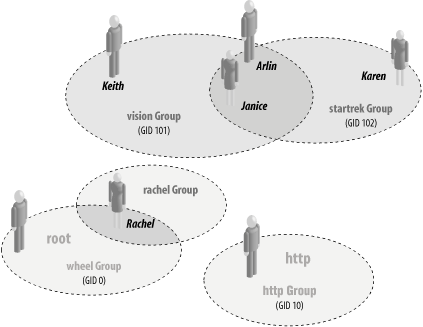
Here is a sample /etc/group file that defines six groups: wheel, http, vision, startrek, rachel, and users:
wheel:*:0:root,rachel
http:*:10:http
users:*:100:
vision:*:101:keith,arlin,janice
startrek:*:102:janice,karen,arlin
rachel:*:181:
The first line of this file defines the wheel group. The fields are explained in Table 5-1.
Table 5-1. The first line of the example /etc/group file
|
Field contents |
Description |
|---|---|
|
|
Group name |
|
* |
Group’s “password” (described later) |
|
0 |
Group’s GID |
|
|
List of the users who are in the group |
Most versions of Unix use the wheel group as the list of all of the computer’s system administrators (in this case, rachel and the root user are the only members). On some systems, the group has a GID of 0; on other systems, the group has a GID of 10. Unlike a UID of 0, a GID of 0 is usually not significant. However, the name wheel is very significant: on many systems the use of the su command to invoke superuser privileges is restricted to users who are members of a group named wheel.
The second line of this file defines the http group. There is one member in the http group—the http user.
The third line defines the users group. The users group does not explicitly list any users; on some systems, each user is placed into this group by default through his individual entry in the /etc/passwd file.
The fourth and fifth lines define two groups of users. The vision group includes the users keith, arlin, and janice. The startrek group contains the users janice, karen, and arlin. Notice that the order in which the usernames are listed on each line is not important. (This group is depicted graphically in Figure 5-1.)
Finally, the sixth line defines a group for the user rachel.
Remember that the users mentioned in the /etc/group file are in these groups in addition to the groups mentioned as their primary groups in the file /etc/passwd. For example, Rachel is in the rachel group even though she does not appear in that group in the file /etc/group because her primary group number is 181. On most versions of Unix, you can use the groups command to list which groups that you are currently in:
% groups
rachel wheel
%
The groups command can also take a username as an argument:
% groups arlin
vision, startrek
%
When a user logs into the Unix system, the /bin/login program scans the /etc/passwd and /etc/group files, determines which groups the user is a member of, and adds them to the user’s user structure using the setgroups( ) system call.[53]
Some versions of Unix are equipped with an id command that offers more detailed UIDs, GIDs, and group lists:
%iduid=181(rachel) gid=181(rachel) groups=181(rachel), 0(wheel) %id rootuid=0(root) gid=0(wheel) groups=0(wheel),1(bin),15(shadow),65534(nogroup)
Figure 5-1 illustrates how users can be included in multiple groups.
Tip
It is not necessary for there to be an entry in the /etc/group file for a group to exist! As with UIDs and account names, Unix actually uses only the integer part of the GID for all settings and permissions. The name in the /etc/group file is simply a convenience for the users—a means of associating a mnemonic with the GID value.
[49] lp stands for line printer, although these days most people seem to be using laser printers.
[50] Technically, it is a simple relational database.
[51] The advantage of assigning each user his own group is that it allows users to have a unified umask of 007 in all instances. When users wish to restrict access of a file or directory to themselves, they leave the group set to their individual group. When they wish to open the file or directory to members of their workgroup or project, all they need to do is to change the file’s or directory’s group accordingly.
[52] As with the password file, if your site is running NIS, NIS+, or DCE, the /etc/group file may be incomplete or missing. See the discussion in Section 4.3.1 in Chapter 4.
[53] If you are on a system that uses NIS, NIS+, or some other system for managing user accounts throughout a network, these network databases will be referenced as well. For more information, see Chapter 19.