Table of Contents for
The IDA Pro Book, 2nd Edition
 The IDA Pro Book, 2nd Edition
Published by
No Starch Press, 2011
The IDA Pro Book, 2nd Edition
Published by
No Starch Press, 2011
- Cover
- The IDA Pro Book
- PRAISE FOR THE FIRST EDITION OF THE IDA PRO BOOK
- Acknowledgments
- Introduction
- I. Introduction to IDA
- 1. Introduction to Disassembly
- The What of Disassembly
- The Why of Disassembly
- The How of Disassembly
- Summary
- 2. Reversing and Disassembly Tools
- Summary Tools
- Deep Inspection Tools
- Summary
- 3. IDA Pro Background
- Obtaining IDA Pro
- IDA Support Resources
- Your IDA Installation
- Thoughts on IDA’s User Interface
- Summary
- II. Basic IDA Usage
- 4. Getting Started with IDA
- IDA Database Files
- Introduction to the IDA Desktop
- Desktop Behavior During Initial Analysis
- IDA Desktop Tips and Tricks
- Reporting Bugs
- Summary
- 5. IDA Data Displays
- Secondary IDA Displays
- Tertiary IDA Displays
- Summary
- 6. Disassembly Navigation
- Stack Frames
- Searching the Database
- Summary
- 7. Disassembly Manipulation
- Commenting in IDA
- Basic Code Transformations
- Basic Data Transformations
- Summary
- 8. Datatypes and Data Structures
- Creating IDA Structures
- Using Structure Templates
- Importing New Structures
- Using Standard Structures
- IDA TIL Files
- C++ Reversing Primer
- Summary
- 9. Cross-References and Graphing
- IDA Graphing
- Summary
- 10. The Many Faces of IDA
- Using IDA’s Batch Mode
- Summary
- III. Advanced IDA Usage
- 11. Customizing IDA
- Additional IDA Configuration Options
- Summary
- 12. Library Recognition Using FLIRT Signatures
- Applying FLIRT Signatures
- Creating FLIRT Signature Files
- Summary
- 13. Extending IDA’s Knowledge
- Augmenting Predefined Comments with loadint
- Summary
- 14. Patching Binaries and Other IDA Limitations
- IDA Output Files and Patch Generation
- Summary
- IV. Extending IDA’s Capabilities
- 15. IDA Scripting
- The IDC Language
- Associating IDC Scripts with Hotkeys
- Useful IDC Functions
- IDC Scripting Examples
- IDAPython
- IDAPython Scripting Examples
- Summary
- 16. The IDA Software Development Kit
- The IDA Application Programming Interface
- Summary
- 17. The IDA Plug-in Architecture
- Building Your Plug-ins
- Installing Plug-ins
- Configuring Plug-ins
- Extending IDC
- Plug-in User Interface Options
- Scripted Plug-ins
- Summary
- 18. Binary Files and IDA Loader Modules
- Manually Loading a Windows PE File
- IDA Loader Modules
- Writing an IDA Loader Using the SDK
- Alternative Loader Strategies
- Writing a Scripted Loader
- Summary
- 19. IDA Processor Modules
- The Python Interpreter
- Writing a Processor Module Using the SDK
- Building Processor Modules
- Customizing Existing Processors
- Processor Module Architecture
- Scripting a Processor Module
- Summary
- V. Real-World Applications
- 20. Compiler Personalities
- RTTI Implementations
- Locating main
- Debug vs. Release Binaries
- Alternative Calling Conventions
- Summary
- 21. Obfuscated Code Analysis
- Anti–Dynamic Analysis Techniques
- Static De-obfuscation of Binaries Using IDA
- Virtual Machine-Based Obfuscation
- Summary
- 22. Vulnerability Analysis
- After-the-Fact Vulnerability Discovery with IDA
- IDA and the Exploit-Development Process
- Analyzing Shellcode
- Summary
- 23. Real-World IDA Plug-ins
- IDAPython
- collabREate
- ida-x86emu
- Class Informer
- MyNav
- IdaPdf
- Summary
- VI. The IDA Debugger
- 24. The IDA Debugger
- Basic Debugger Displays
- Process Control
- Automating Debugger Tasks
- Summary
- 25. Disassembler/Debugger Integration
- IDA Databases and the IDA Debugger
- Debugging Obfuscated Code
- IdaStealth
- Dealing with Exceptions
- Summary
- 26. Additional Debugger Features
- Debugging with Bochs
- Appcall
- Summary
- A. Using IDA Freeware 5.0
- Using IDA Freeware
- B. IDC/SDK Cross-Reference
- Index
- About the Author
The collabREate plug-in is designed to facilitate collaboration between multiple users analyzing the same binary file. The goals of the project are to provide a natural integration of a plug-in component representing the synchronization client with a robust server component backed by a SQL database and capable of supporting features beyond simple database synchronization.
collabREate | |
Author | Chris Eagle and Tim Vidas |
Distribution | C++ source and binary (including IDA freeware) |
Price | Free |
Description | Collaborative framework for synchronizing remote IDA sessions |
Information |
From a high-level perspective, collabREate owes much to the IDA Sync project.[209] The collabREate plug-in processes databases updates and communicates with a remote server component to synchronize database updates with additional project members. Because IDA is a single-threaded application, some mechanism for dealing with asynchronous non-blocking network communications is necessary. In IDA versions prior to 6.0, the asynchronous communications component derives from the Windows Asynchronous Sockets techniques used by IDA Sync; however, with the introduction of IDA 6.0, asynchronous communications are now handled using Qt socket classes, allowing collabREate to be used on all IDA-supported platforms.
CollabREate takes an integrated approach to capturing user actions by leveraging IDA’s process and IDB event-notification mechanisms. By hooking various database change notifications, collabREate is able to seamlessly propagate database updates to the collabREate server. The types and numbers of change notifications generated by IDA have grown with each release of IDA, and collabREate endeavors to hook as many useful notifications as it possibly can for the version of IDA that it has been built for. An interesting side effect of using collabREate is that it allows users of very different versions of IDA (5.2 and 6.0, for example) to synchronize their activities even when they would be unable to exchange .idb files with one another.[210] The collabREate architecture offers true publish and subscribe capabilities to participating users. A user may selectively choose to publish her changes to the collabREate server, subscribe to changes posted to the server, or both publish and subscribe. For example, an experienced user may wish to share (publish) her changes with a group while blocking (not subscribing to) all changes made by other users. Users may select the types of actions to which they may publish and subscribe, such as byte-value changes, name changes, and the addition or deletion of comments. For example, one user may wish only to publish comments, while another user may wish to subscribe only to name changes and patched-byte notifications.
One of the most significant features of the collabREate plug-in is its degree of integration with the IDA SDK. IDA notifications are tied to specific database actions, not specific user actions. The fact that user actions happen to trigger IDA notifications is, of course, critical to the collaborative process; however, notifications can be triggered by other means as well. Scripts and API function calls can generate notification messages as well. As a result, the actions of a script that patches database bytes, renames locations or variables, or inserts new comments will be published to the collabREate server and will ultimately be shared with other IDA users working on the same project.
The collabREate server component is currently implemented in Java and utilizes JDBC[211] to communicate with a backend SQL database. The server is responsible for user and project management. User accounts are managed via a command-line interface to the server, while projects are created by users as they connect to the server. Following authentication with the server, a user’s collabREate plug-in sends the MD5 hash of the input file that the user is analyzing to the server. The MD5 value is used to ensure that multiple users are in fact working on identical input files. Upon initial connection, users indicate the types of updates that they would like to subscribe to, at which point the server forwards all updates that have been cached since the user’s last session. CollabREate’s Project Selection dialog is shown in Figure 23-2.
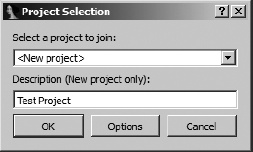
Users are presented with a drop-down list of projects that are compatible with the current database. As an option, it is always possible to create a new project that requires the user to enter a project description for others to view.
The collabREate server is capable of forking existing projects to allow users to create alternate branches of a project without impacting other users. This is a useful feature if you want to make (and track) a significant number of changes to a database without forcing those changes on other users. Since the server is capable of handling multiple projects related to a single binary input file, the plug-in and the server take additional steps to ensure that users are connecting to the proper project for their particular database.
The server does not provide rollback capability but does provide for a form of “save point.” A snapshot can be made at any time; then, to return to that database state, a user could re-open the binary (new .idb file) and fork a new project from the snapshot. This allows users to return to a specific point in time in the reversing process. CollabREate’s fork and snapshot features are accessed through the same hotkey sequence used for initial activation of the plug-in, which results in the dialog shown in Figure 23-3.
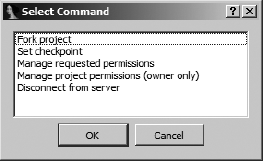
A final feature of the collabREate server is the ability to restrict users to specific types of updates. For example, one user may be restricted to a subscribe-only profile, while another user may be allowed to publish only comments, while a third is allowed to publish all types of updates.