Table of Contents for
The IDA Pro Book, 2nd Edition
 The IDA Pro Book, 2nd Edition
Published by
No Starch Press, 2011
The IDA Pro Book, 2nd Edition
Published by
No Starch Press, 2011
- Cover
- The IDA Pro Book
- PRAISE FOR THE FIRST EDITION OF THE IDA PRO BOOK
- Acknowledgments
- Introduction
- I. Introduction to IDA
- 1. Introduction to Disassembly
- The What of Disassembly
- The Why of Disassembly
- The How of Disassembly
- Summary
- 2. Reversing and Disassembly Tools
- Summary Tools
- Deep Inspection Tools
- Summary
- 3. IDA Pro Background
- Obtaining IDA Pro
- IDA Support Resources
- Your IDA Installation
- Thoughts on IDA’s User Interface
- Summary
- II. Basic IDA Usage
- 4. Getting Started with IDA
- IDA Database Files
- Introduction to the IDA Desktop
- Desktop Behavior During Initial Analysis
- IDA Desktop Tips and Tricks
- Reporting Bugs
- Summary
- 5. IDA Data Displays
- Secondary IDA Displays
- Tertiary IDA Displays
- Summary
- 6. Disassembly Navigation
- Stack Frames
- Searching the Database
- Summary
- 7. Disassembly Manipulation
- Commenting in IDA
- Basic Code Transformations
- Basic Data Transformations
- Summary
- 8. Datatypes and Data Structures
- Creating IDA Structures
- Using Structure Templates
- Importing New Structures
- Using Standard Structures
- IDA TIL Files
- C++ Reversing Primer
- Summary
- 9. Cross-References and Graphing
- IDA Graphing
- Summary
- 10. The Many Faces of IDA
- Using IDA’s Batch Mode
- Summary
- III. Advanced IDA Usage
- 11. Customizing IDA
- Additional IDA Configuration Options
- Summary
- 12. Library Recognition Using FLIRT Signatures
- Applying FLIRT Signatures
- Creating FLIRT Signature Files
- Summary
- 13. Extending IDA’s Knowledge
- Augmenting Predefined Comments with loadint
- Summary
- 14. Patching Binaries and Other IDA Limitations
- IDA Output Files and Patch Generation
- Summary
- IV. Extending IDA’s Capabilities
- 15. IDA Scripting
- The IDC Language
- Associating IDC Scripts with Hotkeys
- Useful IDC Functions
- IDC Scripting Examples
- IDAPython
- IDAPython Scripting Examples
- Summary
- 16. The IDA Software Development Kit
- The IDA Application Programming Interface
- Summary
- 17. The IDA Plug-in Architecture
- Building Your Plug-ins
- Installing Plug-ins
- Configuring Plug-ins
- Extending IDC
- Plug-in User Interface Options
- Scripted Plug-ins
- Summary
- 18. Binary Files and IDA Loader Modules
- Manually Loading a Windows PE File
- IDA Loader Modules
- Writing an IDA Loader Using the SDK
- Alternative Loader Strategies
- Writing a Scripted Loader
- Summary
- 19. IDA Processor Modules
- The Python Interpreter
- Writing a Processor Module Using the SDK
- Building Processor Modules
- Customizing Existing Processors
- Processor Module Architecture
- Scripting a Processor Module
- Summary
- V. Real-World Applications
- 20. Compiler Personalities
- RTTI Implementations
- Locating main
- Debug vs. Release Binaries
- Alternative Calling Conventions
- Summary
- 21. Obfuscated Code Analysis
- Anti–Dynamic Analysis Techniques
- Static De-obfuscation of Binaries Using IDA
- Virtual Machine-Based Obfuscation
- Summary
- 22. Vulnerability Analysis
- After-the-Fact Vulnerability Discovery with IDA
- IDA and the Exploit-Development Process
- Analyzing Shellcode
- Summary
- 23. Real-World IDA Plug-ins
- IDAPython
- collabREate
- ida-x86emu
- Class Informer
- MyNav
- IdaPdf
- Summary
- VI. The IDA Debugger
- 24. The IDA Debugger
- Basic Debugger Displays
- Process Control
- Automating Debugger Tasks
- Summary
- 25. Disassembler/Debugger Integration
- IDA Databases and the IDA Debugger
- Debugging Obfuscated Code
- IdaStealth
- Dealing with Exceptions
- Summary
- 26. Additional Debugger Features
- Debugging with Bochs
- Appcall
- Summary
- A. Using IDA Freeware 5.0
- Using IDA Freeware
- B. IDC/SDK Cross-Reference
- Index
- About the Author

One day word will get out that you have become the resident IDA geek. You may relish the fact that you have hit the big time, or you may bemoan the fact that from that day forward, people will be interrupting you with questions about what some file does. Eventually, either as a result of one such question or simply because you enjoy using IDA to open virtually every file you can find, you may be confronted with the dialog shown in Figure 18-1.
This is IDA’s standard file-loading dialog with a minor problem (from the user’s perspective). The short list of recognized file types contains only one entry, Binary file, indicating that none of IDA’s installed loader modules recognize the format of the file you want to load. Hopefully you will at least know what machine language you are dealing with (you do at least know where the file came from, right?) and can make an intelligent choice for the processor type, because that is about all you can do in such cases.
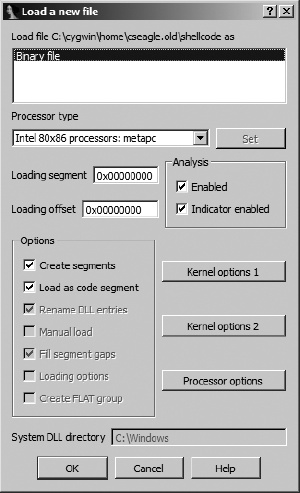
In this chapter we will discuss IDA’s capabilities for helping you make sense of unrecognized file types, beginning with manual analysis of binary file formats and then using that as motivation for the development of your own IDA loader modules.
An infinite number of file formats exist for storing executable code. IDA ships with loader modules to recognize many of the more common file formats, but there is no way that IDA can accommodate the ever-increasing number of formats in existence. Binary images may contain executable files formatted for use with specific operating systems, ROM images extracted from embedded systems, firmware images extracted from flash updates, or simply raw blocks of machine language, perhaps extracted from network packet captures. The format of these images may be dictated by the operating system (executable files), the target processor and system architecture (ROM images), or nothing at all (exploit shellcode embedded in application layer data).
Assuming that a processor module is available to disassemble the code contained in the unknown binary, it will be your job to properly arrange the file image within an IDA database before informing IDA which portions of the binary represent code and which portions of the binary represent data. For most processor types, the result of loading a file using the binary format is simply a list of the contents of the file piled into a single segment beginning at address zero, as shown in Example 18-1.
Example 18-1. Initial lines of a PE file loaded in binary mode
seg000:00000000                 db  4Dh ; M
seg000:00000001                 db  5Ah ; Z
seg000:00000002                 db  90h ; É
seg000:00000003                 db    0
seg000:00000004                 db    3
seg000:00000005                 db    0
seg000:00000006                 db    0
seg000:00000007                 db    0
In some cases, depending on the sophistication of the selected processor module, some disassembly may take place. This may be the case when a selected processor is an embedded microcontroller that can make specific assumptions about the memory layout of ROM images. For those interested in such applications, Andy Whittaker has created an excellent walk-through[128] of reverse engineering a binary image for a Siemens C166 microcontroller application.
When faced with binary files, you will almost certainly need to arm yourself with as many resources related to the file as you can get your hands on. Such resources might include CPU references, operating system references, system design documentation, and any memory layout information obtained through debugging or hardware-assisted (such as via logic analyzers) analysis.
In the following section, for the sake of example we assume that IDA does not recognize the Windows PE file format. PE is a well-known file format that many readers may be familiar with. More important, documents detailing the structure of PE files are widely available, which makes dissecting an arbitrary PE file a relatively simple task.