Table of Contents for
The IDA Pro Book, 2nd Edition
 The IDA Pro Book, 2nd Edition
Published by
No Starch Press, 2011
The IDA Pro Book, 2nd Edition
Published by
No Starch Press, 2011
- Cover
- The IDA Pro Book
- PRAISE FOR THE FIRST EDITION OF THE IDA PRO BOOK
- Acknowledgments
- Introduction
- I. Introduction to IDA
- 1. Introduction to Disassembly
- The What of Disassembly
- The Why of Disassembly
- The How of Disassembly
- Summary
- 2. Reversing and Disassembly Tools
- Summary Tools
- Deep Inspection Tools
- Summary
- 3. IDA Pro Background
- Obtaining IDA Pro
- IDA Support Resources
- Your IDA Installation
- Thoughts on IDA’s User Interface
- Summary
- II. Basic IDA Usage
- 4. Getting Started with IDA
- IDA Database Files
- Introduction to the IDA Desktop
- Desktop Behavior During Initial Analysis
- IDA Desktop Tips and Tricks
- Reporting Bugs
- Summary
- 5. IDA Data Displays
- Secondary IDA Displays
- Tertiary IDA Displays
- Summary
- 6. Disassembly Navigation
- Stack Frames
- Searching the Database
- Summary
- 7. Disassembly Manipulation
- Commenting in IDA
- Basic Code Transformations
- Basic Data Transformations
- Summary
- 8. Datatypes and Data Structures
- Creating IDA Structures
- Using Structure Templates
- Importing New Structures
- Using Standard Structures
- IDA TIL Files
- C++ Reversing Primer
- Summary
- 9. Cross-References and Graphing
- IDA Graphing
- Summary
- 10. The Many Faces of IDA
- Using IDA’s Batch Mode
- Summary
- III. Advanced IDA Usage
- 11. Customizing IDA
- Additional IDA Configuration Options
- Summary
- 12. Library Recognition Using FLIRT Signatures
- Applying FLIRT Signatures
- Creating FLIRT Signature Files
- Summary
- 13. Extending IDA’s Knowledge
- Augmenting Predefined Comments with loadint
- Summary
- 14. Patching Binaries and Other IDA Limitations
- IDA Output Files and Patch Generation
- Summary
- IV. Extending IDA’s Capabilities
- 15. IDA Scripting
- The IDC Language
- Associating IDC Scripts with Hotkeys
- Useful IDC Functions
- IDC Scripting Examples
- IDAPython
- IDAPython Scripting Examples
- Summary
- 16. The IDA Software Development Kit
- The IDA Application Programming Interface
- Summary
- 17. The IDA Plug-in Architecture
- Building Your Plug-ins
- Installing Plug-ins
- Configuring Plug-ins
- Extending IDC
- Plug-in User Interface Options
- Scripted Plug-ins
- Summary
- 18. Binary Files and IDA Loader Modules
- Manually Loading a Windows PE File
- IDA Loader Modules
- Writing an IDA Loader Using the SDK
- Alternative Loader Strategies
- Writing a Scripted Loader
- Summary
- 19. IDA Processor Modules
- The Python Interpreter
- Writing a Processor Module Using the SDK
- Building Processor Modules
- Customizing Existing Processors
- Processor Module Architecture
- Scripting a Processor Module
- Summary
- V. Real-World Applications
- 20. Compiler Personalities
- RTTI Implementations
- Locating main
- Debug vs. Release Binaries
- Alternative Calling Conventions
- Summary
- 21. Obfuscated Code Analysis
- Anti–Dynamic Analysis Techniques
- Static De-obfuscation of Binaries Using IDA
- Virtual Machine-Based Obfuscation
- Summary
- 22. Vulnerability Analysis
- After-the-Fact Vulnerability Discovery with IDA
- IDA and the Exploit-Development Process
- Analyzing Shellcode
- Summary
- 23. Real-World IDA Plug-ins
- IDAPython
- collabREate
- ida-x86emu
- Class Informer
- MyNav
- IdaPdf
- Summary
- VI. The IDA Debugger
- 24. The IDA Debugger
- Basic Debugger Displays
- Process Control
- Automating Debugger Tasks
- Summary
- 25. Disassembler/Debugger Integration
- IDA Databases and the IDA Debugger
- Debugging Obfuscated Code
- IdaStealth
- Dealing with Exceptions
- Summary
- 26. Additional Debugger Features
- Debugging with Bochs
- Appcall
- Summary
- A. Using IDA Freeware 5.0
- Using IDA Freeware
- B. IDC/SDK Cross-Reference
- Index
- About the Author

After navigation, the next most significant features of IDA are designed to allow you to modify the disassembly to suit your needs. In this chapter we will show that because of IDA’s underlying database nature, changes that you make to a disassembly are easily propagated to all IDA subviews to maintain a consistent picture of your disassembly. One of the most powerful features that IDA offers is the ability to easily manipulate disassemblies to add new information or reformat a listing to suit your particular needs. IDA automatically handles operations such as global search and replace when it makes sense to do so and makes trivial work of reformatting instructions and data and vice versa, features not available in other disassembly tools.
Note
Remember: There is no undo in IDA. Keep this in mind as you start manipulating the database. The closest you’re going to get is saving the database often and reverting to a recently saved version of the database.
At this point, we have encountered two categories of names in IDA disassemblies: names associated with virtual addresses (named locations) and names associated with stack frame variables. In the majority of cases IDA will automatically generate all of these names according to the guidelines previously discussed. IDA refers to such automatically generated names as dummy names.
Unfortunately, these names seldom hint at the intended purpose of a location or variable and therefore don’t generally add to our understanding of a program’s behavior. As you begin to analyze any program, one of the first and most common ways that you will want to manipulate a disassembly listing is to change default names into more meaningful names. Fortunately, IDA allows you to easily change any name and handles all of the details of propagating all name changes throughout the entire disassembly. In most cases, changing a name is as simple as clicking the name you wish to change (this highlights the name) and using the N hotkey to open a name-change dialog. Alternatively, right-clicking the name to be changed generally presents a context-sensitive menu that contains a Rename option, as shown in Figure 6-5. The name-change process does differ somewhat between stack variables and named locations, and these differences are detailed in the following sections.
Names associated with stack variables are the simplest form of name in a disassembly listing, primarily because they are not associated with a specific virtual address and thus can never appear in the Names window. As in most programming languages, such names are considered to be restricted in scope based on the function to which a given stack frame belongs. Thus, every function in a program might have its own stack variable named arg_0, but no function may have more than one variable named arg_0. The dialog shown in Figure 7-1 is used to rename a stack variable.

Once a new name is supplied, IDA takes care of changing every occurrence of the old name in the context of the current function. Changing the name of var_5C to y for demo_stackframe would result in the new listing shown here, with changes at  .
.
.text:00401090 ; =========== S U B R O U T I N E ========================= .text:00401090 .text:00401090 ; Attributes: bp-based frame .text:00401090 .text:00401090 demo_stackframe proc near ; CODE XREF: sub_4010C1+41↓p .text:00401090 .text:00401090 var_60 = dword ptr −60h .text:00401090
Should you ever wish to revert to the default name for a given variable, open the renaming dialog and enter a blank name, and IDA will regenerate the default name for you.
Renaming a named location or adding a name to an unnamed location is slightly different from changing the name of a stack variable. The process for accessing the name-change dialog is identical (hotkey N), but things quickly change. Figure 7-2 shows the renaming dialog associated with named locations.
This dialog informs you exactly what address you are naming along with a list of attributes that can be associated with the name. The maximum name length merely echoes a value from one of IDA’s configuration files (<IDADIR>/cfg/ida.cfg). You are free to use names longer than this value, which will cause IDA to complain weakly by informing you that you have exceeded the maximum name length and offering to increase the maximum name length for you. Should you choose to do so, the new maximum name length value will be enforced (weakly) only in the current database. Any new databases that you create will continue to be governed by the maximum name length contained in the configuration file.
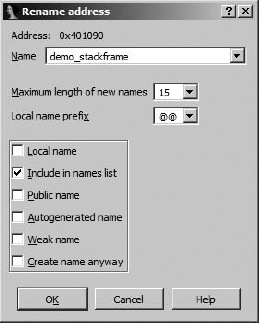
The following attributes can be associated with any named location:
- Local name
A local name is restricted in scope to the current function, so the uniqueness of local names is enforced only within a given function. Like local variables, two different functions may contain identical local names, but a single function cannot contain two local names that are identical. Named locations that exist outside function boundaries cannot be designated as local names. These include names that represent function names as well as global variables. The most common use for local names is to provide symbolic names for the targets of jumps within a function, such as those associated with branching control structures.
- Include in names list
Selecting this option causes a name to be added to the Names window, which can make the name easier to find when you wish to return to it. Autogenerated (dummy) names are never included in the Names window by default.
- Public name
A public name is typically a name that is being exported by a binary such as a shared library. IDA’s parsers typically discover public names while parsing file headers during initial loading into the database. You can force a symbol to be treated as public by selecting this attribute. In general, this has very little effect on the disassembly other than to cause public annotations to be added to the name in the disassembly listing and in the Names window.
- Autogenerated name
This attribute appears to have no discernible effect on disassemblies. Selecting it does not cause IDA to automatically generate a name.
- Weak name
A weak symbol is a specialized form of public symbol utilized only when no public symbol of the same name is found to override it. Marking a symbol as weak has some significance to an assembler but little significance in an IDA disassembly.
- Create name anyway
As discussed previously, no two locations within a function may be given the same name. Similarly, no two locations outside any function (in the global scope) may be given the same name. This option is somewhat confusing, as it behaves differently depending on the type of name you are attempting to create.
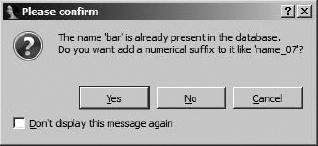
If you are editing a name at the global scope (such as a function name or global variable) and you attempt to assign a name that is already in use in the database, IDA will display the conflicting name dialog, shown in Figure 7-3, offering to automatically generate a unique numeric suffix to resolve the conflict. This dialog is presented regardless of whether you have selected the Create name anyway option or not.
If, however, you are editing a local name within a function and you attempt to assign a name that is already in use, the default behavior is simply to reject the attempt. If you are determined to use the given name, you must select Create name anyway in order to force IDA to generate a unique numeric suffix for the local name. Of course, the simplest way to resolve any name conflict is to choose a name that is not already in use.
A third type of name that is often overlooked is the register name. Within the boundaries of a function, IDA allows registers to be renamed. It may be useful to rename a register when a compiler has elected to allocate a variable in a register rather than on the program stack, and you wish to refer to the variable using a name more suited to its purpose than EDX, for example. Register renaming works much the same as renaming in any other location. Use the N hotkey, or right-click the register name and select Rename to open the register-renaming dialog. When you rename a register you are, in effect, providing an alias with which to refer to the register for the duration of the current function (IDA even denotes this alias with an alias = register syntax at the beginning of the function). IDA takes care of replacing all instances of the register name with the alias that you provide. It is not possible to rename a register used in code that does not belong to a function.