Table of Contents for
The IDA Pro Book, 2nd Edition
 The IDA Pro Book, 2nd Edition
Published by
No Starch Press, 2011
The IDA Pro Book, 2nd Edition
Published by
No Starch Press, 2011
- Cover
- The IDA Pro Book
- PRAISE FOR THE FIRST EDITION OF THE IDA PRO BOOK
- Acknowledgments
- Introduction
- I. Introduction to IDA
- 1. Introduction to Disassembly
- The What of Disassembly
- The Why of Disassembly
- The How of Disassembly
- Summary
- 2. Reversing and Disassembly Tools
- Summary Tools
- Deep Inspection Tools
- Summary
- 3. IDA Pro Background
- Obtaining IDA Pro
- IDA Support Resources
- Your IDA Installation
- Thoughts on IDA’s User Interface
- Summary
- II. Basic IDA Usage
- 4. Getting Started with IDA
- IDA Database Files
- Introduction to the IDA Desktop
- Desktop Behavior During Initial Analysis
- IDA Desktop Tips and Tricks
- Reporting Bugs
- Summary
- 5. IDA Data Displays
- Secondary IDA Displays
- Tertiary IDA Displays
- Summary
- 6. Disassembly Navigation
- Stack Frames
- Searching the Database
- Summary
- 7. Disassembly Manipulation
- Commenting in IDA
- Basic Code Transformations
- Basic Data Transformations
- Summary
- 8. Datatypes and Data Structures
- Creating IDA Structures
- Using Structure Templates
- Importing New Structures
- Using Standard Structures
- IDA TIL Files
- C++ Reversing Primer
- Summary
- 9. Cross-References and Graphing
- IDA Graphing
- Summary
- 10. The Many Faces of IDA
- Using IDA’s Batch Mode
- Summary
- III. Advanced IDA Usage
- 11. Customizing IDA
- Additional IDA Configuration Options
- Summary
- 12. Library Recognition Using FLIRT Signatures
- Applying FLIRT Signatures
- Creating FLIRT Signature Files
- Summary
- 13. Extending IDA’s Knowledge
- Augmenting Predefined Comments with loadint
- Summary
- 14. Patching Binaries and Other IDA Limitations
- IDA Output Files and Patch Generation
- Summary
- IV. Extending IDA’s Capabilities
- 15. IDA Scripting
- The IDC Language
- Associating IDC Scripts with Hotkeys
- Useful IDC Functions
- IDC Scripting Examples
- IDAPython
- IDAPython Scripting Examples
- Summary
- 16. The IDA Software Development Kit
- The IDA Application Programming Interface
- Summary
- 17. The IDA Plug-in Architecture
- Building Your Plug-ins
- Installing Plug-ins
- Configuring Plug-ins
- Extending IDC
- Plug-in User Interface Options
- Scripted Plug-ins
- Summary
- 18. Binary Files and IDA Loader Modules
- Manually Loading a Windows PE File
- IDA Loader Modules
- Writing an IDA Loader Using the SDK
- Alternative Loader Strategies
- Writing a Scripted Loader
- Summary
- 19. IDA Processor Modules
- The Python Interpreter
- Writing a Processor Module Using the SDK
- Building Processor Modules
- Customizing Existing Processors
- Processor Module Architecture
- Scripting a Processor Module
- Summary
- V. Real-World Applications
- 20. Compiler Personalities
- RTTI Implementations
- Locating main
- Debug vs. Release Binaries
- Alternative Calling Conventions
- Summary
- 21. Obfuscated Code Analysis
- Anti–Dynamic Analysis Techniques
- Static De-obfuscation of Binaries Using IDA
- Virtual Machine-Based Obfuscation
- Summary
- 22. Vulnerability Analysis
- After-the-Fact Vulnerability Discovery with IDA
- IDA and the Exploit-Development Process
- Analyzing Shellcode
- Summary
- 23. Real-World IDA Plug-ins
- IDAPython
- collabREate
- ida-x86emu
- Class Informer
- MyNav
- IdaPdf
- Summary
- VI. The IDA Debugger
- 24. The IDA Debugger
- Basic Debugger Displays
- Process Control
- Automating Debugger Tasks
- Summary
- 25. Disassembler/Debugger Integration
- IDA Databases and the IDA Debugger
- Debugging Obfuscated Code
- IdaStealth
- Dealing with Exceptions
- Summary
- 26. Additional Debugger Features
- Debugging with Bochs
- Appcall
- Summary
- A. Using IDA Freeware 5.0
- Using IDA Freeware
- B. IDC/SDK Cross-Reference
- Index
- About the Author

Given the variety of uses that IDA has been put to over the years, it should not be surprising that a large number of plug-ins have been developed to add capabilities that people have found useful in their particular applications of IDA. If you decide that you would like to take advantage of other people’s work, know that there is no one-stop shop for publicly available plug-ins. The three principal locations where you may find references to plug-ins are the Hex-Rays download page,[200] the OpenRCE downloads page,[201] and the RCE reverse engineering forums.[202] Of course, spending a little time with Google doesn’t hurt either.
As with any other piece of publicly available software, you may face some challenges while attempting to install third-party plug-ins. In cases where plug-in developers have elected to publish their efforts, plug-ins are distributed in the form of source code, a compiled binary, or both. If forced to build from source, you must deal with the make files (or equivalents) supplied by the plug-in’s author, which may or may not work with your particular compiler configuration. On the other hand, if a plug-in is distributed in binary form, it may have been built with a version of the SDK that is incompatible with your version of IDA, which means you will not be able to run the plug-in at all until the author elects to release an updated version. Finally, the plug-in may have external dependencies that must be satisfied in order to build it, run it, or both.
In this chapter we will review several popular IDA plug-ins; their purpose; where to obtain them; and how to build, install, and use them.
Perhaps the granddaddy of all IDA plug-ins, Hex-Rays is a decompiler plug-in capable of generating “C-like pseudocode”[203] for functions in compiled ARM or 32-bit x86 binaries. Hex-Rays is a commercial plug-in created and sold by the same company that produces IDA. The decompiler is available for all 32-bit versions of IDA. Hex-Rays is shipped in binary form only, and installation is performed by copying the supplied plug-in into <IDADIR>/plugins. A manual for using Hex-Rays is available online[204] that provides a nice overview of using Hex-Rays and that contains some documentation for the Hex-Rays SDK[205] used to create decompiler plug-ins.
Once installed, the decompiler is activated via View ▸ Open Subviews ▸ Pseudocode (hotkey F5) to decompile the function containing the cursor or via File ▸ Produce File ▸ Create C File (hotkey ctrl-F5) to decompile all functions in the database and save them to a file.
When you generate pseudocode for a single function, a new subview (tabbed window) containing the decompiled function opens in the IDA display. Example 23-1 shows an example of pseudocode generated using Hex-Rays to examine a Defcon 15 Capture the Flag binary. Each time you generate pseudocode for a function, Hex-Rays opens a new tabbed window to display the result.
Example 23-1. Example Hex-Rays output
signed int __cdecl sub_80489B4(int fd)
{
  int v1; // eax@1
  signed int v2; // edx@1
  char buf; // [sp+4h] [bp-208h]@2
  char s; // [sp+104h] [bp-108h]@2

  v1 = sub_8048B44(fd, (int)"Hans Brix? Oh no! Oh,
 herro. Great to see you again, Hans! ", 0);
  v2 = −1;
  if ( v1 != −1 )
  {
    recv(fd, &buf, 0x100u, 0);
    snprintf(&s, 0x12Cu, "Hans Brix says: \"%s\"\n", &buf);
    sub_8048B44(fd, (int)&s, 0);
    v2 = 0;
  }
  return v2;
}
Note that while Hex-Rays uses a slightly different dummy-naming convention for arguments (a1, a2, etc.) and local variables (v1, v2) than is used in IDA, the ability to distinguish between function parameters and local variables remains. If you have changed the names of any variables within the disassembly, the decompiler will make use of those names rather than internally generated dummy names.
Name | Hex-Rays Decompiler |
Author | Ilfak Guilfanov, Hex-Rays.com |
Distribution | Binary only |
Price | US$2,239 |
Description | Generates C-like pseudocode from compiled ARM or 32-bit, x86 functions |
Information |
Hex-Rays utilizes the same cues employed by IDA to deduce datatypes; however, you will probably notice some type casting taking place in order to coerce type conversions where the types used in an operation do not appear to match Hex-Rays’s expectations. As a convenience, you may tell Hex-Rays to hide all casts by right-clicking and choosing the Hide Casts menu option.
Once a pseudocode window has been opened, you may use it almost like a source code editor and navigator. Navigating and editing within a pseudo-code window are much like navigating and editing within a standard IDA disassembly window. Double-clicking a function name, for example, immediately causes the selected function to be decompiled within the pseudocode window. Many editing features are available via context-sensitive menus, as shown in Figure 23-1, including the ability to change variable and function names and types.
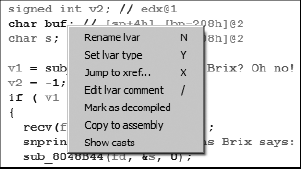
Further, changes that you make to variable names, function names, and datatypes are propagated back to IDA’s disassembly windows. Through repeated application of Rename and Set Type, and by hiding casts, Example 23-1 is easily transformed into the following.
signed int __cdecl sub_80489B4(int fd)
{
  int length; // eax@1
  signed int error; // edx@1
  char buf[256]; // [sp+4h] [bp-208h]@2
  char s[264]; // [sp+104h] [bp-108h]@2

  length = write_string(fd, "Hans Brix? Oh no! Oh, herro.
 Great to see you again, Hans! ", 0);
  error = −1;
  if ( length != −1 )
  {
    recv(fd, buf, 256u, 0);
    snprintf(s, 300u, "Hans Brix says: \"%s\"\n", buf);
    write_string(fd, s, 0);
    error = 0;
  }
  return error;
}
Keep in mind that information is lost during compilation. There is no need to retain symbol information for any nonexternal symbols, and compiler optimizations tend to remove redundancies and streamline code. As a result, in addition to the liberal use of type casts, you are also likely to notice more goto statements in the generated pseudocode than you might generally expect to see in human-generated C code. This is not unexpected, because it is often very difficult to neatly map compiler-generated control flows back to their original C form. However, Hex-Rays is capable of recognizing complex C constructs such as switch statements, and a tremendous amount of work has been put into recognizing standard code sequences utilized by various C compilers.
For all of its capabilities, you are encouraged not to become overreliant on Hex-Rays. C source is certainly easier to read and more succinct than its corresponding assembly representation, but decompilation is not a perfect science. In reading Hex-Rays pseudocode, you are trusting that what you see is a faithful representation of the underlying assembly, and while Ilfak works very hard to ensure that Hex-Rays is as accurate as possible, there are certainly edge cases that may prove problematic for Hex-Rays. It is highly recommended that you back up any conclusions you draw from reading Hex-Rays pseudo-code by verifying them against the underlying assembly code. Finally, keep in mind that while Hex-Rays may be used on binaries compiled from C++ code, it is only capable of generating C code, and the resulting code will lack any features that are specific to C++.