Table of Contents for
The IDA Pro Book, 2nd Edition
 The IDA Pro Book, 2nd Edition
Published by
No Starch Press, 2011
The IDA Pro Book, 2nd Edition
Published by
No Starch Press, 2011
- Cover
- The IDA Pro Book
- PRAISE FOR THE FIRST EDITION OF THE IDA PRO BOOK
- Acknowledgments
- Introduction
- I. Introduction to IDA
- 1. Introduction to Disassembly
- The What of Disassembly
- The Why of Disassembly
- The How of Disassembly
- Summary
- 2. Reversing and Disassembly Tools
- Summary Tools
- Deep Inspection Tools
- Summary
- 3. IDA Pro Background
- Obtaining IDA Pro
- IDA Support Resources
- Your IDA Installation
- Thoughts on IDA’s User Interface
- Summary
- II. Basic IDA Usage
- 4. Getting Started with IDA
- IDA Database Files
- Introduction to the IDA Desktop
- Desktop Behavior During Initial Analysis
- IDA Desktop Tips and Tricks
- Reporting Bugs
- Summary
- 5. IDA Data Displays
- Secondary IDA Displays
- Tertiary IDA Displays
- Summary
- 6. Disassembly Navigation
- Stack Frames
- Searching the Database
- Summary
- 7. Disassembly Manipulation
- Commenting in IDA
- Basic Code Transformations
- Basic Data Transformations
- Summary
- 8. Datatypes and Data Structures
- Creating IDA Structures
- Using Structure Templates
- Importing New Structures
- Using Standard Structures
- IDA TIL Files
- C++ Reversing Primer
- Summary
- 9. Cross-References and Graphing
- IDA Graphing
- Summary
- 10. The Many Faces of IDA
- Using IDA’s Batch Mode
- Summary
- III. Advanced IDA Usage
- 11. Customizing IDA
- Additional IDA Configuration Options
- Summary
- 12. Library Recognition Using FLIRT Signatures
- Applying FLIRT Signatures
- Creating FLIRT Signature Files
- Summary
- 13. Extending IDA’s Knowledge
- Augmenting Predefined Comments with loadint
- Summary
- 14. Patching Binaries and Other IDA Limitations
- IDA Output Files and Patch Generation
- Summary
- IV. Extending IDA’s Capabilities
- 15. IDA Scripting
- The IDC Language
- Associating IDC Scripts with Hotkeys
- Useful IDC Functions
- IDC Scripting Examples
- IDAPython
- IDAPython Scripting Examples
- Summary
- 16. The IDA Software Development Kit
- The IDA Application Programming Interface
- Summary
- 17. The IDA Plug-in Architecture
- Building Your Plug-ins
- Installing Plug-ins
- Configuring Plug-ins
- Extending IDC
- Plug-in User Interface Options
- Scripted Plug-ins
- Summary
- 18. Binary Files and IDA Loader Modules
- Manually Loading a Windows PE File
- IDA Loader Modules
- Writing an IDA Loader Using the SDK
- Alternative Loader Strategies
- Writing a Scripted Loader
- Summary
- 19. IDA Processor Modules
- The Python Interpreter
- Writing a Processor Module Using the SDK
- Building Processor Modules
- Customizing Existing Processors
- Processor Module Architecture
- Scripting a Processor Module
- Summary
- V. Real-World Applications
- 20. Compiler Personalities
- RTTI Implementations
- Locating main
- Debug vs. Release Binaries
- Alternative Calling Conventions
- Summary
- 21. Obfuscated Code Analysis
- Anti–Dynamic Analysis Techniques
- Static De-obfuscation of Binaries Using IDA
- Virtual Machine-Based Obfuscation
- Summary
- 22. Vulnerability Analysis
- After-the-Fact Vulnerability Discovery with IDA
- IDA and the Exploit-Development Process
- Analyzing Shellcode
- Summary
- 23. Real-World IDA Plug-ins
- IDAPython
- collabREate
- ida-x86emu
- Class Informer
- MyNav
- IdaPdf
- Summary
- VI. The IDA Debugger
- 24. The IDA Debugger
- Basic Debugger Displays
- Process Control
- Automating Debugger Tasks
- Summary
- 25. Disassembler/Debugger Integration
- IDA Databases and the IDA Debugger
- Debugging Obfuscated Code
- IdaStealth
- Dealing with Exceptions
- Summary
- 26. Additional Debugger Features
- Debugging with Bochs
- Appcall
- Summary
- A. Using IDA Freeware 5.0
- Using IDA Freeware
- B. IDC/SDK Cross-Reference
- Index
- About the Author
After working with IDA’s structure-creation and editing features for a while, you may find yourself longing for an easier way to do things. Fortunately, IDA does offer some shortcuts concerning new structures. IDA is capable of parsing individual C (not C++) data declarations, as well as entire C header files, and automatically building IDA structure representations for any structures defined in those declarations or header files. If you happen to have the source code, or at least the header files, for the binary that you are reversing, then you can save a lot of time by having IDA extract related structures directly from the source code.
A Local Types subview window is available by using the View ▸ OpenSubviews ▸ Local Types command. The Local Types window displays a list of all types that have been parsed into the current database. For new databases, the Local Types window is initially empty, but the window offers the capability to parse new types via the insert key or the Insert option from the context menu. The resulting type entry dialog is shown in Figure 8-11.
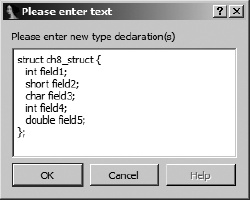
Errors encountered while parsing the new type are displayed in the IDA output window. If the type declaration is successfully parsed, the type and its associated declaration are listed in the Local Types window, as shown in Figure 8-12.

Note that the IDA parser utilizes a default structure member alignment of 4 bytes. If your structure requires an alternate alignment, you may include it, and IDA will recognize a pragma pack directive to specify the desired member alignment.
Datatypes added to the Local Types windows are not immediately available via the Structures window. There are two methods for adding local type declarations to the Structures window. The easiest method is to right-click on the desired local type and select Synchronize to idb. Alternatively, as each new type is added to a list of standard structures; the new type may be imported into the Structures window as described in Using Standard Structures in Using Standard Structures.
To parse a header file, use File ▸ Load File ▸ Parse C Header File to choose the header you wish to parse. If all goes well, IDA returns the message: Compilation successful. If the parser encounters any problems, you are notified that there were errors. Any associated error messages are displayed in the IDA output window.
IDA adds all structures that were successfully parsed to both the list of local types and the list of standard structures (to the end of the list to be exact) available in the current database. When a new structure has the same name as an existing structure, the existing structure definition is overwritten with the new structure layout. None of the new structures appear in the Structures window until you elect to explicitly add them, as described above for local types or in Using Standard Structures in Using Standard Structures.
When parsing C header files, it is useful to keep the following points in mind:
The built-in parser does not necessarily use the same default structure member alignment as your compiler, though it does honor the
packpragma. By default, the parser creates structures that are 4-byte aligned.The parser understands the C preprocessor
includedirective. To resolveincludedirectives, the parser searches the directory containing the file being parsed as well as any directories listed asIncludedirectories in the Options ▸ Compiler configuration dialog.The parser understands only C standard datatypes. However, the parser also understands the preprocessor
definedirective as well as the Ctypedefstatement. Thus, types such asuint32_twill be correctly parsed if the parser has encountered an appropriatetypedefprior to their use.When you don’t have any source code, you may find it easier to quickly define a structure layout in C notation using a text editor and parse the resulting header file or paste the declaration as a new local type, rather than using IDA’s cumbersome manual structure-definition tools.
New structures are available only in the current database. You must repeat the structure-creation steps in each additional database for which you wish to use the structures. We will discuss some steps for simplifying this process when we discuss TIL files later in the chapter.
In general, to maximize your chances of successfully parsing a header file, you will want to simplify your structure definitions as much as possible through the use of standard C datatypes and minimizing the use of include files. Remember, the most important thing about creating structures in IDA is to ensure that the layout is correct. Correct layout depends far more on the correct size of each field and the correct alignment of the structure than getting the exact type of each field just right. In other words, if you need to replace all occurrences of uint32_t with int in order to get a file to parse correctly, you should go right ahead and do it.