Table of Contents for
The IDA Pro Book, 2nd Edition
 The IDA Pro Book, 2nd Edition
Published by
No Starch Press, 2011
The IDA Pro Book, 2nd Edition
Published by
No Starch Press, 2011
- Cover
- The IDA Pro Book
- PRAISE FOR THE FIRST EDITION OF THE IDA PRO BOOK
- Acknowledgments
- Introduction
- I. Introduction to IDA
- 1. Introduction to Disassembly
- The What of Disassembly
- The Why of Disassembly
- The How of Disassembly
- Summary
- 2. Reversing and Disassembly Tools
- Summary Tools
- Deep Inspection Tools
- Summary
- 3. IDA Pro Background
- Obtaining IDA Pro
- IDA Support Resources
- Your IDA Installation
- Thoughts on IDA’s User Interface
- Summary
- II. Basic IDA Usage
- 4. Getting Started with IDA
- IDA Database Files
- Introduction to the IDA Desktop
- Desktop Behavior During Initial Analysis
- IDA Desktop Tips and Tricks
- Reporting Bugs
- Summary
- 5. IDA Data Displays
- Secondary IDA Displays
- Tertiary IDA Displays
- Summary
- 6. Disassembly Navigation
- Stack Frames
- Searching the Database
- Summary
- 7. Disassembly Manipulation
- Commenting in IDA
- Basic Code Transformations
- Basic Data Transformations
- Summary
- 8. Datatypes and Data Structures
- Creating IDA Structures
- Using Structure Templates
- Importing New Structures
- Using Standard Structures
- IDA TIL Files
- C++ Reversing Primer
- Summary
- 9. Cross-References and Graphing
- IDA Graphing
- Summary
- 10. The Many Faces of IDA
- Using IDA’s Batch Mode
- Summary
- III. Advanced IDA Usage
- 11. Customizing IDA
- Additional IDA Configuration Options
- Summary
- 12. Library Recognition Using FLIRT Signatures
- Applying FLIRT Signatures
- Creating FLIRT Signature Files
- Summary
- 13. Extending IDA’s Knowledge
- Augmenting Predefined Comments with loadint
- Summary
- 14. Patching Binaries and Other IDA Limitations
- IDA Output Files and Patch Generation
- Summary
- IV. Extending IDA’s Capabilities
- 15. IDA Scripting
- The IDC Language
- Associating IDC Scripts with Hotkeys
- Useful IDC Functions
- IDC Scripting Examples
- IDAPython
- IDAPython Scripting Examples
- Summary
- 16. The IDA Software Development Kit
- The IDA Application Programming Interface
- Summary
- 17. The IDA Plug-in Architecture
- Building Your Plug-ins
- Installing Plug-ins
- Configuring Plug-ins
- Extending IDC
- Plug-in User Interface Options
- Scripted Plug-ins
- Summary
- 18. Binary Files and IDA Loader Modules
- Manually Loading a Windows PE File
- IDA Loader Modules
- Writing an IDA Loader Using the SDK
- Alternative Loader Strategies
- Writing a Scripted Loader
- Summary
- 19. IDA Processor Modules
- The Python Interpreter
- Writing a Processor Module Using the SDK
- Building Processor Modules
- Customizing Existing Processors
- Processor Module Architecture
- Scripting a Processor Module
- Summary
- V. Real-World Applications
- 20. Compiler Personalities
- RTTI Implementations
- Locating main
- Debug vs. Release Binaries
- Alternative Calling Conventions
- Summary
- 21. Obfuscated Code Analysis
- Anti–Dynamic Analysis Techniques
- Static De-obfuscation of Binaries Using IDA
- Virtual Machine-Based Obfuscation
- Summary
- 22. Vulnerability Analysis
- After-the-Fact Vulnerability Discovery with IDA
- IDA and the Exploit-Development Process
- Analyzing Shellcode
- Summary
- 23. Real-World IDA Plug-ins
- IDAPython
- collabREate
- ida-x86emu
- Class Informer
- MyNav
- IdaPdf
- Summary
- VI. The IDA Debugger
- 24. The IDA Debugger
- Basic Debugger Displays
- Process Control
- Automating Debugger Tasks
- Summary
- 25. Disassembler/Debugger Integration
- IDA Databases and the IDA Debugger
- Debugging Obfuscated Code
- IdaStealth
- Dealing with Exceptions
- Summary
- 26. Additional Debugger Features
- Debugging with Bochs
- Appcall
- Summary
- A. Using IDA Freeware 5.0
- Using IDA Freeware
- B. IDC/SDK Cross-Reference
- Index
- About the Author
Unlike for some other aspects of IDA, a reasonable amount of help is available for the IDC language in IDA’s help system. Topics available at the top level of the help system include IDC language, which covers the basics of IDC syntax, and Index of IDC functions, which provides an exhaustive list of built-in functions available to IDC programmers.
IDC is a scripting language that borrows most of its syntactic elements from C. Beginning with IDA 5.6, IDC actually takes on more of the flavor of C++ with the introduction of object-oriented features and exception handling. Because of its similarity to C and C++, we will describe IDC in terms of these languages and focus primarily on where IDC differs.
IDC is a loosely typed language, meaning that variables have no explicit type. The three primary datatypes used in IDC are integers (IDA documentation uses the type name long), strings, and floating point values, with the overwhelming majority of operations taking place on integers and strings. Strings are treated as a native datatype in IDC, and there is no need to keep track of the space required to store a string or whether a string is null terminated or not. Beginning with IDA 5.6, IDC incorporates a number of additional variable types, including objects, references, and function pointers.
All variables must be declared prior to their use. IDC supports local variables and, since IDA 5.4, global variables as well. The IDC keyword auto is used to introduce a local variable declaration, and local variable declarations may include initial values. The following examples show legal IDC local variable declarations:
auto addr, reg, val;   // legal, multiple variables declared with no initializers
auto count = 0;        // declaration with initialization
IDC recognizes C-style multiline comments using /* */ and C++–style line-terminating comments using //. Also, note that several variables may be declared in a single statement and that all statements in IDC are terminated using a semicolon (as in C). IDC does not support C-style arrays (slices are introduced in IDA 5.6), pointers (though references are supported beginning with IDA 5.6), or complex datatypes such as structs and unions. Classes are introduced in IDA 5.6.
Global variable declarations are introduced using the extern keyword, and their declarations are legal both inside and outside of any function definition. It is not legal to provide an initial value when a global variable is declared. The following listing shows the declaration of two global variables.
extern outsideGlobal;

static main() {
   extern insideGlobal;
   outsideGlobal = "Global";
   insideGlobal = 1;
}
Global variables are allocated the first time they are encountered during an IDA session and persist as long as that session remains active, regardless of the number of databases that you may open and close.
With a few exceptions, IDC supports virtually all of the arithmetic and logical operators available in C, including the ternary operator (? :). Compound assignment operators of the form op= (+=, *=, >>=, and the like) are not supported. The comma operator is supported beginning with IDA 5.6. All integer operands are treated as signed values. This affects integer comparisons (which are always signed) and the right-shift operator (>>), which always performs an arithmetic shift with sign bit replication. If you require logical right shifts, you must implement them yourself by masking off the top bit of the result, as shown here:
result = (x >> 1) & 0x7fffffff; //set most significant bit to zero
Because strings are a native type in IDC, some operations on strings take on a different meaning than they might in C. The assignment of a string operand into a string variable results in a string copy operation; thus there is no need for string copying or duplicating functions such as C’s strcpy and strdup. Also, the addition of two string operands results in the concatenation of the two operands; thus “Hello” + “World” yields “HelloWorld”; there is no need for a concatenation function such as C’s strcat. Starting with IDA 5.6, IDC offers a slice operator for use with strings. Python programmers will be familiar with slices, which basically allow you to specify subsequences of array-like variables. Slices are specified using square brackets and a start (inclusive) and end (exclusive) index. At least one index is required. The following listing demonstrates the use of IDC slices.
auto str = "String to slice";
auto s1, s2, s3, s4;
s1 = str[7:9];     // "to"
s2 = str[:6];      // "String", omitting start index starts at 0
s3 = str[10:];     // "slice", omitting end index goes to end of string
s4 = str[5];       // "g", single element slice, similar to array element access
Note that while there are no array datatypes available in IDC, the slice operator effectively allows you to treat IDC strings as if they were arrays.
As in C, all simple statements are terminated with a semicolon. The only C-style compound statement that IDC does not support is the switch statement. When using for loops, keep in mind that IDC does not support compound assignment operators, which may affect you if you wish to count by anything other than one, as shown here:
auto i;
for (i = 0; i < 10; i += 2) {}     // illegal, += is not supported
for (i = 0; i < 10; i = i + 2) {}  // legal
With IDA 5.6, IDC introduces try/catch blocks and the associated throw statement, which are syntactically similar to C++ exceptions.[99] IDA’s built-in help contains specifics on IDC’s exception-handling implementation.
For compound statements, IDC utilizes the same bracing ({}) syntax and semantics as C. Within a braced block, it is permissible to declare new variables as long as the variable declarations are the first statements within the block. However, IDC does not rigorously enforce the scope of the newly introduced variables, because such variables may be referenced beyond the block in which they were declared. Consider the following example:
if (1) {    //always true
   auto x;
   x = 10;
}
else {      //never executes
   auto y;
   y = 3;
}
Message("x = %d\n", x);   // x remains accessible after its block terminates
Message("y = %d\n", y);   // IDC allows this even though the else did not execute
The output statements (the Message function is analogous to C’s printf) will inform us that x = 10 and y = 0. Given that IDC does not strictly enforce the scope of x, it is not terribly surprising that we are allowed to print the value of x. What is somewhat surprising is that y is accessible at all, given that the block in which y is declared is never executed. This is simply a quirk of IDC. Note that while IDC may loosely enforce variable scoping within a function, variables declared within one function continue to remain inaccessible in any other function.
IDC supports user-defined functions in standalone programs (.idc files) only. User-defined functions are not supported when using the IDC command dialog (see USING THE IDC COMMAND DIALOG in USING THE IDC COMMAND DIALOG). IDC’s syntax for declaring user-defined functions is where it differs most from C. The static keyword is used to introduce a user-defined function, and the function’s parameter list consists solely of a comma-separated list of parameter names. The following listing details the basic structure of a user-defined function:
static my_func(x, y, z) {
   //declare any local variables first
   auto a, b, c;
   //add statements to define the function's behavior
   // ...
}
Prior to IDA 5.6, all function parameters are strictly call-by-value. Call-by-reference parameter passing was introduced with IDA 5.6. Interestingly, whether a parameter is passed using call-by-value or call-by-reference is determined by the manner in which the function is called, not the manner in which the function is declared. The unary & operator is used in a function call (not the function declaration) to denote that an argument is being passed by reference. The following examples show invocations of the my_func function from the previous listing making use of both call-by-value and call-by-reference parameter passing.
auto q = 0, r = 1, s = 2;
my_func(q, r, s);   //all three arguments passed using call-by-value
                    //upon return, q, r, and s hold 0, 1, and 2 respectively
my_func(q, &r, s);  //q and s passed call-by-value, r is passed call-by-reference
                    //upon return, q, and s hold 0 and 2 respectively, but r may have
                    //changed. In this second case, any changes
 that my_func makes to its
                    //formal parameter y will be reflected in the
 caller as changes to r
Function declarations never indicate whether a function explicitly returns a value or what type of value is returned when a function does yield a result.
When you wish to return a value from a function, use a return statement to return the desired value. It is permissible to return entirely different datatypes from different paths of execution within a function. In other words, a function may return a string in some cases, while in other cases the same function may return an integer. As in C, use of a return statement within a function is optional. However, unlike C, any function that does not explicitly return a value implicitly returns the value zero.
As a final note, beginning with IDA 5.6, functions take a step closer to becoming first-class objects in IDC. It is now possible to pass function references as arguments to other functions and return function references as the result of a function. The following listing demonstrates the use of function parameters and functions as return values.
static getFunc() {
   return Message;  //return the built-in Message function as a result
}

static useFunc(func, arg) {  //func here is expected to be a function reference
   func(arg);
}

static main() {
   auto f = getFunc();
   f("Hello World\n");       //invoke the returned function f
   useFunc(f, "Print me\n"); //no need for & operator,
 functions always call-by-reference
}Another feature introduced in IDA 5.6 is the ability to define classes and, as a result, have variables that represent objects. In the discussion that follows, we assume that you have some familiarity with an object-oriented programming language such as C++ or Java.
IDC defines a root class named object from which all classes ultimately derive, and single inheritance is supported when creating new classes. IDC does not make use of access specifiers such as public and private; all class members are effectively public. Class declarations contain only the definitions of the class’s member functions. In order to create data members within a class, you simply create an assignment statement that assigns a value to the data member. The following listing will help to clarify.
class ExampleClass {
   ExampleClass(x, y) {   //constructor
      this.a = x;         //all ExampleClass objects have data member a
      this.b = y;         //all ExampleClass objects have data member b
   }
   ~ExampleClass() {      //destructor
   }
   foo(x) {
      this.a = this.a + x;
   }
   //...   other member functions as desired
};

static main() {
   ExampleClass ex;            //DON'T DO THIS!! This is not
 a valid variable declaration
   auto ex = ExampleClass(1, 2);   //reference variables are initialized by assigning
                                   //the result of calling the class constructor
   ex.foo(10);                 //dot notation is used to access members
   ex.z = "string";            //object ex now has a member z, BUT the class does not
}
For more information on IDC classes and their syntax, refer to the appropriate section within IDA’s built-in help file.
For any scripting applications that require more than a few IDC statements, you are likely to want to create a standalone IDC program file. Among other things, saving your scripts as programs gives you some measure of persistence and portability.
IDC program files require you to make use of user-defined functions. At a minimum, you must define a function named main that takes no arguments. In most cases, you will also want to include the file idc.idc in order to pick up useful macro definitions that it contains. The following listing details the components of a minimal IDC program file:
#include <idc.idc>    // useful include directive
//declare additional functions as required
static main() {
   //do something fun here
}
IDC recognizes the following C-style preprocessor directives:
#include<file>Includes the named file in the current file.
#define<name> [optional value]Creates a macro named name and optionally assigns it the specified value. IDC predefines a number of macros that may be used to test various aspects of your script’s execution environment. These include _NT_, _LINUX_, _MAC_, _GUI_, and
_TXT_ among others. See the Predefined symbols section of the IDA help file for more information on these and other symbols.#ifdef<name>Tests for the existence of the named macro and optionally processes any statements that follow if the named macro exists.
#elseOptionally used in conjunction with an
#ifdefto provide an alternative set of statements to process in the event the named macro does not exist.#endifThis is a required terminator for an
#ifdefor#ifdef/#elseblock.#undef<name>Deletes the named macro.
No one is ever going to praise IDC for its error-reporting capabilities. There are two types of errors that you can expect to encounter when running IDC scripts: parsing errors and runtime errors.
Parsing errors are those errors that prevent your program from ever being executed and include such things as syntax errors, references to undefined variables, and supplying an incorrect number of arguments to a function. During the parsing phase, IDC reports only the first parsing error that it encounters. In some cases, error messages correctly identify both the location and the type of an error (hello_world.idc,20: Missing semicolon), while in other cases, error messages offer no real assistance (Syntax error near: <END>). Only the first error encountered during parsing is reported. As a result, in a script with 15 syntax errors, it may take 15 attempts at running the script before you are informed of every error.
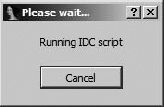
Runtime errors are generally encountered less frequently than parsing errors. When encountered, runtime errors cause a script to terminate immediately. One example of a runtime error results from an attempt to call an undefined function that for some reason is not detected when the script is initially parsed. Another problem arises with scripts that take an excessive amount of time to execute. Once a script is started, there is no easy way to terminate the script if it inadvertently ends up in an infinite loop or simply takes longer to execute than you are willing to wait. Once a script has executed for more than two to three seconds, IDA displays the dialog shown in Figure 15-4.
This dialog is the only means by which you can terminate a script that fails to terminate properly.
Debugging is another of IDC’s weak points. Other than liberal use of output statements, there is no way to debug IDC scripts. With the introduction of exception handling (try/catch) in IDA 5.6, it does become possible to build more robust scripts that can terminate or continue as gracefully as you choose.
Perhaps you are the curious type who, not trusting that we would provide sufficient coverage of IDA’s scripting capability, raced off to see what the IDA help system has to say on the subject. If so, welcome back, and if not, we appreciate you sticking with us this far. In any case, somewhere along the way you may have acquired knowledge that claims that IDC does in fact support arrays, in which case you must surely be questioning the quality of this book. We urge you to give us a chance to sort out this potential confusion.
As mentioned previously, IDC does not support arrays in the traditional sense of declaring a large block of storage and then using a subscript notation to access individual items within that block. However, IDA’s documentation on scripting does mention something called global persistent arrays. IDC global arrays are better thought of as persistent named objects. The objects just happen to be sparse arrays.[101] Global arrays are stored within an IDA database and are persistent across script invocations and IDA sessions. Data is stored in global arrays by specifying an index and a data value to be stored at the specified index in the array. Each element in an array can simultaneously hold one integer value and one string value. IDC’s global arrays provide no means for storing floating point values.
Note
For the overly curious, IDA’s internal mechanism for storing persistent arrays is called a netnode. While the array-manipulation functions described next provide an abstracted interface to netnodes, lower-level access to netnode data is available using the IDA SDK, which is discussed, along with netnodes, in Chapter 16.
All interaction with global arrays occurs through the use of IDC functions dedicated to array manipulation. Descriptions of these functions follow:
long CreateArray(string name)This function creates a persistent object with the specified name. The return value is an integer handle required for all future access to the array. If the named object already exists, the return value is −1.
long GetArrayId(string name)Once an array has been created, subsequent access to the array must be done through an integer handle, which can be obtained by looking up the array name. The return value for this function is an integer handle to be used for all future interaction with the array. If the named array does not exist, the return value is −1.
long SetArrayLong(long id, long idx, long value)Stores an integer
valueinto the array referred to byidat the position specified byidx. The return value is 1 on success or 0 on failure. The operation will fail if the arrayidis invalid.long SetArrayString(long id, long idx, string str)Stores a string
valueinto the array referred to byidat the position specified byidx. The return value is 1 on success or 0 on failure. The operation will fail if the arrayidis invalid.string or long GetArrayElement(long tag, long id, long idx)While there are distinct functions for storing data into an array depending on the type of data to be stored, there is only one function for retrieving data from an array. This function retrieves either an integer or a string value from the specified index (
idx) in the specified array (id). Whether an integer or a string is retrieved is determined by the value of thetagparameter, which must be one of the constantsAR_LONG(to retrieve an integer) orAR_STR(to retrieve a string).long DelArrayElement(long tag, long id, long idx)Deletes the contents of the specified array location from the specified array. The value of
tagdetermines whether the integer value or string value associated with the specified index is deleted.void DeleteArray(long id)Deletes the array referenced by
idand all of its associated contents. Once an array has been created, it continues to exist, even after a script terminates, until a call is made toDeleteArrayto remove the array from the database in which it was created.long RenameArray(long id, string newname)Renames the array referenced by
idtonewname. Returns 1 if successful or 0 if the operation fails.
Possible uses for global arrays include approximating global variables, approximating complex datatypes, and providing persistent storage across script invocations. Global variables for a script are simulated by creating a global array when the script begins and storing global values in the array. These global values are shared either by passing the array handle to functions requiring access to the values or by requiring any function that requires access to perform a name lookup for the desired array.
Values stored in an IDC global array persist for the lifetime of the database in which the script was executed. You may test for the existence of an array by examining the return value of the CreateArray function. If the values stored in an array are applicable only to a specific invocation of a script, then the array should be deleted before the script terminates. Deleting the array ensures that no global values carry over from one execution of a script to a subsequent execution of the same script.
[101] Sparse arrays do not necessarily preallocate space for the entire array, nor are they limited to a particular maximum index. Instead, space for array elements is allocated on an as-needed basis when elements are added to the array.