Table of Contents for
The IDA Pro Book, 2nd Edition
 The IDA Pro Book, 2nd Edition
Published by
No Starch Press, 2011
The IDA Pro Book, 2nd Edition
Published by
No Starch Press, 2011
- Cover
- The IDA Pro Book
- PRAISE FOR THE FIRST EDITION OF THE IDA PRO BOOK
- Acknowledgments
- Introduction
- I. Introduction to IDA
- 1. Introduction to Disassembly
- The What of Disassembly
- The Why of Disassembly
- The How of Disassembly
- Summary
- 2. Reversing and Disassembly Tools
- Summary Tools
- Deep Inspection Tools
- Summary
- 3. IDA Pro Background
- Obtaining IDA Pro
- IDA Support Resources
- Your IDA Installation
- Thoughts on IDA’s User Interface
- Summary
- II. Basic IDA Usage
- 4. Getting Started with IDA
- IDA Database Files
- Introduction to the IDA Desktop
- Desktop Behavior During Initial Analysis
- IDA Desktop Tips and Tricks
- Reporting Bugs
- Summary
- 5. IDA Data Displays
- Secondary IDA Displays
- Tertiary IDA Displays
- Summary
- 6. Disassembly Navigation
- Stack Frames
- Searching the Database
- Summary
- 7. Disassembly Manipulation
- Commenting in IDA
- Basic Code Transformations
- Basic Data Transformations
- Summary
- 8. Datatypes and Data Structures
- Creating IDA Structures
- Using Structure Templates
- Importing New Structures
- Using Standard Structures
- IDA TIL Files
- C++ Reversing Primer
- Summary
- 9. Cross-References and Graphing
- IDA Graphing
- Summary
- 10. The Many Faces of IDA
- Using IDA’s Batch Mode
- Summary
- III. Advanced IDA Usage
- 11. Customizing IDA
- Additional IDA Configuration Options
- Summary
- 12. Library Recognition Using FLIRT Signatures
- Applying FLIRT Signatures
- Creating FLIRT Signature Files
- Summary
- 13. Extending IDA’s Knowledge
- Augmenting Predefined Comments with loadint
- Summary
- 14. Patching Binaries and Other IDA Limitations
- IDA Output Files and Patch Generation
- Summary
- IV. Extending IDA’s Capabilities
- 15. IDA Scripting
- The IDC Language
- Associating IDC Scripts with Hotkeys
- Useful IDC Functions
- IDC Scripting Examples
- IDAPython
- IDAPython Scripting Examples
- Summary
- 16. The IDA Software Development Kit
- The IDA Application Programming Interface
- Summary
- 17. The IDA Plug-in Architecture
- Building Your Plug-ins
- Installing Plug-ins
- Configuring Plug-ins
- Extending IDC
- Plug-in User Interface Options
- Scripted Plug-ins
- Summary
- 18. Binary Files and IDA Loader Modules
- Manually Loading a Windows PE File
- IDA Loader Modules
- Writing an IDA Loader Using the SDK
- Alternative Loader Strategies
- Writing a Scripted Loader
- Summary
- 19. IDA Processor Modules
- The Python Interpreter
- Writing a Processor Module Using the SDK
- Building Processor Modules
- Customizing Existing Processors
- Processor Module Architecture
- Scripting a Processor Module
- Summary
- V. Real-World Applications
- 20. Compiler Personalities
- RTTI Implementations
- Locating main
- Debug vs. Release Binaries
- Alternative Calling Conventions
- Summary
- 21. Obfuscated Code Analysis
- Anti–Dynamic Analysis Techniques
- Static De-obfuscation of Binaries Using IDA
- Virtual Machine-Based Obfuscation
- Summary
- 22. Vulnerability Analysis
- After-the-Fact Vulnerability Discovery with IDA
- IDA and the Exploit-Development Process
- Analyzing Shellcode
- Summary
- 23. Real-World IDA Plug-ins
- IDAPython
- collabREate
- ida-x86emu
- Class Informer
- MyNav
- IdaPdf
- Summary
- VI. The IDA Debugger
- 24. The IDA Debugger
- Basic Debugger Displays
- Process Control
- Automating Debugger Tasks
- Summary
- 25. Disassembler/Debugger Integration
- IDA Databases and the IDA Debugger
- Debugging Obfuscated Code
- IdaStealth
- Dealing with Exceptions
- Summary
- 26. Additional Debugger Features
- Debugging with Bochs
- Appcall
- Summary
- A. Using IDA Freeware 5.0
- Using IDA Freeware
- B. IDC/SDK Cross-Reference
- Index
- About the Author
One of the more interesting menu options in IDA is the File ▸ Produce File menu. According to the options on this menu, IDA can generate MAP, ASM, INC, LST, EXE, DIF, and HTML files. Many of these sound intriguing, so each is described in the following sections.
A .map file describes the overall layout of a binary, including information about the sections that make up the binary and the location of symbols within each section. When generating a .map file, you are asked for the name of the file you wish to create and the types of symbols you would like to store in the .map file. Figure 14-5 shows the MAP file options dialog, in which you select the information you wish to include in the .map file.
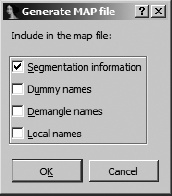
Address information in a .map file is represented using logical addresses. A logical address describes a symbol’s location using a segment number and a segment offset. The first few lines of a simple .map file are shown in the following listing. In this listing we show three segments and the first two of many symbols. The logical address of _fprintf indicates that it resides at byte offset 69h within the first (.text) segment.
Start         Length     Name                   Class
 0001:00000000 000008644H .text                  CODE
 0002:00000000 000001DD6H .rdata                 DATA
 0003:00000000 000002B84H .data                  DATA

  Address         Publics by Value

 0001:00000000       _main
 0001:00000069       _fprintf
MAP files generated by IDA are compatible with Borland’s Turbo Debugger. The principle purpose of .map files is to assist in restoring symbol names when debugging binaries that may have been stripped.
IDA can generate a .asm file from the current database. The general idea is to create a file that could be run through an assembler to re-create the underlying binary file. IDA attempts to dump enough information, including such things as structure layouts, to make successful assembly possible. Whether you will be able to successfully assemble the generated .asm file depends on a number of factors, not the least of which is whether your particular assembler understands the syntax IDA uses.
The target assembly language syntax is determined by the Target assembler setting found on the Analysis tab under the Options ▸ General menu. By default IDA generates an assembly file representing the entire database. However, you may limit the scope of the listing by clicking and dragging or using shift-up arrow or shift-down arrow to scroll and select the region you wish to dump. In console versions of IDA, you would utilize the Anchor (alt-L) command to set an anchor point at the start of a selection region and then use the arrow keys to extend the size of the region.
An INC (include) file contains definitions of data structures and enumerated datatypes. This is essentially a dump of the contents of the Structures windows in a form suitable for consumption by an assembler.
An LST file is nothing more than a text file dump of the contents of the IDA disassembly window. You can narrow the scope of the generating listing by selecting a range of addresses to dump, as described previously for ASM files.
While this is the most promising menu option, it unfortunately is also the most crippled. In a nutshell, it doesn’t work for most file types, and you can expect to receive an error message stating, “This type of output file is not supported.”
While this would be an ideal capability for a patcher, in general it is very difficult to regenerate executable files from an IDA database. The information that you are presented with in an IDA database is comprised primarily of the contents of the sections that make up the original input file. In many cases, however, IDA does not process every section of an input file, and certain information is lost when the file is loaded into the database, making generation of an executable from the database impossible. The simplest example of such loss is the fact that IDA does not load the resource (.rsrc) section of PE files by default, which makes restoration of the resource section from the database impossible.
In other cases, IDA processes information from the original binary but does not make it easily accessible in its original form. Examples include symbol tables, import tables, and export tables, which would require a fair amount of effort to properly reconstruct in order to generate a functional executable file.
One effort to provide an EXE-generation capability for IDA is the pe_scripts[93] of Atli Mar Gudmundsson. These are a set of IDA scripts for working with PE files. One of the scripts is titled pe_write.idc, and its goal is to dump a working PE image out of an existing database. If you intend to patch a PE file, the proper sequence of events for using the scripts is as follows:
Load the desired PE file into IDA. Make sure that you uncheck the Make imports section option in the loader dialog.
Run the included pe_sections.idc script to map all sections from the original binary into the new database.
Make any desired changes to the database.
Execute the pe_write.idc script to dump the database contents to a new PE file.
Scripting with IDC is the subject of Chapter 15.
An IDA DIF file is a plaintext file that lists all bytes that have been modified within an IDA database. This is the most useful file format if your goal is to patch an original binary based on changes made to an IDA database. The format of the file is quite simple, as shown in the example .dif file here:
This difference file is created by The Interactive Disassembler

dif_example.exe
000002F8: 83 FF
000002F9: EC 75
000002FA: 04 EC
000002FB: FF 68
The file includes a one-line header comment followed by the name of the original binary file and then a list of bytes within the file that have changed. Each change line specifies the file offset (not virtual address) of the changed byte, the original value of the byte, and the current value of the byte within the database. In this example, the database for dif_example.exe has been modified at four locations corresponding to byte offsets 0x2F8–0x2FB within the original file. It is a trivial task to write a program to parse IDA .dif files and apply the changes to the original binary file to generate a patched version of the binary. One such utility is available at the companion website for this book.[94]
IDA takes advantage of the markup capabilities available with HTML in order to generate colorized disassembly listings. An IDA-generated HTML file is essentially an LST file with HTML tags added to produce a listing that is colored similarly to the actual IDA disassembly window. Unfortunately, the generated HTML files do not contain any hyperlinks that would make navigating the file any easier than if one used a standard text listing. For example, one useful feature would be the addition of hyperlinks to all name references, which would make following name references as simple as following a link.