Table of Contents for
The IDA Pro Book, 2nd Edition
 The IDA Pro Book, 2nd Edition
Published by
No Starch Press, 2011
The IDA Pro Book, 2nd Edition
Published by
No Starch Press, 2011
- Cover
- The IDA Pro Book
- PRAISE FOR THE FIRST EDITION OF THE IDA PRO BOOK
- Acknowledgments
- Introduction
- I. Introduction to IDA
- 1. Introduction to Disassembly
- The What of Disassembly
- The Why of Disassembly
- The How of Disassembly
- Summary
- 2. Reversing and Disassembly Tools
- Summary Tools
- Deep Inspection Tools
- Summary
- 3. IDA Pro Background
- Obtaining IDA Pro
- IDA Support Resources
- Your IDA Installation
- Thoughts on IDA’s User Interface
- Summary
- II. Basic IDA Usage
- 4. Getting Started with IDA
- IDA Database Files
- Introduction to the IDA Desktop
- Desktop Behavior During Initial Analysis
- IDA Desktop Tips and Tricks
- Reporting Bugs
- Summary
- 5. IDA Data Displays
- Secondary IDA Displays
- Tertiary IDA Displays
- Summary
- 6. Disassembly Navigation
- Stack Frames
- Searching the Database
- Summary
- 7. Disassembly Manipulation
- Commenting in IDA
- Basic Code Transformations
- Basic Data Transformations
- Summary
- 8. Datatypes and Data Structures
- Creating IDA Structures
- Using Structure Templates
- Importing New Structures
- Using Standard Structures
- IDA TIL Files
- C++ Reversing Primer
- Summary
- 9. Cross-References and Graphing
- IDA Graphing
- Summary
- 10. The Many Faces of IDA
- Using IDA’s Batch Mode
- Summary
- III. Advanced IDA Usage
- 11. Customizing IDA
- Additional IDA Configuration Options
- Summary
- 12. Library Recognition Using FLIRT Signatures
- Applying FLIRT Signatures
- Creating FLIRT Signature Files
- Summary
- 13. Extending IDA’s Knowledge
- Augmenting Predefined Comments with loadint
- Summary
- 14. Patching Binaries and Other IDA Limitations
- IDA Output Files and Patch Generation
- Summary
- IV. Extending IDA’s Capabilities
- 15. IDA Scripting
- The IDC Language
- Associating IDC Scripts with Hotkeys
- Useful IDC Functions
- IDC Scripting Examples
- IDAPython
- IDAPython Scripting Examples
- Summary
- 16. The IDA Software Development Kit
- The IDA Application Programming Interface
- Summary
- 17. The IDA Plug-in Architecture
- Building Your Plug-ins
- Installing Plug-ins
- Configuring Plug-ins
- Extending IDC
- Plug-in User Interface Options
- Scripted Plug-ins
- Summary
- 18. Binary Files and IDA Loader Modules
- Manually Loading a Windows PE File
- IDA Loader Modules
- Writing an IDA Loader Using the SDK
- Alternative Loader Strategies
- Writing a Scripted Loader
- Summary
- 19. IDA Processor Modules
- The Python Interpreter
- Writing a Processor Module Using the SDK
- Building Processor Modules
- Customizing Existing Processors
- Processor Module Architecture
- Scripting a Processor Module
- Summary
- V. Real-World Applications
- 20. Compiler Personalities
- RTTI Implementations
- Locating main
- Debug vs. Release Binaries
- Alternative Calling Conventions
- Summary
- 21. Obfuscated Code Analysis
- Anti–Dynamic Analysis Techniques
- Static De-obfuscation of Binaries Using IDA
- Virtual Machine-Based Obfuscation
- Summary
- 22. Vulnerability Analysis
- After-the-Fact Vulnerability Discovery with IDA
- IDA and the Exploit-Development Process
- Analyzing Shellcode
- Summary
- 23. Real-World IDA Plug-ins
- IDAPython
- collabREate
- ida-x86emu
- Class Informer
- MyNav
- IdaPdf
- Summary
- VI. The IDA Debugger
- 24. The IDA Debugger
- Basic Debugger Displays
- Process Control
- Automating Debugger Tasks
- Summary
- 25. Disassembler/Debugger Integration
- IDA Databases and the IDA Debugger
- Debugging Obfuscated Code
- IdaStealth
- Dealing with Exceptions
- Summary
- 26. Additional Debugger Features
- Debugging with Bochs
- Appcall
- Summary
- A. Using IDA Freeware 5.0
- Using IDA Freeware
- B. IDC/SDK Cross-Reference
- Index
- About the Author
Once you calm down from the initial excitement of receiving your shiny, new IDA CD and get down to the task of installing IDA, you will see that your CD contains directories named utilities and sdk containing various add-on utilities and the IDA software development kit, respectively. These will be discussed in detail later in the book. In the root directory of the CD you will find an installation binary. For Windows users, this binary is a traditional Windows installer executable. For Linux and OS X users, the installation binary is a gzipped .tar file.
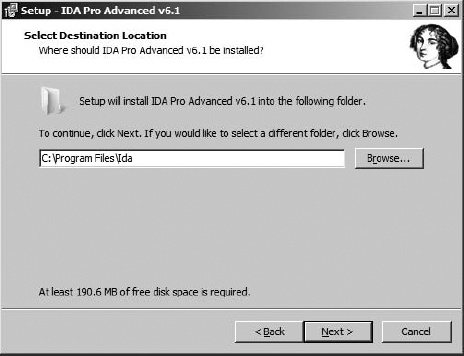
Installing IDA on Windows is very straightforward. IDA’s Windows installer requires a password that is supplied with your CD or via email if you have downloaded your copy of IDA. Launching the Windows installer walks you through several informational dialogs, only one of which requires any thought. As shown in Figure 3-1, you will be offered the opportunity to specify an installation location or to accept the default suggested by the installer. Regardless of whether you choose the default or specify an alternate location, for the remainder of this book we will refer to your chosen install location as <IDADIR>. In your IDA directory, you will find your key file, ida.key, along with the following IDA executables:
With the move to the Qt cross-platform GUI library in IDA version 6.0, the native Windows version of IDA (idag.exe) has been deprecated and will cease to ship with IDA beginning with version 6.2.
For installation on either OS X or Linux, gunzip and untar the appropriate archive to a location of your choosing. On a Linux system, it might look like this:
# tar -xvzf ida61l.tgzOn an OS X system, it will look like this:
# tar -xvzf ida61m.tgzIn either case, you will have a top-level directory named ida that contains all required files.
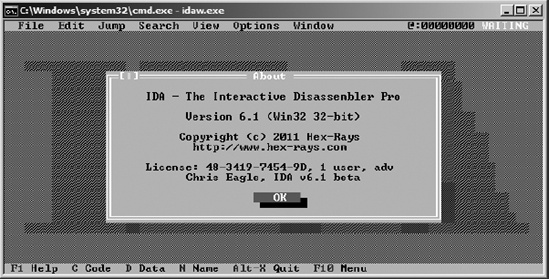
For both OS X and Linux, the name of the GUI version is idaq and the name of the console version is idal. The appearance of the console version is very similar to the Windows console version of IDA, which is shown in Figure 3-2. Linux users may need to verify (using ldd) that all shared libraries required by IDA are available on their systems. One plug-in in particular, IDAPython, expects to find Python version 2.6 installed. You may need to upgrade your Python installation or create symbolic links as necessary to satisfy IDA requirements.
If you are a Linux user that has SELinux enabled, you may find that IDA complains it “cannot enable executable stack as shared object” when attempting to load your desired processor module. The execstack command may be used to fix this problem on a per module basis as shown here:
execstack -c <IDADIR>/procs/pc.ilx
Users of the advanced version of IDA will notice that they have two versions of each IDA executable, such as idag.exe and idag64.exe or idaq and idaq64. The distinction between the versions is that idax64 is capable of disassembling 64-bit code; however, all of the IDA executables themselves are 32-bit code. As a result, users running IDA on 64-bit platforms need to ensure that any supporting software required by IDA is available in a 32-bit version. For example, 64-bit Linux users must ensure that a 32-bit version of Python is installed if they wish to use IDAPython for scripting. Consult the documentation for your operating system for details on mixing 32- and 64-bit software.
Instant familiarity with the contents of your IDA installation is by no means a requirement before you start using IDA. However, since our attention is turned to your new IDA install for the moment, let’s take an initial look at the basic layout. An understanding of the IDA directory structure will become more important as you progress to using the more advanced features of IDA covered later in the book. A brief description of each of the subdirectories within the IDA installation follows (for Windows and Linux users, these are found under <IDADIR>; for OS X users, these will be found under <IDA-DIR>/idaq.app/Contents/MacOS):
- cfg
The cfg directory contains various configuration files, including the basic IDA configuration file ida.cfg, the GUI configuration file idagui.cfg, and the text-mode user interface configuration file idatui.cfg. Some of the more useful configuration capabilities of IDA will be covered in Chapter 11.
- idc
The idc directory contains the core files required by IDA’s built-in scripting language, IDC. Scripting with IDC will be covered in more detail in Chapter 15.
- ids
The ids directory contains symbol files (IDS files in IDA parlance) that describe the content of shared libraries that may be referenced by binaries loaded into IDA. These IDS files contain summary information that lists all entries that are exported from a given library. These entries describe the type and number of parameters that a function requires, the return type (if any) of a function, and the calling convention utilized by the function.
- loaders
The loaders directory contains IDA extensions that are used during the file-loading process to recognize and parse known file formats such as PE or ELF files. IDA loaders will be discussed in more detail in Chapter 18.
- plugins
The plugins directory contains IDA modules designed to provide additional, and in most cases user-defined, behavior for IDA. IDA plug-ins will be discussed in greater detail in Chapter 17.
- procs
The procs directory contains the processor modules supported by the installed version of IDA. Processor modules provide the machine-language-to-assembly-language translation capability within IDA and are responsible for generating the assembly language displayed in the IDA user interface. IDA processor modules will be discussed in more detail in Chapter 19.
- sig
The sig directory contains signatures for existing code that IDA utilizes for various pattern-matching operations. It is through such pattern matching that IDA can identify sequences of code as known library code, potentially saving you significant amounts of time in the analysis process. The signatures are generated using IDA’s Fast Library Identification and Recognition Technology (FLIRT), which will be covered in more detail in Chapter 12.
- til
The til directory contains type library information that IDA uses to record the layout of data structures specific to various compiler libraries. Customizing IDA type libraries will be discussed further in Chapter 13.