Table of Contents for
OpenLayers 3 : Beginner's Guide
 OpenLayers 3 : Beginner's Guide
Published by
Packt Publishing, 2015
OpenLayers 3 : Beginner's Guide
Published by
Packt Publishing, 2015
- Cover
- Table of Contents
- OpenLayers 3 Beginner's Guide
- OpenLayers 3 Beginner's Guide
- Credits
- About the Authors
- About the Reviewers
- www.PacktPub.com
- Preface
- What you need for this book
- Who this book is for
- Sections
- Time for action – heading
- Conventions
- Reader feedback
- Customer support
- 1. Getting Started with OpenLayers
- Advantages of using OpenLayers
- What, technically, is OpenLayers?
- Anatomy of a web mapping application
- Connecting to Google, Bing Maps, and other mapping APIs
- Time for action – downloading OpenLayers
- Time for action – creating your first map
- Where to go for help
- OpenLayers issues
- OpenLayers source code repository
- Getting live news from RSS and social networks
- Summary
- 2. Key Concepts in OpenLayers
- Time for action – creating a map
- Time for action – using the JavaScript console
- Time for action – overlaying information
- OpenLayers' super classes
- Key-Value Observing with the Object class
- Time for action – using bindTo
- Working with collections
- Summary
- 3. Charting the Map Class
- Time for action – creating a map
- Map renderers
- Time for action – rendering a masterpiece
- Map properties
- Time for action – target practice
- Map methods
- Time for action – creating animated maps
- Events
- Views
- Time for action – linking two views
- Summary
- 4. Interacting with Raster Data Source
- Layers in OpenLayers 3
- Common operations on layers
- Time for action – changing layer properties
- Tiled versus untiled layers
- Types of raster sources
- Tiled images' layers and their sources
- Time for action – creating a Stamen layer
- Time for action – creating a Bing Maps layer
- Time for action – creating tiles and adding Zoomify layer
- Image layers and their sources
- Using Spherical Mercator raster data with other layers
- Time For action – playing with various sources and layers together
- Time For action – applying Zoomify sample knowledge to a single raw image
- Summary
- 5. Using Vector Layers
- Time for action – creating a vector layer
- How the vector layer works
- The vector layer class
- Vector sources
- Time for action – using the cluster source
- Time for action – creating a loader function
- Time for action – working with the TileVector source
- Time for action – a drag and drop viewer for vector files
- Features and geometries
- Time for action – geometries in action
- Time for action – interacting with features
- Summary
- 6. Styling Vector Layers
- Time for action – basic styling
- The style class
- Time for action – using the icon style
- Have a go hero – using the circle style
- Multiple styles
- Time for action – using multiple styles
- Style functions
- Time for action – using properties to style features
- Interactive styles
- Time for action – creating interactive styles
- Summary
- 7. Wrapping Our Heads Around Projections
- Time for action – using different projection codes
- Time for action – determining coordinates
- OpenLayers projection class
- Transforming coordinates
- Time for action – coordinate transforms
- Time for action – setting up Proj4js.org
- Time for action – reprojecting extent
- Time for action – using custom projection with WMS sources
- Time for action – reprojecting geometries in vector layers
- Summary
- 8. Interacting with Your Map
- Time for action – converting your local or national authorities data into web mapping formats
- Time for action – testing the use cases for ol.interaction.Select
- Time for action – more options with ol.interaction.Select
- Introducing methods to get information from your map
- Time for action – understanding the forEachFeatureAtPixel method
- Time for action – understanding the getGetFeatureInfoUrl method
- Adding a pop-up on your map
- Time for action – introducing ol.Overlay with a static example
- Time for action – using ol.Overlay dynamically with layers information
- Time for action – using ol.interaction.Draw to share new information on the Web
- Time for action – using ol.interaction.Modify to update drawing
- Understanding interactions and their architecture
- Time for action – configuring default interactions
- Discovering the other interactions
- Time for action – using ol.interaction.DragRotateAndZoom
- Time for action – making rectangle export to GeoJSON with ol.interaction.DragBox
- Summary
- 9. Taking Control of Controls
- Adding controls to your map
- Time for action – starting with the default controls
- Controls overview
- Time for action – changing the default attribution styles
- Time for action – finding your mouse position
- Time for action – configuring ZoomToExtent and manipulate controls
- Creating a custom control
- Time for action – extending ol.control.Control to make your own control
- Summary
- 10. OpenLayers Goes Mobile
- Using a web server
- Time for action – go mobile!
- The Geolocation class
- Time for action – location, location, location
- The DeviceOrientation class
- Time for action – a sense of direction
- Debugging mobile web applications
- Debugging on iOS
- Debugging on Android
- Going offline
- Time for action – MANIFEST destiny
- Going native with web applications
- Time for action – track me
- Summary
- 11. Creating Web Map Apps
- Using geospatial data from Flickr
- Time for action – getting Flickr data
- A simple application
- Time for Action – adding data to your map
- Styling the features
- Time for action – creating a style function
- Creating a thumbnail style
- Time for action – switching to JSON data
- Time for action – creating a thumbnail style
- Turning our example into an application
- Time for action – adding the select interaction
- Time for action – handling selection events
- Time for action – displaying photo information
- Using real time data
- Time for action – getting dynamic data
- Wrapping up the application
- Time for action – adding dynamic tags to your map
- Deploying an application
- Creating custom builds
- Creating a combined build
- Time for action – creating a combined build
- Creating a separate build
- Time for action – creating a separate build
- Summary
- A. Object-oriented Programming – Introduction and Concepts
- Going further
- B. More details on Closure Tools and Code Optimization Techniques
- Introducing Closure Library, yet another JavaScript library
- Time for action – first steps with Closure Library
- Making custom build for optimizing performance
- Time for action – playing with Closure Compiler
- Applying your knowledge to the OpenLayers case
- Time for action - running official examples with the internal OpenLayers toolkit
- Time for action - building your custom OpenLayers library
- Syntax and styles
- Time for action – using Closure Linter to fix JavaScript
- Summary
- C. Squashing Bugs with Web Debuggers
- Time for action – opening Chrome Developer Tools
- Explaining Chrome Developer debugging controls
- Time for action – using DOM manipulation with OpenStreetMap map images
- Time for action – using breakpoints to explore your code
- Time for action – playing with zoom button and map copyrights
- Using the Console panel
- Time for action – executing code in the Console
- Time for action – creating object literals
- Time for action – interacting with a map
- Improving Chrome and Developer Tools with extensions
- Debugging in other browsers
- Summary
- D. Pop Quiz Answers
- Chapter 5, Using Vector Layers
- Chapter 7, Wrapping Our Heads Around Projections
- Chapter 8, Interacting with Your Map
- Chapter 9, Taking Control of Controls
- Chapter 10, OpenLayers Goes Mobile
- Appendix B, More details on Closure Tools and Code Optimization Techniques
- Appendix C, Squashing Bugs with Web Debuggers
- Index
When you look at a map, you are looking at a two-dimensional representation of a 3D object (the Earth). Because we are, essentially, 'losing' a dimension when we create a map, no map is a perfect representation of the Earth. All maps have some distortion.
The distortion depends on what projection (a method of representing the earth's surface on a two dimensional plane) you use. In this chapter, we'll talk more about what projections are, why they're important, and how we can use them in OpenLayers. We'll also cover some other fundamental geographic principles that will help make it easier to better understand OpenLayers.
In this chapter, we will cover the following topics:
- Concept of map projections
- Types of projections
- Latitude, longitude, and other geographic concepts
- The OpenLayers projection class
- Transforming coordinates
- Projections in context of raster layers
- Projections using vector layers
Let's get started!
No maps of the earth are truly perfect representations; all maps have some distortion. The reason for this, is because they are attempting to represent a 3D object (an ellipsoid: the Earth) in two dimensions (a plane: the map itself).
A projection is a representation of the entire, or parts of a surface of a 3D sphere (or more precisely, an ellipsoid) on a 2D plane (or other types of geometry).
Every map has some sort of projection—it is an inherent attribute of maps. Imagine unpeeling an orange and then flattening the peel out. Some kind of distortion will occur, and if you try to fully fit the peel into a square or rectangle (like a flat, two-dimensional map), you'd have a very hard time.
To get the peel to fit perfectly onto a flat square or rectangle, you can try to stretch out certain parts of the peel or cut some pieces of the peel off and rearrange them. The same sort of idea applies while trying to create a map.
There are literally an infinite amount of possible map projections; an unlimited number of ways to represent a three-dimensional surface in two dimensions, but none of them are totally distortion free.
So, if there are so many different map projections, how do we decide on which one to use? Is there a best one? The answer is no. The 'best' projection to use depends on the context in which you use your map, what you're looking at, and what characteristics you wish to preserve.
As a two-dimensional representation is not without distortion, each projection makes a trade off between some characteristics. As we lose a dimension when projecting the earth onto a map, we must make some sort of trade off between the characteristics we want to preserve. There are numerous characteristics, but for now, let's focus on three of them.
Area refers to the size of features on the map. Projections that preserve area are known as equal-area projections (also known as equiareal, equivalent, or homolographic). A projection preserves area if, for example, a meter measured at different places on the map covers the same area. Because area remains the same, angles, scales, and shapes are distorted. This is what an equal area projected map may look like:
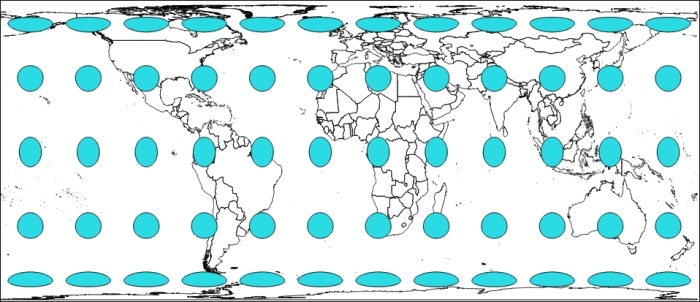
Here, we use Tissot indicatrix with EPSG:3410 NSIDC EASE-Grid Global, where the EPSG code helps define all existing projections. We will cover EPSG in detail, later in this chapter.
Without going into technical details, Tissot indicatrix is a way to display map projections deformation visually. In a perfect projection, we will keep area, distance, and shape, with circles with equal area and equal distance.
As you see, with this equal-area projection, we have circle and ellipse shapes but areas remain the same.
Scale is the ratio of the map's distance to the actual distance (for example, one centimeter on the map may be equal to one hundred actual meters). All map projections show scale incorrectly at some areas throughout the map; no map can show the same scale throughout the map. There are parts of the map, however, where scale remains correct—the placement of these locations mitigates scale errors elsewhere. The deformation of scale also depends on the area being mapped. Projections are referred to as equidistant if they contain true scale between a point and every other point on the map.
An example to illustrate can be the EPSG:32662 projection known as Plate Carree.
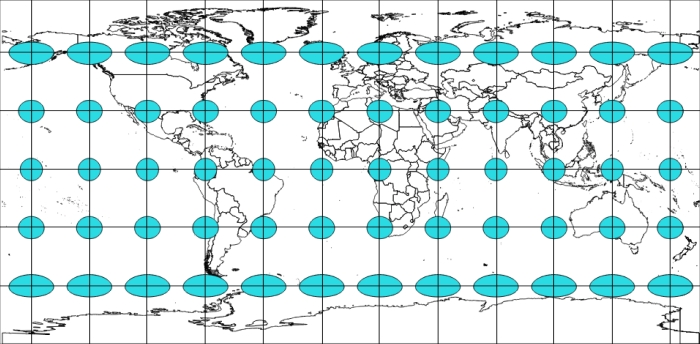
Here, we keep the distance between the center of the ellipse/circle. We overlay on top of the image of a grid so that you can better evaluate distance.
Maps that preserve shape are known as conformal or orthomorphic. Shape means that relative angles to all points on a map are correct. Most maps that show the entire earth are conformal, such as the Mercator projection (used by Google Earth and other common web maps). Depending on the specific projection, areas throughout the map are generally distorted but may be correct in certain places. Also, a map that is conformal cannot be equal-area.
To illustrate shape preservations, let's see the following example using EPSG code 3395 (WGS 84 - World Mercator), where all circles stay circles wherever they are:
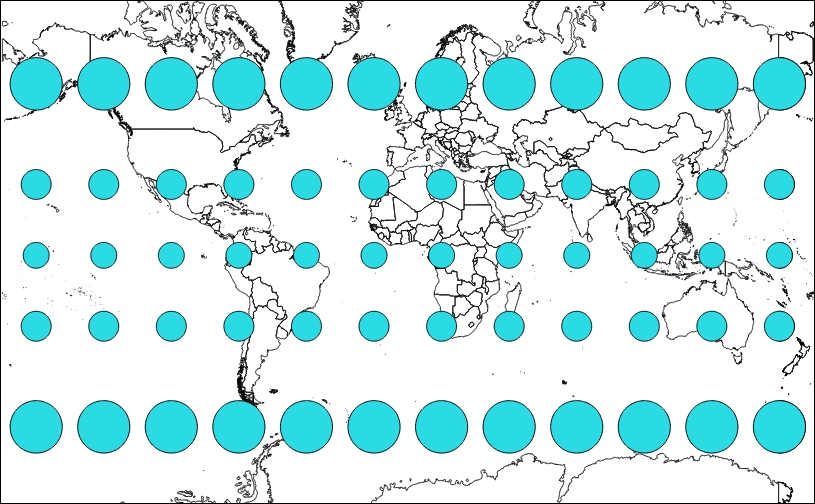
Projections have numerous other characteristics, such as bearing, distance, and direction. The key concept to take away here is that all projections preserve some characteristics at the expense of others. For instance, a map that preserves shape cannot completely preserve area.
There is no perfect map projection. The usefulness of a projection depends on the context the map is being used in. A particular projection may excel at a certain task, for example, navigation, but can be a poor choice for other purposes. For example, when we do thematic mapping and respect representations rules, colors are related to areas of countries. When we look at a world thematic map with a wrong projection, our eyes see a country bigger than the others, whereas because of projections, this country can, in reality, have a calculated area identical to countries represented with a smaller size.
The following figure overlays an area preserving projection (Robinson) on top of a Spherical Mercator to show the difference and why it matters:
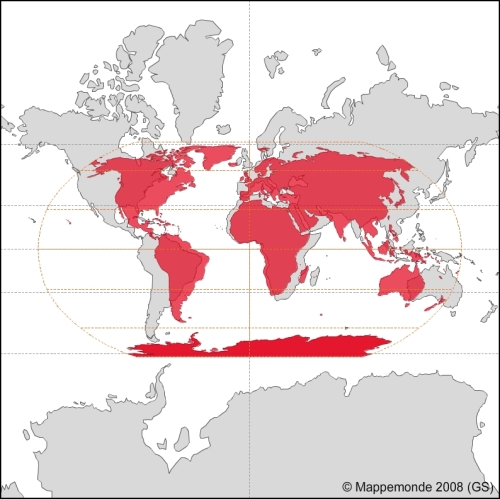
One of the simple ways to convince you that each projection has a reason to exist is to visit the OpenLayers 3 website examples.
We will compare the scale line example, http://openlayers.org/en/v3.0.0/examples/scale-, with the tiled WMS with the custom projection example, http://openlayers.org/en/v3.0.0/examples/wms-custom-proj.html.
Your instructions until now are:
Projections are projected onto a geometric surface, three of the most common ones being a plane, cone, or cylinder.
Imagine a cylinder being wrapped around the earth, with the center of the cylinder's circumference touching the equator. Now, the earth is projected onto the surface of this cylinder, and if you cut the cylinder from top to bottom vertically and unwrap it and lay it flat, you'd have a regular cylindrical projection:
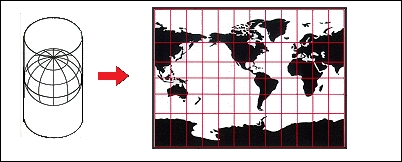
The Mercator projection is just one of these types of projections. If you've never worked with projections before, there is a good chance that most of the maps you've seen were in this projection.
Because of its nature, there is heavy distortion near the ends of the poles. Looking at the previous screenshot, you can see that the cells get progressively larger, the closer you get to the North and South poles. For example, Greenland looks larger than South America, but in reality, it is about the size of Mexico. For illustrating this problem visually, you can compare countries overlapping with http://overlapmaps.com. If area distortion is important in your map, you might consider using an equal area projection, as we mentioned earlier.
Note
More information about projections can be found at the USGS (US Geological Survey) website at http://pubs.er.usgs.gov/publication/pp1395, where you can download the reference book Map Projections: A Working Manual (U.S. Geological Survey Professional Paper 1395), John P. Snyder, 1987, 397 pages.
As we mentioned, there are literally an infinite number of possible projections. So, it makes sense that there should be some universally agreed upon classification system that keeps track of projection information. There are many different classification systems, but OpenLayers uses EPSG codes. EPSG refers to the European Petroleum Survey Group, a scientific organization involved in oil exploration, which in 2005 was taken over by the OGP (International Association of Oil and Gas Producers).
For the purpose of OpenLayers, EPSG codes are referred to as EPSG:4326.
The numbers (4326, in this case) after EPSG: refer to the projection identification number. It uses the familiar longitude/latitude coordinate system, with coordinates that range from -180° to 180° (longitude) and -90° to 90° (latitude).