Table of Contents for
PHP 7: Real World Application Development
 PHP 7: Real World Application Development
Published by
Packt Publishing, 2016
PHP 7: Real World Application Development
Published by
Packt Publishing, 2016
- Cover
- Table of Contents
- PHP 7: Real World Application Development
- PHP 7: Real World Application Development
- PHP 7: Real World Application Development
- Credits
- Preface
- What you need for this learning path
- Who this learning path is for
- Reader feedback
- Customer support
- 1. Module 1
- 1. Building a Foundation
- PHP 7 installation considerations
- Using the built-in PHP web server
- Defining a test MySQL database
- Installing PHPUnit
- Implementing class autoloading
- Hoovering a website
- Building a deep web scanner
- Creating a PHP 5 to PHP 7 code converter
- 2. Using PHP 7 High Performance Features
- Understanding the abstract syntax tree
- Understanding differences in parsing
- Understanding differences in foreach() handling
- Improving performance using PHP 7 enhancements
- Iterating through a massive file
- Uploading a spreadsheet into a database
- Recursive directory iterator
- 3. Working with PHP Functions
- Developing functions
- Hinting at data types
- Using return value data typing
- Using iterators
- Writing your own iterator using generators
- 4. Working with PHP Object-Oriented Programming
- Developing classes
- Extending classes
- Using static properties and methods
- Using namespaces
- Defining visibility
- Using interfaces
- Using traits
- Implementing anonymous classes
- 5. Interacting with a Database
- Using PDO to connect to a database
- Building an OOP SQL query builder
- Handling pagination
- Defining entities to match database tables
- Tying entity classes to RDBMS queries
- Embedding secondary lookups into query results
- Implementing jQuery DataTables PHP lookups
- 6. Building Scalable Websites
- Creating a generic form element generator
- Creating an HTML radio element generator
- Creating an HTML select element generator
- Implementing a form factory
- Chaining $_POST filters
- Chaining $_POST validators
- Tying validation to a form
- 7. Accessing Web Services
- Converting between PHP and XML
- Creating a simple REST client
- Creating a simple REST server
- Creating a simple SOAP client
- Creating a simple SOAP server
- 8. Working with Date/Time and International Aspects
- Using emoticons or emoji in a view script
- Converting complex characters
- Getting the locale from browser data
- Formatting numbers by locale
- Handling currency by locale
- Formatting date/time by locale
- Creating an HTML international calendar generator
- Building a recurring events generator
- Handling translation without gettext
- 9. Developing Middleware
- Authenticating with middleware
- Using middleware to implement access control
- Improving performance using the cache
- Implementing routing
- Making inter-framework system calls
- Using middleware to cross languages
- 10. Looking at Advanced Algorithms
- Using getters and setters
- Implementing a linked list
- Building a bubble sort
- Implementing a stack
- Building a binary search class
- Implementing a search engine
- Displaying a multi-dimensional array and accumulating totals
- 11. Implementing Software Design Patterns
- Creating an array to object hydrator
- Building an object to array hydrator
- Implementing a strategy pattern
- Defining a mapper
- Implementing object-relational mapping
- Implementing the Pub/Sub design pattern
- 12. Improving Web Security
- Filtering $_POST data
- Validating $_POST data
- Safeguarding the PHP session
- Securing forms with a token
- Building a secure password generator
- Safeguarding forms with a CAPTCHA
- Encrypting/decrypting without mcrypt
- 13. Best Practices, Testing, and Debugging
- Using Traits and Interfaces
- Universal exception handler
- Universal error handler
- Writing a simple test
- Writing a test suite
- Generating fake test data
- Customizing sessions using session_start parameters
- A. Defining PSR-7 Classes
- Implementing PSR-7 value object classes
- Developing a PSR-7 Request class
- Defining a PSR-7 Response class
- 2. Module 2
- 1. Setting Up the Environment
- Setting up Debian or Ubuntu
- Setting up CentOS
- Setting up Vagrant
- Summary
- 2. New Features in PHP 7
- New operators
- Uniform variable syntax
- Miscellaneous features and changes
- Summary
- 3. Improving PHP 7 Application Performance
- HTTP server optimization
- HTTP persistent connection
- Content Delivery Network (CDN)
- CSS and JavaScript optimization
- Full page caching
- Varnish
- The infrastructure
- Summary
- 4. Improving Database Performance
- Storage engines
- The Percona Server - a fork of MySQL
- MySQL performance monitoring tools
- Percona XtraDB Cluster (PXC)
- Redis – the key-value cache store
- Memcached key-value cache store
- Summary
- 5. Debugging and Profiling
- Profiling with Xdebug
- PHP DebugBar
- Summary
- 6. Stress/Load Testing PHP Applications
- ApacheBench (ab)
- Siege
- Load testing real-world applications
- Summary
- 7. Best Practices in PHP Programming
- Test-driven development (TDD)
- Design patterns
- Service-oriented architecture (SOA)
- Being object-oriented and reusable always
- PHP frameworks
- Version control system (VCS) and Git
- Deployment and Continuous Integration (CI)
- Summary
- A. Tools to Make Life Easy
- Git – A version control system
- Grunt watch
- Summary
- B. MVC and Frameworks
- Laravel
- Lumen
- Apigility
- Summary
- 3. Module 3
- 1. Ecosystem Overview
- Summary
- 2. GoF Design Patterns
- Structural patterns
- Behavioral patterns
- Summary
- 3. SOLID Design Principles
- Open/closed principle
- Liskov substitution principle
- Interface Segregation Principle
- Dependency inversion principle
- Summary
- 4. Requirement Specification for a Modular Web Shop App
- Wireframing
- Defining a technology stack
- Summary
- 5. Symfony at a Glance
- Creating a blank project
- Using Symfony console
- Controller
- Routing
- Templates
- Forms
- Configuring Symfony
- The bundle system
- Databases and Doctrine
- Testing
- Validation
- Summary
- 6. Building the Core Module
- Dependencies
- Implementation
- Unit testing
- Functional testing
- Summary
- 7. Building the Catalog Module
- Dependencies
- Implementation
- Unit testing
- Functional testing
- Summary
- 8. Building the Customer Module
- Dependencies
- Implementation
- Unit testing
- Functional testing
- Summary
- 9. Building the Payment Module
- Dependencies
- Implementation
- Unit testing
- Functional testing
- Summary
- 10. Building the Shipment Module
- Dependencies
- Implementation
- Unit testing
- Functional testing
- Summary
- 11. Building the Sales Module
- Dependencies
- Implementation
- Unit testing
- Functional testing
- Summary
- 12. Integrating and Distributing Modules
- Understanding GitHub
- Understanding Composer
- Understanding Packagist
- Summary
- Bibliography
- Index
We start by creating a new module called Foggyline\SalesBundle. We do so with the help of the console, by running the command as follows:
php bin/console generate:bundle --namespace=Foggyline/SalesBundle
The command triggers an interactive process, asking us several questions along the way, as shown here:
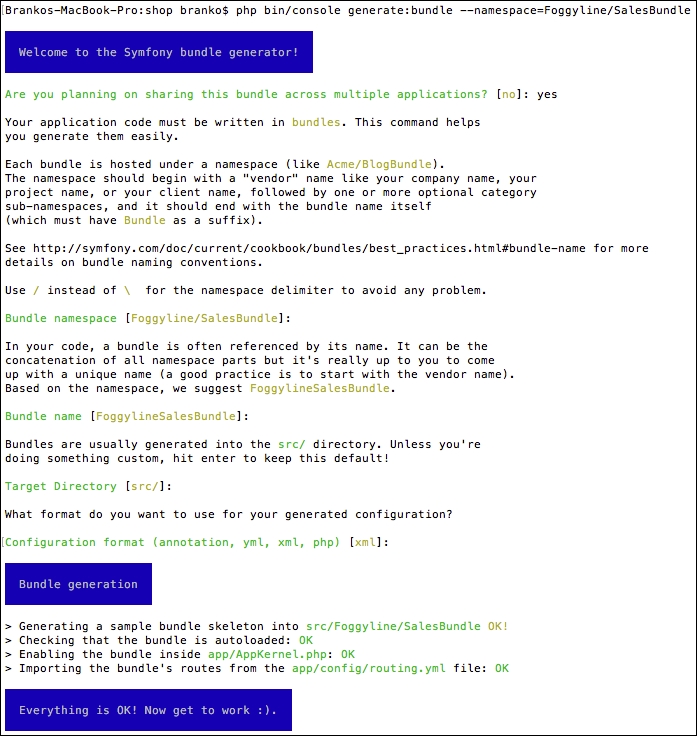
Once done, the app/AppKernel.php and app/config/routing.yml files get modified automatically. The registerBundles method of an AppKernel class has been added to the following line under the $bundles array:
new Foggyline\PaymentBundle\FoggylineSalesBundle(),
The routing.yml file has been updated with the following entry:
foggyline_payment:
  resource: "@FoggylineSalesBundle/Resources/config/routing.xml"
  prefix:   /
In order to avoid collision with the core application code, we need to change prefix: / into prefix: /sales/.
Let's go ahead and create a Cart entity. We do so by using the console, as shown here:
php bin/console generate:doctrine:entity
This triggers the interactive generator as shown in the following sreenshot:
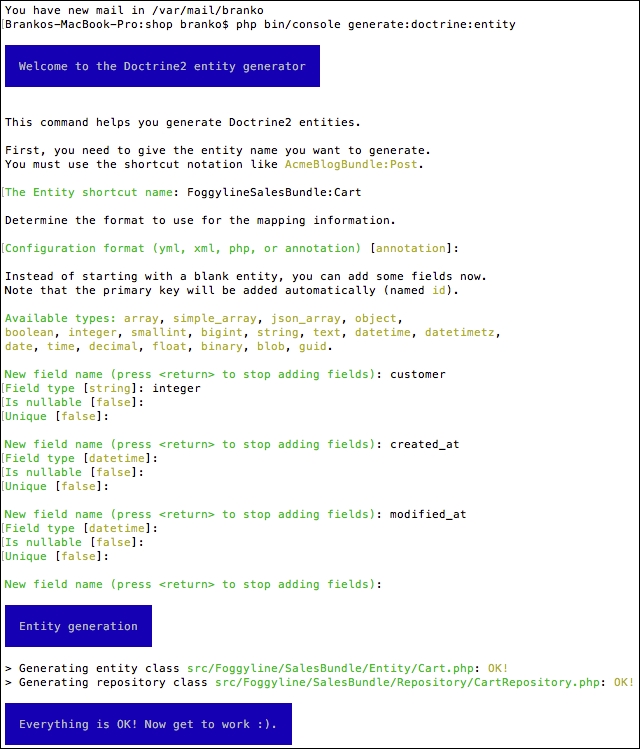
This creates the Entity/Cart.php and Repository/CartRepository.php files within the src/Foggyline/SalesBundle/ directory. After this, we need to update the database, so it pulls in the Cart entity, by running the following command:
php bin/console doctrine:schema:update --force
With the Cart entity in place, we can go ahead and generate the CartItem entity.
Let's go ahead and create a CartItem entity. We do so by using the now well-known console command:
php bin/console generate:doctrine:entity
This triggers the interactive generator as shown in the following screenshot:
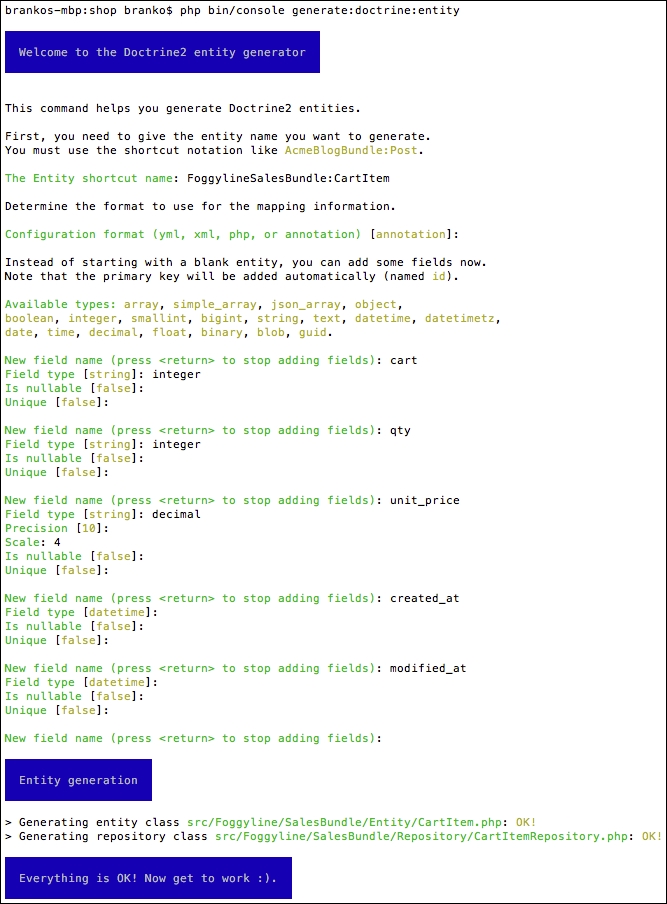
This creates Entity/CartItem.php and Repository/CartItemRepository.php within the src/Foggyline/SalesBundle/ directory. Once the auto generate has done its work, we need to go back and edit the CartItem entity to update the cart field relation as follows:
/**
 * @ORM\ManyToOne(targetEntity="Cart", inversedBy="items")
 * @ORM\JoinColumn(name="cart_id", referencedColumnName="id")
 */
private $cart;
Here, we have defined the so-called bidirectional one-to-many association. The foreign key in a one-to-many association is being defined on the many side, which in this case is the CartItem entity. The bidirectional mapping requires the mappedBy attribute on the OneToMany association and the inversedBy attribute on the ManyToOne association. The OneToMany side in this case is the Cart entity, so we go back to the src/Foggyline/SalesBundle/Entity/Cart.php file and add the following to it:
/**
 * @ORM\OneToMany(targetEntity="CartItem", mappedBy="cart")
 */
private $items;

public function __construct() {
  $this->items = new \Doctrine\Common\Collections\ArrayCollection();
}
We then need to update the database, so it pulls in the CartItem entity, by running the following command:
php bin/console doctrine:schema:update --force
With the CartItem entity in place, we can go ahead and generate the Order entity.
Let's go ahead and create an Order entity. We do so by using the console, as shown here:
php bin/console generate:doctrine:entity
If we tried to provide FoggylineSalesBundle:Order as an entity shortcut name, the generated output would throw an error as shown in the following screenshot:
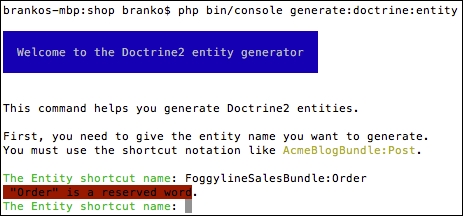
Instead, we will use SensioGeneratorBundle:SalesOrder for the entity shortcut name, and follow the generator through as shown here:
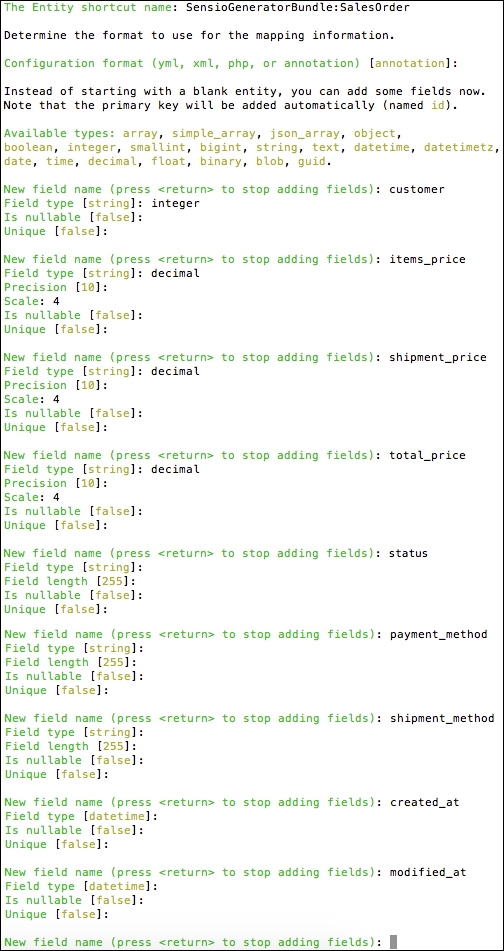
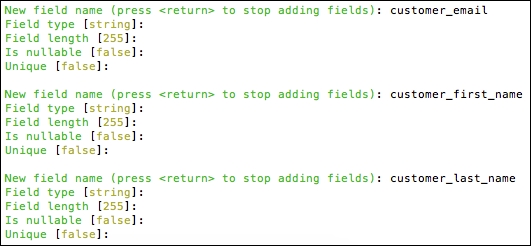
This is followed by the rest of the customer-information-related fields. To get a better idea, look at the following screenshot:
This is followed by the rest of the order-address-related fields as shown here:
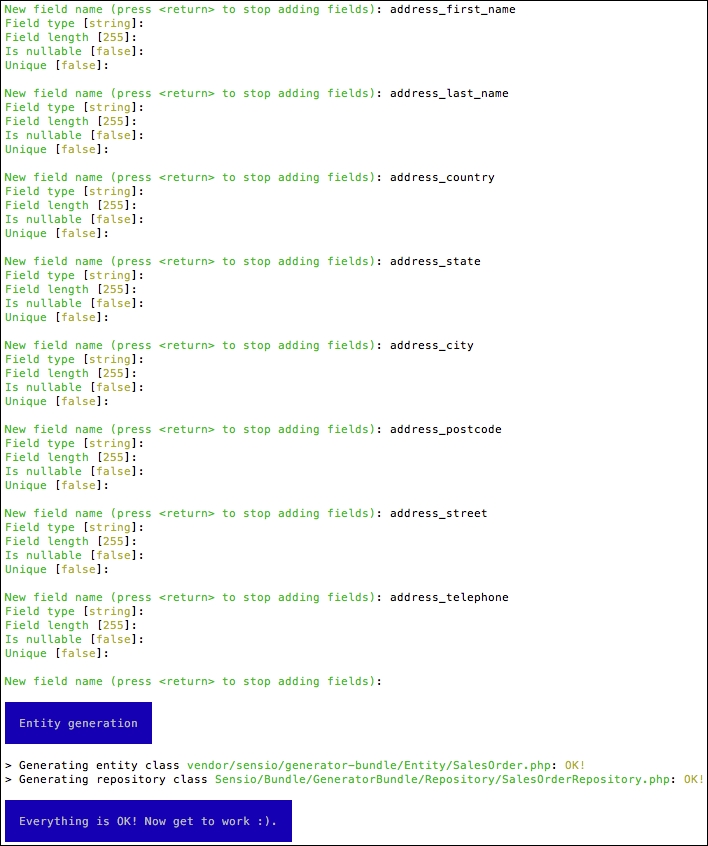
It is worth noting that normally we would like to extract the address information in its own table, that is make it its own entity. However, to keep things simple, we will proceed by keeping it as part of the SalesOrder entity.
Once done, this creates Entity/SalesOrder.php and Repository/SalesOrderRepository.php files within the src/Foggyline/SalesBundle/ directory. After this, we need to update the database, so it pulls in the SalesOrder entity, by running the following command:
php bin/console doctrine:schema:update --force
With the SalesOrder entity in place, we can go ahead and generate the SalesOrderItem entity.
Let's go ahead and create a SalesOrderItem entity. We start the code generator by using the following console command:
php bin/console generate:doctrine:entity
When asked for the entity shortcut name, we provide FoggylineSalesBundle:SalesOrderItem, and then follow the generator field definitions as shown in the following screenshot:
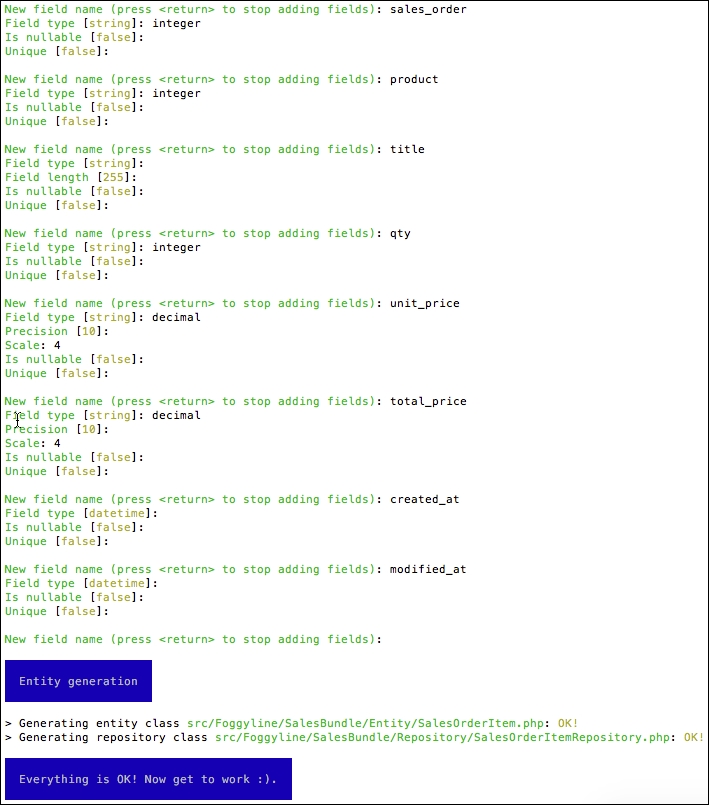
This creates Entity/SalesOrderItem.php and Repository/SalesOrderItemRepository.php files within the src/Foggyline/SalesBundle/ directory. Once the auto-generate has done its work, we need to go back and edit the SalesOrderItem entity to update the SalesOrder field relation as follows:
/**
 * @ORM\ManyToOne(targetEntity="SalesOrder", inversedBy="items")
 * @ORM\JoinColumn(name="sales_order_id", referencedColumnName="id")
 */
private $salesOrder;

/**
 * @ORM\OneToOne(targetEntity="Foggyline\CatalogBundle\Entity\Product")
 * @ORM\JoinColumn(name="product_id", referencedColumnName="id")
 */
private $product;
Here, we have defined two types of relations. The first one, relating to $salesOrder, is the bidirectional one-to-many association, which we saw in the Cart and CartItem entities. The second one, relating to $product, is the unidirectional one-to-one association. The reference is said to be unidirectional because CartItem references Product, while Product won't be referencing CartItem, as we do not want to change something that is part of another module.
We still need to go back to the src/Foggyline/SalesBundle/Entity/SalesOrder.php file and add the following to it:
/**
 * @ORM\OneToMany(targetEntity="SalesOrderItem", mappedBy="salesOrder")
 */
private $items;

public function __construct() {
  $this->items = new \Doctrine\Common\Collections\ArrayCollection();
}
We then need to update the database, so it pulls in the SalesOrderItem entity, by running the following command:
php bin/console doctrine:schema:update --force
With the SalesOrderItem entity in place, we can go ahead and start building the cart and checkout pages.
The add_to_cart_url service was originally declared in FoggylineCustomerBundle with dummy data. This is because we needed a way to build Add to Cart URLs on products before sales functionality was available. While certainly not ideal, it is one possible way of doing it.
Now we are going to override that service with the one declared in our Sales module in order to provide correct Add to Cart URLs. We start off by defining the service within src/Foggyline/SalesBundle/Resources/config/services.xml, by adding the following service element under the services as follows:
<service id="foggyline_sales.add_to_cart_url" class="Foggyline\SalesBundle\Service\AddToCartUrl">
  <argument type="service" id="doctrine.orm.entity_manager"/>
  <argument type="service" id="router"/>
</service>
We then create src/Foggyline/SalesBundle/Service/AddToCartUrl.php with content as follows:
namespace Foggyline\SalesBundle\Service;

class AddToCartUrl
{
  private $em;
  private $router;

  public function __construct(
    \Doctrine\ORM\EntityManager $entityManager,
    \Symfony\Bundle\FrameworkBundle\Routing\Router $router
  )
  {
    $this->em = $entityManager;
    $this->router = $router;
  }

  public function getAddToCartUrl($productId)
  {
    return $this->router->generate('foggyline_sales_cart_add', array('id' => $productId));
  }
}
The router service here expects the route named foggyline_sales_cart_add, which still does not exist. We create the route by adding the following entry under the routes element of the src/Foggyline/SalesBundle/Resources/config/routing.xml file as follows:
<route id="foggyline_sales_cart_add" path="/cart/add/{id}">
  <default key="_controller">FoggylineSalesBundle:Cart:add</default>
</route>
Route definition expects to find the addAction function within the cart controller in the src/Foggyline/SalesBundle/Controller/CartController.php file, which we define as follows:
namespace Foggyline\SalesBundle\Controller;

use Symfony\Component\HttpFoundation\Request;
use Symfony\Bundle\FrameworkBundle\Controller\Controller;


class CartController extends Controller
{
  public function addAction($id)
  {
    if ($customer = $this->getUser()) {
      $em = $this->getDoctrine()->getManager();
      $now = new \DateTime();

      $product = $em->getRepository('FoggylineCatalogBundle:Product')->find($id);

      // Grab the cart for current user
      $cart = $em->getRepository('FoggylineSalesBundle:Cart')->findOneBy(array('customer' => $customer));

      // If there is no cart, create one
      if (!$cart) {
        $cart = new \Foggyline\SalesBundle\Entity\Cart();
        $cart->setCustomer($customer);
        $cart->setCreatedAt($now);
        $cart->setModifiedAt($now);
      } else {
        $cart->setModifiedAt($now);
      }

      $em->persist($cart);
      $em->flush();

      // Grab the possibly existing cart item
      // But, lets find it directly
      $cartItem = $em->getRepository('FoggylineSalesBundle:CartItem')->findOneBy(array('cart' => $cart, 'product' => $product));

      if ($cartItem) {
        // Cart item exists, update it
        $cartItem->setQty($cartItem->getQty() + 1);
        $cartItem->setModifiedAt($now);
      } else {
        // Cart item does not exist, add new one
        $cartItem = new \Foggyline\SalesBundle\Entity\CartItem();
        $cartItem->setCart($cart);
        $cartItem->setProduct($product);
        $cartItem->setQty(1);
        $cartItem->setUnitPrice($product->getPrice());
        $cartItem->setCreatedAt($now);
        $cartItem->setModifiedAt($now);
      }

      $em->persist($cartItem);
      $em->flush();

      $this->addFlash('success', sprintf('%s successfully added to cart', $product->getTitle()));

      return $this->redirectToRoute('foggyline_sales_cart');
    } else {
      $this->addFlash('warning', 'Only logged in users can add to cart.');
      return $this->redirect('/');
    }
  }
}
There is quite a bit of logic going on here in the addAction method. We are first checking whether the current user already has a cart entry in the database; if not, we create a new one. We then add or update the existing cart item.
In order for our new add_to_cart service to actually override the one from the Customermodule, we still need to add a compiler. We do so by defining the src/Foggyline/SalesBundle/DependencyInjection/Compiler/OverrideServiceCompilerPass.phpfile with content as follows:
namespace Foggyline\SalesBundle\DependencyInjection\Compiler;

use Symfony\Component\DependencyInjection\Compiler\CompilerPassInterface;
use Symfony\Component\DependencyInjection\ContainerBuilder;
use Symfony\Component\DependencyInjection\Definition;

class OverrideServiceCompilerPass implements CompilerPassInterface
{
    public function process(ContainerBuilder $container)
    {
        // Override 'add_to_cart_url' service
        $container->removeDefinition('add_to_cart_url');
        $container->setDefinition('add_to_cart_url', $container->getDefinition('foggyline_sales.add_to_cart_url'));

        // Override 'checkout_menu' service
        // Override 'foggyline_customer.customer_orders' service
        // Override 'bestsellers' service
        // Pickup/parse 'shipment_method' services
        // Pickup/parse 'payment_method' services
    }
}
Later on, we will add the rest of the overrides to this file. In order to tie things up for the moment, and make the add_to_cart service override kick in, we need to register the compiler pass within the build method of our src/Foggyline/SalesBundle/FoggylineSalesBundle.php file as follows:
public function build(ContainerBuilder $container)
{
    parent::build($container);;
    $container->addCompilerPass(new OverrideServiceCompilerPass());
}
The override should now be in effect, and our Sales module should now be providing valid Add to Cart links.
The checkout menu service defined in the Customer module has a simple purpose which is to provide a link to the cart and the first step of the checkout process. Since the Sales module was unknown at the time, the Customer module provided a dummy link, which we will now override.
We start by adding the following service entry under the services element of the src/Foggyline/SalesBundle/Resources/config/services.xml file as follows:
<service id="foggyline_sales.checkout_menu" class="Foggyline\SalesBundle\Service\CheckoutMenu">
<argument type="service" id="doctrine.orm.entity_manager"/>
<argument type="service" id="security.token_storage"/>
<argument type="service" id="router"/>
</service>
We then add the src/Foggyline/SalesBundle/Service/CheckoutMenu.php file with content as follows:
namespace Foggyline\SalesBundle\Service;

class CheckoutMenu
{
  private $em;
  private $token;
  private $router;

  public function __construct(
    \Doctrine\ORM\EntityManager $entityManager,
    $tokenStorage,
    \Symfony\Bundle\FrameworkBundle\Routing\Router $router
  )
  {
    $this->em = $entityManager;
    $this->token = $tokenStorage->getToken();
    $this->router = $router;
  }

  public function getItems()
  {
    if ($this->token
      && $this->token->getUser() instanceof \Foggyline\CustomerBundle\Entity\Customer
    ) {
      $customer = $this->token->getUser();

      $cart = $this->em->getRepository('FoggylineSalesBundle:Cart')->findOneBy(array('customer' => $customer));

      if ($cart) {
        return array(
          array('path' => $this->router->generate('foggyline_sales_cart'), 'label' =>sprintf('Cart (%s)', count($cart->getItems()))),
          array('path' => $this->router->generate('foggyline_sales_checkout'), 'label' =>'Checkout'),
        );
      }
    }

    return array();
  }
}
The service expects two routes, foggyline_sales_cart and foggyline_sales_checkout, so we need to amend the src/Foggyline/SalesBundle/Resources/config/routing.xml by file adding the following route definitions to it:
<route id="foggyline_sales_cart" path="/cart/">
  <default key="_controller">FoggylineSalesBundle:Cart:index</default>
</route>

<route id="foggyline_sales_checkout" path="/checkout/">
  <default key="_controller">FoggylineSalesBundle:Checkout:index</default>
</route>
The newly added routes expect the cart and checkout controller. The cart controller is already in place, so we just need to add the indexAction to it. At this point, let's just add an empty one as follows:
public function indexAction(Request $request)
{
}
Similarly, let's create a src/Foggyline/SalesBundle/Controller/CheckoutController.php file with content as follows:
namespace Foggyline\SalesBundle\Controller;

use Symfony\Component\HttpFoundation\Request;
use Symfony\Bundle\FrameworkBundle\Controller\Controller;
use Symfony\Component\Form\Extension\Core\Type\TextType;
use Symfony\Component\Form\Extension\Core\Type\CountryType;

class CheckoutController extends Controller
{
  public function indexAction()
  {
  }
}
Later on, we will revert back to these two indexAction methods and add proper method body implementations.
To conclude the service override, we now amend the previously created src/Foggyline/SalesBundle/DependencyInjection/Compiler/OverrideServiceCompilerPass.php file, by replacing the // Override 'checkout_menu' service comment with the following:
$container->removeDefinition('checkout_menu');
$container->setDefinition('checkout_menu', $container->getDefinition('foggyline_sales.checkout_menu'));
Our newly defined service should now override the one defined in the Customer module, thus providing the right checkout and cart (with items in the cart count) URL.
The foggyline_customer.customer_orders service was to provide a collection of previously created orders for currently logged-in customers. The Customer module defined a dummy service for this purpose, just so we can move forward with building up the My Orders section under My Account page. We now need to override this service, making it return proper orders.
We start by adding the following service element under the services of the src/Foggyline/SalesBundle/Resources/config/services.xml file as follows:
<service id="foggyline_sales.customer_orders" class="Foggyline\SalesBundle\Service\CustomerOrders">
  <argument type="service" id="doctrine.orm.entity_manager"/>
  <argument type="service" id="security.token_storage"/>
  <argument type="service" id="router"/>
</service>
We then add the src/Foggyline/SalesBundle/Service/CustomerOrders.php file with content as follows:
namespace Foggyline\SalesBundle\Service;

class CustomerOrders
{
  private $em;
  private $token;
  private $router;

  public function __construct(
    \Doctrine\ORM\EntityManager $entityManager,
    $tokenStorage,
    \Symfony\Bundle\FrameworkBundle\Routing\Router $router
  )
  {
    $this->em = $entityManager;
    $this->token = $tokenStorage->getToken();
    $this->router = $router;
  }

  public function getOrders()
  {
    $orders = array();

    if ($this->token
    && $this->token->getUser() instanceof \Foggyline\CustomerBundle\Entity\Customer
    ) {
      $salesOrders = $this->em->getRepository('FoggylineSalesBundle:SalesOrder')
      ->findBy(array('customer' => $this->token->getUser()));

      foreach ($salesOrders as $salesOrder) {
        $orders[] = array(
          'id' => $salesOrder->getId(),
          'date' => $salesOrder->getCreatedAt()->format('d/m/Y H:i:s'),
          'ship_to' => $salesOrder->getAddressFirstName() . '' . $salesOrder->getAddressLastName(),
'         'order_total' => $salesOrder->getTotalPrice(),
          'status' => $salesOrder->getStatus(),
          'actions' => array(
            array(
              'label' =>'Cancel',
              'path' => $this->router->generate('foggyline_sales_order_cancel', array('id' => $salesOrder->getId()))
            ),
            array(
              'label' =>'Print',
              'path' => $this->router->generate('foggyline_sales_order_print', array('id' => $salesOrder->getId()))
            )
          )
        );
      }
    }
    return $orders;
  }
}
The route generate method expects to find two routes, foggyline_sales_order_cancel and foggyline_sales_order_print, which are not yet created.
Let's go ahead and create them by adding the following under the route element of the src/Foggyline/SalesBundle/Resources/config/routing.xml file:
<route id="foggyline_sales_order_cancel"path="/order/cancel/{id}">
  <default key="_controller">FoggylineSalesBundle:SalesOrder:cancel</default>
</route>

<route id="foggyline_sales_order_print" path="/order/print/{id}">
  <default key="_controller">FoggylineSalesBundle:SalesOrder:print</default>
</route>
The routes definition, in turn, expects SalesOrderController to be defined. Since our application will require an admin user to be able to list and edit the orders, we will use the following Symfony command to auto-generate the CRUD for our Sales Orderentity:
php bin/console generate:doctrine:crud
When asked for the entity shortcut name, we simply provide FoggylineSalesBundle:SalesOrder and proceed, allowing for creation of write actions. At this point, several files have been created for us, as well as a few entries outside of the Sales bundle. One of these entries is the route definition within the app/config/routing.yml file, as follows:
foggyline_sales_sales_order:
  resource: "@FoggylineSalesBundle/Controller/SalesOrderController.php"
  type:     annotation
We should already have a foggyline_sales entry in there as well. The difference being that foggyline_sales points to our router.xml file and the newly created foggyline_sales_sales_order points to the exact newly created SalesOrderController. For the sake of simplicity, we can keep them both.
The auto-generator also created a salesorder directory under the app/Resources/views/ directory, which we need to move over into our bundle as the src/Foggyline/SalesBundle/Resources/views/Default/salesorder/ directory.
We can now address our print and cancel actions by adding the following into the src/Foggyline/SalesBundle/Controller/SalesOrderController.php file as follows:
public function cancelAction($id)
{
  if ($customer = $this->getUser()) {
    $em = $this->getDoctrine()->getManager();
    $salesOrder = $em->getRepository('FoggylineSalesBundle:SalesOrder')
    ->findOneBy(array('customer' => $customer, 'id' => $id));

    if ($salesOrder->getStatus() != \Foggyline\SalesBundle\Entity\SalesOrder::STATUS_COMPLETE) {
      $salesOrder->setStatus(\Foggyline\SalesBundle\Entity\SalesOrder::STATUS_CANCELED);
      $em->persist($salesOrder);
      $em->flush();
    }
  }

  return $this->redirectToRoute('customer_account');
}

public function printAction($id)
{
  if ($customer = $this->getUser()) {
    $em = $this->getDoctrine()->getManager();
    $salesOrder = $em->getRepository('FoggylineSalesBundle:SalesOrder')
    ->findOneBy(array('customer' => $customer, 'id' =>$id));

    return $this->render('FoggylineSalesBundle:default:salesorder/print.html.twig', array(
      'salesOrder' => $salesOrder,
      'customer' => $customer
    ));
  }

  return $this->redirectToRoute('customer_account');
}
The cancelAction method merely checks whether the order in question belongs to the currently logged-in customer; if so, a change of order status is allowed. The printAction method merely loads the order if it belongs to the currently logged-in customer, and passes it on to a print.html.twig template.
We then create the src/Foggyline/SalesBundle/Resources/views/Default/salesorder/print.html.twig template with content as follows:
{% block body %}
<h1>Printing Order #{{ salesOrder.id }}</h1>
  {#<p>Just a dummy Twig dump of entire variable</p>#}
  {{ dump(salesOrder) }}
{% endblock %}
Obviously, this is just a simplified output, which we can further customize to our needs. The important bit is that we have passed along the order object to our template, and can now extract any piece of information needed from it.
Finally, we replace the // Override 'foggyline_customer.customer_orders' service comment within the src/Foggyline/SalesBundle/DependencyInjection/Compiler/OverrideServiceCompilerPass.php file with code as follows:
$container->removeDefinition('foggyline_customer.customer_orders');
$container->setDefinition('foggyline_customer.customer_orders', $container->getDefinition('foggyline_sales.customer_orders'));
This will make the service override kick in, and pull in all of the changes we just made.
The bestsellers service defined in the Customer module was supposed to provide dummy data for the bestsellers feature shown on the homepage. The idea is to showcase five of the bestselling products in the store. The Sales module now needs to override this service in order to provide the right implementation, where actual sold product quantities will affect the content of the bestsellers shown.
We start off by adding the following definition under the service element of the src/Foggyline/SalesBundle/Resources/config/services.xml file:
<service id="foggyline_sales.bestsellers" class="Foggyline\SalesBundle\Service\BestSellers">
  <argument type="service" id="doctrine.orm.entity_manager"/>
  <argument type="service" id="router"/>
</service>
We then define the src/Foggyline/SalesBundle/Service/BestSellers.php file with content as follows:
namespace Foggyline\SalesBundle\Service;

class BestSellers
{
  private $em;
  private $router;

  public function __construct(
    \Doctrine\ORM\EntityManager $entityManager,
    \Symfony\Bundle\FrameworkBundle\Routing\Router $router
  )
  {
    $this->em = $entityManager;
    $this->router = $router;
  }

  public function getItems()
  {
    $products = array();
    $salesOrderItem = $this->em->getRepository('FoggylineSalesBundle:SalesOrderItem');
    $_products = $salesOrderItem->getBestsellers();

    foreach ($_products as $_product) {
      $products[] = array(
        'path' => $this->router->generate('product_show', array('id' => $_product->getId())),
        'name' => $_product->getTitle(),
        'img' => $_product->getImage(),
        'price' => $_product->getPrice(),
        'id' => $_product->getId(),
      );
    }
    return $products;
  }
}
Here, we are fetching the instance of the SalesOrderItemRepository class and calling the getBestsellers method on it. This method still has not been defined. We do so by adding it to file src/Foggyline/SalesBundle/Repository/SalesOrderItemRepository.php file as follows:
public function getBestsellers()
{
  $products = array();

  $query = $this->_em->createQuery('SELECT IDENTITY(t.product), SUM(t.qty) AS HIDDEN q
  FROM Foggyline\SalesBundle\Entity\SalesOrderItem t
  GROUP BY t.product ORDER BY q DESC')
  ->setMaxResults(5);

  $_products = $query->getResult();

  foreach ($_products as $_product) {
    $products[] = $this->_em->getRepository('FoggylineCatalogBundle:Product')
    ->find(current($_product));
  }

  return $products;
}
Here, we are using Doctrine Query Language (DQL) in order to build a list of the five bestselling products. Finally, we need to replace the // Override 'bestsellers' service comment from within the src/Foggyline/SalesBundle/DependencyInjection/Compiler/OverrideServiceCompilerPass.php file with code as follows:
$container->removeDefinition('bestsellers');
$container->setDefinition('bestsellers', $container->getDefinition('foggyline_sales.bestsellers'));
By overriding the bestsellers service, we are exposing the actual sales-based list of bestselling products for other modules to fetch.
The cart page is where the customer gets to see a list of products added to the cart via Add to Cart buttons, from either the homepage, a category page, or a product page. We previously created CartController and an empty indexAction function. Now let's go ahead and edit the indexAction function as follows:
public function indexAction()
{
  if ($customer = $this->getUser()) {
    $em = $this->getDoctrine()->getManager();

    $cart = $em->getRepository('FoggylineSalesBundle:Cart')->findOneBy(array('customer' => $customer));
    $items = $cart->getItems();
    $total = null;

    foreach ($items as $item) {
      $total += floatval($item->getQty() * $item->getUnitPrice());
    }

    return $this->render('FoggylineSalesBundle:default:cart/index.html.twig', array(
        'customer' => $customer,
        'items' => $items,
        'total' => $total,
      ));
  } else {
    $this->addFlash('warning', 'Only logged in customers can access cart page.');
    return $this->redirectToRoute('foggyline_customer_login');
  }
}
Here, we are checking whether the user is logged in; if they are, we are showing them the cart with all their items. The non-logged-in user is redirected to a customer login URL. The indexAction function is expecting the src/Foggyline/SalesBundle/Resources/views/Default/cart/index.html.twig file, whose content we define as follows:
{% extends 'base.html.twig' %}
{% block body %}
<h1>Shopping Cart</h1>
<div class="row">
  <div class="large-8 columns">
    <form action="{{ path('foggyline_sales_cart_update') }}"method="post">
    <table>
      <thead>
        <tr>
          <th>Item</th>
          <th>Price</th>
          <th>Qty</th>
          <th>Subtotal</th>
        </tr>
      </thead>
      <tbody>
        {% for item in items %}
        <tr>
          <td>{{ item.product.title }}</td>
          <td>{{ item.unitPrice }}</td>
          <td><input name="item[{{ item.id }}]" value="{{ item.qty }}"/></td>
          <td>{{ item.qty * item.unitPrice }}</td>
        </tr>
        {% endfor %}
      </tbody>
    </table>
    <button type="submit" class="button">Update Cart</button>
  </form>
</div>
<div class="large-4 columns">
  <div>Order Total: {{ total }}</div>
  <div><a href="{{ path('foggyline_sales_checkout') }}"class="button">Go to Checkout</a></div>
  </div>
</div>
{% endblock %}
When rendered, the template will show quantity input elements under each added product, alongside the Update Cart button. The Update Cart button submits the form, whose action is pointing to the foggyline_sales_cart_update route.
Let's go ahead and create foggyline_sales_cart_update, by adding the following entry under the route element of the src/Foggyline/SalesBundle/Resources/config/routing.xml file as follows:
<route id="foggyline_sales_cart_update" path="/cart/update">
  <default key="_controller">FoggylineSalesBundle:Cart:update</default>
</route>
The newly defined route expects to find an updateAction function under the src/Foggyline/SalesBundle/Controller/CartController.php file, which we add as follows:
public function updateAction(Request $request)
{
  $items = $request->get('item');

  $em = $this->getDoctrine()->getManager();
  foreach ($items as $_id => $_qty) {
    $cartItem = $em->getRepository('FoggylineSalesBundle:CartItem')->find($_id);
    if (intval($_qty) > 0) {
      $cartItem->setQty($_qty);
      $em->persist($cartItem);
    } else {
      $em->remove($cartItem);
    }
  }
  // Persist to database
  $em->flush();

  $this->addFlash('success', 'Cart updated.');

  return $this->redirectToRoute('foggyline_sales_cart');
}
To remove a product from the cart, we simply insert 0 as the quantity value and click the Update Cart button. This completes our simple cart page.
In order to move from cart to checkout, we need to sort out payment and shipment services. The previous Payment and Shipment modules exposed some of their Payment and Shipment services, which we now need to aggregate into a single Payment and Shipment service that our checkout process will use.
We start by replacing the previously added // Pickup/parse 'payment_method' services comment under the src/Foggyline/SalesBundle/DependencyInjection/Compiler/OverrideServiceCompilerPass.php file with code as follows:
$container->getDefinition('foggyline_sales.payment')
  ->addArgument(
  array_keys($container->findTaggedServiceIds('payment_method'))
);
The findTaggedServiceIds method returns a key-value list of all the services tagged with payment_method, which we then pass on as argument to our foggyline_sales.payment service. This is the only way to fetch the list of services in Symfony during the compilation time.
We then edit the src/Foggyline/SalesBundle/Resources/config/services.xml file by adding the following under the service element:
<service id="foggyline_sales.payment" class="Foggyline\SalesBundle\Service\Payment">
  <argument type="service" id="service_container"/>
</service>
Finally, we create the Payment class under the src/Foggyline/SalesBundle/Service/Payment.php file as follows:
namespace Foggyline\SalesBundle\Service;

class Payment
{
  private $container;
  private $methods;

  public function __construct($container, $methods)
  {
    $this->container = $container;
    $this->methods = $methods;
  }

  public function getAvailableMethods()
  {
    $methods = array();

    foreach ($this->methods as $_method) {
      $methods[] = $this->container->get($_method);
    }

    return $methods;
  }
}
In compliance with the service definition in the services.xml file, our service accepts two parameters, one being $container and the second one being $methods. The $methods argument is passed during compilation time, where we are able to fetch a list of all the payment_method tagged services. This effectively means our getAvailableMethods is now capable of returning all payment_method tagged services, from any module.
The Shipment service is implemented much like the Payment service. The overall idea is similar, with merely a few differences along the way. We start by replacing the previously added // Pickup/parse shipment_method' services comment under the src/Foggyline/SalesBundle/DependencyInjection/Compiler/OverrideServiceCompilerPass.php file with code as follows:
$container->getDefinition('foggyline_sales.shipment')
  ->addArgument(
  array_keys($container->findTaggedServiceIds('shipment_method'))
);
We then edit the src/Foggyline/SalesBundle/Resources/config/services.xml file by adding the following under the service element:
<service id="foggyline_sales.shipment"class="Foggyline\SalesBundle\Service\Payment">
  <argument type="service" id="service_container"/>
</service>
Finally, we create the Shipment class under the src/Foggyline/SalesBundle/Service/Shipment.php file as follows:
namespace Foggyline\SalesBundle\Service;

class Shipment
{
  private $container;
  private $methods;

  public function __construct($container, $methods)
  {
    $this->container = $container;
    $this->methods = $methods;
  }

  public function getAvailableMethods()
  {
    $methods = array();
    foreach ($this->methods as $_method) {
      $methods[] = $this->container->get($_method);
    }

    return $methods;
  }
}
We are now able to fetch all the Payment and Shipment services via our unified Payment and Shipment service, thus making the checkout process easy.
The checkout page will be constructed out of two checkout steps, the first one being shipment information gathering, and the second one being payment information gathering.
We start off with a shipment step, by changing our src/Foggyline/SalesBundle/Controller/CheckoutController.php file and its indexAction as follows:
public function indexAction()
{
  if ($customer = $this->getUser()) {

    $form = $this->getAddressForm();

    $em = $this->getDoctrine()->getManager();
    $cart = $em->getRepository('FoggylineSalesBundle:Cart')->findOneBy(array('customer' => $customer));
    $items = $cart->getItems();
    $total = null;

    foreach ($items as $item) {
      $total += floatval($item->getQty() * $item->getUnitPrice());
    }

    return $this->render('FoggylineSalesBundle:default:checkout/index.html.twig', array(
      'customer' => $customer,
      'items' => $items,
      'cart_subtotal' => $total,
      'shipping_address_form' => $form->createView(),
      'shipping_methods' => $this->get('foggyline_sales.shipment')->getAvailableMethods()
    ));
  } else {
    $this->addFlash('warning', 'Only logged in customers can access checkout page.');
    return $this->redirectToRoute('foggyline_customer_login');
  }
}
private function getAddressForm()
{
  return $this->createFormBuilder()
  ->add('address_first_name', TextType::class)
  ->add('address_last_name', TextType::class)
  ->add('company', TextType::class)
  ->add('address_telephone', TextType::class)
  ->add('address_country', CountryType::class)
  ->add('address_state', TextType::class)
  ->add('address_city', TextType::class)
  ->add('address_postcode', TextType::class)
  ->add('address_street', TextType::class)
  ->getForm();
}
Here, we are fetching the currently logged-in customer cart and passing it onto a checkout/index.html.twig template, alongside several other variables needed for the shipment step. The getAddressForm method simply builds an address form for us. There is also a call toward our newly created the foggyline_sales.shipment service, which enables us to fetch a list of all available shipment methods.
We then create src/Foggyline/SalesBundle/Resources/views/Default/checkout/index.html.twig with content as follows:
{% extends 'base.html.twig' %}
{% block body %}
<h1>Checkout</h1>

<div class="row">
  <div class="large-8 columns">
    <form action="{{ path('foggyline_sales_checkout_payment') }}" method="post" id="shipping_form">
      <fieldset>
        <legend>Shipping Address</legend>
        {{ form_widget(shipping_address_form) }}
      </fieldset>

      <fieldset>
        <legend>Shipping Methods</legend>
        <ul>
          {% for method in shipping_methods %}
          {% set shipment = method.getInfo('street', 'city', 'country', 'postcode', 'amount', 'qty')['shipment'] %}
          <li>
            <label>{{ shipment.title }}</label>
            <ul>
              {% for delivery_option in shipment.delivery_options %}
              <li>
                <input type="radio" name="shipment_method"
                  value="{{ shipment.code }}____{{ delivery_option.code }}____{{ delivery_option.price }}"> {{ delivery_option.title }}
                  ({{ delivery_option.price }})
                <br>
              </li>
              {% endfor %}
            </ul>
          </li>
          {% endfor %}
        </ul>
      </fieldset>
    </form>
  </div>
  <div class="large-4 columns">
    {% include 'FoggylineSalesBundle:default:checkout/order_sumarry.html.twig'
    %}
    <div>Cart Subtotal: {{ cart_subtotal }}</div>
    <div><a id="shipping_form_submit" href="#" class="button">Next</a>
    </div>
  </div>
</div>

<script type="text/javascript">
  var form = document.getElementById('shipping_form');
  document.getElementById('shipping_form_submit').addEventListener('click', function () {
    form.submit();
  });
</script>
{% endblock %}
The template lists all of the address-related form fields, alongside available shipment methods. The JavaScript part handles the Next button click, which basically submits the form to the foggyline_sales_checkout_payment route.
We then define the foggyline_sales_checkout_payment route by adding the following entry under the routes element of the src/Foggyline/SalesBundle/Resources/config/routing.xml file:
<route id="foggyline_sales_checkout_payment" path="/checkout/payment">
  <default key="_controller">FoggylineSalesBundle:Checkout:payment</default>
</route>
The route entry expects to find a paymentAction within CheckoutController, which we define as follows:
public function paymentAction(Request $request)
{
  $addressForm = $this->getAddressForm();
  $addressForm->handleRequest($request);

  if ($addressForm->isSubmitted() && $addressForm->isValid() && $customer = $this->getUser()) {

    $em = $this->getDoctrine()->getManager();
    $cart = $em->getRepository('FoggylineSalesBundle:Cart')->findOneBy(array('customer' => $customer));
    $items = $cart->getItems();
    $cartSubtotal = null;

    foreach ($items as $item) {
      $cartSubtotal += floatval($item->getQty() * $item->getUnitPrice());
    }

    $shipmentMethod = $_POST['shipment_method'];
    $shipmentMethod = explode('____', $shipmentMethod);
    $shipmentMethodCode = $shipmentMethod[0];
    $shipmentMethodDeliveryCode = $shipmentMethod[1];
    $shipmentMethodDeliveryPrice = $shipmentMethod[2];

    // Store relevant info into session
    $checkoutInfo = $addressForm->getData();
    $checkoutInfo['shipment_method'] = $shipmentMethodCode . '____' . $shipmentMethodDeliveryCode;
    $checkoutInfo['shipment_price'] = $shipmentMethodDeliveryPrice;
    $checkoutInfo['items_price'] = $cartSubtotal;
    $checkoutInfo['total_price'] = $cartSubtotal + $shipmentMethodDeliveryPrice;
    $this->get('session')->set('checkoutInfo', $checkoutInfo);

    return $this->render('FoggylineSalesBundle:default:checkout/payment.html.twig', array(
      'customer' => $customer,
      'items' => $items,
      'cart_subtotal' => $cartSubtotal,
      'delivery_subtotal' => $shipmentMethodDeliveryPrice,
      'delivery_label' =>'Delivery Label Here',
      'order_total' => $cartSubtotal + $shipmentMethodDeliveryPrice,
      'payment_methods' => $this->get('foggyline_sales.payment')->getAvailableMethods()
    ));
  } else {
    $this->addFlash('warning', 'Only logged in customers can access checkout page.');
    return $this->redirectToRoute('foggyline_customer_login');
  }
}
The preceding code fetches the submission made from the shipment step of the checkout process, stores the relevant values into the session, fetches the variables required for the payment step and renders back the checkout/payment.html.twig template.
We define the src/Foggyline/SalesBundle/Resources/views/Default/checkout/payment.html.twig file with content as follows:
{% extends 'base.html.twig' %}
{% block body %}
<h1>Checkout</h1>
<div class="row">
  <div class="large-8 columns">
    <form action="{{ path('foggyline_sales_checkout_process') }}"method="post" id="payment_form">
      <fieldset>
        <legend>Payment Methods</legend>
        <ul>
          {% for method in payment_methods %}
          {% set payment = method.getInfo()['payment'] %}
          <li>
            <input type="radio" name="payment_method"
              value="{{ payment.code }}"> {{ payment.title }}
            {% if payment['form'] is defined %}
            <div id="{{ payment.code }}_form">
              {{ form_widget(payment['form']) }}
            </div>
            {% endif %}
          </li>
          {% endfor %}
        </ul>
      </fieldset>
    </form>
  </div>
  <div class="large-4 columns">
    {% include 'FoggylineSalesBundle:default:checkout/order_sumarry.html.twig' %}
    <div>Cart Subtotal: {{ cart_subtotal }}</div>
    <div>{{ delivery_label }}: {{ delivery_subtotal }}</div>
    <div>Order Total: {{ order_total }}</div>
    <div><a id="payment_form_submit" href="#" class="button">Place Order</a>
    </div>
  </div>
</div>
<script type="text/javascript">
  var form = document.getElementById('payment_form');
  document.getElementById('payment_form_submit').addEventListener('click', function () {
    form.submit();
  });
</script>
{% endblock %}
Similar to the shipment step, we have a rendering of available payment methods here, alongside a Place Order button which is handled by JavaScript as the button is located outside of the submission form. Once an order is placed, the POST submission is made onto the foggyline_sales_checkout_process route, which we defined under the routes element of the src/Foggyline/SalesBundle/Resources/config/routing.xml file as follows:
<route id="foggyline_sales_checkout_process"path="/checkout/process">
  <default key="_controller">FoggylineSalesBundle:Checkout:process</default>
</route>
The route points to the processAction function within CheckoutController, which we define as follows:
public function processAction()
{
  if ($customer = $this->getUser()) {

    $em = $this->getDoctrine()->getManager();
    // Merge all the checkout info, for SalesOrder
    $checkoutInfo = $this->get('session')->get('checkoutInfo');
    $now = new \DateTime();

    // Create Sales Order
    $salesOrder = new \Foggyline\SalesBundle\Entity\SalesOrder();
    $salesOrder->setCustomer($customer);
    $salesOrder->setItemsPrice($checkoutInfo['items_price']);
    $salesOrder->setShipmentPrice
      ($checkoutInfo['shipment_price']);
    $salesOrder->setTotalPrice($checkoutInfo['total_price']);
    $salesOrder->setPaymentMethod($_POST['payment_method']);
    $salesOrder->setShipmentMethod($checkoutInfo['shipment_method']);
    $salesOrder->setCreatedAt($now);
    $salesOrder->setModifiedAt($now);
    $salesOrder->setCustomerEmail($customer->getEmail());
    $salesOrder->setCustomerFirstName($customer->getFirstName());
    $salesOrder->setCustomerLastName($customer->getLastName());
    $salesOrder->setAddressFirstName($checkoutInfo['address_first_name']);
    $salesOrder->setAddressLastName($checkoutInfo['address_last_name']);
    $salesOrder->setAddressCountry($checkoutInfo['address_country']);
    $salesOrder->setAddressState($checkoutInfo['address_state']);
    $salesOrder->setAddressCity($checkoutInfo['address_city']);
    $salesOrder->setAddressPostcode($checkoutInfo['address_postcode']);
    $salesOrder->setAddressStreet($checkoutInfo['address_street']);
    $salesOrder->setAddressTelephone($checkoutInfo['address_telephone']);
    $salesOrder->setStatus(\Foggyline\SalesBundle\Entity\SalesOrder::STATUS_PROCESSING);

    $em->persist($salesOrder);
    $em->flush();

    // Foreach cart item, create order item, and delete cart item
    $cart = $em->getRepository('FoggylineSalesBundle:Cart')->findOneBy(array('customer' => $customer));
    $items = $cart->getItems();

    foreach ($items as $item) {
      $orderItem = new \Foggyline\SalesBundle\Entity\SalesOrderItem();

      $orderItem->setSalesOrder($salesOrder);
      $orderItem->setTitle($item->getProduct()->getTitle());
      $orderItem->setQty($item->getQty());
      $orderItem->setUnitPrice($item->getUnitPrice());
      $orderItem->setTotalPrice($item->getQty() * $item->getUnitPrice());
      $orderItem->setModifiedAt($now);
      $orderItem->setCreatedAt($now);
      $orderItem->setProduct($item->getProduct());

      $em->persist($orderItem);
      $em->remove($item);
    }

    $em->remove($cart);
    $em->flush();

    $this->get('session')->set('last_order', $salesOrder->getId());
    return $this->redirectToRoute('foggyline_sales_checkout_success');
  } else {
    $this->addFlash('warning', 'Only logged in customers can access checkout page.');
    return $this->redirectToRoute('foggyline_customer_login');
  }
}
Once the POST submission hits the controller, a new order with all of the related items gets created. At the same time, the cart and cart items are cleared. Finally, the customer is redirected to the order success page.
The order success page has an important role in full-blown web shop applications. This is where we get to thank the customer for their purchase and possibly present some more related or cross-related shopping options, alongside some optional discounts. Though our application is simple, it's worth building a simple order success page.
We start by adding the following route definition under the routes element of the src/Foggyline/SalesBundle/Resources/config/routing.xml file:
<route id="foggyline_sales_checkout_success" path="/checkout/success">
  <default key="_controller">FoggylineSalesBundle:Checkout:success</default>
</route>
The route points to a successAction function within CheckoutController, which we define as follows:
public function successAction()
{

  return $this->render('FoggylineSalesBundle:default:checkout/success.html.twig', array(
    'last_order' => $this->get('session')->get('last_order')
  ));
}
Here, we are simply fetching the last created order ID for the currently logged-in customer and passing the full order object to the src/Foggyline/SalesBundle/Resources/views/Default/checkout/success.html.twig template as follows:
{% extends 'base.html.twig' %}
{% block body %}
<h1>Checkout Success</h1>
<div class="row">
  <p>Thank you for placing your order #{{ last_order }}.</p>
  <p>You can see order details <a href="{{ path('customer_account') }}">here</a>.</p>
</div>
{% endblock %}
With this, we finalize the entire checkout process for our web shop. Though it is an absolutely simplistic one, it sets the foundation for more robust implementations.
Now that we have finalized the checkout Sales module, let's revert quickly to our core module, AppBundle. As per our application requirements, let's go ahead and create a simple store manager dashboard.
We start by adding the src/AppBundle/Controller/StoreManagerController.php file with content as follows:
namespace AppBundle\Controller;

use Sensio\Bundle\FrameworkExtraBundle\Configuration\Route;
use Symfony\Bundle\FrameworkBundle\Controller\Controller;

class StoreManagerController extends Controller
{
  /**
  * @Route("/store_manager", name="store_manager")
  */
  public function indexAction()
  {
    return $this->render('AppBundle:default:store_manager.html.twig');
  }
}
The indexAction function simply returns the src/AppBundle/Resources/views/default/store_manager.html.twig file, whose content we define as follows:
{% extends 'base.html.twig' %}
{% block body %}
<h1>Store Manager</h1>
<div class="row">
  <div class="large-6 columns">
    <div class="stacked button-group">
      <a href="{{ path('category_new') }}" class="button">Add new Category</a>
      <a href="{{ path('product_new') }}" class="button">Add new Product</a>
      <a href="{{ path('customer_new') }}" class="button">Add new Customer</a>
    </div>
  </div>
  <div class="large-6 columns">
    <div class="stacked button-group">
      <a href="{{ path('category_index') }}" class="button">List & Manage Categories</a>
      <a href="{{ path('product_index') }}" class="button">List & Manage Products</a>
      <a href="{{ path('customer_index') }}" class="button">List & Manage Customers</a>
      <a href="{{ path('salesorder_index') }}" class="button">List & Manage Orders</a>
    </div>
  </div>
</div>
{% endblock %}
The template merely renders the category, product, customer, and order management links. The actual access to these links is controlled by the firewall, as explained in previous chapters.