Table of Contents for
PHP 7: Real World Application Development
 PHP 7: Real World Application Development
Published by
Packt Publishing, 2016
PHP 7: Real World Application Development
Published by
Packt Publishing, 2016
- Cover
- Table of Contents
- PHP 7: Real World Application Development
- PHP 7: Real World Application Development
- PHP 7: Real World Application Development
- Credits
- Preface
- What you need for this learning path
- Who this learning path is for
- Reader feedback
- Customer support
- 1. Module 1
- 1. Building a Foundation
- PHP 7 installation considerations
- Using the built-in PHP web server
- Defining a test MySQL database
- Installing PHPUnit
- Implementing class autoloading
- Hoovering a website
- Building a deep web scanner
- Creating a PHP 5 to PHP 7 code converter
- 2. Using PHP 7 High Performance Features
- Understanding the abstract syntax tree
- Understanding differences in parsing
- Understanding differences in foreach() handling
- Improving performance using PHP 7 enhancements
- Iterating through a massive file
- Uploading a spreadsheet into a database
- Recursive directory iterator
- 3. Working with PHP Functions
- Developing functions
- Hinting at data types
- Using return value data typing
- Using iterators
- Writing your own iterator using generators
- 4. Working with PHP Object-Oriented Programming
- Developing classes
- Extending classes
- Using static properties and methods
- Using namespaces
- Defining visibility
- Using interfaces
- Using traits
- Implementing anonymous classes
- 5. Interacting with a Database
- Using PDO to connect to a database
- Building an OOP SQL query builder
- Handling pagination
- Defining entities to match database tables
- Tying entity classes to RDBMS queries
- Embedding secondary lookups into query results
- Implementing jQuery DataTables PHP lookups
- 6. Building Scalable Websites
- Creating a generic form element generator
- Creating an HTML radio element generator
- Creating an HTML select element generator
- Implementing a form factory
- Chaining $_POST filters
- Chaining $_POST validators
- Tying validation to a form
- 7. Accessing Web Services
- Converting between PHP and XML
- Creating a simple REST client
- Creating a simple REST server
- Creating a simple SOAP client
- Creating a simple SOAP server
- 8. Working with Date/Time and International Aspects
- Using emoticons or emoji in a view script
- Converting complex characters
- Getting the locale from browser data
- Formatting numbers by locale
- Handling currency by locale
- Formatting date/time by locale
- Creating an HTML international calendar generator
- Building a recurring events generator
- Handling translation without gettext
- 9. Developing Middleware
- Authenticating with middleware
- Using middleware to implement access control
- Improving performance using the cache
- Implementing routing
- Making inter-framework system calls
- Using middleware to cross languages
- 10. Looking at Advanced Algorithms
- Using getters and setters
- Implementing a linked list
- Building a bubble sort
- Implementing a stack
- Building a binary search class
- Implementing a search engine
- Displaying a multi-dimensional array and accumulating totals
- 11. Implementing Software Design Patterns
- Creating an array to object hydrator
- Building an object to array hydrator
- Implementing a strategy pattern
- Defining a mapper
- Implementing object-relational mapping
- Implementing the Pub/Sub design pattern
- 12. Improving Web Security
- Filtering $_POST data
- Validating $_POST data
- Safeguarding the PHP session
- Securing forms with a token
- Building a secure password generator
- Safeguarding forms with a CAPTCHA
- Encrypting/decrypting without mcrypt
- 13. Best Practices, Testing, and Debugging
- Using Traits and Interfaces
- Universal exception handler
- Universal error handler
- Writing a simple test
- Writing a test suite
- Generating fake test data
- Customizing sessions using session_start parameters
- A. Defining PSR-7 Classes
- Implementing PSR-7 value object classes
- Developing a PSR-7 Request class
- Defining a PSR-7 Response class
- 2. Module 2
- 1. Setting Up the Environment
- Setting up Debian or Ubuntu
- Setting up CentOS
- Setting up Vagrant
- Summary
- 2. New Features in PHP 7
- New operators
- Uniform variable syntax
- Miscellaneous features and changes
- Summary
- 3. Improving PHP 7 Application Performance
- HTTP server optimization
- HTTP persistent connection
- Content Delivery Network (CDN)
- CSS and JavaScript optimization
- Full page caching
- Varnish
- The infrastructure
- Summary
- 4. Improving Database Performance
- Storage engines
- The Percona Server - a fork of MySQL
- MySQL performance monitoring tools
- Percona XtraDB Cluster (PXC)
- Redis – the key-value cache store
- Memcached key-value cache store
- Summary
- 5. Debugging and Profiling
- Profiling with Xdebug
- PHP DebugBar
- Summary
- 6. Stress/Load Testing PHP Applications
- ApacheBench (ab)
- Siege
- Load testing real-world applications
- Summary
- 7. Best Practices in PHP Programming
- Test-driven development (TDD)
- Design patterns
- Service-oriented architecture (SOA)
- Being object-oriented and reusable always
- PHP frameworks
- Version control system (VCS) and Git
- Deployment and Continuous Integration (CI)
- Summary
- A. Tools to Make Life Easy
- Git – A version control system
- Grunt watch
- Summary
- B. MVC and Frameworks
- Laravel
- Lumen
- Apigility
- Summary
- 3. Module 3
- 1. Ecosystem Overview
- Summary
- 2. GoF Design Patterns
- Structural patterns
- Behavioral patterns
- Summary
- 3. SOLID Design Principles
- Open/closed principle
- Liskov substitution principle
- Interface Segregation Principle
- Dependency inversion principle
- Summary
- 4. Requirement Specification for a Modular Web Shop App
- Wireframing
- Defining a technology stack
- Summary
- 5. Symfony at a Glance
- Creating a blank project
- Using Symfony console
- Controller
- Routing
- Templates
- Forms
- Configuring Symfony
- The bundle system
- Databases and Doctrine
- Testing
- Validation
- Summary
- 6. Building the Core Module
- Dependencies
- Implementation
- Unit testing
- Functional testing
- Summary
- 7. Building the Catalog Module
- Dependencies
- Implementation
- Unit testing
- Functional testing
- Summary
- 8. Building the Customer Module
- Dependencies
- Implementation
- Unit testing
- Functional testing
- Summary
- 9. Building the Payment Module
- Dependencies
- Implementation
- Unit testing
- Functional testing
- Summary
- 10. Building the Shipment Module
- Dependencies
- Implementation
- Unit testing
- Functional testing
- Summary
- 11. Building the Sales Module
- Dependencies
- Implementation
- Unit testing
- Functional testing
- Summary
- 12. Integrating and Distributing Modules
- Understanding GitHub
- Understanding Composer
- Understanding Packagist
- Summary
- Bibliography
- Index
In order to improve the user experience on a website, it's important to display information in a format that is acceptable in the user's locale. Locale is a generic term used to indicate an area of the world. An effort in the I.T. community has been made to codify locales using a two-part designation consisting of codes for both language and country. But when a person visits your website, how do you know their locale? Probably the most useful technique involves examining the HTTP language header.
- In order to encapsulate locale functionality, we will assume a class,
Application\I18n\Locale. We will have this class extend an existing class,Locale, which is part of the PHPIntlextension.namespace Application\I18n; use Locale as PhpLocale; class Locale extends PhpLocale { const FALLBACK_LOCALE = 'en'; // some code } - To get an idea of what an incoming request looks like, use
phpinfo(INFO_VARIABLES). Be sure to disable this function immediately after testing as it gives away too much information to potential attackers:<?php phpinfo(INFO_VARIABLES); ?>
- Locale information is stored in
$_SERVER['HTTP_ACCEPT_LANGUAGE']. The value will take this general form:ll-CC,rl;q=0.n, ll-CC,rl;q=0.n, as defined in this table:Abbreviation
Meaning
llTwo-character lowercase code representing the language.
-Separates language from country in the locale code
ll-CC.CC,Separates locale code from fallback root locale code (usually the same as the language code).
rlTwo-character lowercase code representing the suggested root locale.
;Separates locale information from quality. If quality is missing, default is
q=1(100%) probability; this is preferred.qQuality.
0.nSome value between 0.00 and 1.0. Multiply this value by 100 to get the percentage of probability that this is the actual language preferred by this visitor.
- There can easily be more than one locale listed. For example, the website visitor could have multiple languages installed on their computer. It so happens that the PHP
Localeclass has a method,acceptFromHttp(), which reads theAccept-languageheader string and gives us the desired setting:protected $localeCode; public function setLocaleCode($acceptLangHeader) { $this->localeCode = $this->acceptFromHttp($acceptLangHeader); } - We can then define the appropriate getters. The
get AcceptLanguage()method returns the value from$_SERVER['HTTP_ACCEPT_LANGUAGE']:public function getAcceptLanguage() { return $_SERVER['HTTP_ACCEPT_LANGUAGE'] ?? self::FALLBACK_LOCALE; } public function getLocaleCode() { return $this->localeCode; } - Next we define a constructor that allows us to "manually" set the locale. Otherwise, the locale information is drawn from the browser:
public function __construct($localeString = NULL) { if ($localeString) { $this->setLocaleCode($localeString); } else { $this->setLocaleCode($this->getAcceptLanguage()); } } - Now comes the big decision: what to do with this information! This is covered in the next few recipes.
Note
Even though a visitor appears to accept one or more languages, that visitor does not necessarily want contents in the language/locale indicated by their browser. Accordingly, although you can certainly set the locale given this information, you should also provide them with a static list of alternative languages.
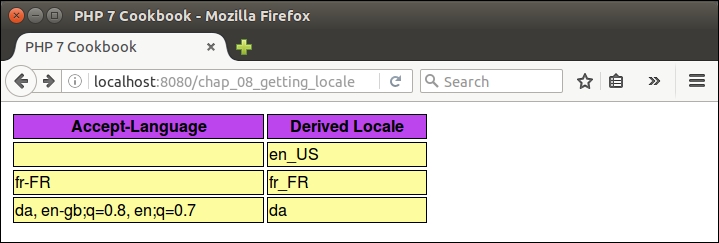
In this illustration, let's take three examples:
- information derived from the browser
- a preset locale
fr-FR - a string taken from RFC 2616:
da, en-gb;q=0.8, en;q=0.7
Place the code from steps 1 to 6 into a file, Locale.php, which is in the Application\I18n folder.
Next, create a file, chap_08_getting_locale_from_browser.php, which sets up autoloading and uses the new class:
<?php
  require __DIR__ . '/../Application/Autoload/Loader.php';
  Application\Autoload\Loader::init(__DIR__ . '/..');
  use Application\I18n\Locale;
Now you can define an array with the three test locale strings:
$locale = [NULL, 'fr-FR', 'da, en-gb;q=0.8, en;q=0.7'];
Finally, loop through the three locale strings, creating instances of the new class. Echo the value returned from getLocaleCode() to see what choice was made:
echo '<table>';
foreach ($locale as $code) {
  $locale = new Locale($code);
  echo '<tr>
    <td>' . htmlspecialchars($code) . '</td>
    <td>' . $locale->getLocaleCode() . '</td>
  </tr>';
}
echo '</table>';
Here is the result (with a little bit of styling):
- For information on the PHP
Localeclass, see http://php.net/manual/en/class.locale.php - For more information on the
Accept-Languageheader, see section 14.4 of RFC 2616: https://www.w3.org/Protocols/rfc2616/rfc2616-sec14.html