Table of Contents for
PHP 7: Real World Application Development
 PHP 7: Real World Application Development
Published by
Packt Publishing, 2016
PHP 7: Real World Application Development
Published by
Packt Publishing, 2016
- Cover
- Table of Contents
- PHP 7: Real World Application Development
- PHP 7: Real World Application Development
- PHP 7: Real World Application Development
- Credits
- Preface
- What you need for this learning path
- Who this learning path is for
- Reader feedback
- Customer support
- 1. Module 1
- 1. Building a Foundation
- PHP 7 installation considerations
- Using the built-in PHP web server
- Defining a test MySQL database
- Installing PHPUnit
- Implementing class autoloading
- Hoovering a website
- Building a deep web scanner
- Creating a PHP 5 to PHP 7 code converter
- 2. Using PHP 7 High Performance Features
- Understanding the abstract syntax tree
- Understanding differences in parsing
- Understanding differences in foreach() handling
- Improving performance using PHP 7 enhancements
- Iterating through a massive file
- Uploading a spreadsheet into a database
- Recursive directory iterator
- 3. Working with PHP Functions
- Developing functions
- Hinting at data types
- Using return value data typing
- Using iterators
- Writing your own iterator using generators
- 4. Working with PHP Object-Oriented Programming
- Developing classes
- Extending classes
- Using static properties and methods
- Using namespaces
- Defining visibility
- Using interfaces
- Using traits
- Implementing anonymous classes
- 5. Interacting with a Database
- Using PDO to connect to a database
- Building an OOP SQL query builder
- Handling pagination
- Defining entities to match database tables
- Tying entity classes to RDBMS queries
- Embedding secondary lookups into query results
- Implementing jQuery DataTables PHP lookups
- 6. Building Scalable Websites
- Creating a generic form element generator
- Creating an HTML radio element generator
- Creating an HTML select element generator
- Implementing a form factory
- Chaining $_POST filters
- Chaining $_POST validators
- Tying validation to a form
- 7. Accessing Web Services
- Converting between PHP and XML
- Creating a simple REST client
- Creating a simple REST server
- Creating a simple SOAP client
- Creating a simple SOAP server
- 8. Working with Date/Time and International Aspects
- Using emoticons or emoji in a view script
- Converting complex characters
- Getting the locale from browser data
- Formatting numbers by locale
- Handling currency by locale
- Formatting date/time by locale
- Creating an HTML international calendar generator
- Building a recurring events generator
- Handling translation without gettext
- 9. Developing Middleware
- Authenticating with middleware
- Using middleware to implement access control
- Improving performance using the cache
- Implementing routing
- Making inter-framework system calls
- Using middleware to cross languages
- 10. Looking at Advanced Algorithms
- Using getters and setters
- Implementing a linked list
- Building a bubble sort
- Implementing a stack
- Building a binary search class
- Implementing a search engine
- Displaying a multi-dimensional array and accumulating totals
- 11. Implementing Software Design Patterns
- Creating an array to object hydrator
- Building an object to array hydrator
- Implementing a strategy pattern
- Defining a mapper
- Implementing object-relational mapping
- Implementing the Pub/Sub design pattern
- 12. Improving Web Security
- Filtering $_POST data
- Validating $_POST data
- Safeguarding the PHP session
- Securing forms with a token
- Building a secure password generator
- Safeguarding forms with a CAPTCHA
- Encrypting/decrypting without mcrypt
- 13. Best Practices, Testing, and Debugging
- Using Traits and Interfaces
- Universal exception handler
- Universal error handler
- Writing a simple test
- Writing a test suite
- Generating fake test data
- Customizing sessions using session_start parameters
- A. Defining PSR-7 Classes
- Implementing PSR-7 value object classes
- Developing a PSR-7 Request class
- Defining a PSR-7 Response class
- 2. Module 2
- 1. Setting Up the Environment
- Setting up Debian or Ubuntu
- Setting up CentOS
- Setting up Vagrant
- Summary
- 2. New Features in PHP 7
- New operators
- Uniform variable syntax
- Miscellaneous features and changes
- Summary
- 3. Improving PHP 7 Application Performance
- HTTP server optimization
- HTTP persistent connection
- Content Delivery Network (CDN)
- CSS and JavaScript optimization
- Full page caching
- Varnish
- The infrastructure
- Summary
- 4. Improving Database Performance
- Storage engines
- The Percona Server - a fork of MySQL
- MySQL performance monitoring tools
- Percona XtraDB Cluster (PXC)
- Redis – the key-value cache store
- Memcached key-value cache store
- Summary
- 5. Debugging and Profiling
- Profiling with Xdebug
- PHP DebugBar
- Summary
- 6. Stress/Load Testing PHP Applications
- ApacheBench (ab)
- Siege
- Load testing real-world applications
- Summary
- 7. Best Practices in PHP Programming
- Test-driven development (TDD)
- Design patterns
- Service-oriented architecture (SOA)
- Being object-oriented and reusable always
- PHP frameworks
- Version control system (VCS) and Git
- Deployment and Continuous Integration (CI)
- Summary
- A. Tools to Make Life Easy
- Git – A version control system
- Grunt watch
- Summary
- B. MVC and Frameworks
- Laravel
- Lumen
- Apigility
- Summary
- 3. Module 3
- 1. Ecosystem Overview
- Summary
- 2. GoF Design Patterns
- Structural patterns
- Behavioral patterns
- Summary
- 3. SOLID Design Principles
- Open/closed principle
- Liskov substitution principle
- Interface Segregation Principle
- Dependency inversion principle
- Summary
- 4. Requirement Specification for a Modular Web Shop App
- Wireframing
- Defining a technology stack
- Summary
- 5. Symfony at a Glance
- Creating a blank project
- Using Symfony console
- Controller
- Routing
- Templates
- Forms
- Configuring Symfony
- The bundle system
- Databases and Doctrine
- Testing
- Validation
- Summary
- 6. Building the Core Module
- Dependencies
- Implementation
- Unit testing
- Functional testing
- Summary
- 7. Building the Catalog Module
- Dependencies
- Implementation
- Unit testing
- Functional testing
- Summary
- 8. Building the Customer Module
- Dependencies
- Implementation
- Unit testing
- Functional testing
- Summary
- 9. Building the Payment Module
- Dependencies
- Implementation
- Unit testing
- Functional testing
- Summary
- 10. Building the Shipment Module
- Dependencies
- Implementation
- Unit testing
- Functional testing
- Summary
- 11. Building the Sales Module
- Dependencies
- Implementation
- Unit testing
- Functional testing
- Summary
- 12. Integrating and Distributing Modules
- Understanding GitHub
- Understanding Composer
- Understanding Packagist
- Summary
- Bibliography
- Index
There are several considerations when implementing a REST server. The answers to these three questions will then let you define your REST service:
- We will implement our REST server by building onto the request and response classes defined in the previous recipe, Creating a simple REST client. Review the classes discussed in the previous recipe, including the following:
Application\Web\AbstractHttpApplication\Web\RequestApplication\Web\Received
- We will also need to define a formal
Application\Web\Responseresponse class, based onAbstractHttp. The primary difference between this class and the others is that it accepts an instance ofApplication\Web\Requestas an argument. The primary work is accomplished in the__construct()method. It's also important to set theContent-Typeheader and status:namespace Application\Web; class Response extends AbstractHttp { public function __construct(Request $request = NULL, $status = NULL, $contentType = NULL) { if ($request) { $this->uri = $request->getUri(); $this->data = $request->getData(); $this->method = $request->getMethod(); $this->cookies = $request->getCookies(); $this->setTransport(); } $this->processHeaders($contentType); if ($status) { $this->setStatus($status); } } protected function processHeaders($contentType) { if (!$contentType) { $this->setHeaderByKey(self::HEADER_CONTENT_TYPE, self::CONTENT_TYPE_JSON); } else { $this->setHeaderByKey(self::HEADER_CONTENT_TYPE, $contentType); } } public function setStatus($status) { $this->status = $status; } public function getStatus() { return $this->status; } } - We are now in a position to define the
Application\Web\Rest\Serverclass. You may be surprised at how simple it is. The real work is done in the associated API class:namespace Application\Web\Rest; use Application\Web\ { Request, Response, Received }; class Server { protected $api; public function __construct(ApiInterface $api) { $this->api = $api; } - Next, we define a
listen()method that serves as a target for the request. The heart of the server implementation is this line of code:$jsonData = json_decode(file_get_contents('php://input'),true); - This captures raw input, which is assumed to be in JSON format:
public function listen()
{
  $request  = new Request();
  $response = new Response($request);
  $getPost  = $_REQUEST ?? array();
  $jsonData = json_decode(
    file_get_contents('php://input'),true);
  $jsonData = $jsonData ?? array();
  $request->setData(array_merge($getPost,$jsonData));
Note
We have also added a provision for authentication. Otherwise, anybody could make requests and obtain potentially sensitive data. You will note that we do not have the server class performing authentication; rather, we leave it to the API class:
if (!$this->api->authenticate($request)) { $response->setStatus(Request::STATUS_401); echo $this->api::ERROR; exit; } - We then map API methods to the primary HTTP methods
GET,PUT,POST,andDELETE:$id = $request->getData()[$this->api::ID_FIELD] ?? NULL; switch (strtoupper($request->getMethod())) { case Request::METHOD_POST : $this->api->post($request, $response); break; case Request::METHOD_PUT : $this->api->put($request, $response); break; case Request::METHOD_DELETE : $this->api->delete($request, $response); break; case Request::METHOD_GET : default : // return all if no params $this->api->get($request, $response); } - Finally, we package the response and send it out, JSON-encoded:
  $this->processResponse($response);
  echo json_encode($response->getData());
}
- The
processResponse()method sets headers and makes sure the result is packaged as anApplication\Web\Responseobject:protected function processResponse($response) { if ($response->getHeaders()) { foreach ($response->getHeaders() as $key => $value) { header($key . ': ' . $value, TRUE, $response->getStatus()); } } header(Request::HEADER_CONTENT_TYPE . ': ' . Request::CONTENT_TYPE_JSON, TRUE); if ($response->getCookies()) { foreach ($response->getCookies() as $key => $value) { setcookie($key, $value); } } } - As mentioned earlier, the real work is done by the API class. We start by defining an abstract class that ensures the primary methods
get(),put(), and so on are represented, and that all such methods accept request and response objects as arguments. You might notice that we have added agenerateToken()method that uses the PHP 7random_bytes()function to generate a truly random series of 16 bytes:namespace Application\Web\Rest; use Application\Web\ { Request, Response }; abstract class AbstractApi implements ApiInterface { const TOKEN_BYTE_SIZE = 16; protected $registeredKeys; abstract public function get(Request $request, Response $response); abstract public function put(Request $request, Response $response); abstract public function post(Request $request, Response $response); abstract public function delete(Request $request, Response $response); abstract public function authenticate(Request $request); public function __construct($registeredKeys, $tokenField) { $this->registeredKeys = $registeredKeys; } public static function generateToken() { return bin2hex(random_bytes(self::TOKEN_BYTE_SIZE)); } } - We also define a corresponding interface that can be used for architectural and design purposes, as well as code development control:
namespace Application\Web\Rest; use Application\Web\ { Request, Response }; interface ApiInterface { public function get(Request $request, Response $response); public function put(Request $request, Response $response); public function post(Request $request, Response $response); public function delete(Request $request, Response $response); public function authenticate(Request $request); } - Here, we present a sample API based on
AbstractApi. This class leverages database classes defined in Chapter 5, Interacting with a Database:namespace Application\Web\Rest; use Application\Web\ { Request, Response, Received }; use Application\Entity\Customer; use Application\Database\ { Connection, CustomerService }; class CustomerApi extends AbstractApi { const ERROR = 'ERROR'; const ERROR_NOT_FOUND = 'ERROR: Not Found'; const SUCCESS_UPDATE = 'SUCCESS: update succeeded'; const SUCCESS_DELETE = 'SUCCESS: delete succeeded'; const ID_FIELD = 'id'; // field name of primary key const TOKEN_FIELD = 'token'; // field used for authentication const LIMIT_FIELD = 'limit'; const OFFSET_FIELD = 'offset'; const DEFAULT_LIMIT = 20; const DEFAULT_OFFSET = 0; protected $service; public function __construct($registeredKeys, $dbparams, $tokenField = NULL) { parent::__construct($registeredKeys, $tokenField); $this->service = new CustomerService( new Connection($dbparams)); } - All methods receive request and response as arguments. You will notice the use of
getDataByKey()to retrieve data items. The actual database interaction is performed by the service class. You might also notice that in all cases, we set an HTTP status code to inform the client of success or failure. In the case ofget(), we look for an ID parameter. If received, we deliver information on a single customer only. Otherwise, we deliver a list of all customers using limit and offset:public function get(Request $request, Response $response) { $result = array(); $id = $request->getDataByKey(self::ID_FIELD) ?? 0; if ($id > 0) { $result = $this->service-> fetchById($id)->entityToArray(); } else { $limit = $request->getDataByKey(self::LIMIT_FIELD) ?? self::DEFAULT_LIMIT; $offset = $request->getDataByKey(self::OFFSET_FIELD) ?? self::DEFAULT_OFFSET; $result = []; $fetch = $this->service->fetchAll($limit, $offset); foreach ($fetch as $row) { $result[] = $row; } } if ($result) { $response->setData($result); $response->setStatus(Request::STATUS_200); } else { $response->setData([self::ERROR_NOT_FOUND]); $response->setStatus(Request::STATUS_500); } } - The
put()method is used to insert customer data:public function put(Request $request, Response $response) { $cust = Customer::arrayToEntity($request->getData(), new Customer()); if ($newCust = $this->service->save($cust)) { $response->setData(['success' => self::SUCCESS_UPDATE, 'id' => $newCust->getId()]); $response->setStatus(Request::STATUS_200); } else { $response->setData([self::ERROR]); $response->setStatus(Request::STATUS_500); } } - The
post()method is used to update existing customer entries:public function post(Request $request, Response $response) { $id = $request->getDataByKey(self::ID_FIELD) ?? 0; $reqData = $request->getData(); $custData = $this->service-> fetchById($id)->entityToArray(); $updateData = array_merge($custData, $reqData); $updateCust = Customer::arrayToEntity($updateData, new Customer()); if ($this->service->save($updateCust)) { $response->setData(['success' => self::SUCCESS_UPDATE, 'id' => $updateCust->getId()]); $response->setStatus(Request::STATUS_200); } else { $response->setData([self::ERROR]); $response->setStatus(Request::STATUS_500); } } - As the name implies,
delete()removes a customer entry:public function delete(Request $request, Response $response) { $id = $request->getDataByKey(self::ID_FIELD) ?? 0; $cust = $this->service->fetchById($id); if ($cust && $this->service->remove($cust)) { $response->setData(['success' => self::SUCCESS_DELETE, 'id' => $id]); $response->setStatus(Request::STATUS_200); } else { $response->setData([self::ERROR_NOT_FOUND]); $response->setStatus(Request::STATUS_500); } } - Finally, we define
authenticate()to provide, in this example, a low-level mechanism to protect API usage:public function authenticate(Request $request) { $authToken = $request->getDataByKey(self::TOKEN_FIELD) ?? FALSE; if (in_array($authToken, $this->registeredKeys, TRUE)) { return TRUE; } else { return FALSE; } } }
Define the following classes, which were discussed in the previous recipe:
Application\Web\AbstractHttpApplication\Web\RequestApplication\Web\Received
You can then define the following classes, described in this recipe, summarized in this table:
|
Class Application\Web\* |
Discussed in these steps |
|---|---|
|
|
2 |
|
|
3 - 8 |
|
|
9 |
|
|
10 |
|
|
11 - 16 |
You are now free to develop your own API class. If you choose to follow the illustration Application\Web\Rest\CustomerApi, however, you will need to also be sure to implement these classes, covered in Chapter 5, Interacting with a Database:
Application\Entity\CustomerApplication\Database\ConnectionApplication\Database\CustomerService
You can now define a chap_07_simple_rest_server.php script that invokes the REST server:
<?php
$dbParams = include __DIR__ .  '/../../config/db.config.php';
require __DIR__ . '/../Application/Autoload/Loader.php';
Application\Autoload\Loader::init(__DIR__ . '/..');
use Application\Web\Rest\Server;
use Application\Web\Rest\CustomerApi;
$apiKey = include __DIR__ . '/api_key.php';
$server = new Server(new CustomerApi([$apiKey], $dbParams, 'id'));
$server->listen();
You can then use the built-in PHP 7 development server to listen on port 8080 for REST requests:
php -S localhost:8080 chap_07_simple_rest_server.php
To test your API, use the Application\Web\Rest\AbstractApi::generateToken() method to generate an authentication token that you can place in an api_key.php file, something like this:
<?php return '79e9b5211bbf2458a4085707ea378129';
You can then use a generic API client (such as the one described in the previous recipe), or a browser plugin such as RESTClient by Chao Zhou (see http://restclient.net/ for more information) to generate sample requests. Make sure you include the token for your request, otherwise the API as defined will reject the request.
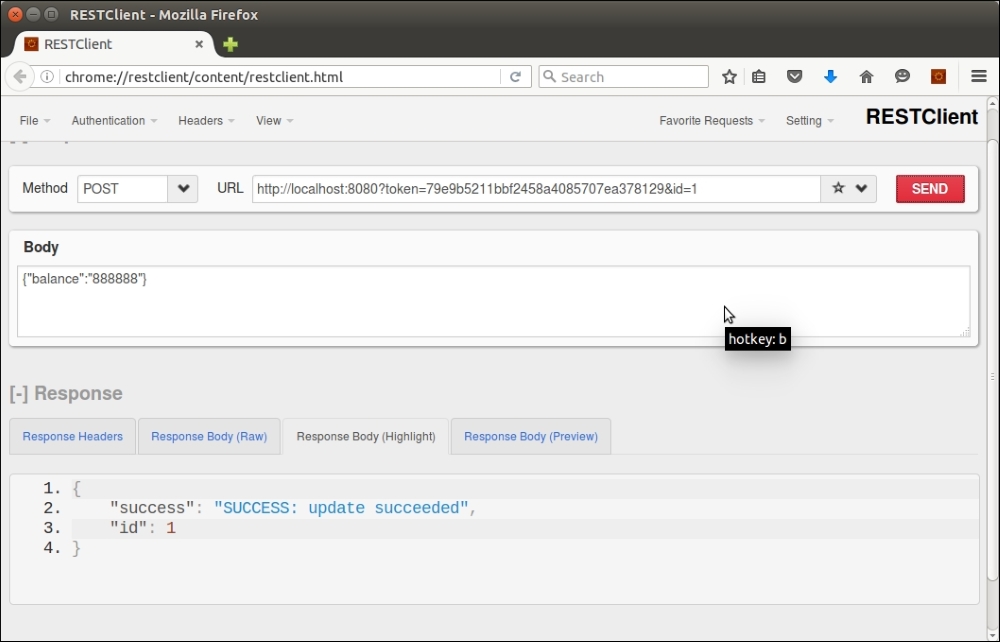
Here is an example of a POST request for ID 1, which sets the balance field to a value of 888888:
There are a number of libraries that help you implement a REST server. One of my favorites is an example implementing a REST server in a single file: https://www.leaseweb.com/labs/2015/10/creating-a-simple-rest-api-in-php/
Various frameworks, such as CodeIgniter and Zend Framework, also have REST server implementations.