Table of Contents for
PHP 7: Real World Application Development
 PHP 7: Real World Application Development
Published by
Packt Publishing, 2016
PHP 7: Real World Application Development
Published by
Packt Publishing, 2016
- Cover
- Table of Contents
- PHP 7: Real World Application Development
- PHP 7: Real World Application Development
- PHP 7: Real World Application Development
- Credits
- Preface
- What you need for this learning path
- Who this learning path is for
- Reader feedback
- Customer support
- 1. Module 1
- 1. Building a Foundation
- PHP 7 installation considerations
- Using the built-in PHP web server
- Defining a test MySQL database
- Installing PHPUnit
- Implementing class autoloading
- Hoovering a website
- Building a deep web scanner
- Creating a PHP 5 to PHP 7 code converter
- 2. Using PHP 7 High Performance Features
- Understanding the abstract syntax tree
- Understanding differences in parsing
- Understanding differences in foreach() handling
- Improving performance using PHP 7 enhancements
- Iterating through a massive file
- Uploading a spreadsheet into a database
- Recursive directory iterator
- 3. Working with PHP Functions
- Developing functions
- Hinting at data types
- Using return value data typing
- Using iterators
- Writing your own iterator using generators
- 4. Working with PHP Object-Oriented Programming
- Developing classes
- Extending classes
- Using static properties and methods
- Using namespaces
- Defining visibility
- Using interfaces
- Using traits
- Implementing anonymous classes
- 5. Interacting with a Database
- Using PDO to connect to a database
- Building an OOP SQL query builder
- Handling pagination
- Defining entities to match database tables
- Tying entity classes to RDBMS queries
- Embedding secondary lookups into query results
- Implementing jQuery DataTables PHP lookups
- 6. Building Scalable Websites
- Creating a generic form element generator
- Creating an HTML radio element generator
- Creating an HTML select element generator
- Implementing a form factory
- Chaining $_POST filters
- Chaining $_POST validators
- Tying validation to a form
- 7. Accessing Web Services
- Converting between PHP and XML
- Creating a simple REST client
- Creating a simple REST server
- Creating a simple SOAP client
- Creating a simple SOAP server
- 8. Working with Date/Time and International Aspects
- Using emoticons or emoji in a view script
- Converting complex characters
- Getting the locale from browser data
- Formatting numbers by locale
- Handling currency by locale
- Formatting date/time by locale
- Creating an HTML international calendar generator
- Building a recurring events generator
- Handling translation without gettext
- 9. Developing Middleware
- Authenticating with middleware
- Using middleware to implement access control
- Improving performance using the cache
- Implementing routing
- Making inter-framework system calls
- Using middleware to cross languages
- 10. Looking at Advanced Algorithms
- Using getters and setters
- Implementing a linked list
- Building a bubble sort
- Implementing a stack
- Building a binary search class
- Implementing a search engine
- Displaying a multi-dimensional array and accumulating totals
- 11. Implementing Software Design Patterns
- Creating an array to object hydrator
- Building an object to array hydrator
- Implementing a strategy pattern
- Defining a mapper
- Implementing object-relational mapping
- Implementing the Pub/Sub design pattern
- 12. Improving Web Security
- Filtering $_POST data
- Validating $_POST data
- Safeguarding the PHP session
- Securing forms with a token
- Building a secure password generator
- Safeguarding forms with a CAPTCHA
- Encrypting/decrypting without mcrypt
- 13. Best Practices, Testing, and Debugging
- Using Traits and Interfaces
- Universal exception handler
- Universal error handler
- Writing a simple test
- Writing a test suite
- Generating fake test data
- Customizing sessions using session_start parameters
- A. Defining PSR-7 Classes
- Implementing PSR-7 value object classes
- Developing a PSR-7 Request class
- Defining a PSR-7 Response class
- 2. Module 2
- 1. Setting Up the Environment
- Setting up Debian or Ubuntu
- Setting up CentOS
- Setting up Vagrant
- Summary
- 2. New Features in PHP 7
- New operators
- Uniform variable syntax
- Miscellaneous features and changes
- Summary
- 3. Improving PHP 7 Application Performance
- HTTP server optimization
- HTTP persistent connection
- Content Delivery Network (CDN)
- CSS and JavaScript optimization
- Full page caching
- Varnish
- The infrastructure
- Summary
- 4. Improving Database Performance
- Storage engines
- The Percona Server - a fork of MySQL
- MySQL performance monitoring tools
- Percona XtraDB Cluster (PXC)
- Redis – the key-value cache store
- Memcached key-value cache store
- Summary
- 5. Debugging and Profiling
- Profiling with Xdebug
- PHP DebugBar
- Summary
- 6. Stress/Load Testing PHP Applications
- ApacheBench (ab)
- Siege
- Load testing real-world applications
- Summary
- 7. Best Practices in PHP Programming
- Test-driven development (TDD)
- Design patterns
- Service-oriented architecture (SOA)
- Being object-oriented and reusable always
- PHP frameworks
- Version control system (VCS) and Git
- Deployment and Continuous Integration (CI)
- Summary
- A. Tools to Make Life Easy
- Git – A version control system
- Grunt watch
- Summary
- B. MVC and Frameworks
- Laravel
- Lumen
- Apigility
- Summary
- 3. Module 3
- 1. Ecosystem Overview
- Summary
- 2. GoF Design Patterns
- Structural patterns
- Behavioral patterns
- Summary
- 3. SOLID Design Principles
- Open/closed principle
- Liskov substitution principle
- Interface Segregation Principle
- Dependency inversion principle
- Summary
- 4. Requirement Specification for a Modular Web Shop App
- Wireframing
- Defining a technology stack
- Summary
- 5. Symfony at a Glance
- Creating a blank project
- Using Symfony console
- Controller
- Routing
- Templates
- Forms
- Configuring Symfony
- The bundle system
- Databases and Doctrine
- Testing
- Validation
- Summary
- 6. Building the Core Module
- Dependencies
- Implementation
- Unit testing
- Functional testing
- Summary
- 7. Building the Catalog Module
- Dependencies
- Implementation
- Unit testing
- Functional testing
- Summary
- 8. Building the Customer Module
- Dependencies
- Implementation
- Unit testing
- Functional testing
- Summary
- 9. Building the Payment Module
- Dependencies
- Implementation
- Unit testing
- Functional testing
- Summary
- 10. Building the Shipment Module
- Dependencies
- Implementation
- Unit testing
- Functional testing
- Summary
- 11. Building the Sales Module
- Dependencies
- Implementation
- Unit testing
- Functional testing
- Summary
- 12. Integrating and Distributing Modules
- Understanding GitHub
- Understanding Composer
- Understanding Packagist
- Summary
- Bibliography
- Index
An iterator is a special type of class that allows you to traverse a container or list. The keyword here is traverse. What this means is that the iterator provides the means to go through a list, but it does not perform the traversal itself.
The SPL provides a rich assortment of generic and specialized iterators designed for different contexts. The ArrayIterator, for example, is designed to allow object-oriented traversal of arrays. The DirectoryIterator is designed for filesystem scanning.
Certain SPL iterators are designed to work with others, and add value. Examples include FilterIterator and LimitIterator. The former gives you the ability to remove unwanted values from the parent iterator. The latter provides a pagination capability whereby you can designate how many items to traverse along with an offset that determines where to start.
Finally, there are a series of recursive iterators, which allow you to repeatedly call the parent iterator. An example would be RecursiveDirectoryIterator which scans a directory tree all the way from a starting point to the last possible subdirectory.
- We first examine the
ArrayIteratorclass. It's extremely easy to use. All you need to do is to supply an array as an argument to the constructor. After that you can use any of the methods that are standard to all SPL-based iterators, such ascurrent(),next(), and so on.$iterator = new ArrayIterator($array);
- As an example of a practical use for the iterator, have a look at this example. It takes an iterator and produces a series of HTML
<ul>and<li>tags:function htmlList($iterator) { $output = '<ul>'; while ($value = $iterator->current()) { $output .= '<li>' . $value . '</li>'; $iterator->next(); } $output .= '</ul>'; return $output; } - Alternatively, you can simply wrap the
ArrayIteratorinstance into a simpleforeach()loop:function htmlList($iterator) { $output = '<ul>'; foreach($iterator as $value) { $output .= '<li>' . $value . '</li>'; } $output .= '</ul>'; return $output; } CallbackFilterIteratoris a great way to add value to any existing iterator you might be using. It allows you to wrap any existing iterator and screen the output. In this example we'll definefetchCountryName(), which iterates through a database query which produces a list of country names. First, we define anArrayIteratorinstance from a query that uses theApplication\Database\Connectionclass defined in Chapter 1, Building a Foundation:function fetchCountryName($sql, $connection) { $iterator = new ArrayIterator(); $stmt = $connection->pdo->query($sql); while($row = $stmt->fetch(PDO::FETCH_ASSOC)) { $iterator->append($row['name']); } return $iterator; }- Next, we define a filter method,
nameFilterIterator(), which accepts a partial country name as an argument along with theArrayIteratorinstance:function nameFilterIterator($innerIterator, $name) { if (!$name) return $innerIterator; $name = trim($name); $iterator = new CallbackFilterIterator($innerIterator, function($current, $key, $iterator) use ($name) { $pattern = '/' . $name . '/i'; return (bool) preg_match($pattern, $current); } ); return $iterator; } LimitIteratoradds a basic pagination aspect to your applications. To use this iterator, you only need to supply the parent iterator, an offset, and a limit.LimitIteratorwill then only produce a subset of the entire data set starting at the offset. Taking the same example mentioned in step 2, we'll paginate the results coming from our database query. We can do this quite simply by wrapping the iterator produced by thefetchCountryName()method inside aLimitIteratorinstance:$pagination = new LimitIterator(fetchCountryName( $sql, $connection), $offset, $limit);
- Iterators can be stacked. In this simple example, an
ArrayIteratoris processed by aFilterIterator, which in turn is limited by aLimitIterator. First we set up an instance ofArrayIterator:$i = new ArrayIterator($a);
- Next, we plug the
ArrayIteratorinto aFilterIteratorinstance. Note that we are using the new PHP 7 anonymous class feature. In this case the anonymous class extendsFilterIteratorand overrides theaccept()method, allowing only letters with even-numbered ASCII codes:$f = new class ($i) extends FilterIterator { public function accept() { $current = $this->current(); return !(ord($current) & 1); } }; - Finally, we supply the
FilterIteratorinstance as an argument toLimitIterator, and provide an offset (2in this example) and a limit (6in this example):$l = new LimitIterator($f, 2, 6);
- We could then define a simple function to display output, and call each iterator in turn to see the results on a simple array produced by
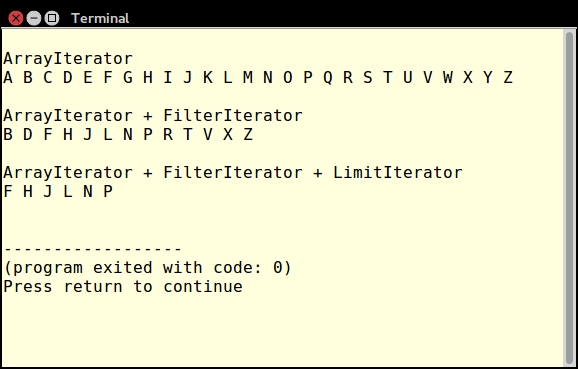
range('A', 'Z'):function showElements($iterator) { foreach($iterator as $item) echo $item . ' '; echo PHP_EOL; } $a = range('A', 'Z'); $i = new ArrayIterator($a); showElements($i); - Here is a variation that produces every other letter by stacking a
FilterIteratoron top of anArrayIterator:$f = new class ($i) extends FilterIterator { public function accept() { $current = $this->current(); return !(ord($current) & 1); } }; showElements($f); - And here's yet another variation that only produces
F H J L N P, which demonstrates aLimitIteratorthat consumes aFilterIterator, which in turn consumes anArrayIterator. The output of these three examples is as follows:$l = new LimitIterator($f, 2, 6); showElements($l);
- Returning to our example that produces a list of country names, suppose, instead of only the country name, we wished to iterate through a multi-dimensional array consisting of country names and ISO codes. The simple iterators mentioned so far would not be sufficient. Instead, we will use what are known as recursive iterators.
- First of all, we need to define a method that uses the database connection class mentioned previously to pull all columns from the database. As before, we return an
ArrayIteratorinstance populated with data from the query:function fetchAllAssoc($sql, $connection) { $iterator = new ArrayIterator(); $stmt = $connection->pdo->query($sql); while($row = $stmt->fetch(PDO::FETCH_ASSOC)) { $iterator->append($row); } return $iterator; } - At first glance one would be tempted to simply wrap a standard
ArrayIteratorinstance insideRecursiveArrayIterator. Unfortunately, this approach only performs a shallow iteration, and doesn't give us what we want: an iteration through all elements of the multi-dimensional array that is returned from a database query:$iterator = fetchAllAssoc($sql, $connection); $shallow = new RecursiveArrayIterator($iterator);
- Although this returns an iteration where each item represents a row from the database query, in this case we wish to provide an iteration that will iterate through all columns of all rows returned by the query. In order to accomplish this, we'll need to roll out the big brass by way of a
RecursiveIteratorIterator. - Monty Python fans will revel in the rich irony of this class name as it brings back fond memories of the The Department of Redundancy Department. Fittingly, this class causes our old friend the
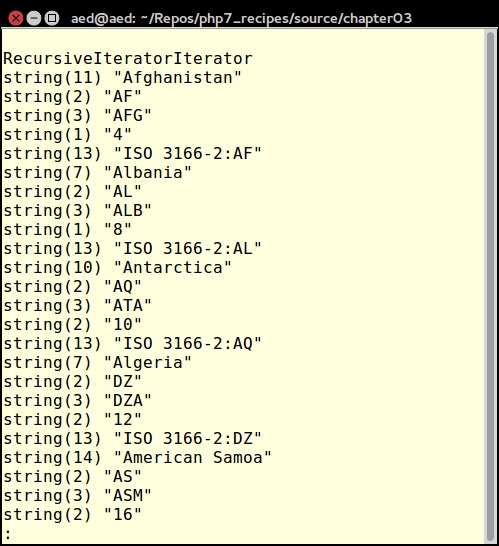
RecursiveArrayIteratorclass to work overtime and perform a deep iteration through all levels of the array:$deep = new RecursiveIteratorIterator($shallow);
As a practical example, you can develop a test script which implements filtering and pagination using iterators. For this illustration, you could call the chap_03_developing_functions_filtered_and_paginated.php test code file.
First of all, following best practices, place the functions described above into an include file called chap_03_developing_functions_iterators_library.php. In the test script, be sure to include this file.
The data source is a table called iso_country_codes, which contains ISO2, ISO3, and country names. The database connection could be in a config/db.config.php file. You could also include the Application\Database\Connection class discussed in the previous chapter:
define('DB_CONFIG_FILE', '/../config/db.config.php');
define('ITEMS_PER_PAGE', [5, 10, 15, 20]);
include (__DIR__ . '/chap_03_developing_functions_iterators_library.php');
include (__DIR__ . '/../Application/Database/Connection.php');Next, you can process input parameters for the country name and the number of items per page. The current page number will start at 0 and can be incremented (next page) or decremented (previous page):
$name = strip_tags($_GET['name'] ?? ''); $limit = (int) ($_GET['limit'] ?? 10); $page = (int) ($_GET['page'] ?? 0); $offset = $page * $limit; $prev = ($page > 0) ? $page - 1 : 0; $next = $page + 1;
Now you're ready to fire up the database connection and run a simple SELECT query. This should be placed in a try {} catch {} block. You can then place the iterators to be stacked inside the try {} block:
try {
$connection = new Application\Database\Connection(
include __DIR__ . DB_CONFIG_FILE);
$sql = 'SELECT * FROM iso_country_codes';
$arrayIterator = fetchCountryName($sql, $connection);
$filteredIterator = nameFilterIterator($arrayIterator, $name);
$limitIterator = pagination(
$filteredIterator, $offset, $limit);
} catch (Throwable $e) {
echo $e->getMessage();
}Now we're ready for the HTML. In this simple example we present a form that lets the user select the number of items per page and the country name:
<form>
Country Name:
<input type="text" name="name"
value="<?= htmlspecialchars($name) ?>">
Items Per Page:
<select name="limit">
<?php foreach (ITEMS_PER_PAGE as $item) : ?>
<option<?= ($item == $limit) ? ' selected' : '' ?>>
<?= $item ?></option>
<?php endforeach; ?>
</select>
<input type="submit" />
</form>
<a href="?name=<?= $name ?>&limit=<?= $limit ?>
&page=<?= $prev ?>">
<< PREV</a>
<a href="?name=<?= $name ?>&limit=<?= $limit ?>
&page=<?= $next ?>">
NEXT >></a>
<?= htmlList($limitIterator); ?>The output will look something like this:
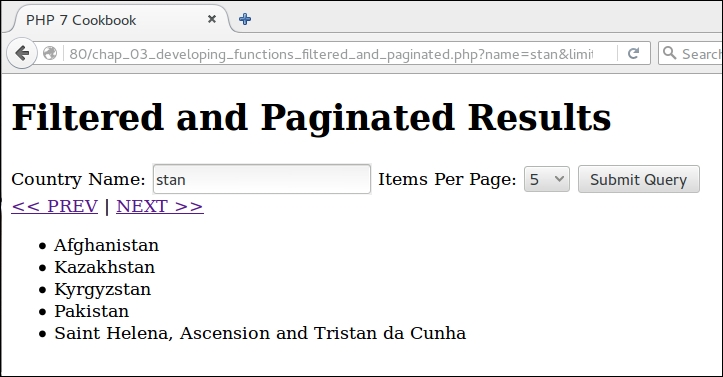
Finally, in order to test the recursive iteration of the country database lookup, you will need to include the iterator's library file, as well as the Application\Database\Connection class:
define('DB_CONFIG_FILE', '/../config/db.config.php');
include (__DIR__ . '/chap_03_developing_functions_iterators_library.php');
include (__DIR__ . '/../Application/Database/Connection.php');As before, you should wrap your database query in a try {} catch {} block. You can then place the code to test the recursive iteration inside the try {} block:
try {
$connection = new Application\Database\Connection(
include __DIR__ . DB_CONFIG_FILE);
$sql = 'SELECT * FROM iso_country_codes';
$iterator = fetchAllAssoc($sql, $connection);
$shallow  = new RecursiveArrayIterator($iterator);
foreach ($shallow as $item) var_dump($item);
$deep = new RecursiveIteratorIterator($shallow);
foreach ($deep as $item) var_dump($item);
} catch (Throwable $e) {
echo $e->getMessage();
}Here is what you can expect to see in terms of output from RecursiveArrayIterator:
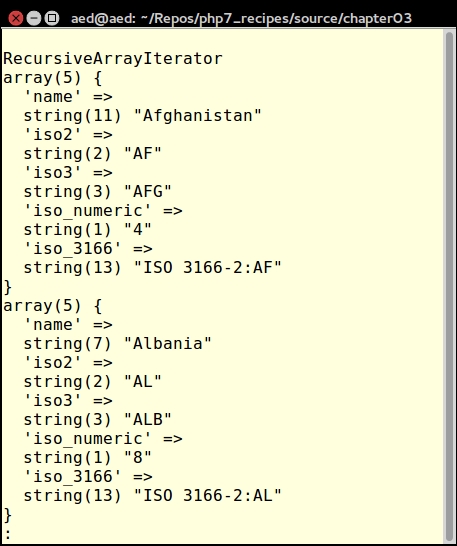
Here is the output after using RecursiveIteratorIterator: