Table of Contents for
PHP 7: Real World Application Development
 PHP 7: Real World Application Development
Published by
Packt Publishing, 2016
PHP 7: Real World Application Development
Published by
Packt Publishing, 2016
- Cover
- Table of Contents
- PHP 7: Real World Application Development
- PHP 7: Real World Application Development
- PHP 7: Real World Application Development
- Credits
- Preface
- What you need for this learning path
- Who this learning path is for
- Reader feedback
- Customer support
- 1. Module 1
- 1. Building a Foundation
- PHP 7 installation considerations
- Using the built-in PHP web server
- Defining a test MySQL database
- Installing PHPUnit
- Implementing class autoloading
- Hoovering a website
- Building a deep web scanner
- Creating a PHP 5 to PHP 7 code converter
- 2. Using PHP 7 High Performance Features
- Understanding the abstract syntax tree
- Understanding differences in parsing
- Understanding differences in foreach() handling
- Improving performance using PHP 7 enhancements
- Iterating through a massive file
- Uploading a spreadsheet into a database
- Recursive directory iterator
- 3. Working with PHP Functions
- Developing functions
- Hinting at data types
- Using return value data typing
- Using iterators
- Writing your own iterator using generators
- 4. Working with PHP Object-Oriented Programming
- Developing classes
- Extending classes
- Using static properties and methods
- Using namespaces
- Defining visibility
- Using interfaces
- Using traits
- Implementing anonymous classes
- 5. Interacting with a Database
- Using PDO to connect to a database
- Building an OOP SQL query builder
- Handling pagination
- Defining entities to match database tables
- Tying entity classes to RDBMS queries
- Embedding secondary lookups into query results
- Implementing jQuery DataTables PHP lookups
- 6. Building Scalable Websites
- Creating a generic form element generator
- Creating an HTML radio element generator
- Creating an HTML select element generator
- Implementing a form factory
- Chaining $_POST filters
- Chaining $_POST validators
- Tying validation to a form
- 7. Accessing Web Services
- Converting between PHP and XML
- Creating a simple REST client
- Creating a simple REST server
- Creating a simple SOAP client
- Creating a simple SOAP server
- 8. Working with Date/Time and International Aspects
- Using emoticons or emoji in a view script
- Converting complex characters
- Getting the locale from browser data
- Formatting numbers by locale
- Handling currency by locale
- Formatting date/time by locale
- Creating an HTML international calendar generator
- Building a recurring events generator
- Handling translation without gettext
- 9. Developing Middleware
- Authenticating with middleware
- Using middleware to implement access control
- Improving performance using the cache
- Implementing routing
- Making inter-framework system calls
- Using middleware to cross languages
- 10. Looking at Advanced Algorithms
- Using getters and setters
- Implementing a linked list
- Building a bubble sort
- Implementing a stack
- Building a binary search class
- Implementing a search engine
- Displaying a multi-dimensional array and accumulating totals
- 11. Implementing Software Design Patterns
- Creating an array to object hydrator
- Building an object to array hydrator
- Implementing a strategy pattern
- Defining a mapper
- Implementing object-relational mapping
- Implementing the Pub/Sub design pattern
- 12. Improving Web Security
- Filtering $_POST data
- Validating $_POST data
- Safeguarding the PHP session
- Securing forms with a token
- Building a secure password generator
- Safeguarding forms with a CAPTCHA
- Encrypting/decrypting without mcrypt
- 13. Best Practices, Testing, and Debugging
- Using Traits and Interfaces
- Universal exception handler
- Universal error handler
- Writing a simple test
- Writing a test suite
- Generating fake test data
- Customizing sessions using session_start parameters
- A. Defining PSR-7 Classes
- Implementing PSR-7 value object classes
- Developing a PSR-7 Request class
- Defining a PSR-7 Response class
- 2. Module 2
- 1. Setting Up the Environment
- Setting up Debian or Ubuntu
- Setting up CentOS
- Setting up Vagrant
- Summary
- 2. New Features in PHP 7
- New operators
- Uniform variable syntax
- Miscellaneous features and changes
- Summary
- 3. Improving PHP 7 Application Performance
- HTTP server optimization
- HTTP persistent connection
- Content Delivery Network (CDN)
- CSS and JavaScript optimization
- Full page caching
- Varnish
- The infrastructure
- Summary
- 4. Improving Database Performance
- Storage engines
- The Percona Server - a fork of MySQL
- MySQL performance monitoring tools
- Percona XtraDB Cluster (PXC)
- Redis – the key-value cache store
- Memcached key-value cache store
- Summary
- 5. Debugging and Profiling
- Profiling with Xdebug
- PHP DebugBar
- Summary
- 6. Stress/Load Testing PHP Applications
- ApacheBench (ab)
- Siege
- Load testing real-world applications
- Summary
- 7. Best Practices in PHP Programming
- Test-driven development (TDD)
- Design patterns
- Service-oriented architecture (SOA)
- Being object-oriented and reusable always
- PHP frameworks
- Version control system (VCS) and Git
- Deployment and Continuous Integration (CI)
- Summary
- A. Tools to Make Life Easy
- Git – A version control system
- Grunt watch
- Summary
- B. MVC and Frameworks
- Laravel
- Lumen
- Apigility
- Summary
- 3. Module 3
- 1. Ecosystem Overview
- Summary
- 2. GoF Design Patterns
- Structural patterns
- Behavioral patterns
- Summary
- 3. SOLID Design Principles
- Open/closed principle
- Liskov substitution principle
- Interface Segregation Principle
- Dependency inversion principle
- Summary
- 4. Requirement Specification for a Modular Web Shop App
- Wireframing
- Defining a technology stack
- Summary
- 5. Symfony at a Glance
- Creating a blank project
- Using Symfony console
- Controller
- Routing
- Templates
- Forms
- Configuring Symfony
- The bundle system
- Databases and Doctrine
- Testing
- Validation
- Summary
- 6. Building the Core Module
- Dependencies
- Implementation
- Unit testing
- Functional testing
- Summary
- 7. Building the Catalog Module
- Dependencies
- Implementation
- Unit testing
- Functional testing
- Summary
- 8. Building the Customer Module
- Dependencies
- Implementation
- Unit testing
- Functional testing
- Summary
- 9. Building the Payment Module
- Dependencies
- Implementation
- Unit testing
- Functional testing
- Summary
- 10. Building the Shipment Module
- Dependencies
- Implementation
- Unit testing
- Functional testing
- Summary
- 11. Building the Sales Module
- Dependencies
- Implementation
- Unit testing
- Functional testing
- Summary
- 12. Integrating and Distributing Modules
- Understanding GitHub
- Understanding Composer
- Understanding Packagist
- Summary
- Bibliography
- Index
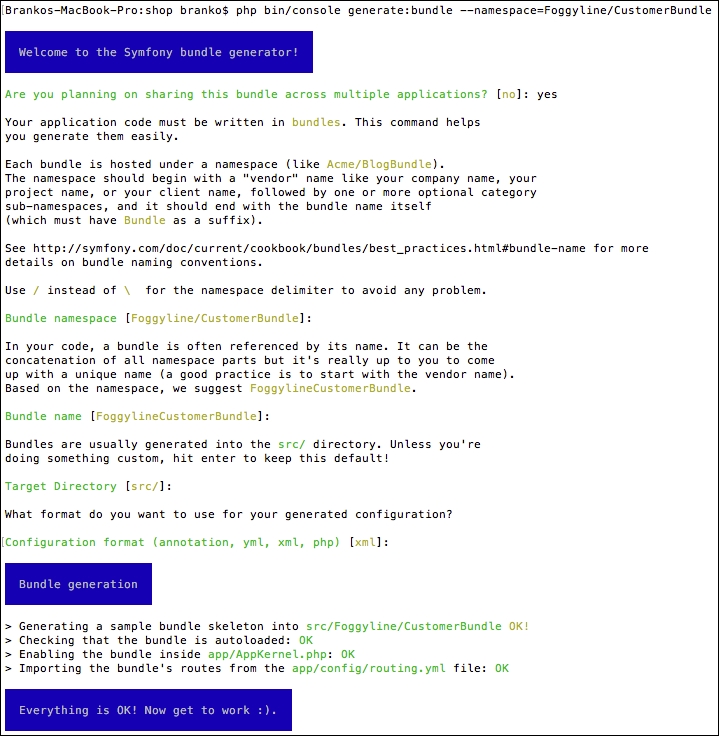
We start of by creating a new module called Foggyline\CustomerBundle. We do so with the help of console, by running the command as follows:
php bin/console generate:bundle --namespace=Foggyline/CustomerBundle
The command triggers an interactive process asking us several questions along the way, as shown in the following screenshot:
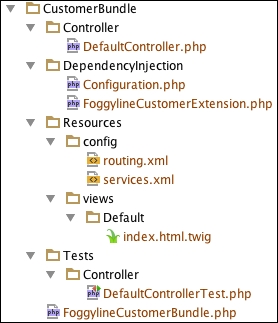
Once done, the following structure is generated for us:
If we now take a look at the app/AppKernel.php file, we would see the following line under the registerBundles method:
new Foggyline\CustomerBundle\FoggylineCustomerBundle()
Similarly, the app/config/routing.yml directory has the following route definition added to it:
foggyline_customer:
  resource: "@FoggylineCustomerBundle/Resources/config/routing.xml"
  prefix:   /
Here we need to change prefix: / into prefix: /customer/, so we don't collide with core module routes. Leaving it as prefix: / would simply overrun our core AppBundle and output Hello World! from the src/Foggyline/CustomerBundle/Resources/views/Default/index.html.twig template to the browser at this point. We want to keep things nice and separated. What this means is that the module does not define root route for itself.
Let's go ahead and create a Customer entity. We do so by using the console, as shown here:
php bin/console generate:doctrine:entity
This command triggers the interactive generator, where we need to provide entity properties. Once done, the generator creates the Entity/Customer.php and Repository/CustomerRepository.php files within the src/Foggyline/CustomerBundle/ directory. After this, we need to update the database, so it pulls in the Customer entity, by running the following command:
php bin/console doctrine:schema:update --force
This results in a screen as shown in the following screenshot:

With entity in place, we are ready to generate its CRUD. We do so by using the following command:
php bin/console generate:doctrine:crud
This results in an interactive output as shown here:
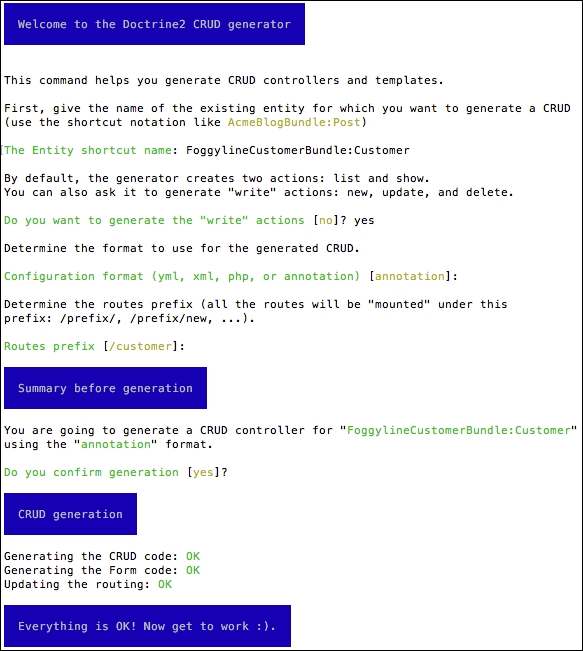
This results in the src/Foggyline/CustomerBundle/Controller/CustomerController.php directory being created. It also adds an entry to our app/config/routing.yml file as follows:
foggyline_customer_customer:
  resource: "@FoggylineCustomerBundle/Controller/CustomerController.php"
  type:     annotation
Again, the view files were created under the app/Resources/views/customer/ directory, which is not what we might expect. We want them under our module src/Foggyline/CustomerBundle/Resources/views/Default/customer/ directory, so we need to copy them over. Additionally, we need to modify all of the $this->render calls within our CustomerController by appending the FoggylineCustomerBundle:default: string to each of the template path.
Before we proceed further with the actual changes within our module, let's imagine our module requirements mandate a certain security configuration in order to make it work. These requirements state that we need to apply several changes to the app/config/security.yml file. We first edit the providers element by adding to it the following entry:
foggyline_customer:
  entity:
    class: FoggylineCustomerBundle:Customer
  property: username
This effectively defines our Customer class as a security provider, whereas the username element is the property storing user identity.
We then define the encoder type under the encoders element, as follows:
Foggyline\CustomerBundle\Entity\Customer:
  algorithm: bcrypt
  cost: 12
This tells Symfony to use the bcrypt algorithm with a value of 12 for algorithmic cost while encrypting our password. This way our passwords won't end up in clear text when saved in the database.
We then go ahead and define a new firewall entry under the firewalls element, as follows:
foggyline_customer:
  anonymous: ~
  provider: foggyline_customer
  form_login:
    login_path: foggyline_customer_login
    check_path: foggyline_customer_login
    default_target_path: customer_account
  logout:
    path:   /customer/logout
    target: /
There is quite a lot going on here. Our firewall uses the anonymous: ~ definition to denote that it does not really need a user to be logged in to see certain pages. By default, all Symfony users are authenticated as anonymous, as shown in the following screenshot, on the Developer toolbar:
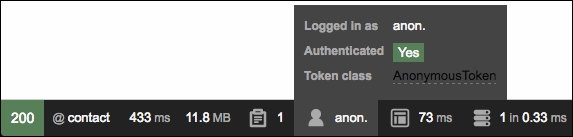
The form_login definition takes three properties. The login_path and the check_path point to our custom route foggyline_customer_login. When the security system initiates the authentication process, it will redirect the user to the foggyline_customer_login route, where we will soon implement needed controller logic and view templates in order to handle the login form. Once logged in, the default_target_path determines where the user will be redirected to.
Finally, we reuse the Symfony anonymous user feature in order to exclude certain pages from being forbidden. We want our non-authenticated customer to be able to access login, register, and forgotten password pages. To make that possible, we add the following entries under the access_control element:
- { path: customer/login, roles: IS_AUTHENTICATED_ANONYMOUSLY }
- { path: customer/register, roles: IS_AUTHENTICATED_ANONYMOUSLY }
- { path: customer/forgotten_password, roles: IS_AUTHENTICATED_ANONYMOUSLY }
- { path: customer/account, roles: ROLE_USER }
- { path: customer/logout, roles: ROLE_USER }
- { path: customer/, roles: ROLE_ADMIN }
It is worth noting that this approach to handling security between module and base application is by far the ideal one. This is merely one possible example of how we can achieve what is needed for this module to make it functional.
With the preceding security.yml additions in place, we are now ready to actually start implementing the registration process. First we edit the Customer entity within the src/Foggyline/CustomerBundle/Entity/ directory, by making it implement the Symfony\Component\Security\Core\User\UserInterface, \Serializable. This implies implementation of the following methods:
public function getSalt()
{
  return null;
}

public function getRoles()
{
  return array('ROLE_USER');
}

public function eraseCredentials()
{
}

public function serialize()
{
  return serialize(array(
    $this->id,
    $this->username,
    $this->password
  ));
}

public function unserialize($serialized)
{
  list (
    $this->id,
    $this->username,
    $this->password,
  ) = unserialize($serialized);
}
Even though all of the passwords need to be hashed with salt, the getSalt function in this case is irrelevant since bcrypt does this internally. The getRoles function is the important bit. We can return one or more roles that individual customers will have. To make things simple, we will only assign one ROLE_USER role to each of our customers. But this can easily be made much more robust, so that the roles are stored in the database as well. The eraseCredentials function is merely a cleanup method, which we left blank.
Since the user object is first unserialized, serialized, and saved to a session per each request, we implement the \Serializable interface. The actual implementation of serialize and unserialize can include only a fraction of customer properties, as we do not need to store everything in the session.
Before we go ahead and start implementing the register, login, forgot your password, and other bits, let's go ahead and define the needed services we are going to use later on.
We will create an orders service which will be used to fill in the data available under the My Account page. Later on, other modules can override this service and inject real customer orders. To define an orders service, we edit the src/Foggyline/CustomerBundle/Resources/config/services.xml file by adding the following under the services element:
<service id="foggyline_customer.customer_orders" class="Foggyline\CustomerBundle\Service\CustomerOrders">
</service>
Then, we go ahead and create the src/Foggyline/CustomerBundle/Service/CustomerOrders.php directory with content as follows:
namespace Foggyline\CustomerBundle\Service;

class CustomerOrders
{
  public function getOrders()
  {
    return array(
      array(
        'id' => '0000000001',
        'date' => '23/06/2016 18:45',
        'ship_to' => 'John Doe',
        'order_total' => 49.99,
        'status' => 'Processing',
        'actions' => array(
          array(
            'label' => 'Cancel',
            'path' => '#'
          ),
          array(
            'label' => 'Print',
            'path' => '#'
          )
        )
      ),
    );
  }
}
The getOrders method simply returns some dummy data here. We can easily make it return an empty array. Ideally, we would want this to return a collection of certain types of element that conform to some specific interface.
In the previous module we defined a customer service that filled in the Customer menu with some dummy data. Now we will create an overriding service that fills the menu with actual customer data, depending on customer login status. To define a customer menu service, we edit the src/Foggyline/CustomerBundle/Resources/config/services.xml file by adding the following under the services element:
<service id="foggyline_customer.customer_menu" class="Foggyline\CustomerBundle\Service\Menu\CustomerMenu">
  <argument type="service" id="security.token_storage"/>
  <argument type="service" id="router"/>
</service>
Here we are injecting the token_storage and router objects into our service, as we will need them to construct the menu based on the login state of a customer.
We then go ahead and create the src/Foggyline/CustomerBundle/Service/Menu/CustomerMenu.php directory with content as follows:
namespace Foggyline\CustomerBundle\Service\Menu;

class CustomerMenu
{
  private $token;
  private $router;

  public function __construct(
    $tokenStorage,
    \Symfony\Bundle\FrameworkBundle\Routing\Router $router
  )
  {
    $this->token = $tokenStorage->getToken();
    $this->router = $router;
  }

  public function getItems()
  {
    $items = array();
    $user = $this->token->getUser();

    if ($user instanceof \Foggyline\CustomerBundle\Entity\Customer) {
      // customer authentication
      $items[] = array(
        'path' => $this->router->generate('customer_account'),
        'label' => $user->getFirstName() . ' ' . $user->getLastName(),
      );
      $items[] = array(
        'path' => $this->router->generate('customer_logout'),
        'label' => 'Logout',
      );
    } else {
      $items[] = array(
        'path' => $this->router->generate('foggyline_customer_login'),
        'label' => 'Login',
      );
      $items[] = array(
        'path' => $this->router->generate('foggyline_customer_register'),
        'label' => 'Register',
      );
    }

    return $items;
  }
}
Here we see a menu being constructed based on user login state. This way a customer gets to see the Logout link when logged in, or Login when not logged in.
We then add the src/Foggyline/CustomerBundle/DependencyInjection/Compiler/OverrideServiceCompilerPass.php directory with content as follows:
namespace Foggyline\CustomerBundle\DependencyInjection\Compiler;

use Symfony\Component\DependencyInjection\Compiler\CompilerPassInterface;
use Symfony\Component\DependencyInjection\ContainerBuilder;

class OverrideServiceCompilerPass implements CompilerPassInterface
{
  public function process(ContainerBuilder $container)
  {
    // Override the core module 'onsale' service
    $container->removeDefinition('customer_menu');
    $container->setDefinition('customer_menu', $container->getDefinition('foggyline_customer.customer_menu'));
  }
}
Here we are doing the actual customer_menu service override. However, this won't kick in until we edit the src/Foggyline/CustomerBundle/FoggylineCustomerBundle.php directory, by adding the build method to it as follows:
namespace Foggyline\CustomerBundle;

use Symfony\Component\HttpKernel\Bundle\Bundle;
use Symfony\Component\DependencyInjection\ContainerBuilder;
use Foggyline\CustomerBundle\DependencyInjection\Compiler\OverrideServiceCompilerPass;

class FoggylineCustomerBundle extends Bundle
{
  public function build(ContainerBuilder $container)
  {
    parent::build($container);;
    $container->addCompilerPass(new OverrideServiceCompilerPass());
  }
}
The addCompilerPass method call accepts the instance of our OverrideServiceCompilerPass, ensuring our service override will kick in.
To implement a register page, we first modify the src/Foggyline/CustomerBundle/Controller/CustomerController.php file as follows:
/**
 * @Route("/register", name="foggyline_customer_register")
 */
public function registerAction(Request $request)
{
  // 1) build the form
  $user = new Customer();
  $form = $this->createForm(CustomerType::class, $user);

  // 2) handle the submit (will only happen on POST)
  $form->handleRequest($request);
  if ($form->isSubmitted() && $form->isValid()) {

    // 3) Encode the password (you could also do this via Doctrine listener)
    $password = $this->get('security.password_encoder')
    ->encodePassword($user, $user->getPlainPassword());
    $user->setPassword($password);

    // 4) save the User!
    $em = $this->getDoctrine()->getManager();
    $em->persist($user);
    $em->flush();

    // ... do any other work - like sending them an email, etc
    // maybe set a "flash" success message for the user

    return $this->redirectToRoute('customer_account');
  }

  return $this->render(
    'FoggylineCustomerBundle:default:customer/register.html.twig',
    array('form' => $form->createView())
  );
}
The register page uses a standard auto-generated Customer CRUD form, simply pointing it to the src/Foggyline/CustomerBundle/Resources/views/Default/customer/register.html.twig template file with content as follows:
{% extends 'base.html.twig' %}
{% block body %}
  {{ form_start(form) }}
  {{ form_widget(form) }}
  <button type="submit">Register!</button>
  {{ form_end(form) }}
{% endblock %}
Once these two files are in place, our register functionality should be working.
We will implement the login page on its own /customer/login URL, thus we edit the CustomerController.php file by adding the loginAction function as follows:
/**
 * Creates a new Customer entity.
 *
 * @Route("/login", name="foggyline_customer_login")
 */
public function loginAction(Request $request)
{
  $authenticationUtils = $this->get('security.authentication_utils');

  // get the login error if there is one
  $error = $authenticationUtils->getLastAuthenticationError();

  // last username entered by the user
  $lastUsername = $authenticationUtils->getLastUsername();

  return $this->render(
    'FoggylineCustomerBundle:default:customer/login.html.twig',
    array(
      // last username entered by the user
      'last_username' => $lastUsername,
      'error'         => $error,
    )
  );
}
Here we are simply checking if the user already tried to login, and if it did we are passing that info to the template, along with the potential errors. We then edit the src/Foggyline/CustomerBundle/Resources/views/Default/customer/login.html.twig file with content as follows:
{% extends 'base.html.twig' %}
{% block body %}
{% if error %}
<div>{{ error.messageKey|trans(error.messageData, 'security') }}</div>
{% endif %}

<form action="{{ path('foggyline_customer_login') }}" method="post">
  <label for="username">Username:</label>
  <input type="text" id="username" name="_username" value="{{ last_username }}"/>
  <label for="password">Password:</label>
  <input type="password" id="password" name="_password"/>
  <button type="submit">login</button>
</form>

<div class="row">
  <a href="{{ path('customer_forgotten_password') }}">Forgot your password?</a>
</div>
{% endblock %}
Once logged in, the user will be redirected to the /customer/account page. We create this page by adding the accountAction method to the CustomerController.php file as follows:
/**
 * Finds and displays a Customer entity.
 *
 * @Route("/account", name="customer_account")
 * @Method({"GET", "POST"})
 */
public function accountAction(Request $request)
{
  if (!$this->get('security.authorization_checker')->isGranted('ROLE_USER')) {
    throw $this->createAccessDeniedException();
  }

  if ($customer = $this->getUser()) {

    $editForm = $this->createForm('Foggyline\CustomerBundle\Form\CustomerType', $customer, array( 'action' => $this->generateUrl('customer_account')));
    $editForm->handleRequest($request);

    if ($editForm->isSubmitted() && $editForm->isValid()) {
      $em = $this->getDoctrine()->getManager();
      $em->persist($customer);
      $em->flush();

      $this->addFlash('success', 'Account updated.');
      return $this->redirectToRoute('customer_account');
    }

    return $this->render('FoggylineCustomerBundle:default:customer/account.html.twig', array(
    'customer' => $customer,
    'form' => $editForm->createView(),
    'customer_orders' => $this->get('foggyline_customer.customer_orders')->getOrders()
    ));
  } else {
    $this->addFlash('notice', 'Only logged in customers can access account page.');
    return $this->redirectToRoute('foggyline_customer_login');
  }
}
Using $this->getUser() we are checking if logged in user is set, and if so, passing its info to the template. We then edit the src/Foggyline/CustomerBundle/Resources/views/Default/customer/account.html.twig file with content as follows:
{% extends 'base.html.twig' %}
{% block body %}
<h1>My Account</h1>
{{ form_start(form) }}
<div class="row">
  <div class="medium-6 columns">
    {{ form_row(form.email) }}
    {{ form_row(form.username) }}
    {{ form_row(form.plainPassword.first) }}
    {{ form_row(form.plainPassword.second) }}
    {{ form_row(form.firstName) }}
    {{ form_row(form.lastName) }}
    {{ form_row(form.company) }}
    {{ form_row(form.phoneNumber) }}
  </div>
  <div class="medium-6 columns">
    {{ form_row(form.country) }}
    {{ form_row(form.state) }}
    {{ form_row(form.city) }}
    {{ form_row(form.postcode) }}
    {{ form_row(form.street) }}
    <button type="submit">Save</button>
  </div>
</div>
{{ form_end(form) }}
<!-- customer_orders -->
{% endblock %}
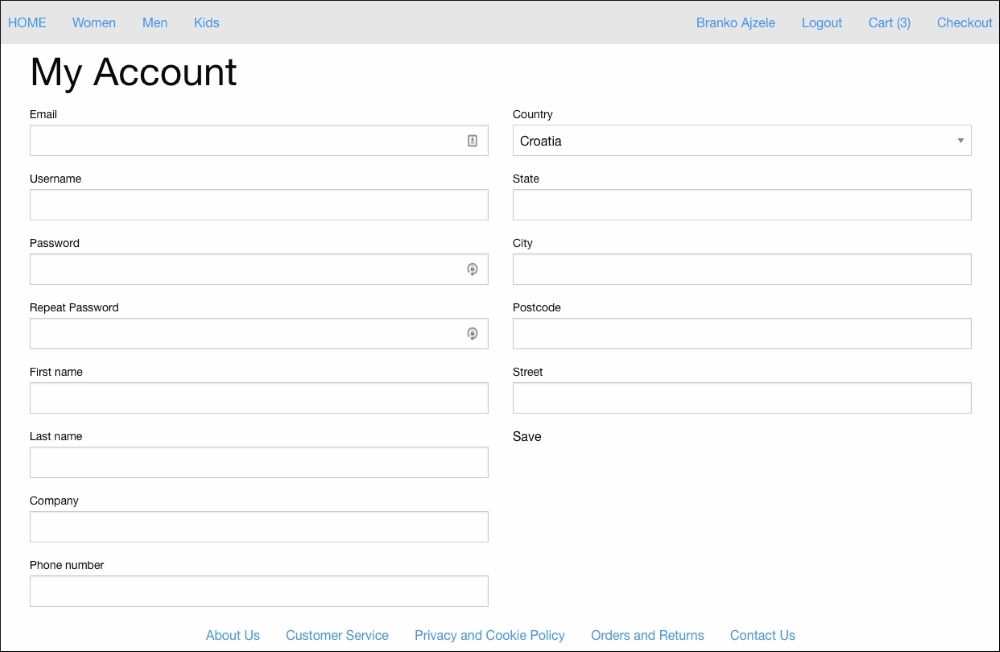
With this we address the actual customer information section of the My Account page. In its current state, this page should render an Edit form as shown in the following screenshot, enabling us to edit all of our customer information:
We then address the <!-- customer_orders -->, by replacing it with the following bits:
{% block customer_orders %}
<h2>My Orders</h2>
<div class="row">
  <table>
    <thead>
      <tr>
        <th width="200">Order Id</th>
        <th>Date</th>
        <th width="150">Ship To</th>
        <th width="150">Order Total</th>
        <th width="150">Status</th>
        <th width="150">Actions</th>
      </tr>
    </thead>
    <tbody>
      {% for order in customer_orders %}
      <tr>
        <td>{{ order.id }}</td>
        <td>{{ order.date }}</td>
        <td>{{ order.ship_to }}</td>
        <td>{{ order.order_total }}</td>
        <td>{{ order.status }}</td>
        <td>
          <div class="small button-group">
            {% for action in order.actions %}
            <a class="button" href="{{ action.path }}">{{ action.label }}</a>
            {% endfor %}
          </div>
        </td>
      </tr>
      {% endfor %}
    /tbody>
  </table>
</div>
{% endblock %}
This should now render the My Orders section of the My Account page as shown here:

This is just dummy data coming from service defined in a src/Foggyline/CustomerBundle/Resources/config/services.xml. In a later chapter, when we get to the sales module, we will make sure it overrides the foggyline_customer.customer_orders service in order to insert real customer data here.
One of the changes we did to security.yml when defining our firewall, was configuring the logout path, which we pointed to /customer/logout. The implementation of that path is done within the CustomerController.php file as follows:
/**
 * @Route("/logout", name="customer_logout")
 */
public function logoutAction()
{

}
Note, the logoutAction method is actually empty. There is no implementation as such. Implementation is not needed, as Symfony intercepts the request and processes the logout for us. We did, however, need to define this route as we referenced it from our system.xml file.
The forgotten password feature is going to be implemented as a separate page. We edit the CustomerController.php file by adding the forgottenPasswordAction function to it as follows:
/**
 * @Route("/forgotten_password", name="customer_forgotten_password")
 * @Method({"GET", "POST"})
 */
public function forgottenPasswordAction(Request $request)
{

  // Build a form, with validation rules in place
  $form = $this->createFormBuilder()
  ->add('email', EmailType::class, array(
    'constraints' => new Email()
  ))
  ->add('save', SubmitType::class, array(
    'label' => 'Reset!',
    'attr' => array('class' => 'button'),
  ))
  ->getForm();

  // Check if this is a POST type request and if so, handle form
  if ($request->isMethod('POST')) {
    $form->handleRequest($request);

    if ($form->isSubmitted() && $form->isValid()) {
      $this->addFlash('success', 'Please check your email for reset password.');

      // todo: Send an email out to website admin or something...

      return $this->redirect($this->generateUrl('foggyline_customer_login'));
    }
  }

  // Render "contact us" page
  return $this->render('FoggylineCustomerBundle:default:customer/forgotten_password.html.twig', array(
      'form' => $form->createView()
    ));
}
Here we merely check if the HTTP request is GET or POST, then either send an e-mail or load the template. For the sake of simplicity, we haven't really implemented the actual e-mail sending. This is something that needs to be tackled outside of this book. The rendered template is pointing to the src/Foggyline/CustomerBundle/Resources/views/Default/customer/ forgotten_password.html.twig file with content as follows:
{% extends 'base.html.twig' %}
{% block body %}
<div class="row">
  <h1>Forgotten Password</h1>
</div>

<div class="row">
  {{ form_start(form) }}
  {{ form_widget(form) }}
  {{ form_end(form) }}
</div>
{% endblock %}