Table of Contents for
PHP 7: Real World Application Development
 PHP 7: Real World Application Development
Published by
Packt Publishing, 2016
PHP 7: Real World Application Development
Published by
Packt Publishing, 2016
- Cover
- Table of Contents
- PHP 7: Real World Application Development
- PHP 7: Real World Application Development
- PHP 7: Real World Application Development
- Credits
- Preface
- What you need for this learning path
- Who this learning path is for
- Reader feedback
- Customer support
- 1. Module 1
- 1. Building a Foundation
- PHP 7 installation considerations
- Using the built-in PHP web server
- Defining a test MySQL database
- Installing PHPUnit
- Implementing class autoloading
- Hoovering a website
- Building a deep web scanner
- Creating a PHP 5 to PHP 7 code converter
- 2. Using PHP 7 High Performance Features
- Understanding the abstract syntax tree
- Understanding differences in parsing
- Understanding differences in foreach() handling
- Improving performance using PHP 7 enhancements
- Iterating through a massive file
- Uploading a spreadsheet into a database
- Recursive directory iterator
- 3. Working with PHP Functions
- Developing functions
- Hinting at data types
- Using return value data typing
- Using iterators
- Writing your own iterator using generators
- 4. Working with PHP Object-Oriented Programming
- Developing classes
- Extending classes
- Using static properties and methods
- Using namespaces
- Defining visibility
- Using interfaces
- Using traits
- Implementing anonymous classes
- 5. Interacting with a Database
- Using PDO to connect to a database
- Building an OOP SQL query builder
- Handling pagination
- Defining entities to match database tables
- Tying entity classes to RDBMS queries
- Embedding secondary lookups into query results
- Implementing jQuery DataTables PHP lookups
- 6. Building Scalable Websites
- Creating a generic form element generator
- Creating an HTML radio element generator
- Creating an HTML select element generator
- Implementing a form factory
- Chaining $_POST filters
- Chaining $_POST validators
- Tying validation to a form
- 7. Accessing Web Services
- Converting between PHP and XML
- Creating a simple REST client
- Creating a simple REST server
- Creating a simple SOAP client
- Creating a simple SOAP server
- 8. Working with Date/Time and International Aspects
- Using emoticons or emoji in a view script
- Converting complex characters
- Getting the locale from browser data
- Formatting numbers by locale
- Handling currency by locale
- Formatting date/time by locale
- Creating an HTML international calendar generator
- Building a recurring events generator
- Handling translation without gettext
- 9. Developing Middleware
- Authenticating with middleware
- Using middleware to implement access control
- Improving performance using the cache
- Implementing routing
- Making inter-framework system calls
- Using middleware to cross languages
- 10. Looking at Advanced Algorithms
- Using getters and setters
- Implementing a linked list
- Building a bubble sort
- Implementing a stack
- Building a binary search class
- Implementing a search engine
- Displaying a multi-dimensional array and accumulating totals
- 11. Implementing Software Design Patterns
- Creating an array to object hydrator
- Building an object to array hydrator
- Implementing a strategy pattern
- Defining a mapper
- Implementing object-relational mapping
- Implementing the Pub/Sub design pattern
- 12. Improving Web Security
- Filtering $_POST data
- Validating $_POST data
- Safeguarding the PHP session
- Securing forms with a token
- Building a secure password generator
- Safeguarding forms with a CAPTCHA
- Encrypting/decrypting without mcrypt
- 13. Best Practices, Testing, and Debugging
- Using Traits and Interfaces
- Universal exception handler
- Universal error handler
- Writing a simple test
- Writing a test suite
- Generating fake test data
- Customizing sessions using session_start parameters
- A. Defining PSR-7 Classes
- Implementing PSR-7 value object classes
- Developing a PSR-7 Request class
- Defining a PSR-7 Response class
- 2. Module 2
- 1. Setting Up the Environment
- Setting up Debian or Ubuntu
- Setting up CentOS
- Setting up Vagrant
- Summary
- 2. New Features in PHP 7
- New operators
- Uniform variable syntax
- Miscellaneous features and changes
- Summary
- 3. Improving PHP 7 Application Performance
- HTTP server optimization
- HTTP persistent connection
- Content Delivery Network (CDN)
- CSS and JavaScript optimization
- Full page caching
- Varnish
- The infrastructure
- Summary
- 4. Improving Database Performance
- Storage engines
- The Percona Server - a fork of MySQL
- MySQL performance monitoring tools
- Percona XtraDB Cluster (PXC)
- Redis – the key-value cache store
- Memcached key-value cache store
- Summary
- 5. Debugging and Profiling
- Profiling with Xdebug
- PHP DebugBar
- Summary
- 6. Stress/Load Testing PHP Applications
- ApacheBench (ab)
- Siege
- Load testing real-world applications
- Summary
- 7. Best Practices in PHP Programming
- Test-driven development (TDD)
- Design patterns
- Service-oriented architecture (SOA)
- Being object-oriented and reusable always
- PHP frameworks
- Version control system (VCS) and Git
- Deployment and Continuous Integration (CI)
- Summary
- A. Tools to Make Life Easy
- Git – A version control system
- Grunt watch
- Summary
- B. MVC and Frameworks
- Laravel
- Lumen
- Apigility
- Summary
- 3. Module 3
- 1. Ecosystem Overview
- Summary
- 2. GoF Design Patterns
- Structural patterns
- Behavioral patterns
- Summary
- 3. SOLID Design Principles
- Open/closed principle
- Liskov substitution principle
- Interface Segregation Principle
- Dependency inversion principle
- Summary
- 4. Requirement Specification for a Modular Web Shop App
- Wireframing
- Defining a technology stack
- Summary
- 5. Symfony at a Glance
- Creating a blank project
- Using Symfony console
- Controller
- Routing
- Templates
- Forms
- Configuring Symfony
- The bundle system
- Databases and Doctrine
- Testing
- Validation
- Summary
- 6. Building the Core Module
- Dependencies
- Implementation
- Unit testing
- Functional testing
- Summary
- 7. Building the Catalog Module
- Dependencies
- Implementation
- Unit testing
- Functional testing
- Summary
- 8. Building the Customer Module
- Dependencies
- Implementation
- Unit testing
- Functional testing
- Summary
- 9. Building the Payment Module
- Dependencies
- Implementation
- Unit testing
- Functional testing
- Summary
- 10. Building the Shipment Module
- Dependencies
- Implementation
- Unit testing
- Functional testing
- Summary
- 11. Building the Sales Module
- Dependencies
- Implementation
- Unit testing
- Functional testing
- Summary
- 12. Integrating and Distributing Modules
- Understanding GitHub
- Understanding Composer
- Understanding Packagist
- Summary
- Bibliography
- Index
Part of the testing and debugging process involves incorporating realistic test data. In some cases, especially when testing database access and producing benchmarks, large amounts of test data are needed. One way in which this can be accomplished is to incorporate a process of scraping data from websites, and then putting the data together in realistic, yet random, combinations to be inserted into a database.
- The first step is to determine what data is needed in order to test your application. Another consideration is dose the website address an international audience, or will the market be primarily from a single country?
- In order to produce a consistent fake data tool, it's extremely important to move the data from its source into a usable digital format. The first choice is a series of database tables. Another, not as attractive, alternative is a CSV file.
- You may end up converting the data in stages. For example, you could pull data from a web page that lists country codes and country names into a text file.
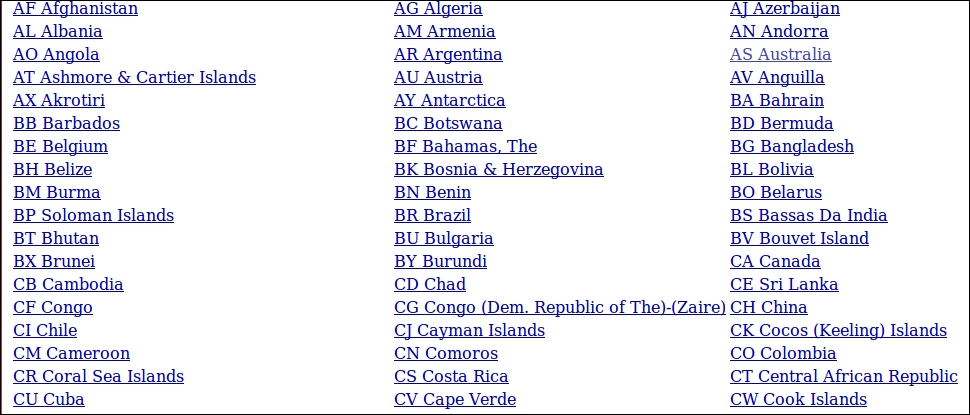
- Since this list is short, it's easy to literally cut and paste this into a text file.
- We can then do a search for " " and replace with "
\n", which gives us this: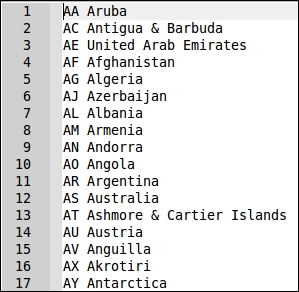
- This can then be imported into a spreadsheet, which then lets you export to a CSV file. From there, it's a simple matter to import it into a database. phpMyAdmin, for example, has such a facility.
- For the sake of this illustration, we will assume that we are generating data that will end up in the
prospectstable. Here is the SQL statement used to create this table:CREATE TABLE 'prospects' ( 'id' int(11) NOT NULL AUTO_INCREMENT, 'first_name' varchar(128) NOT NULL, 'last_name' varchar(128) NOT NULL, 'address' varchar(256) DEFAULT NULL, 'city' varchar(64) DEFAULT NULL, 'state_province' varchar(32) DEFAULT NULL, 'postal_code' char(16) NOT NULL, 'phone' varchar(16) NOT NULL, 'country' char(2) NOT NULL, 'email' varchar(250) NOT NULL, 'status' char(8) DEFAULT NULL, 'budget' decimal(10,2) DEFAULT NULL, 'last_updated' datetime DEFAULT NULL, PRIMARY KEY ('id'), UNIQUE KEY 'UNIQ_35730C06E7927C74' ('email') ) ENGINE=InnoDB DEFAULT CHARSET=utf8; - Now it's time to create a class that is capable of generating fake data. We will then create methods to generate data for each of the fields shown above, except for
id, which is auto-generated:namespace Application\Test; use PDO; use Exception; use DateTime; use DateInterval; use PDOException; use SplFileObject; use InvalidArgumentsException; use Application\Database\Connection; class FakeData { // data generation methods here } - Next, we define constants and properties that will be used as part of the process:
const MAX_LOOKUPS     = 10;
const SOURCE_FILE     = 'file';
const SOURCE_TABLE    = 'table';
const SOURCE_METHOD   = 'method';
const SOURCE_CALLBACK = 'callback';
const FILE_TYPE_CSV   = 'csv';
const FILE_TYPE_TXT   = 'txt';
const ERROR_DB        = 'ERROR: unable to read source table';
const ERROR_FILE      = 'ERROR: file not found';
const ERROR_COUNT     = 'ERROR: unable to ascertain count or ID column missing';
const ERROR_UPLOAD    = 'ERROR: unable to upload file';
const ERROR_LOOKUP    = 'ERROR: unable to find any IDs in the source table';

protected $connection;
protected $mapping;
protected $files;
protected $tables;
- We then define properties that will be used to generate random letters, street names, and e-mail addresses. You can think of these arrays as seeds that can be modified and/or expanded to suite your needs. As an example, you might substitute street name fragments in Paris for a French audience:
protected $alpha = 'ABCDEFGHIJKLMNOPQRSTUVWXYZ';
protected $street1 = ['Amber','Blue','Bright','Broad','Burning',
  'Cinder','Clear','Dewy','Dusty','Easy']; // etc.
protected $street2 = ['Anchor','Apple','Autumn','Barn','Beacon',
  'Bear','Berry','Blossom','Bluff','Cider','Cloud']; // etc.
protected $street3 = ['Acres','Arbor','Avenue','Bank','Bend',
  'Canyon','Circle','Street'];
protected $email1 = ['northern','southern','eastern','western',
  'fast','midland','central'];
protected $email2 = ['telecom','telco','net','connect'];
protected $email3 = ['com','net'];
- In the constructor, we accept a
Connectionobject, used for database access, an array of mappings to the fake data:public function __construct(Connection $conn, array $mapping) { $this->connection = $conn; $this->mapping = $mapping; } - To generate street names, rather than attempt to create a database table, it might be more efficient to use a set of seed arrays to generate random combinations. Here is an example of how this might work:
public function getAddress($entry) { return random_int(1,999) . ' ' . $this->street1[array_rand($this->street1)] . ' ' . $this->street2[array_rand($this->street2)] . ' ' . $this->street3[array_rand($this->street3)]; } - Depending on the level of realism desired, you could also build a database table that matches postal codes to cities. Postal codes could also be randomly generated. Here is an example that generates postal codes for the UK:
public function getPostalCode($entry, $pattern = 1) { return $this->alpha[random_int(0,25)] . $this->alpha[random_int(0,25)] . random_int(1, 99) . ' ' . random_int(1, 9) . $this->alpha[random_int(0,25)] . $this->alpha[random_int(0,25)]; } - Fake e-mail generation can likewise use a set of seed arrays to produce random results. We could also program it to receive an existing
$entryarray, with parameters, and use those parameters to create the name portion of the address:public function getEmail($entry, $params = NULL) { $first = $entry[$params[0]] ?? $this->alpha[random_int(0,25)]; $last = $entry[$params[1]] ?? $this->alpha[random_int(0,25)]; return $first[0] . '.' . $last . '@' . $this->email1[array_rand($this->email1)] . $this->email2[array_rand($this->email2)] . '.' . $this->email3[array_rand($this->email3)]; } - For date generation, one approach would be to accept as arguments an existing
$entryarray, with parameters. The parameters would be an array where the first value is a start date. The second parameter would be the maximum number of days to subtract from the start date. This effectively lets you return a random date from a range. Note that we useDateTime::sub()to subtract a random number of days.sub()requires aDateIntervalinstance, which we build usingP, the random number of days, and then'D':public function getDate($entry, $params) { list($fromDate, $maxDays) = $params; $date = new DateTime($fromDate); $date->sub(new DateInterval('P' . random_int(0, $maxDays) . 'D')); return $date->format('Y-m-d H:i:s'); } - As mentioned at the beginning of this recipe, the data sources we will use for fake data generation will vary. In some cases, as shown in the previous few steps, we use seed arrays, and build the fake data. In other cases, we might want to use a text or CSV file as a data source. Here is how such a method might look:
public function getEntryFromFile($name, $type) { if (empty($this->files[$name])) { $this->pullFileData($name, $type); } return $this->files[$name][ random_int(0, count($this->files[$name]))]; } - You will note that we first need to pull the file data into an array, which forms the return value. Here is the method that does that for us. We throw an
Exceptionif the specified file is not found. The file type is identified as one of our class constants:FILE_TYPE_TEXTorFILE_TYPE_CSV. Depending on the type, we use eitherfgetcsv()orfgets():public function pullFileData($name, $type) { if (!file_exists($name)) { throw new Exception(self::ERROR_FILE); } $fileObj = new SplFileObject($name, 'r'); if ($type == self::FILE_TYPE_CSV) { while ($data = $fileObj->fgetcsv()) { $this->files[$name][] = trim($data); } } else { while ($data = $fileObj->fgets()) { $this->files[$name][] = trim($data); } } - Probably the most complicated aspect of this process is drawing random data from a database table. We accept as arguments the table name, the name of the column that comprises the primary key, an array that maps between the database column name in the lookup table, and the target column name:
public function getEntryFromTable($tableName, $idColumn, $mapping) { $entry = array(); try { if (empty($this->tables[$tableName])) { $sql = 'SELECT ' . $idColumn . ' FROM ' . $tableName . ' ORDER BY ' . $idColumn . ' ASC LIMIT 1'; $stmt = $this->connection->pdo->query($sql); $this->tables[$tableName]['first'] = $stmt->fetchColumn(); $sql = 'SELECT ' . $idColumn . ' FROM ' . $tableName . ' ORDER BY ' . $idColumn . ' DESC LIMIT 1'; $stmt = $this->connection->pdo->query($sql); $this->tables[$tableName]['last'] = $stmt->fetchColumn(); } - We are now in a position to set up the prepared statement and initialize a number of critical variables:
$result = FALSE;
$count = self::MAX_LOOKUPS;
$sql  = 'SELECT * FROM ' . $tableName
  . ' WHERE ' . $idColumn . ' = ?';
$stmt = $this->connection->pdo->prepare($sql);
- The actual lookup we place inside a
do...whileloop. The reason for this is that we need to run the query at least once to achieve results. Only if we do not arrive at a result do we continue with the loop. We generate a random number between the lowest ID and the highest ID, and then use this in a parameter in the query. Notice that we also decrement a counter to prevent an endless loop. This is in case the IDs are not sequential, in which case we could accidentally generate an ID that does not exist. If we exceed the maximum attempts, still with no results, we throw anException:do { $id = random_int($this->tables[$tableName]['first'], $this->tables[$tableName]['last']); $stmt->execute([$id]); $result = $stmt->fetch(PDO::FETCH_ASSOC); } while ($count-- && !$result); if (!$result) { error_log(__METHOD__ . ':' . self::ERROR_LOOKUP); throw new Exception(self::ERROR_LOOKUP); } } catch (PDOException $e) { error_log(__METHOD__ . ':' . $e->getMessage()); throw new Exception(self::ERROR_DB); } - We then use the mapping array to retrieve values from the source table using keys expected in the destination table:
foreach ($mapping as $key => $value) { $entry[$value] = $result[$key] ?? NULL; } return $entry; } - The heart of this class is a
getRandomEntry()method, which generates a single array of fake data. We loop through$mappingone entry at a time and examine the various parameters:public function getRandomEntry() { $entry = array(); foreach ($this->mapping as $key => $value) { if (isset($value['source'])) { switch ($value['source']) { - The
sourceparameter is used to implement what effectively serves as a Strategy Pattern. We support four different possibilities forsource, all defined as class constants. The first one isSOURCE_FILE. In this case, we use thegetEntryFromFile()method discussed previously:case self::SOURCE_FILE : $entry[$key] = $this->getEntryFromFile( $value['name'], $value['type']); break; - The callback option returns a value according to the callback supplied in the
$mappingarray:case self::SOURCE_CALLBACK : $entry[$key] = $value['name'](); break; - The
SOURCE_TABLEoption uses the database table defined in$mappingas a lookup. Note thatgetEntryFromTable(), discussed previously, is able to return an array of values, which means we need to usearray_merge()to consolidate the results:case self::SOURCE_TABLE : $result = $this->getEntryFromTable( $value['name'],$value['idCol'],$value['mapping']); $entry = array_merge($entry, $result); break; - The
SOURCE_METHODoption, which is also the default, uses a method already included with this class. We check to see whether parameters are included, and, if so, add those to the method call. Note the use of{}to influence interpolation. If we made a$this->$value['name']()PHP 7 call, due to the Abstract Syntax Tree (AST) rewrite, it would interpolate like this,${$this->$value}['name'](), which is not what we want:case self::SOURCE_METHOD : default : if (!empty($value['params'])) { $entry[$key] = $this->{$value['name']}( $entry, $value['params']); } else { $entry[$key] = $this->{$value['name']}($entry); } } } } return $entry; } - We define a method that loops through
getRandomEntry()to produce multiple lines of fake data. We also add an option to insert to a destination table. If this option is enabled, we set up a prepared statement to insert, and also check to see whether we need to truncate any data currently in this table:public function generateData( $howMany, $destTableName = NULL, $truncateDestTable = FALSE) { try { if ($destTableName) { $sql = 'INSERT INTO ' . $destTableName . ' (' . implode(',', array_keys($this->mapping)) . ') '. ' VALUES ' . ' (:' . implode(',:', array_keys($this->mapping)) . ')'; $stmt = $this->connection->pdo->prepare($sql); if ($truncateDestTable) { $sql = 'DELETE FROM ' . $destTableName; $this->connection->pdo->query($sql); } } } catch (PDOException $e) { error_log(__METHOD__ . ':' . $e->getMessage()); throw new Exception(self::ERROR_COUNT); } - Next, we loop through the number of lines of data requested, and run
getRandomEntry(). If a database insert is requested, we execute the prepared statement in atry/catchblock. In any event, we turn this method into a generator using theyieldkeyword:for ($x = 0; $x < $howMany; $x++) { $entry = $this->getRandomEntry(); if ($insert) { try { $stmt->execute($entry); } catch (PDOException $e) { error_log(__METHOD__ . ':' . $e->getMessage()); throw new Exception(self::ERROR_DB); } } yield $entry; } }
The first thing to do is to ensure you have the data ready for random data generation. In this recipe, we will presume that the destination table is prospects, which has the following SQL database definition shown in step 7.
As a data source for names, you could create text files for first names and surnames. In this illustration, we will reference the data/files directory, and the files first_names.txt and surnames.txt. For city, state or province, postal code, and country, it might be useful to download the data from a source such as http://www.geonames.org/, and upload to a world_city_data table. For the remaining fields, such as address, e-mail, status, and so on, you could either use methods built into FakeData, or define callbacks.
Next, be sure to define Application\Test\FakeData, adding the content discussed in steps 8 to 29. After you have finished, create a calling program called chap_13_fake_data.php, which sets up autoloading and uses the appropriate classes. You should also define constants that match the path to the database configuration, and names files:
<?php
define('DB_CONFIG_FILE', __DIR__ . '/../config/db.config.php');
define('FIRST_NAME_FILE', __DIR__ . '/../data/files/first_names.txt');
define('LAST_NAME_FILE', __DIR__ . '/../data/files/surnames.txt');
require __DIR__ . '/../Application/Autoload/Loader.php';
Application\Autoload\Loader::init(__DIR__ . '/..');
use Application\Test\FakeData;
use Application\Database\Connection;
Next, define a mapping array that uses the column names in the destination table (prospects) as a key. You need to then define sub-keys for source, name, and any other parameters that are required. For starters, 'first_name' and 'last_name' will both use a file as a source, 'name' points to the name of the file, and 'type' indicates a file type of text:
$mapping = [
  'first_name'   => ['source' => FakeData::SOURCE_FILE,
  'name'         => FIRST_NAME_FILE,
  'type'         => FakeData::FILE_TYPE_TXT],
  'last_name'    => ['source' => FakeData::SOURCE_FILE,
  'name'         => LAST_NAME_FILE,
  'type'         => FakeData::FILE_TYPE_TXT],
The 'address', 'email', and 'last_updated' all use built-in methods as a data source. The last two also define parameters to be passed:
  'address'      => ['source' => FakeData::SOURCE_METHOD,
  'name'         => 'getAddress'],
  'email'        => ['source' => FakeData::SOURCE_METHOD,
  'name'         => 'getEmail',
  'params'       => ['first_name','last_name']],
  'last_updated' => ['source' => FakeData::SOURCE_METHOD,
  'name'         => 'getDate',
  'params'       => [date('Y-m-d'), 365*5]]
The 'phone', 'status' and 'budget' could all use callbacks to provide fake data:
  'phone'        => ['source' => FakeData::SOURCE_CALLBACK,
  'name'         => function () {
                    return sprintf('%3d-%3d-%4d', random_int(101,999),
                    random_int(101,999), random_int(0,9999)); }],
  'status'       => ['source' => FakeData::SOURCE_CALLBACK,
  'name'         => function () { $status = ['BEG','INT','ADV'];
                    return $status[rand(0,2)]; }],
  'budget'       => ['source' => FakeData::SOURCE_CALLBACK,
                     'name' => function() { return random_int(0, 99999)
                     + (random_int(0, 99) * .01); }]
And finally, 'city' draws its data from a lookup table, which also gives you data for the fields listed in the 'mapping' parameter. You can then leave those keys undefined. Notice that you should also specify the column representing the primary key for the table:
'city' => ['source' => FakeData::SOURCE_TABLE,
'name' => 'world_city_data',
'idCol' => 'id',
'mapping' => [
'city' => 'city',
'state_province' => 'state_province',
'postal_code_prefix' => 'postal_code',
'iso2' => 'country']
],
  'state_province'=> [],
  'postal_code'  => [],
  'country'    => [],
];
You can then define the destination table, a Connection instance, and create the FakeData instance. A foreach() loop will suffice to display a given number of entries:
$destTableName = 'prospects';
$conn = new Connection(include DB_CONFIG_FILE);
$fake = new FakeData($conn, $mapping);
foreach ($fake->generateData(10) as $row) {
  echo implode(':', $row) . PHP_EOL;
}
The output, for 10 rows, would look something like this:
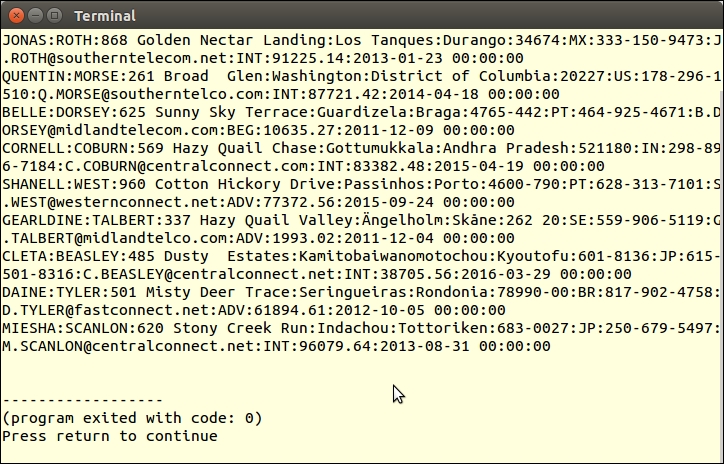
Here is a summary of websites with various lists of data that could be of use when generating test data:
|
Type of Data |
URL |
Notes |
|---|---|---|
|
Names | ||
|
http://www.babynamewizard.com/international-names-lists-popular-names-from-around-the-world | ||
|
Raw Name Lists | ||
|
US male first names | ||
|
US female first names | ||
|
US male first names | ||
|
Last Names |
US surnames from census | |
|
http://surname.sofeminine.co.uk/w/surnames/most-common-surnames-in-great-britain.html | ||
|
List of US surnames in the form of a PHP array | ||
|
Dutch surnames | ||
|
International surnames; just change the last letter(s) to get a list of names starting with that letter(s) | ||
|
Cities |
World cities | |
|
Postal Codes |
US only; includes cities, postal codes, latitude and longitude | |
|
International; city names, postal codes, EVERYTHING!; free download |