Table of Contents for
PHP 7: Real World Application Development
 PHP 7: Real World Application Development
Published by
Packt Publishing, 2016
PHP 7: Real World Application Development
Published by
Packt Publishing, 2016
- Cover
- Table of Contents
- PHP 7: Real World Application Development
- PHP 7: Real World Application Development
- PHP 7: Real World Application Development
- Credits
- Preface
- What you need for this learning path
- Who this learning path is for
- Reader feedback
- Customer support
- 1. Module 1
- 1. Building a Foundation
- PHP 7 installation considerations
- Using the built-in PHP web server
- Defining a test MySQL database
- Installing PHPUnit
- Implementing class autoloading
- Hoovering a website
- Building a deep web scanner
- Creating a PHP 5 to PHP 7 code converter
- 2. Using PHP 7 High Performance Features
- Understanding the abstract syntax tree
- Understanding differences in parsing
- Understanding differences in foreach() handling
- Improving performance using PHP 7 enhancements
- Iterating through a massive file
- Uploading a spreadsheet into a database
- Recursive directory iterator
- 3. Working with PHP Functions
- Developing functions
- Hinting at data types
- Using return value data typing
- Using iterators
- Writing your own iterator using generators
- 4. Working with PHP Object-Oriented Programming
- Developing classes
- Extending classes
- Using static properties and methods
- Using namespaces
- Defining visibility
- Using interfaces
- Using traits
- Implementing anonymous classes
- 5. Interacting with a Database
- Using PDO to connect to a database
- Building an OOP SQL query builder
- Handling pagination
- Defining entities to match database tables
- Tying entity classes to RDBMS queries
- Embedding secondary lookups into query results
- Implementing jQuery DataTables PHP lookups
- 6. Building Scalable Websites
- Creating a generic form element generator
- Creating an HTML radio element generator
- Creating an HTML select element generator
- Implementing a form factory
- Chaining $_POST filters
- Chaining $_POST validators
- Tying validation to a form
- 7. Accessing Web Services
- Converting between PHP and XML
- Creating a simple REST client
- Creating a simple REST server
- Creating a simple SOAP client
- Creating a simple SOAP server
- 8. Working with Date/Time and International Aspects
- Using emoticons or emoji in a view script
- Converting complex characters
- Getting the locale from browser data
- Formatting numbers by locale
- Handling currency by locale
- Formatting date/time by locale
- Creating an HTML international calendar generator
- Building a recurring events generator
- Handling translation without gettext
- 9. Developing Middleware
- Authenticating with middleware
- Using middleware to implement access control
- Improving performance using the cache
- Implementing routing
- Making inter-framework system calls
- Using middleware to cross languages
- 10. Looking at Advanced Algorithms
- Using getters and setters
- Implementing a linked list
- Building a bubble sort
- Implementing a stack
- Building a binary search class
- Implementing a search engine
- Displaying a multi-dimensional array and accumulating totals
- 11. Implementing Software Design Patterns
- Creating an array to object hydrator
- Building an object to array hydrator
- Implementing a strategy pattern
- Defining a mapper
- Implementing object-relational mapping
- Implementing the Pub/Sub design pattern
- 12. Improving Web Security
- Filtering $_POST data
- Validating $_POST data
- Safeguarding the PHP session
- Securing forms with a token
- Building a secure password generator
- Safeguarding forms with a CAPTCHA
- Encrypting/decrypting without mcrypt
- 13. Best Practices, Testing, and Debugging
- Using Traits and Interfaces
- Universal exception handler
- Universal error handler
- Writing a simple test
- Writing a test suite
- Generating fake test data
- Customizing sessions using session_start parameters
- A. Defining PSR-7 Classes
- Implementing PSR-7 value object classes
- Developing a PSR-7 Request class
- Defining a PSR-7 Response class
- 2. Module 2
- 1. Setting Up the Environment
- Setting up Debian or Ubuntu
- Setting up CentOS
- Setting up Vagrant
- Summary
- 2. New Features in PHP 7
- New operators
- Uniform variable syntax
- Miscellaneous features and changes
- Summary
- 3. Improving PHP 7 Application Performance
- HTTP server optimization
- HTTP persistent connection
- Content Delivery Network (CDN)
- CSS and JavaScript optimization
- Full page caching
- Varnish
- The infrastructure
- Summary
- 4. Improving Database Performance
- Storage engines
- The Percona Server - a fork of MySQL
- MySQL performance monitoring tools
- Percona XtraDB Cluster (PXC)
- Redis – the key-value cache store
- Memcached key-value cache store
- Summary
- 5. Debugging and Profiling
- Profiling with Xdebug
- PHP DebugBar
- Summary
- 6. Stress/Load Testing PHP Applications
- ApacheBench (ab)
- Siege
- Load testing real-world applications
- Summary
- 7. Best Practices in PHP Programming
- Test-driven development (TDD)
- Design patterns
- Service-oriented architecture (SOA)
- Being object-oriented and reusable always
- PHP frameworks
- Version control system (VCS) and Git
- Deployment and Continuous Integration (CI)
- Summary
- A. Tools to Make Life Easy
- Git – A version control system
- Grunt watch
- Summary
- B. MVC and Frameworks
- Laravel
- Lumen
- Apigility
- Summary
- 3. Module 3
- 1. Ecosystem Overview
- Summary
- 2. GoF Design Patterns
- Structural patterns
- Behavioral patterns
- Summary
- 3. SOLID Design Principles
- Open/closed principle
- Liskov substitution principle
- Interface Segregation Principle
- Dependency inversion principle
- Summary
- 4. Requirement Specification for a Modular Web Shop App
- Wireframing
- Defining a technology stack
- Summary
- 5. Symfony at a Glance
- Creating a blank project
- Using Symfony console
- Controller
- Routing
- Templates
- Forms
- Configuring Symfony
- The bundle system
- Databases and Doctrine
- Testing
- Validation
- Summary
- 6. Building the Core Module
- Dependencies
- Implementation
- Unit testing
- Functional testing
- Summary
- 7. Building the Catalog Module
- Dependencies
- Implementation
- Unit testing
- Functional testing
- Summary
- 8. Building the Customer Module
- Dependencies
- Implementation
- Unit testing
- Functional testing
- Summary
- 9. Building the Payment Module
- Dependencies
- Implementation
- Unit testing
- Functional testing
- Summary
- 10. Building the Shipment Module
- Dependencies
- Implementation
- Unit testing
- Functional testing
- Summary
- 11. Building the Sales Module
- Dependencies
- Implementation
- Unit testing
- Functional testing
- Summary
- 12. Integrating and Distributing Modules
- Understanding GitHub
- Understanding Composer
- Understanding Packagist
- Summary
- Bibliography
- Index
Proper filtering and validation is a common problem when processing data submitted by users from an online form. It is arguably also the number one security vulnerability for a website. Furthermore, it can be quite awkward to have the filters and validators scattered all over the application. A chaining mechanism would resolve these issues neatly, and would also allow you to exert control over the order in which the filters and validators are processed.
- There is a little-known PHP function,
filter_input_array(), that, at first glance, seems well suited for this task. Looking more deeply into its functionality, however, it soon becomes apparent that this function was designed in the early days, and is not up to modern requirements for protection against attack and flexibility. Accordingly, we will instead present a much more flexible mechanism based on an array of callbacks performing filtering and validation. - In order to increase flexibility, we will make our base filter and validation classes relatively light. By this, we mean not defining any specific filters or validation methods. Instead, we will operate entirely on the basis of a configuration array of callbacks. In order to ensure compatibility in filtering and validation results, we will also define a specific result object,
Application\Filter\Result. - The primary function of the
Resultclass will be to hold a$itemvalue, which would be the filtered value or a boolean result of validation. Another property,$messages, will hold an array of messages populated during the filtering or validation operation. In the constructor, the value supplied for$messagesis formulated as an array. You might observe that both properties are definedpublic. This is to facilitate ease of access:namespace Application\Filter; class Result { public $item; // (mixed) filtered data | (bool) result of validation public $messages = array(); // [(string) message, (string) message ] public function __construct($item, $messages) { $this->item = $item; if (is_array($messages)) { $this->messages = $messages; } else { $this->messages = [$messages]; } } - We also define a method that allows us to merge this
Resultinstance with another. This is important as at some point we will be processing the same value through a chain of filters. In such a case, we want the newly filtered value to overwrite the existing one, but we want the messages to be merged:public function mergeResults(Result $result) { $this->item = $result->item; $this->mergeMessages($result); } public function mergeMessages(Result $result) { if (isset($result->messages) && is_array($result->messages)) { $this->messages = array_merge($this->messages, $result->messages); } } - Finally, to finish the methods for this class, we add a method that merges validation results. The important consideration here is that any value of
FALSE, up or down the validation chain, must cause the entire result to beFALSE:public function mergeValidationResults(Result $result) { if ($this->item === TRUE) { $this->item = (bool) $result->item; } $this->mergeMessages($result); } } - Next, to make sure that the callbacks produce compatible results, we will define an
Application\Filter\CallbackInterfaceinterface. You will note that we are taking advantage of the PHP 7 ability to data type the return value to ensure that we are getting aResultinstance in return:namespace Application\Filter; interface CallbackInterface { public function __invoke ($item, $params) : Result; } - Each callback should reference the same set of messages. Accordingly, we define a
Application\Filter\Messagesclass with a series of static properties. We provide methods to set all messages, or just one message. The$messagesproperty has been madepublicfor easier access:namespace Application\Filter; class Messages { const MESSAGE_UNKNOWN = 'Unknown'; public static $messages; public static function setMessages(array $messages) { self::$messages = $messages; } public static function setMessage($key, $message) { self::$messages[$key] = $message; } public static function getMessage($key) { return self::$messages[$key] ?? self::MESSAGE_UNKNOWN; } } - We are now in a position to define a
Application\Web\AbstractFilterclass that implements core functionality. As mentioned previously, this class will be relatively lightweight and we do not need to worry about specific filters or validators as they will be supplied through configuration. We use theUnexpectedValueExceptionclass, provided as part of the PHP 7 Standard PHP Library (SPL), in order to throw a descriptive exception in case one of the callbacks does not implementCallbackInterface:namespace Application\Filter; use UnexpectedValueException; abstract class AbstractFilter { // code described in the next several bullets - First, we define useful class constants that hold various housekeeping values. The last four shown here control the format of messages to be displayed, and how to describe missing data:
const BAD_CALLBACK = 'Must implement CallbackInterface';
const DEFAULT_SEPARATOR = '<br>' . PHP_EOL;
const MISSING_MESSAGE_KEY = 'item.missing';
const DEFAULT_MESSAGE_FORMAT = '%20s : %60s';
const DEFAULT_MISSING_MESSAGE = 'Item Missing';
- Next, we define core properties.
$separatoris used in conjunction with filtering and validation messages.$callbacksrepresents the array of callbacks that perform filtering and validation.$assignmentsmap data fields to filters and/or validators.$missingMessageis represented as a property so that it can be overwritten (that is, for multi-language websites). Finally,$resultsis an array ofApplication\Filter\Resultobjects and is populated by the filtering or validation operation:protected $separator; // used for message display protected $callbacks; protected $assignments; protected $missingMessage; protected $results = array();
- At this point, we can build the
__construct()method. Its main function is to set the array of callbacks and assignments. It also either sets values or accepts defaults for the separator (used in message display), and the missing message:public function __construct(array $callbacks, array $assignments, $separator = NULL, $message = NULL) { $this->setCallbacks($callbacks); $this->setAssignments($assignments); $this->setSeparator($separator ?? self::DEFAULT_SEPARATOR); $this->setMissingMessage($message ?? self::DEFAULT_MISSING_MESSAGE); } - Next, we define a series of methods that allow us to set or remove callbacks. Notice that we allow the getting and setting of a single callback. This is useful if you have a generic set of callbacks, and need to modify just one. You will also note that
setOneCall()checks to see if the callback implementsCallbackInterface. If it does not, anUnexpectedValueExceptionis thrown:public function getCallbacks() { return $this->callbacks; } public function getOneCallback($key) { return $this->callbacks[$key] ?? NULL; } public function setCallbacks(array $callbacks) { foreach ($callbacks as $key => $item) { $this->setOneCallback($key, $item); } } public function setOneCallback($key, $item) { if ($item instanceof CallbackInterface) { $this->callbacks[$key] = $item; } else { throw new UnexpectedValueException(self::BAD_CALLBACK); } } public function removeOneCallback($key) { if (isset($this->callbacks[$key])) unset($this->callbacks[$key]); } - Methods for results processing are quite simple. For convenience, we added
getItemsAsArray(), otherwisegetResults()will return an array ofResultobjects:public function getResults() { return $this->results; } public function getItemsAsArray() { $return = array(); if ($this->results) { foreach ($this->results as $key => $item) $return[$key] = $item->item; } return $return; } - Retrieving messages is just a matter of looping through the array of
$this ->resultsand extracting the$messagesproperty. For convenience, we also addedgetMessageString()with some formatting options. To easily produce an array of messages, we use the PHP 7yield fromsyntax. This has the effect of turninggetMessages()into a delegating generator. The array of messages becomes a sub-generator:public function getMessages() { if ($this->results) { foreach ($this->results as $key => $item) if ($item->messages) yield from $item->messages; } else { return array(); } } public function getMessageString($width = 80, $format = NULL) { if (!$format) $format = self::DEFAULT_MESSAGE_FORMAT . $this->separator; $output = ''; if ($this->results) { foreach ($this->results as $key => $value) { if ($value->messages) { foreach ($value->messages as $message) { $output .= sprintf( $format, $key, trim($message)); } } } } return $output; } - Lastly, we define a mixed group of useful getters and setters:
public function setMissingMessage($message) { $this->missingMessage = $message; } public function setSeparator($separator) { $this->separator = $separator; } public function getSeparator() { return $this->separator; } public function getAssignments() { return $this->assignments; } public function setAssignments(array $assignments) { $this->assignments = $assignments; } // closing bracket for class AbstractFilter } - Filtering and validation, although often performed together, are just as often performed separately. Accordingly, we define discrete classes for each. We'll start with
Application\Filter\Filter. We make this class extendAbstractFilterin order to provide the core functionality described previously:namespace Application\Filter; class Filter extends AbstractFilter { // code } - Within this class we define a core
process()method that scans an array of data and applies filters as per the array of assignments. If there are no assigned filters for this data set, we simply returnNULL:public function process(array $data) { if (!(isset($this->assignments) && count($this->assignments))) { return NULL; } - Otherwise, we initialize
$this->resultsto an array ofResultobjects where the$itemproperty is the original value from$data, and the$messagesproperty is an empty array:foreach ($data as $key => $value) { $this->results[$key] = new Result($value, array()); } - We then make a copy of
$this->assignmentsand check to see if there are any global filters (identified by the '*' key. If so, we runprocessGlobal()and then unset the '*' key:$toDo = $this->assignments; if (isset($toDo['*'])) { $this->processGlobalAssignment($toDo['*'], $data); unset($toDo['*']); } - Finally, we loop through any remaining assignments, calling
processAssignment():foreach ($toDo as $key => $assignment) { $this->processAssignment($assignment, $key); } - As you will recall, each assignment is keyed to the data field, and represents an array of callbacks for that field. Thus, in
processGlobalAssignment()we need to loop through the array of callbacks. In this case, however, because these assignments are global, we also need to loop through the entire data set, and apply each global filter in turn:protected function processGlobalAssignment($assignment, $data) { foreach ($assignment as $callback) { if ($callback === NULL) continue; foreach ($data as $k => $value) { $result = $this->callbacks[$callback['key']]($this->results[$k]->item, $callback['params']); $this->results[$k]->mergeResults($result); } } }Note
The tricky bit is this line of code:
$result = $this->callbacks[$callback['key']]($this ->results[$k]->item, $callback['params']);
Remember, each callback is actually an anonymous class that defines the PHP magic
__invoke()method. The arguments supplied are the actual data item to be filtered, and an array of parameters. By running$this->callbacks[$callback['key']]()we are in fact magically calling__invoke(). - When we define
processAssignment(), in a manner akin toprocessGlobalAssignment(), we need to execute each remaining callback assigned to each data key:protected function processAssignment($assignment, $key) { foreach ($assignment as $callback) { if ($callback === NULL) continue; $result = $this->callbacks[$callback['key']]($this->results[$key]->item, $callback['params']); $this->results[$key]->mergeResults($result); } } } // closing brace for Application\Filter\Filter
Create an Application\Filter folder. In this folder, create the following class files, using code from the preceding steps:
|
Application\Filter\* class file |
Code described in these steps |
|---|---|
|
|
3 - 5 |
|
|
6 |
|
|
7 |
|
|
8 - 15 |
|
|
16 - 22 |
Next, take the code discussed in step 5, and use it to configure an array of messages in a chap_06_post_data_config_messages.php file. Each callback references the Messages::$messages property. Here is a sample configuration:
<?php
use Application\Filter\Messages;
Messages::setMessages(
  [
    'length_too_short' => 'Length must be at least %d',
    'length_too_long'  => 'Length must be no more than %d',
    'required'         => 'Please be sure to enter a value',
    'alnum'            => 'Only letters and numbers allowed',
    'float'            => 'Only numbers or decimal point',
    'email'            => 'Invalid email address',
    'in_array'         => 'Not found in the list',
    'trim'             => 'Item was trimmed',
    'strip_tags'       => 'Tags were removed from this item',
    'filter_float'     => 'Converted to a decimal number',
    'phone'            => 'Phone number is [+n] nnn-nnn-nnnn',
    'test'             => 'TEST',
    'filter_length'    => 'Reduced to specified length',
  ]
);
Next, create a chap_06_post_data_config_callbacks.php callback configuration file that contains configuration for filtering callbacks, as described in step 4. Each callback should follow this generic template:
'callback_key' => new class () implements CallbackInterface
{
  public function __invoke($item, $params) : Result
  {
    $changed  = array();
    $filtered = /* perform filtering operation on $item */
    if ($filtered !== $item) $changed = Messages::$messages['callback_key'];
    return new Result($filtered, $changed);
  }
}
The callbacks themselves must implement the interface and return a Result instance. We can take advantage of the PHP 7
anonymous class capability by having our callbacks return an anonymous class that implements CallbackInterface. Here is how an array of filtering callbacks might look:
use Application\Filter\ { Result, Messages, CallbackInterface };
$config = [ 'filters' => [
  'trim' => new class () implements CallbackInterface
  {
    public function __invoke($item, $params) : Result
    {
      $changed  = array();
      $filtered = trim($item);
      if ($filtered !== $item)
      $changed = Messages::$messages['trim'];
      return new Result($filtered, $changed);
    }
  },
  'strip_tags' => new class ()
  implements CallbackInterface
  {
    public function __invoke($item, $params) : Result
    {
      $changed  = array();
      $filtered = strip_tags($item);
      if ($filtered !== $item)
      $changed = Messages::$messages['strip_tags'];
      return new Result($filtered, $changed);
    }
  },
  // etc.
]
];
For test purposes, we will use the prospects table as a target. Instead of providing data from $_POST, we will construct an array of good and bad data:
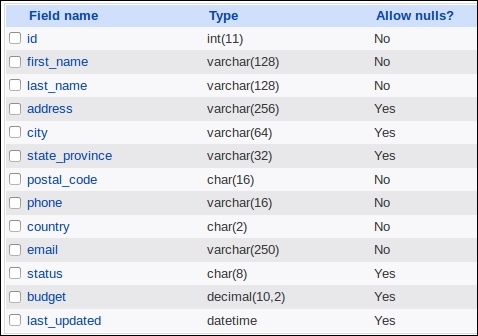
You can now create a chap_06_post_data_filtering.php script that sets up autoloading, includes the messages and callbacks configuration files:
<?php
require __DIR__ . '/../Application/Autoload/Loader.php';
Application\Autoload\Loader::init(__DIR__ . '/..');
include __DIR__ . '/chap_06_post_data_config_messages.php';
include __DIR__ . '/chap_06_post_data_config_callbacks.php';
You then need to define assignments that represent a mapping between the data fields and filter callbacks. Use the * key to define a global filter that applies to all data:
$assignments = [
  '*'   => [ ['key' => 'trim', 'params' => []],
          ['key' => 'strip_tags', 'params' => []] ],
  'first_name'  => [ ['key' => 'length',
   'params' => ['length' => 128]] ],
  'last_name'  => [ ['key' => 'length',
   'params' => ['length' => 128]] ],
  'city'          => [ ['key' => 'length',
   'params' => ['length' => 64]] ],
  'budget'     => [ ['key' => 'filter_float', 'params' => []] ],
];
Next, define good and bad test data:
$goodData = [
  'first_name'      => 'Your Full',
  'last_name'       => 'Name',
  'address'         => '123 Main Street',
  'city'            => 'San Francisco',
  'state_province'  => 'California',
  'postal_code'     => '94101',
  'phone'           => '+1 415-555-1212',
  'country'         => 'US',
  'email'           => 'your@email.address.com',
  'budget'          => '123.45',
];
$badData = [
  'first_name'      => 'This+Name<script>bad tag</script>Valid!',
  'last_name'       => 'ThisLastNameIsWayTooLongAbcdefghijklmnopqrstuvwxyz0123456789Abcdefghijklmnopqrstuvwxyz0123456789Abcdefghijklmnopqrstuvwxyz0123456789Abcdefghijklmnopqrstuvwxyz0123456789',
  //'address'       => '',    // missing
  'city'            => '  ThisCityNameIsTooLong012345678901234567890123456789012345678901234567890123456789  ',
  //'state_province'=> '',    // missing
  'postal_code'     => '!"£$%^Non Alpha Chars',
  'phone'           => ' 12345 ',
  'country'         => 'XX',
  'email'           => 'this.is@not@an.email',
  'budget'          => 'XXX',
];
Finally, you can create an Application\Filter\Filter instance, and test the data:
$filter = new Application\Filter\Filter(
$config['filters'], $assignments);
$filter->setSeparator(PHP_EOL);
  $filter->process($goodData);
echo $filter->getMessageString();
  var_dump($filter->getItemsAsArray());

$filter->process($badData);
echo $filter->getMessageString();
var_dump($filter->getItemsAsArray());
Processing good data produces no messages other than one indicating that the value for the float field was converted from string to float. The bad data, on the other hand, produces the following output:
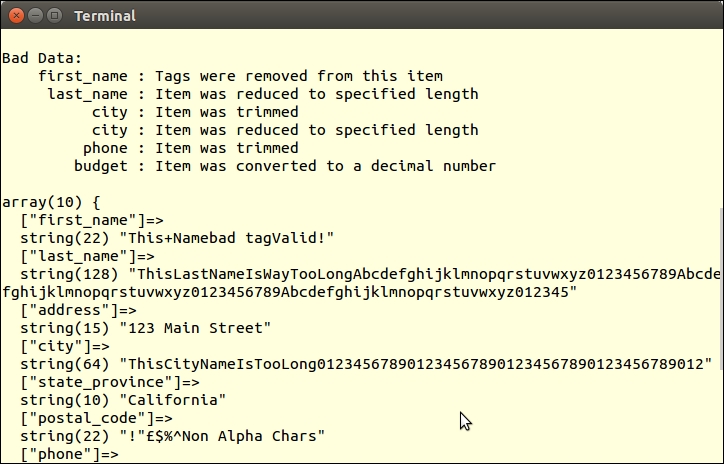
You will also notice that tags were removed from first_name, and that both last_name and city were truncated.
The filter_input_array() function takes two arguments: the input source (in the form of a pre-defined constant used to indicate one of the $_* PHP super-globals, that is, $_POST), and an array of matching field definitions as keys and filters or validators as values. This function performs not only filtering operations, but validation as well. The flags labeled sanitize are actually filters.
Documentation and examples of filter_input_array() can be found at http://php.net/manual/en/function.filter-input-array.php. You might also have a look at the different types of filters that are available on http://php.net/manual/en/filter.filters.php.