Table of Contents for
PHP 7: Real World Application Development
 PHP 7: Real World Application Development
Published by
Packt Publishing, 2016
PHP 7: Real World Application Development
Published by
Packt Publishing, 2016
- Cover
- Table of Contents
- PHP 7: Real World Application Development
- PHP 7: Real World Application Development
- PHP 7: Real World Application Development
- Credits
- Preface
- What you need for this learning path
- Who this learning path is for
- Reader feedback
- Customer support
- 1. Module 1
- 1. Building a Foundation
- PHP 7 installation considerations
- Using the built-in PHP web server
- Defining a test MySQL database
- Installing PHPUnit
- Implementing class autoloading
- Hoovering a website
- Building a deep web scanner
- Creating a PHP 5 to PHP 7 code converter
- 2. Using PHP 7 High Performance Features
- Understanding the abstract syntax tree
- Understanding differences in parsing
- Understanding differences in foreach() handling
- Improving performance using PHP 7 enhancements
- Iterating through a massive file
- Uploading a spreadsheet into a database
- Recursive directory iterator
- 3. Working with PHP Functions
- Developing functions
- Hinting at data types
- Using return value data typing
- Using iterators
- Writing your own iterator using generators
- 4. Working with PHP Object-Oriented Programming
- Developing classes
- Extending classes
- Using static properties and methods
- Using namespaces
- Defining visibility
- Using interfaces
- Using traits
- Implementing anonymous classes
- 5. Interacting with a Database
- Using PDO to connect to a database
- Building an OOP SQL query builder
- Handling pagination
- Defining entities to match database tables
- Tying entity classes to RDBMS queries
- Embedding secondary lookups into query results
- Implementing jQuery DataTables PHP lookups
- 6. Building Scalable Websites
- Creating a generic form element generator
- Creating an HTML radio element generator
- Creating an HTML select element generator
- Implementing a form factory
- Chaining $_POST filters
- Chaining $_POST validators
- Tying validation to a form
- 7. Accessing Web Services
- Converting between PHP and XML
- Creating a simple REST client
- Creating a simple REST server
- Creating a simple SOAP client
- Creating a simple SOAP server
- 8. Working with Date/Time and International Aspects
- Using emoticons or emoji in a view script
- Converting complex characters
- Getting the locale from browser data
- Formatting numbers by locale
- Handling currency by locale
- Formatting date/time by locale
- Creating an HTML international calendar generator
- Building a recurring events generator
- Handling translation without gettext
- 9. Developing Middleware
- Authenticating with middleware
- Using middleware to implement access control
- Improving performance using the cache
- Implementing routing
- Making inter-framework system calls
- Using middleware to cross languages
- 10. Looking at Advanced Algorithms
- Using getters and setters
- Implementing a linked list
- Building a bubble sort
- Implementing a stack
- Building a binary search class
- Implementing a search engine
- Displaying a multi-dimensional array and accumulating totals
- 11. Implementing Software Design Patterns
- Creating an array to object hydrator
- Building an object to array hydrator
- Implementing a strategy pattern
- Defining a mapper
- Implementing object-relational mapping
- Implementing the Pub/Sub design pattern
- 12. Improving Web Security
- Filtering $_POST data
- Validating $_POST data
- Safeguarding the PHP session
- Securing forms with a token
- Building a secure password generator
- Safeguarding forms with a CAPTCHA
- Encrypting/decrypting without mcrypt
- 13. Best Practices, Testing, and Debugging
- Using Traits and Interfaces
- Universal exception handler
- Universal error handler
- Writing a simple test
- Writing a test suite
- Generating fake test data
- Customizing sessions using session_start parameters
- A. Defining PSR-7 Classes
- Implementing PSR-7 value object classes
- Developing a PSR-7 Request class
- Defining a PSR-7 Response class
- 2. Module 2
- 1. Setting Up the Environment
- Setting up Debian or Ubuntu
- Setting up CentOS
- Setting up Vagrant
- Summary
- 2. New Features in PHP 7
- New operators
- Uniform variable syntax
- Miscellaneous features and changes
- Summary
- 3. Improving PHP 7 Application Performance
- HTTP server optimization
- HTTP persistent connection
- Content Delivery Network (CDN)
- CSS and JavaScript optimization
- Full page caching
- Varnish
- The infrastructure
- Summary
- 4. Improving Database Performance
- Storage engines
- The Percona Server - a fork of MySQL
- MySQL performance monitoring tools
- Percona XtraDB Cluster (PXC)
- Redis – the key-value cache store
- Memcached key-value cache store
- Summary
- 5. Debugging and Profiling
- Profiling with Xdebug
- PHP DebugBar
- Summary
- 6. Stress/Load Testing PHP Applications
- ApacheBench (ab)
- Siege
- Load testing real-world applications
- Summary
- 7. Best Practices in PHP Programming
- Test-driven development (TDD)
- Design patterns
- Service-oriented architecture (SOA)
- Being object-oriented and reusable always
- PHP frameworks
- Version control system (VCS) and Git
- Deployment and Continuous Integration (CI)
- Summary
- A. Tools to Make Life Easy
- Git – A version control system
- Grunt watch
- Summary
- B. MVC and Frameworks
- Laravel
- Lumen
- Apigility
- Summary
- 3. Module 3
- 1. Ecosystem Overview
- Summary
- 2. GoF Design Patterns
- Structural patterns
- Behavioral patterns
- Summary
- 3. SOLID Design Principles
- Open/closed principle
- Liskov substitution principle
- Interface Segregation Principle
- Dependency inversion principle
- Summary
- 4. Requirement Specification for a Modular Web Shop App
- Wireframing
- Defining a technology stack
- Summary
- 5. Symfony at a Glance
- Creating a blank project
- Using Symfony console
- Controller
- Routing
- Templates
- Forms
- Configuring Symfony
- The bundle system
- Databases and Doctrine
- Testing
- Validation
- Summary
- 6. Building the Core Module
- Dependencies
- Implementation
- Unit testing
- Functional testing
- Summary
- 7. Building the Catalog Module
- Dependencies
- Implementation
- Unit testing
- Functional testing
- Summary
- 8. Building the Customer Module
- Dependencies
- Implementation
- Unit testing
- Functional testing
- Summary
- 9. Building the Payment Module
- Dependencies
- Implementation
- Unit testing
- Functional testing
- Summary
- 10. Building the Shipment Module
- Dependencies
- Implementation
- Unit testing
- Functional testing
- Summary
- 11. Building the Sales Module
- Dependencies
- Implementation
- Unit testing
- Functional testing
- Summary
- 12. Integrating and Distributing Modules
- Understanding GitHub
- Understanding Composer
- Understanding Packagist
- Summary
- Bibliography
- Index
The primary means of testing PHP code is to use PHPUnit, which is based on a methodology called Unit Testing. The philosophy behind unit testing is quite simple: you break down your code into the smallest possible logical units. You then test each unit in isolation to confirm that it performs as expected. These expectations are codified into a series of assertions. If all assertions return TRUE, then the unit has passed the test.
- The first order of business is to either install PHPUnit directly onto your development server, or download the source code, which is available in the form of a single phar (PHP archive) file. A quick visit to the official website for PHPUnit (https://phpunit.de/) lets us download right from the main page.
- It is a best practice, however, to use a package manager to both install and maintain PHPUnit. For this purpose, we will use a package management program called Composer. To install Composer, visit the main website, https://getcomposer.org/, and follow the instructions on the download page. The current procedure, at the time of writing, is as follows. Note that you need to substitute the hash of the current version in place of
<hash>:php -r "copy('https://getcomposer.org/installer', 'composer-setup.php');" php -r "if (hash_file('SHA384', 'composer-setup.php') === '<hash>') { echo 'Installer verified'; } else { echo 'Installer corrupt'; unlink('composer-setup.php'); } echo PHP_EOL;" php composer-setup.php php -r "unlink('composer-setup.php');" - Next, we use Composer to install PHPUnit. This is accomplished by creating a
composer.jsonfile that contains a series of directives outlining project parameters and dependencies. A full description of these directives is beyond the scope of this book; however, for the purposes of this recipe, we create a minimal set of directives using the key parameterrequire. You will also note that the contents of the file are in JavaScript Object Notation (JSON) format:{ "require-dev": { "phpunit/phpunit": "*" } } - To perform the installation from the command line, we run the following command. The output is shown just after:
php composer.phar install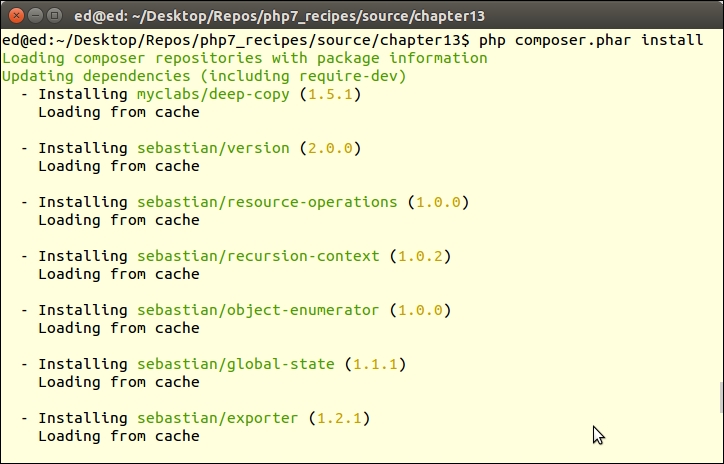
- PHPUnit and its dependencies are placed in a
vendorfolder that Composer will create if it does not already exist. The primary command to invoke PHPUnit is then symbolically linked into thevendor/binfolder. If you place this folder in yourPATH, all you need do is to run this command, which checks the version and incidentally confirms the installation:phpunit --version
- For the purposes of this illustration, let's assume we have a
chap_13_unit_test_simple.phpfile that contains theadd()function:<?php function add($a = NULL, $b = NULL) { return $a + $b; } - Tests are then written as classes that extend
PHPUnit\Framework\TestCase. If you are testing a library of functions, at the beginning of the test class, include the file that contains function definitions. You would then write methods that start with the wordtest, usually followed by the name of the function you are testing, and possibly some additional CamelCase words to further describe the test. For the purposes of this recipe, we will define aSimpleTesttest class:<?php use PHPUnit\Framework\TestCase; require_once __DIR__ . '/chap_13_unit_test_simple.php'; class SimpleTest extends TestCase { // testXXX() methods go here } - Assertions form the heart of any set of tests. The
See alsosection gives you the documentation reference for the complete list of assertions. An assertion is a PHPUnit method that compares a known value against a value produced by that which you wish to test. An example isassertEquals(), which checks to see whether the first argument equals the second. The following example tests a method calledadd()and confirms 2 is the return value foradd(1,1):public function testAdd() { $this->assertEquals(2, add(1,1)); } - You can also test to see whether something is not true. This example asserts that 1 + 1 does not equal 3:
$this->assertNotEquals(3, add(1,1));
- An assertion that is extremely useful when used to test a string is
assertRegExp(). Assume, for this illustration, that we are testing a function that produces an HTML table out of a multidimensional array:function table(array $a) { $table = '<table>'; foreach ($a as $row) { $table .= '<tr><td>'; $table .= implode('</td><td>', $row); $table .= '</td></tr>'; } $table .= '</table>'; return $table; } - We can construct a simple test that confirms that the output contains
<table>, one or more characters, followed by</table>. Further, we wish to confirm that a<td>B</td>element exists. When writing the test, we build a test array that consists of three sub-arrays containing the letters A—C, D—F, and G—I. We then pass the test array to the function, and run assertions against the result:public function testTable() { $a = [range('A', 'C'),range('D', 'F'),range('G','I')]; $table = table($a); $this->assertRegExp('!^<table>.+</table>$!', $table); $this->assertRegExp('!<td>B</td>!', $table); } - To test a class, instead of including a library of functions, simply include the file that defines the class to be tested. For the sake of illustration, let's take the library of functions shown previously and move them into a
Democlass:<?php class Demo { public function add($a, $b) { return $a + $b; } public function sub($a, $b) { return $a - $b; } // etc. } - In our
SimpleClassTesttest class, instead of including the library file, we include the file that represents theDemoclass. We need an instance ofDemoin order to run tests. For this purpose, we use a specially designedsetup()method, which is run before each test. Also, you will note ateardown()method, which is run immediately after each test:<?php use PHPUnit\Framework\TestCase; require_once __DIR__ . '/Demo.php'; class SimpleClassTest extends TestCase { protected $demo; public function setup() { $this->demo = new Demo(); } public function teardown() { unset($this->demo); } public function testAdd() { $this->assertEquals(2, $this->demo->add(1,1)); } public function testSub() { $this->assertEquals(0, $this->demo->sub(1,1)); } // etc. }
- When testing a class, such as a Model class, that has database access, other considerations come into play. The main consideration is that you should run tests against a test database, not the real database used in production. A final point is that by using a test database, you can populate it in advance with appropriate, controlled data.
setup()andteardown()could also be used to add or remove test data. - As an example of a class that uses the database, we will define a class
VisitorOps. The new class will include methods to add, remove, and find visitors. Note that we've also added a method to return the latest SQL statement executed:<?php require __DIR__ . '/../Application/Database/Connection.php'; use Application\Database\Connection; class VisitorOps { const TABLE_NAME = 'visitors'; protected $connection; protected $sql; public function __construct(array $config) { $this->connection = new Connection($config); } public function getSql() { return $this->sql; } public function findAll() { $sql = 'SELECT * FROM ' . self::TABLE_NAME; $stmt = $this->runSql($sql); while ($row = $stmt->fetch(PDO::FETCH_ASSOC)) { yield $row; } } public function findById($id) { $sql = 'SELECT * FROM ' . self::TABLE_NAME; $sql .= ' WHERE id = ?'; $stmt = $this->runSql($sql, [$id]); return $stmt->fetch(PDO::FETCH_ASSOC); } public function removeById($id) { $sql = 'DELETE FROM ' . self::TABLE_NAME; $sql .= ' WHERE id = ?'; return $this->runSql($sql, [$id]); } public function addVisitor($data) { $sql = 'INSERT INTO ' . self::TABLE_NAME; $sql .= ' (' . implode(',',array_keys($data)) . ') '; $sql .= ' VALUES '; $sql .= ' ( :' . implode(',:',array_keys($data)) . ') '; $this->runSql($sql, $data); return $this->connection->pdo->lastInsertId(); } public function runSql($sql, $params = NULL) { $this->sql = $sql; try { $stmt = $this->connection->pdo->prepare($sql); $result = $stmt->execute($params); } catch (Throwable $e) { error_log(__METHOD__ . ':' . $e->getMessage()); return FALSE; } return $stmt; } } - For tests that involve a database, it is recommended that you use a test database instead of the live production database. Accordingly, you will need an extra set of database connection parameters that can be used to establish a database connection in the
setup()method. - It's possible that you wish to establish a consistent block of sample data. This could be inserted into the test database in the
setup()method. - Finally, you may wish to reset the test database after each test, which is accomplished in the
teardown()method.
- In some cases, the test will access complex components that require external resources. An example is a service class that needs access to a database. It is a best practice to minimize database access in a test suite. Another consideration is that we are not testing database access; we are only testing the functionality of one specific class. Accordingly, it is sometimes necessary to define mock classes that mimic the behavior of the their parent class, but that restrict access to external resources.
- In this case, for illustration, define a service class,
VisitorService, which makes use of theVisitorOpsclass discussed earlier:<?php require_once __DIR__ . '/VisitorOps.php'; require_once __DIR__ . '/../Application/Database/Connection.php'; use Application\Database\Connection; class VisitorService { protected $visitorOps; public function __construct(array $config) { $this->visitorOps = new VisitorOps($config); } public function showAllVisitors() { $table = '<table>'; foreach ($this->visitorOps->findAll() as $row) { $table .= '<tr><td>'; $table .= implode('</td><td>', $row); $table .= '</td></tr>'; } $table .= '</table>'; return $table; } - For test purposes, we add a getter and setter for the
$visitorOpsproperty. This allows us to insert a mock class in place of the realVisitorOpsclass:public function getVisitorOps() { return $this->visitorOps; } public function setVisitorOps(VisitorOps $visitorOps) { $this->visitorOps = $visitorOps; } } // closing brace for VisitorService - Next, we define a
VisitorOpsMockmock class that mimics the functionality of its parent class. Class constants and properties are inherited. We then add mock test data, and a getter in case we need access to the test data later:<?php require_once __DIR__ . '/VisitorOps.php'; class VisitorOpsMock extends VisitorOps { protected $testData; public function __construct() { $data = array(); for ($x = 1; $x <= 3; $x++) { $data[$x]['id'] = $x; $data[$x]['email'] = $x . 'test@unlikelysource.com'; $data[$x]['visit_date'] = '2000-0' . $x . '-0' . $x . ' 00:00:00'; $data[$x]['comments'] = 'TEST ' . $x; $data[$x]['name'] = 'TEST ' . $x; } $this->testData = $data; } public function getTestData() { return $this->testData; } - Next, we override
findAll()to return test data usingyield, just as in the parent class. Note that we still build the SQL string, as this is what the parent class does:public function findAll() { $sql = 'SELECT * FROM ' . self::TABLE_NAME; foreach ($this->testData as $row) { yield $row; } } - To mock
findById()we simply return that array key from$this->testData. ForremoveById(), we unset the array key supplied as a parameter from$this->testData:public function findById($id) { $sql = 'SELECT * FROM ' . self::TABLE_NAME; $sql .= ' WHERE id = ?'; return $this->testData[$id] ?? FALSE; } public function removeById($id) { $sql = 'DELETE FROM ' . self::TABLE_NAME; $sql .= ' WHERE id = ?'; if (empty($this->testData[$id])) { return 0; } else { unset($this->testData[$id]); return 1; } } - Adding data is slightly more complicated in that we need to emulate the fact that the
idparameter might not be supplied, as the database would normally auto-generate this for us. To get around this, we check for theidparameter. If not set, we find the largest array key and increment:public function addVisitor($data) { $sql = 'INSERT INTO ' . self::TABLE_NAME; $sql .= ' (' . implode(',',array_keys($data)) . ') '; $sql .= ' VALUES '; $sql .= ' ( :' . implode(',:',array_keys($data)) . ') '; if (!empty($data['id'])) { $id = $data['id']; } else { $keys = array_keys($this->testData); sort($keys); $id = end($keys) + 1; $data['id'] = $id; } $this->testData[$id] = $data; return 1; } } // ending brace for the class VisitorOpsMock
- A nice variation on mock objects involves the use of the new PHP 7 anonymous class in place of creating a formal class that defines mock functionality. The advantage of using an anonymous class is that you can extend an existing class, which makes the object appear legitimate. This approach is especially useful if you only need to override one or two methods.
- For this illustration, we will modify
VisitorServiceTest.phppresented previously, calling itVisitorServiceTestAnonClass.php:<?php use PHPUnit\Framework\TestCase; require_once __DIR__ . '/VisitorService.php'; require_once __DIR__ . '/VisitorOps.php'; class VisitorServiceTestAnonClass extends TestCase { protected $visitorService; protected $dbConfig = [ 'driver' => 'mysql', 'host' => 'localhost', 'dbname' => 'php7cookbook_test', 'user' => 'cook', 'password' => 'book', 'errmode' => PDO::ERRMODE_EXCEPTION, ]; protected $testData; - You will notice that in
setup(), we define an anonymous class that extendsVisitorOps. We only need to override thefindAll()method:public function setup() { $data = array(); for ($x = 1; $x <= 3; $x++) { $data[$x]['id'] = $x; $data[$x]['email'] = $x . 'test@unlikelysource.com'; $data[$x]['visit_date'] = '2000-0' . $x . '-0' . $x . ' 00:00:00'; $data[$x]['comments'] = 'TEST ' . $x; $data[$x]['name'] = 'TEST ' . $x; } $this->testData = $data; $this->visitorService = new VisitorService($this->dbConfig); $opsMock = new class ($this->testData) extends VisitorOps { protected $testData; public function __construct($testData) { $this->testData = $testData; } public function findAll() { return $this->testData; } }; $this->visitorService->setVisitorOps($opsMock); } - Note that in
testShowAllVisitors(), when$this->visitorService->showAllVisitors()is executed, the anonymous class is called by the visitor service, which in turn calls the overriddenfindAll():public function teardown() { unset($this->visitorService); } public function testShowAllVisitors() { $result = $this->visitorService->showAllVisitors(); $this->assertRegExp('!^<table>.+</table>$!', $result); foreach ($this->testData as $key => $value) { $dataWeWant = '!<td>' . $key . '</td>!'; $this->assertRegExp($dataWeWant, $result); } } }
- Another technique is to use
getMockBuilder(). Although this approach does not allow a great deal of finite control over the mock object produced, it's extremely useful in situations where you only need to confirm that an object of a certain class is returned, and when a specified method is run, this method returns some expected value. - In the following example, we copied
VisitorServiceTestAnonClass; the only difference is in how an instance ofVisitorOpsis supplied insetup(), in this case, usinggetMockBuilder(). Note that although we did not usewith()in this example, it is used to feed controlled parameters to the mocked method:<?php use PHPUnit\Framework\TestCase; require_once __DIR__ . '/VisitorService.php'; require_once __DIR__ . '/VisitorOps.php'; class VisitorServiceTestAnonMockBuilder extends TestCase { // code is identical to VisitorServiceTestAnon public function setup() { $data = array(); for ($x = 1; $x <= 3; $x++) { $data[$x]['id'] = $x; $data[$x]['email'] = $x . 'test@unlikelysource.com'; $data[$x]['visit_date'] = '2000-0' . $x . '-0' . $x . ' 00:00:00'; $data[$x]['comments'] = 'TEST ' . $x; $data[$x]['name'] = 'TEST ' . $x; } $this->testData = $data; $this->visitorService = new VisitorService($this->dbConfig); $opsMock = $this->getMockBuilder(VisitorOps::class) ->setMethods(['findAll']) ->disableOriginalConstructor() ->getMock(); $opsMock->expects($this->once()) ->method('findAll') ->with() ->will($this->returnValue($this->testData)); $this->visitorService->setVisitorOps($opsMock); } // remaining code is the same }
First, you need to install PHPUnit, as discussed in steps 1 to 5. Be sure to include vendor/bin in your PATH so that you can run PHPUnit from the command line.
Next, define a chap_13_unit_test_simple.php program file with a series of simple functions, such as add(), sub() and so on, as discussed in step 1. You can then define a simple test class contained in SimpleTest.php as mentioned in steps 2 and 3.
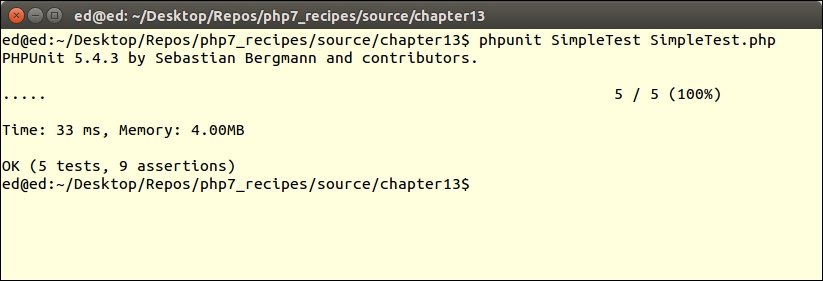
Assuming phpunit is in your PATH, from a terminal window, change to the directory containing the code developed for this recipe, and run the following command:
phpunit SimpleTest SimpleTest.php
You should see the following output:
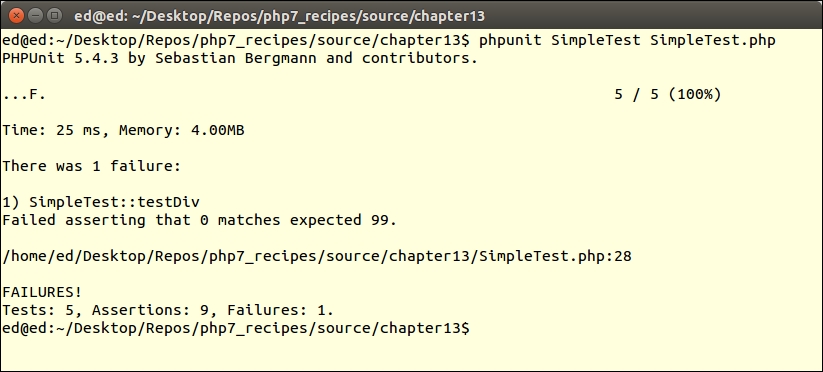
Make a change in SimpleTest.php so that the test will fail (step 4):
public function testDiv()
{
  $this->assertEquals(2, div(4, 2));
  $this->assertEquals(99, div(4, 0));
}
Here is the revised output:
Next, add the table() function to chap_13_unit_test_simple.php (step 5), and testTable() to SimpleTest.php (step 6). Re-run the unit test and observe the results.
To test a class, copy the functions developed in chap_13_unit_test_simple.php to a Demo class (step 7). After making the modifications to SimpleTest.php suggested in step 8, re-run the simple test and observe the results.
First, create an example class to be tested, VisitorOps, shown in step 2 in this subsection. You can now define a class we will call SimpleDatabaseTest to test VisitorOps. First of all, use require_once to load the class to test. (We will discuss how to incorporate autoloading in the next recipe!) Then define key properties, including test database configuration and test data. You could use php7cookbook_test as the test database:
<?php
use PHPUnit\Framework\TestCase;
require_once __DIR__ . '/VisitorOps.php';
class SimpleDatabaseTest extends TestCase
{
  protected $visitorOps;
  protected $dbConfig = [
    'driver'   => 'mysql',
    'host'     => 'localhost',
    'dbname'   => 'php7cookbook_test',
    'user'     => 'cook',
    'password' => 'book',
    'errmode'  => PDO::ERRMODE_EXCEPTION,
  ];
  protected $testData = [
    'id' => 1,
    'email' => 'test@unlikelysource.com',
    'visit_date' => '2000-01-01 00:00:00',
    'comments' => 'TEST',
    'name' => 'TEST'
  ];
}
Next, define setup(), which inserts the test data, and confirms that the last SQL statement was INSERT. You should also check to see whether the return value was positive:
public function setup()
{
  $this->visitorOps = new VisitorOps($this->dbConfig);
  $this->visitorOps->addVisitor($this->testData);
  $this->assertRegExp('/INSERT/', $this->visitorOps->getSql());
}
After that, define teardown(), which removes the test data and confirms that the query for id = 1 comes back as FALSE:
public function teardown()
{
  $result = $this->visitorOps->removeById(1);
  $result = $this->visitorOps->findById(1);
  $this->assertEquals(FALSE, $result);
  unset($this->visitorOps);
}
The first test is for findAll(). First, confirm the data type of the result. You could take the topmost element using current(). We confirm there are five elements, that one of them is name, and that the value is the same as that in the test data:
public function testFindAll()
{
  $result = $this->visitorOps->findAll();
  $this->assertInstanceOf(Generator::class, $result);
  $top = $result->current();
  $this->assertCount(5, $top);
  $this->assertArrayHasKey('name', $top);
  $this->assertEquals($this->testData['name'], $top['name']);
}
The next test is for findById(). It is almost identical to testFindAll():
public function testFindById()
{
  $result = $this->visitorOps->findById(1);
  $this->assertCount(5, $result);
  $this->assertArrayHasKey('name', $result);
  $this->assertEquals($this->testData['name'], $result['name']);
}
You do not need to bother with a test for removeById() as this is already done in teardown(). Likewise, there is no need to test runSql() as this is done as part of the other tests.
First, define a VisitorService service class as described in steps 2 and 3 in this subsection. Next, define a VisitorOpsMock mock class, which is discussed in steps 4 to 7.
You are now in a position to develop a test, VisitorServiceTest, for the service class. Note that you need provide your own database configuration as it is a best practice to use a test database instead of the production version:
<?php
use PHPUnit\Framework\TestCase;
require_once __DIR__ . '/VisitorService.php';
require_once __DIR__ . '/VisitorOpsMock.php';

class VisitorServiceTest extends TestCase
{
  protected $visitorService;
  protected $dbConfig = [
    'driver'   => 'mysql',
    'host'     => 'localhost',
    'dbname'   => 'php7cookbook_test',
    'user'     => 'cook',
    'password' => 'book',
    'errmode'  => PDO::ERRMODE_EXCEPTION,
  ];
}
In setup(), create an instance of the service, and insert VisitorOpsMock in place of the original class:
public function setup()
{
  $this->visitorService = new VisitorService($this->dbConfig);
  $this->visitorService->setVisitorOps(new VisitorOpsMock());
}
public function teardown()
{
  unset($this->visitorService);
}
In our test, which produces an HTML table from the list of visitors, you can then look for certain elements, knowing what to expect in advance as you have control over the test data:
public function testShowAllVisitors()
{
  $result = $this->visitorService->showAllVisitors();
  $this->assertRegExp('!^<table>.+</table>$!', $result);
  $testData = $this->visitorService->getVisitorOps()->getTestData();
  foreach ($testData as $key => $value) {
    $dataWeWant = '!<td>' . $key . '</td>!';
    $this->assertRegExp($dataWeWant, $result);
  }
}
}
You might then wish to experiment with the variations suggested in the last two subsections, Using Anonymous Classes as Mock Objects, and Using Mock Builder.
Other assertions test operations on numbers, strings, arrays, objects, files, JSON, and XML, as summarized in the following table:
|
Category |
Assertions |
|---|---|
|
General |
|
|
Numeric |
|
|
String |
|
|
Array/iterator |
|
|
File |
|
|
Objects |
|
|
JSON |
|
|
XML |
|
- For a good discussion on unit testing, have a look here: https://en.wikipedia.org/wiki/Unit_testing.
- For more information on
composer.jsonfile directives, see https://getcomposer.org/doc/04-schema.md. - For a complete list of assertions, have a look at this PHPUnit documentation page: https://phpunit.de/manual/current/en/phpunit-book.html#appendixes.assertions.
- The PHPUnit documentation also goes into using
getMockBuilder()in detail here: https://phpunit.de/manual/current/en/phpunit-book.html#test-doubles.mock-objects