Table of Contents for
PHP 7: Real World Application Development
 PHP 7: Real World Application Development
Published by
Packt Publishing, 2016
PHP 7: Real World Application Development
Published by
Packt Publishing, 2016
- Cover
- Table of Contents
- PHP 7: Real World Application Development
- PHP 7: Real World Application Development
- PHP 7: Real World Application Development
- Credits
- Preface
- What you need for this learning path
- Who this learning path is for
- Reader feedback
- Customer support
- 1. Module 1
- 1. Building a Foundation
- PHP 7 installation considerations
- Using the built-in PHP web server
- Defining a test MySQL database
- Installing PHPUnit
- Implementing class autoloading
- Hoovering a website
- Building a deep web scanner
- Creating a PHP 5 to PHP 7 code converter
- 2. Using PHP 7 High Performance Features
- Understanding the abstract syntax tree
- Understanding differences in parsing
- Understanding differences in foreach() handling
- Improving performance using PHP 7 enhancements
- Iterating through a massive file
- Uploading a spreadsheet into a database
- Recursive directory iterator
- 3. Working with PHP Functions
- Developing functions
- Hinting at data types
- Using return value data typing
- Using iterators
- Writing your own iterator using generators
- 4. Working with PHP Object-Oriented Programming
- Developing classes
- Extending classes
- Using static properties and methods
- Using namespaces
- Defining visibility
- Using interfaces
- Using traits
- Implementing anonymous classes
- 5. Interacting with a Database
- Using PDO to connect to a database
- Building an OOP SQL query builder
- Handling pagination
- Defining entities to match database tables
- Tying entity classes to RDBMS queries
- Embedding secondary lookups into query results
- Implementing jQuery DataTables PHP lookups
- 6. Building Scalable Websites
- Creating a generic form element generator
- Creating an HTML radio element generator
- Creating an HTML select element generator
- Implementing a form factory
- Chaining $_POST filters
- Chaining $_POST validators
- Tying validation to a form
- 7. Accessing Web Services
- Converting between PHP and XML
- Creating a simple REST client
- Creating a simple REST server
- Creating a simple SOAP client
- Creating a simple SOAP server
- 8. Working with Date/Time and International Aspects
- Using emoticons or emoji in a view script
- Converting complex characters
- Getting the locale from browser data
- Formatting numbers by locale
- Handling currency by locale
- Formatting date/time by locale
- Creating an HTML international calendar generator
- Building a recurring events generator
- Handling translation without gettext
- 9. Developing Middleware
- Authenticating with middleware
- Using middleware to implement access control
- Improving performance using the cache
- Implementing routing
- Making inter-framework system calls
- Using middleware to cross languages
- 10. Looking at Advanced Algorithms
- Using getters and setters
- Implementing a linked list
- Building a bubble sort
- Implementing a stack
- Building a binary search class
- Implementing a search engine
- Displaying a multi-dimensional array and accumulating totals
- 11. Implementing Software Design Patterns
- Creating an array to object hydrator
- Building an object to array hydrator
- Implementing a strategy pattern
- Defining a mapper
- Implementing object-relational mapping
- Implementing the Pub/Sub design pattern
- 12. Improving Web Security
- Filtering $_POST data
- Validating $_POST data
- Safeguarding the PHP session
- Securing forms with a token
- Building a secure password generator
- Safeguarding forms with a CAPTCHA
- Encrypting/decrypting without mcrypt
- 13. Best Practices, Testing, and Debugging
- Using Traits and Interfaces
- Universal exception handler
- Universal error handler
- Writing a simple test
- Writing a test suite
- Generating fake test data
- Customizing sessions using session_start parameters
- A. Defining PSR-7 Classes
- Implementing PSR-7 value object classes
- Developing a PSR-7 Request class
- Defining a PSR-7 Response class
- 2. Module 2
- 1. Setting Up the Environment
- Setting up Debian or Ubuntu
- Setting up CentOS
- Setting up Vagrant
- Summary
- 2. New Features in PHP 7
- New operators
- Uniform variable syntax
- Miscellaneous features and changes
- Summary
- 3. Improving PHP 7 Application Performance
- HTTP server optimization
- HTTP persistent connection
- Content Delivery Network (CDN)
- CSS and JavaScript optimization
- Full page caching
- Varnish
- The infrastructure
- Summary
- 4. Improving Database Performance
- Storage engines
- The Percona Server - a fork of MySQL
- MySQL performance monitoring tools
- Percona XtraDB Cluster (PXC)
- Redis – the key-value cache store
- Memcached key-value cache store
- Summary
- 5. Debugging and Profiling
- Profiling with Xdebug
- PHP DebugBar
- Summary
- 6. Stress/Load Testing PHP Applications
- ApacheBench (ab)
- Siege
- Load testing real-world applications
- Summary
- 7. Best Practices in PHP Programming
- Test-driven development (TDD)
- Design patterns
- Service-oriented architecture (SOA)
- Being object-oriented and reusable always
- PHP frameworks
- Version control system (VCS) and Git
- Deployment and Continuous Integration (CI)
- Summary
- A. Tools to Make Life Easy
- Git – A version control system
- Grunt watch
- Summary
- B. MVC and Frameworks
- Laravel
- Lumen
- Apigility
- Summary
- 3. Module 3
- 1. Ecosystem Overview
- Summary
- 2. GoF Design Patterns
- Structural patterns
- Behavioral patterns
- Summary
- 3. SOLID Design Principles
- Open/closed principle
- Liskov substitution principle
- Interface Segregation Principle
- Dependency inversion principle
- Summary
- 4. Requirement Specification for a Modular Web Shop App
- Wireframing
- Defining a technology stack
- Summary
- 5. Symfony at a Glance
- Creating a blank project
- Using Symfony console
- Controller
- Routing
- Templates
- Forms
- Configuring Symfony
- The bundle system
- Databases and Doctrine
- Testing
- Validation
- Summary
- 6. Building the Core Module
- Dependencies
- Implementation
- Unit testing
- Functional testing
- Summary
- 7. Building the Catalog Module
- Dependencies
- Implementation
- Unit testing
- Functional testing
- Summary
- 8. Building the Customer Module
- Dependencies
- Implementation
- Unit testing
- Functional testing
- Summary
- 9. Building the Payment Module
- Dependencies
- Implementation
- Unit testing
- Functional testing
- Summary
- 10. Building the Shipment Module
- Dependencies
- Implementation
- Unit testing
- Functional testing
- Summary
- 11. Building the Sales Module
- Dependencies
- Implementation
- Unit testing
- Functional testing
- Summary
- 12. Integrating and Distributing Modules
- Understanding GitHub
- Understanding Composer
- Understanding Packagist
- Summary
- Bibliography
- Index
CAPTCHA is actually an acronym for Completely Automated Public Turing Test to Tell Computers and Humans Apart. The technique is similar to the one presented in the preceding recipe, Securing forms with a token. The difference is that instead of storing the token in a hidden form input field, the token is rendered into a graphic that is difficult for an automated attack system to decipher. Also, the intent of a CAPTCHA is slightly different from a form token: it is designed to confirm that the web visitor is a human being, and not an automated system.
- There are several approaches to CAPTCHA: presenting a question based on knowledge only a human would possess, text tricks, and a graphics image that needs to be interpreted.
- The image approach presents web visitors with an image with heavily distorted letters and/or numbers. This approach can be complicated, however, in that it relies on the GD extension, which may not be available on all servers. The GD extension can be difficult to compile, and has heavy dependencies on various libraries that must be present on the host server.
- The text approach is to present a series of letters and/or numbers, and give the web visitor a simple instruction such as please type this backwards. Another variation is to use ASCII "art" to form characters that a human web visitor is able to interpret.
- Finally, you might have a question/answer approach with questions such as The head is attached to the body by what body part, and have answers such as Arm, Leg, and Neck. The downside to this approach is that an automated attack system will have a 1 in 3 chance of passing the test.
- For this illustration, we will start with the text approach, and follow with the image approach. In either case, we first need to define a class that generates the phrase to be presented (and decoded by the web visitor). For this purpose, we define an
Application\Captcha\Phraseclass. We also define properties and class constants used in the phrase generation process:namespace Application\Captcha; class Phrase { const DEFAULT_LENGTH = 5; const DEFAULT_NUMBERS = '0123456789'; const DEFAULT_UPPER = 'ABCDEFGHJKLMNOPQRSTUVWXYZ'; const DEFAULT_LOWER = 'abcdefghijklmnopqrstuvwxyz'; const DEFAULT_SPECIAL = '¬\`|!"£$%^&*()_-+={}[]:;@\'~#<,>.?/|\\'; const DEFAULT_SUPPRESS = ['O','l']; protected $phrase; protected $includeNumbers; protected $includeUpper; protected $includeLower; protected $includeSpecial; protected $otherChars; protected $suppressChars; protected $string; protected $length; - The constructor, as you would expect, accepts values for the various properties, with defaults assigned so that an instance can be created without having to specify any parameters. The
$include*flags are used to signal which character sets will be present in the base string from which the phrase will be generated. For example, if you wish to only have numbers,$includeUpperand$includeLowerwould both be set toFALSE.$otherCharsis provided for extra flexibility. Finally,$suppressCharsrepresents an array of characters that will be removed from the base string. The default removes uppercaseOand lowercasel:public function __construct( $length = NULL, $includeNumbers = TRUE, $includeUpper= TRUE, $includeLower= TRUE, $includeSpecial = FALSE, $otherChars = NULL, array $suppressChars = NULL) { $this->length = $length ?? self::DEFAULT_LENGTH; $this->includeNumbers = $includeNumbers; $this->includeUpper = $includeUpper; $this->includeLower = $includeLower; $this->includeSpecial = $includeSpecial; $this->otherChars = $otherChars; $this->suppressChars = $suppressChars ?? self::DEFAULT_SUPPRESS; $this->phrase = $this->generatePhrase(); } - We then define a series of getters and setters, one for each property. Please note that we only show the first two in order to conserve space.
public function getString() { return $this->string; } public function setString($string) { $this->string = $string; } // other getters and setters not shown - We next need to define a method that initializes the base string. This consists of a series of simple if statements that check the various
$include*flags and append to the base string as appropriate. At the end, we usestr_replace()to remove the characters represented in$suppressChars:public function initString() { $string = ''; if ($this->includeNumbers) { $string .= self::DEFAULT_NUMBERS; } if ($this->includeUpper) { $string .= self::DEFAULT_UPPER; } if ($this->includeLower) { $string .= self::DEFAULT_LOWER; } if ($this->includeSpecial) { $string .= self::DEFAULT_SPECIAL; } if ($this->otherChars) { $string .= $this->otherChars; } if ($this->suppressChars) { $string = str_replace( $this->suppressChars, '', $string); } return $string; } - We are now ready to define the core method that generates the random phrase that the CAPTCHA presents to website visitors. We set up a simple
for()loop, and use the new PHP 7random_int()function to jump around in the base string:public function generatePhrase() { $phrase = ''; $this->string = $this->initString(); $max = strlen($this->string) - 1; for ($x = 0; $x < $this->length; $x++) { $phrase .= substr( $this->string, random_int(0, $max), 1); } return $phrase; } } - Now we turn our attention away from the phrase and onto the class that will produce a text CAPTCHA. For this purpose, we first define an interface so that, in the future, we can create additional CAPTCHA classes that all make use of
Application\Captcha\Phrase. Note thatgetImage()will return text, text art, or an actual image, depending on which class we decide to use:namespace Application\Captcha; interface CaptchaInterface { public function getLabel(); public function getImage(); public function getPhrase(); } - For a text CAPTCHA, we define a
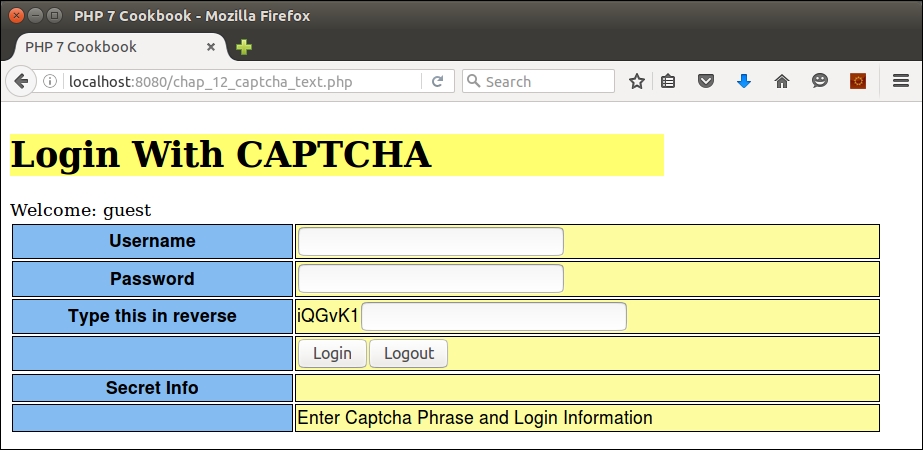
Application\Captcha\Reverseclass. The reason for this name is that this class produces not just text, but text in reverse. The__construct()method builds an instance ofPhrase. Note thatgetImage()returns the phrase in reverse:namespace Application\Captcha; class Reverse implements CaptchaInterface { const DEFAULT_LABEL = 'Type this in reverse'; const DEFAULT_LENGTH = 6; protected $phrase; public function __construct( $label = self::DEFAULT_LABEL, $length = self:: DEFAULT_LENGTH, $includeNumbers = TRUE, $includeUpper = TRUE, $includeLower = TRUE, $includeSpecial = FALSE, $otherChars = NULL, array $suppressChars = NULL) { $this->label = $label; $this->phrase = new Phrase( $length, $includeNumbers, $includeUpper, $includeLower, $includeSpecial, $otherChars, $suppressChars); } public function getLabel() { return $this->label; } public function getImage() { return strrev($this->phrase->getPhrase()); } public function getPhrase() { return $this->phrase->getPhrase(); } }
- The image approach, as you can well imagine, is much more complicated. The phrase generation process is the same. The main difference is that not only do we need to imprint the phrase on a graphic, but we also need to distort each letter differently and introduce noise in the form of random dots.
- We define a
Application\Captcha\Imageclass that implementsCaptchaInterface. The class constants and properties include not only those needed for phrase generation, but what is needed for image generation as well:namespace Application\Captcha; use DirectoryIterator; class Image implements CaptchaInterface { const DEFAULT_WIDTH = 200; const DEFAULT_HEIGHT = 50; const DEFAULT_LABEL = 'Enter this phrase'; const DEFAULT_BG_COLOR = [255,255,255]; const DEFAULT_URL = '/captcha'; const IMAGE_PREFIX = 'CAPTCHA_'; const IMAGE_SUFFIX = '.jpg'; const IMAGE_EXP_TIME = 300; // seconds const ERROR_REQUIRES_GD = 'Requires the GD extension + ' . ' the JPEG library'; const ERROR_IMAGE = 'Unable to generate image'; protected $phrase; protected $imageFn; protected $label; protected $imageWidth; protected $imageHeight; protected $imageRGB; protected $imageDir; protected $imageUrl; - The constructor needs to accept all the arguments required for phrase generation, as described in the previous steps. In addition, we need to accept arguments required for image generation. The two mandatory parameters are
$imageDirand$imageUrl. The first is where the graphic will be written. The second is the base URL, after which we will append the generated filename.$imageFontis provided in case we want to provide TrueType fonts, which will produce a more secure CAPTCHA. Otherwise, we're limited to the default fonts which, to quote a line in a famous movie, ain't a pretty sight:public function __construct( $imageDir, $imageUrl, $imageFont = NULL, $label = NULL, $length = NULL, $includeNumbers = TRUE, $includeUpper= TRUE, $includeLower= TRUE, $includeSpecial = FALSE, $otherChars = NULL, array $suppressChars = NULL, $imageWidth = NULL, $imageHeight = NULL, array $imageRGB = NULL ) { - Next, still in the constructor, we check to see whether the
imagecreatetruecolorfunction exists. If this comes back asFALSE, we know the GD extension is not available. Otherwise, we assign parameters to properties, generate the phrase, remove old images, and write out the CAPTCHA graphic:if (!function_exists('imagecreatetruecolor')) { throw new \Exception(self::ERROR_REQUIRES_GD); } $this->imageDir = $imageDir; $this->imageUrl = $imageUrl; $this->imageFont = $imageFont; $this->label = $label ?? self::DEFAULT_LABEL; $this->imageRGB = $imageRGB ?? self::DEFAULT_BG_COLOR; $this->imageWidth = $imageWidth ?? self::DEFAULT_WIDTH; $this->imageHeight= $imageHeight ?? self::DEFAULT_HEIGHT; if (substr($imageUrl, -1, 1) == '/') { $imageUrl = substr($imageUrl, 0, -1); } $this->imageUrl = $imageUrl; if (substr($imageDir, -1, 1) == DIRECTORY_SEPARATOR) { $imageDir = substr($imageDir, 0, -1); } $this->phrase = new Phrase( $length, $includeNumbers, $includeUpper, $includeLower, $includeSpecial, $otherChars, $suppressChars); $this->removeOldImages(); $this->generateJpg(); } - The process of removing old images is extremely important; otherwise we will end up with a directory filled with expired CAPTCHA images! We use the
DirectoryIteratorclass to scan the designated directory and check the access time. We calculate an old image file as one that is the current time minus the value specified byIMAGE_EXP_TIME:public function removeOldImages() { $old = time() - self::IMAGE_EXP_TIME; foreach (new DirectoryIterator($this->imageDir) as $fileInfo) { if($fileInfo->isDot()) continue; if ($fileInfo->getATime() < $old) { unlink($this->imageDir . DIRECTORY_SEPARATOR . $fileInfo->getFilename()); } } } - We are now ready to move on to the main show. First, we split the
$imageRGBarray into$red,$green, and$blue. We use the coreimagecreatetruecolor()function to generate the base graphic with the width and height specified. We use the RGB values to colorize the background:public function generateJpg() { try { list($red,$green,$blue) = $this->imageRGB; $im = imagecreatetruecolor( $this->imageWidth, $this->imageHeight); $black = imagecolorallocate($im, 0, 0, 0); $imageBgColor = imagecolorallocate( $im, $red, $green, $blue); imagefilledrectangle($im, 0, 0, $this->imageWidth, $this->imageHeight, $imageBgColor); - Next, we define x and y margins based on image width and height. We then initialize variables to be used to write the phrase onto the graphic. We then loop a number of times that matches the length of the phrase:
$xMargin = (int) ($this->imageWidth * .1 + .5); $yMargin = (int) ($this->imageHeight * .3 + .5); $phrase = $this->getPhrase(); $max = strlen($phrase); $count = 0; $x = $xMargin; $size = 5; for ($i = 0; $i < $max; $i++) { - If
$imageFontis specified, we are able to write each character with a different size and angle. We also need to adjust the x axis (that is, horizontal) value according to the size:if ($this->imageFont) { $size = rand(12, 32); $angle = rand(0, 30); $y = rand($yMargin + $size, $this->imageHeight); imagettftext($im, $size, $angle, $x, $y, $black, $this->imageFont, $phrase[$i]); $x += (int) ($size + rand(0,5)); - Otherwise, we're stuck with the default fonts. We use the largest size of
5, as smaller sizes are unreadable. We provide a low level of distortion by alternating betweenimagechar(), which writes the image normally, andimagecharup(), which writes it sideways:} else { $y = rand(0, ($this->imageHeight - $yMargin)); if ($count++ & 1) { imagechar($im, 5, $x, $y, $phrase[$i], $black); } else { imagecharup($im, 5, $x, $y, $phrase[$i], $black); } $x += (int) ($size * 1.2); } } // end for ($i = 0; $i < $max; $i++) - Next we need to add noise in the form of random dots. This is necessary in order to make the image harder for automated systems to detect. It is also recommended that you add code to draw a few lines as well:
$numDots = rand(10, 999); for ($i = 0; $i < $numDots; $i++) { imagesetpixel($im, rand(0, $this->imageWidth), rand(0, $this->imageHeight), $black); } - We then create a random image filename using our old friend
md5()with the date and a random number from0to9999as arguments. Note that we can safely usemd5()as we are not trying to hide any secret information; we're merely interested in generating a unique filename quickly. We wipe out the image object as well to conserve memory:$this->imageFn = self::IMAGE_PREFIX . md5(date('YmdHis') . rand(0,9999)) . self::IMAGE_SUFFIX; imagejpeg($im, $this->imageDir . DIRECTORY_SEPARATOR . $this->imageFn); imagedestroy($im); - The entire construct is in a
try/catchblock. If an error or exception is thrown, we log the message and take the appropriate action:} catch (\Throwable $e) { error_log(__METHOD__ . ':' . $e->getMessage()); throw new \Exception(self::ERROR_IMAGE); } } - Finally, we define the methods required by the interface. Note that
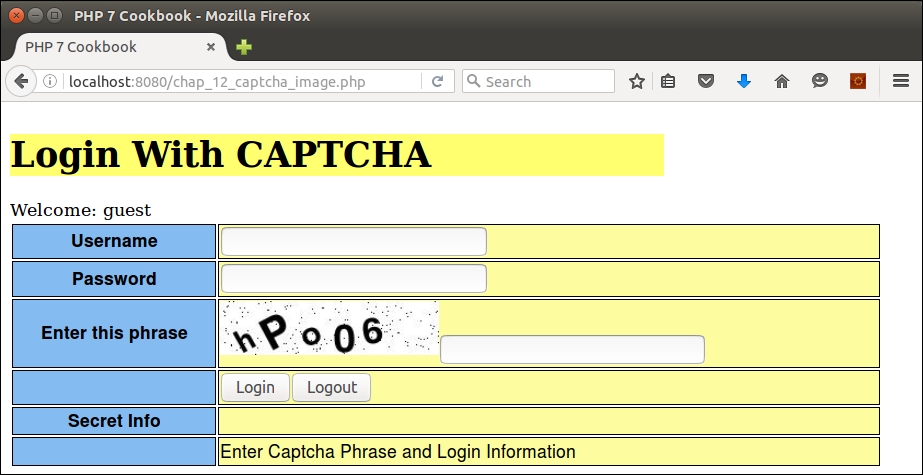
getImage()returns an HTML<img>tag, which can then be immediately displayed:public function getLabel() { return $this->label; } public function getImage() { return sprintf('<img src="%s/%s" />', $this->imageUrl, $this->imageFn); } public function getPhrase() { return $this->phrase->getPhrase(); } }
Be sure to define the classes discussed in this recipe, summarized in the following table:
|
Class |
Subsection |
The steps it appears in |
|---|---|---|
|
|
Generating a text CAPTCHA |
1 - 5 |
|
|
6 | |
|
|
7 | |
|
|
Generating an image CAPTCHA |
2 - 13 |
Next, define a calling program called chap_12_captcha_text.php that implements a text CAPTCHA. You first need to set up autoloading and use the appropriate classes:
<?php
require __DIR__ . '/../Application/Autoload/Loader.php';
Application\Autoload\Loader::init(__DIR__ . '/..');
use Application\Captcha\Reverse;
After that, be sure to start the session. You would use appropriate measures to protect the session as well. To conserve space, we only show one simple measure, session_regenerate_id():
session_start();
session_regenerate_id();
Next, you can define a function that creates the CAPTCHA; retrieves the phrase, label, and image (in this case, reverse text); and stores the value in the session:
function setCaptcha(&$phrase, &$label, &$image)
{
  $captcha = new Reverse();
  $phrase  = $captcha->getPhrase();
  $label   = $captcha->getLabel();
  $image   = $captcha->getImage();
  $_SESSION['phrase'] = $phrase;
}
Now is a good time to initialize variables and determine the loggedIn status:
$image      = '';
$label      = '';
$phrase     = $_SESSION['phrase'] ?? '';
$message    = '';
$info       = 'You Can Now See Super Secret Information!!!';
$loggedIn   = $_SESSION['isLoggedIn'] ?? FALSE;
$loggedUser = $_SESSION['user'] ?? 'guest';
You can then check to see whether the login button has been pressed. If so, check to see whether the CAPTCHA phrase has been entered. If not, initialize a message informing the user they need to enter the CAPTCHA phrase:
if (!empty($_POST['login'])) {
  if (empty($_POST['captcha'])) {
    $message = 'Enter Captcha Phrase and Login Information';
If the CAPTCHA phrase is present, check to see whether it matches what is stored in the session. If it doesn't match, proceed as if the form is invalid. Otherwise, process the login as you would have otherwise. For the purposes of this illustration, you can simulate a login by using hard-coded values for the username and password:
} else {
    if ($_POST['captcha'] == $phrase) {
        $username = 'test';
        $password = 'password';
        if ($_POST['user'] == $username
            && $_POST['pass'] == $password) {
            $loggedIn = TRUE;
            $_SESSION['user'] = strip_tags($username);
            $_SESSION['isLoggedIn'] = TRUE;
        } else {
            $message = 'Invalid Login';
        }
    } else {
        $message = 'Invalid Captcha';
    }
}
You might also want to add code for a logout option, as described in the Safeguarding the PHP session recipe:
} elseif (isset($_POST['logout'])) {
  session_unset();
  session_destroy();
  setcookie('PHPSESSID', 0, time() - 3600);
  header('Location: ' . $_SERVER['REQUEST_URI'] );
  exit;
}
You can then run setCaptcha():
setCaptcha($phrase, $label, $image);
Lastly, don't forget the view logic, which, in this example, presents a basic login form. Inside the form tag, you'll need to add view logic to display the CAPTCHA and label:
<tr>
  <th><?= $label; ?></th>
  <td><?= $image; ?><input type="text" name="captcha" /></td>
</tr>
Here is the resulting output:
To demonstrate how to use the image CAPTCHA, copy the code from chap_12_captcha_text.php to cha_12_captcha_image.php. We define constants that represent the location of the directory in which we will write the CAPTCHA images. (Be sure to create this directory!) Otherwise, the autoloading and use statement structure is similar. Note that we also define a TrueType font. Differences are noted in bold:
<?php
define('IMAGE_DIR', __DIR__ . '/captcha');
define('IMAGE_URL', '/captcha');
define('IMAGE_FONT', __DIR__ . '/FreeSansBold.ttf');
require __DIR__ . '/../Application/Autoload/Loader.php';
Application\Autoload\Loader::init(__DIR__ . '/..');
use Application\Captcha\Image;

session_start();
session_regenerate_id();
Tip
Important!
Fonts can potentially be protected under copyright, trademark, patent, or other intellectual property laws. If you use a font for which you are not licensed, you and your customer could be held liable in court! Use an open source font, or one that is available on the web server for which you have a valid license.
Of course, in the setCaptcha() function, we use the Image class instead of Reverse:
function setCaptcha(&$phrase, &$label, &$image)
{
  $captcha = new Image(IMAGE_DIR, IMAGE_URL, IMAGE_FONT);
  $phrase  = $captcha->getPhrase();
  $label   = $captcha->getLabel();
  $image   = $captcha->getImage();
  $_SESSION['phrase'] = $phrase;
  return $captcha;
}
Variable initialization is the same as the previous script, and login processing is identical to the previous script:
$image      = '';
$label      = '';
$phrase     = $_SESSION['phrase'] ?? '';
$message    = '';
$info       = 'You Can Now See Super Secret Information!!!';
$loggedIn   = $_SESSION['isLoggedIn'] ?? FALSE;
$loggedUser = $_SESSION['user'] ?? 'guest';

if (!empty($_POST['login'])) {

  // etc.  -- identical to chap_12_captcha_text.php
Even the view logic remains the same, as we are using getImage(), which, in the case of the image CAPTCHA, returns directly usable HTML. Here is the output using a TrueType font:
If you are not inclined to use the preceding code to generate your own in-house CAPTCHA, there are plenty of libraries available. Most popular frameworks have this ability. Zend Framework, for example, has its Zend\Captcha component class. There is also reCAPTCHA, which is generally invoked as a service in which your application makes a call to an external website that generates the CAPTCHA and token for you. A good place to start looking is http://www.captcha.net/ website.
For more information on the protection of fonts as intellectual property, refer to the article present at https://en.wikipedia.org/wiki/Intellectual_property_protection_of_typefaces.