
After installing the topology extension, one more preparation step is needed before we can work with data: a new, empty topology has to be created. There are two functions for this: topology.ST_InitTopoGeo and topology.CreateTopology. The former is defined by the ISO standard, and accepts only one argument: the topology name. The latter is a non-standard version that allows the definition of additional parameters: the snapping tolerance, SRID, and dimensionality. Let's use the non-standard version:
SELECT topology.CreateTopology('my_topology', 4326, 0.00028, FALSE);
The first argument defines the topology name, the second is SRID (in this case, WGS84), the third specifies the precision (in this case, 1 arc-second, which is about 30 meters at the equator), and the fourth determines whether the topology should store Z-coordinates.
As a result, the function should return the integer ID of the newly created topology. Let's have a look at the database structure now:
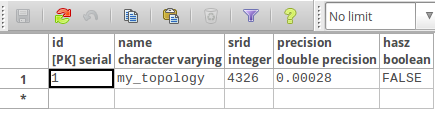
In the topology schema, the newly created topology is registered in the topology.topology metadata table with parameters we have previously supplied as function arguments.
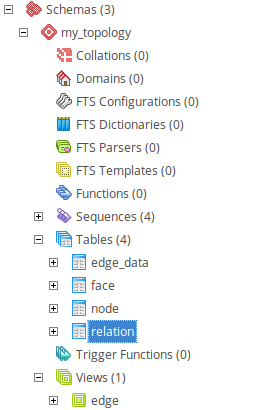
The new schema, called my_topology, has appeared. It contains the following tables: edge_data, face, node and relation.
It also contains an edge view, which contains a subset of the edge_data columns:
The relation table is a typical many-to-many relationship table, which connects topology elements with respective TopoGeometries in a feature table. The element_type column denotes the table where related elements reside: 1 is for node, 2 for edge, and 3 for face. Usually there's no need (and it's not recommended) to manipulate this table directly because the topology functions will take care of it.
These tables are now empty, as no data has been stored so far. We will populate them in the next section.