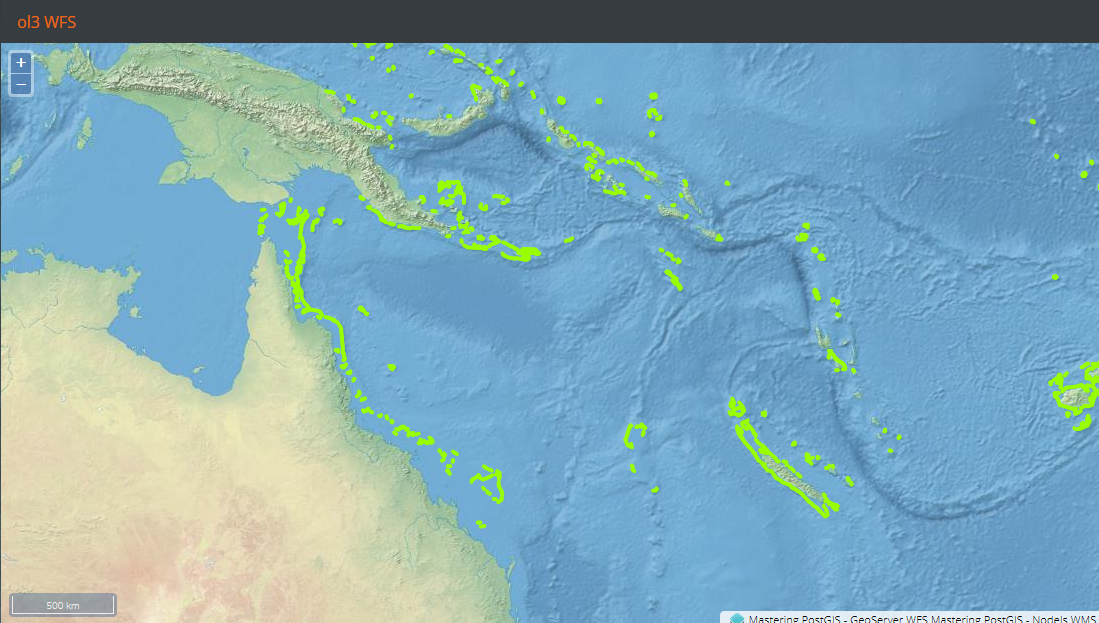
Leaflet does not read WFS, so our WFS example will be OpenLayers only. Consuming WFS means reading, retrieving, and rendering vector data on the client side. Such processes may be intensive on PC resources - we will therefore use a rather small dataset with the ne_reefs vector so we do not have to bother with performance issues when dealing with larger vector datasets.
Our web example will be very similar to the previous one with WMS only. The different part is the layers declaration:
createLayers: function(){
    var proj = ol.proj.get('EPSG:4326');
        format = new ol.format.WFS(),
        wfsVectorSource = new ol.source.Vector({
            projection: proj,
            loader: function(extent, resolution, projection) {
                Ext.Ajax.request({
                    cors: true,
                    url: 'http://localhost:8080/geoserver/wfs?
                    service=WFS&request=GetFeature&version=1.1.0&' +
                    'typename=mastering_postgis:ne_reefs&'+
                    'srsname=EPSG:4326&' +
                    'bbox=' + extent.join(',') + ',EPSG:4326'
                })
                .then(function(response){
                    //rad the features
                    var features =
                    format.readFeatures(response.responseText),
                        f = 0, flen = features.length;

                    //and make sure to swap the coords...
                    for(f; f < flen; f++){
                        features[f].getGeometry().applyTransform(function
                        (coords, coords2, dimension) {
                                var c = 0, clen = coords.length,
                                    x,y;
                                for (c; c < clen; c += dimension) {
                                    y = coords[c]; x = coords[c + 1];
                                    coords[c] = x; coords[c + 1] = y;
                                }
                        });
                    }
                    wfsVectorSource.addFeatures(features);
                });
            },
            //this will make the map request features per tile boundary
            strategy: ol.loadingstrategy.tile(ol.tilegrid.createXYZ({
                extent: proj.getExtent(),
                maxZoom: 8
            })),
            attributions: [
                new ol.Attribution({
                    html: 'Mastering PostGIS - GeoServer WFS'
                })
            ]
        });

    return [
        (...WMS Layer declaration   ),
        new ol.layer.Vector({
            source: wfsVectorSource,
            style: style: (...style declaration...)
        })
    ];
}
The preceding code is a bit more complex than a simple WMS layer declaration, as we need to declare a format object that can read the GML returned by the WFS services, and also, since a vector loading strategy is used, we need a loader function for it. If this was not enough, we need to do some coordinate swapping as EPSG:4326 reverses the axis order.
We now need to navigate to the example's folder, run sencha app watch, and navigate to http://localhost:1841/apps/04_ol3_wfs/. You should see a similar output to the following: