Table of Contents for
Linux Shell Scripting Bootcamp
 Linux Shell Scripting Bootcamp
Published by
Packt Publishing, 2017
Linux Shell Scripting Bootcamp
Published by
Packt Publishing, 2017
- Cover
- Table of Contents
- Linux Shell Scripting Bootcamp
- Linux Shell Scripting Bootcamp
- Credits
- About the Author
- Acknowledgement
- About the Reviewer
- www.PacktPub.com
- Customer Feedback
- Preface
- What you need for this book
- Who this book is for
- Conventions
- Reader feedback
- Customer support
- 1. Getting Started with Shell Scripting
- Demonstrating the use of scripts
- Summary
- 2. Working with Variables
- Validating parameters using conditional statements
- Comparison operators for strings
- Environment variables
- Summary
- 3. Using Loops and the sleep Command
- Screen manipulation
- Indenting your code
- Using the for statement
- Leaving a loop early
- The sleep command
- Watching a process
- Creating numbered backup files
- Summary
- 4. Creating and Calling Subroutines
- File redirection
- Command piping
- Subroutines
- Using parameters
- Making a current backup of your work
- Summary
- 5. Creating Interactive Scripts
- Summary
- 6. Automating Tasks with Scripts
- Summary
- 7. Working with Files
- Reading files
- Reading and writing files
- Reading and writing files interactively
- File checksums
- File encryption
- Summary
- 8. Working with wget and curl
- wget and recursion
- wget options
- curl
- Summary
- 9. Debugging Scripts
- Automatic backups
- More syntax errors
- Logic errors
- Using set to debug scripts
- Summary
- 10. Scripting Best Practices
- ssh and scp
- Find and use a good text editor
- Environment variables and aliases
- ssh prompt
- Testing an archive
- Progress indicator
- Creating new commands from a template
- Alerting the user
- Summary
- Index
Environment variables were covered in Chapter2, Working with Variables. Here is a cool trick that I learned years ago that can really help when using the command line. Most Linux systems generally have several standard directories under $HOME such as Desktop, Downloads, Music, Pictures, and so on. I personally do not like typing the same things over and over again and so do this to help use the system more efficiently. Here are some of the lines that I have added to my /home/guest1/.bashrc file:
export BIN=$HOME/bin
alias bin="cd $BIN"

export DOWN=$HOME/Downloads
alias down="cd $DOWN"

export DESK=$HOME/Desktop
alias desk="cd $DESK"

export MUSIC=$HOME/Music
alias music="cd $MUSIC"

export PICTURES=$HOME/Pictures
alias pictures="cd $PICTURES"

export BOOKMARKS=$HOME/Bookmarks
alias bookmarks="cd $BOOKMARKS"

# Packt- Linux Scripting Bootcamp
export LB=$HOME/LinuxScriptingBook
alias lb="cd $LB"

# Source lbcur
. $LB/source.lbcur.txt
Using this approach you can cd to any of the above directories by just typing the lowercase alias. What's even better is you can also copy or move files to or from the directory by using the uppercase exported environment variable. Check out the following screenshot:
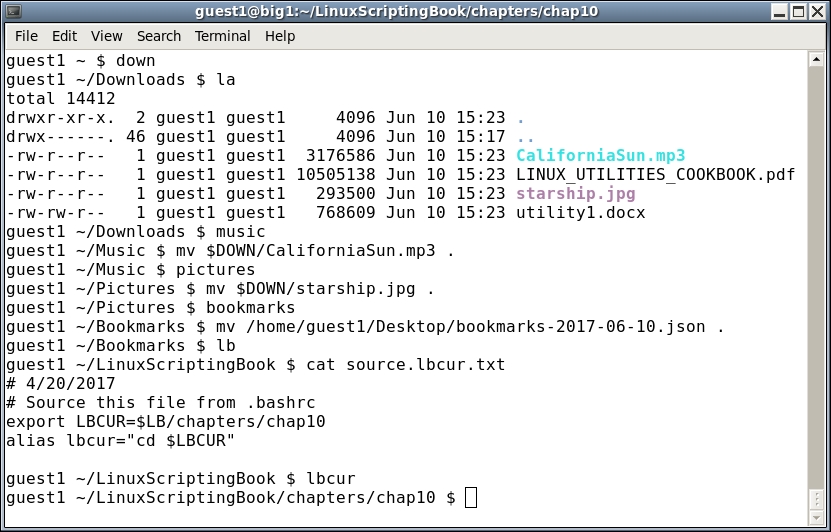
It took me several years to start doing this and I am still kicking myself for not discovering it sooner. Remember to make the alias lowercase and the env var uppercase and you should be good to go.
Notice the command I ran in the Bookmarks directory. I actually typed mv $DESK/ and then hit the Tab key. This caused the line to auto-complete and then I added the dot . character and pressed Enter.
Remember to use command auto-completion any time you can, it's a great time saver.
The line . $LB/source.lbcur.txt needs to be explained. You can see I have an lbcur alias which puts me into the directory where I am currently working on this book. Since I use both my root and guest1 accounts to write a book, I can change the chapter number in just the source.lbcur.txt file. I then source the .bashrc files for root and guest1 and I'm done. Otherwise, I would have to make the change in each .bashrc file. With just two files maybe it wouldn't be that bad, but suppose you had several users? I use this technique quite a bit on my systems as I am a very lazy typist.
Remember: When using aliases and environment variables you need to source the users's .bashrc file before any changes will be picked up in the terminal.