Table of Contents for
Linux Shell Scripting Bootcamp
 Linux Shell Scripting Bootcamp
Published by
Packt Publishing, 2017
Linux Shell Scripting Bootcamp
Published by
Packt Publishing, 2017
- Cover
- Table of Contents
- Linux Shell Scripting Bootcamp
- Linux Shell Scripting Bootcamp
- Credits
- About the Author
- Acknowledgement
- About the Reviewer
- www.PacktPub.com
- Customer Feedback
- Preface
- What you need for this book
- Who this book is for
- Conventions
- Reader feedback
- Customer support
- 1. Getting Started with Shell Scripting
- Demonstrating the use of scripts
- Summary
- 2. Working with Variables
- Validating parameters using conditional statements
- Comparison operators for strings
- Environment variables
- Summary
- 3. Using Loops and the sleep Command
- Screen manipulation
- Indenting your code
- Using the for statement
- Leaving a loop early
- The sleep command
- Watching a process
- Creating numbered backup files
- Summary
- 4. Creating and Calling Subroutines
- File redirection
- Command piping
- Subroutines
- Using parameters
- Making a current backup of your work
- Summary
- 5. Creating Interactive Scripts
- Summary
- 6. Automating Tasks with Scripts
- Summary
- 7. Working with Files
- Reading files
- Reading and writing files
- Reading and writing files interactively
- File checksums
- File encryption
- Summary
- 8. Working with wget and curl
- wget and recursion
- wget options
- curl
- Summary
- 9. Debugging Scripts
- Automatic backups
- More syntax errors
- Logic errors
- Using set to debug scripts
- Summary
- 10. Scripting Best Practices
- ssh and scp
- Find and use a good text editor
- Environment variables and aliases
- ssh prompt
- Testing an archive
- Progress indicator
- Creating new commands from a template
- Alerting the user
- Summary
- Index
Okay, let's add some routines to this script to show how to use parameters with a subroutine. In order to make the output look better the cls routine is called first to clear the screen:
#!/bin/sh
# 6/13/2017
# script5

# Subroutines
cls()
{
 tput clear
 return 0
}

home()
{
 tput cup 0 0
 return 0
}

end()
{
 let x=$COLUMNS-1
 tput cup $LINES $x
 echo -n "X"                 # no newline or else will scroll
}

bold()
{
 tput smso
}

unbold()
{
 tput rmso
}

underline()
{
 tput smul
}

normalline()
{
 tput rmul
}

move()                       # move cursor to row, col
{
 tput cup $1 $2
}

movestr()                    # move cursor to row, col
{
 tput cup $1 $2
 echo $3
}

# Code starts here
cls                          # clear the screen to make the output look better
rc=0                         # return code
if [ $# -ne 1 ] ; then
 echo "Usage: script5 parameter"
 echo "Where parameter can be: "
 echo " home      - put an X at the home position"
 echo " cls       - clear the terminal screen"
 echo " end       - put an X at the last screen position"
 echo " bold      - bold the following output"
 echo " underline - underline the following output"
 echo " move      - move cursor to row,col"
 echo " movestr   - move cursor to row,col and output string"
 exit 255
fi

parm=$1                      # main parameter 1

if [ "$parm" = "home" ] ; then
 home
 echo -n "X"
elif [ "$parm" = "cls" ] ; then
 cls
elif [ "$parm" = "end" ] ; then
 move 0 0
 echo "Calling subroutine end."
end
elif [ "$parm" = "bold" ] ; then
 echo "Calling subroutine bold."
 bold
 echo "After calling subroutine bold."
 unbold
 echo "After calling subroutine unbold."
elif [ "$parm" = "underline" ] ; then
 echo "Calling subroutine underline."
 underline
 echo "After subroutine underline."
 normalline
 echo "After subroutine normalline."
elif [ "$parm" = "move" ] ; then
 move 10 20
 echo "This line started at row 10 col 20"
elif [ "$parm" = "movestr" ] ; then
 movestr 15 40 "This line started at 15 40"
else
 echo "Unknown parameter: $parm"
 rc=1
fi

exit $rc
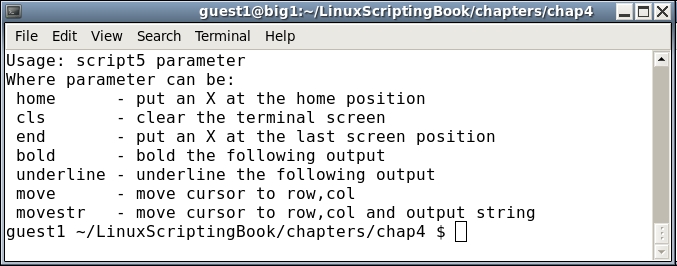
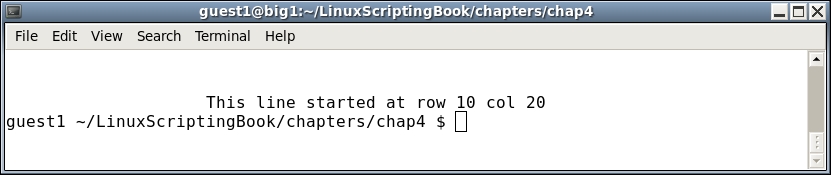
Since this script only has two extra functions you can just run them. This will be shown one command at a time as follows:
guest1 $ script5
guest1 $ script5 move
guest1 $ script5 movestr
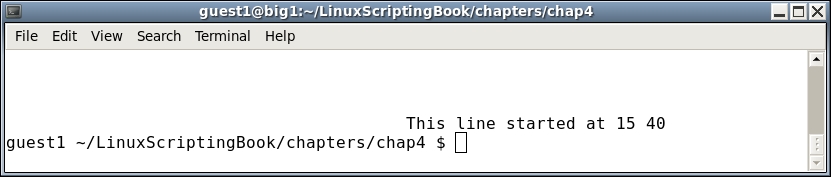
Since we are now placing the cursor at a specific location, the output should make more sense to you. Notice how the command-line prompt reappears where the last cursor position was.
You probably noticed that the parameters to a subroutine work just like with a script. Parameter 1 is $1, parameter 2 is $2, and so on. This is good and bad, good because you don't have to learn anything radically different. But bad in that it is very easy to get the $1, $2, vars mixed up if you are not careful.
A possible solution, and the one I use, is to assign the $1, $2, and so on variables in the main script to a variable with a good meaningful name.
For example, in these example scripts I set parm1 equal to $1 (parm1=$1), and so on.
Take a good look at the script in the next section:
#!/bin/sh
#
# 6/13/2017
# script6

# Subroutines
sub1()
{
 echo "Entering sub1"
 rc1=0                       # default is no error
 if [ $# -ne 1 ] ; then
  echo "sub1 requires 1 parameter"
  rc1=1                      # set error condition
 else
  echo "1st parm: $1"
 fi

 echo "Leaving sub1"
 return $rc1                 # routine return code
}

sub2()
{
 echo "Entering sub2"
 rc2=0                       # default is no error
 if [ $# -ne 2 ] ; then
  echo "sub2 requires 2 parameters"
  rc2=1                      # set error condition
 else
  echo "1st parm: $1"
  echo "2nd parm: $2"
 fi
 echo "Leaving sub2"
 return $rc2                 # routine return code
}

sub3()
{
 echo "Entering sub3"
 rc3=0                       # default is no error
 if [ $# -ne 3 ] ; then
  echo "sub3 requires 3 parameters"
  rc3=1                      # set error condition
 else
  echo "1st parm: $1"
  echo "2nd parm: $2"
  echo "3rd parm: $3"
 fi
 echo "Leaving sub3"
 return $rc3                 # routine return code
}

cls()                        # clear screen
{
 tput clear
 return $?                   # return code from tput
}

causeanerror()
{
 echo "Entering causeanerror"
 tput firephasers
 return $?                   # return code from tput
}

# Code starts here
cls                          # clear the screen
rc=$?
echo "return code from cls: $rc"
rc=0                         # reset the return code
if [ $# -ne 3 ] ; then
 echo "Usage: script6 parameter1 parameter2 parameter3"
 echo "Where all parameters are simple strings."
 exit 255
fi

parm1=$1                     # main parameter 1
parm2=$2                     # main parameter 2
parm3=$3                     # main parameter 3

# show main parameters
echo "parm1: $parm1  parm2: $parm2  parm3: $parm3"

sub1 "sub1-parm1"
echo "return code from sub1: $?"

sub2 "sub2-parm1"
echo "return code from sub2: $?"

sub3 $parm1 $parm2 $parm3
echo "return code from sub3: $?"

causeanerror
echo "return code from causeanerror: $?"

exit $rc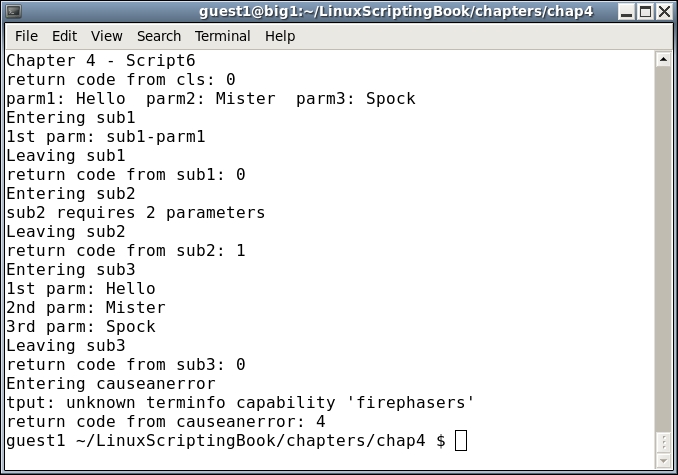
There are some new concepts here and so we will go through this one very carefully.
First, we define the subroutines. Notice that a return code has been added. A cls routine has also been included so that a return code could be shown.
We are now at the start of the code. The cls routine is called and then the return value from it is stored in the rc variable. Then the echo statement showing which script this is will be displayed.
So, why did I have to put the return code from the cls command into the rc var? Couldn't I have just displayed it after the echo of the script title? No, because the echo $? always refers to the command immediately preceding it. This is easy to forget so make sure you understand this point.
Okay, so now we reset the rc var to 0 and continue on. I could have used a different variable for this, but since the value of rc is not going to be needed again I chose to just reuse the rc variable.
Now, at the check for parameters, the Usage statement will be displayed if three parameters are not there.
After three parameters are entered we display them. This is always a good idea especially when first writing a script/program. You can always take it out later if it is not needed.
The first subroutine, sub1, is run with 1 parameter. This is checked and an error is displayed if needed.
The same thing happens with sub2, but in this case I intentionally set it to run with only one parameter so that the error message would be displayed.
For sub3, you can see that the main parameters are still accessible from a subroutine. In fact, all of the named variables are, and also the wildcard * and other file expansion tokens. Only the main script parameters cannot be accessed, which is why we put them into variables.
The final routine was created in order to show how errors can be handled. You can see that the tput command itself displayed the error, and then we also captured it in the script.
Finally, the script exits with the main rc variable.
As was mentioned earlier, this script has a lot in it so be sure to study it carefully. Note that when I wanted to show an error in tput, I just assumed that firephasers was going to be an unknown command. I would have been rather surprised if some phasers had actually shot out of (or worse, into) my computer!