Table of Contents for
Linux Shell Scripting Bootcamp
 Linux Shell Scripting Bootcamp
Published by
Packt Publishing, 2017
Linux Shell Scripting Bootcamp
Published by
Packt Publishing, 2017
- Cover
- Table of Contents
- Linux Shell Scripting Bootcamp
- Linux Shell Scripting Bootcamp
- Credits
- About the Author
- Acknowledgement
- About the Reviewer
- www.PacktPub.com
- Customer Feedback
- Preface
- What you need for this book
- Who this book is for
- Conventions
- Reader feedback
- Customer support
- 1. Getting Started with Shell Scripting
- Demonstrating the use of scripts
- Summary
- 2. Working with Variables
- Validating parameters using conditional statements
- Comparison operators for strings
- Environment variables
- Summary
- 3. Using Loops and the sleep Command
- Screen manipulation
- Indenting your code
- Using the for statement
- Leaving a loop early
- The sleep command
- Watching a process
- Creating numbered backup files
- Summary
- 4. Creating and Calling Subroutines
- File redirection
- Command piping
- Subroutines
- Using parameters
- Making a current backup of your work
- Summary
- 5. Creating Interactive Scripts
- Summary
- 6. Automating Tasks with Scripts
- Summary
- 7. Working with Files
- Reading files
- Reading and writing files
- Reading and writing files interactively
- File checksums
- File encryption
- Summary
- 8. Working with wget and curl
- wget and recursion
- wget options
- curl
- Summary
- 9. Debugging Scripts
- Automatic backups
- More syntax errors
- Logic errors
- Using set to debug scripts
- Summary
- 10. Scripting Best Practices
- ssh and scp
- Find and use a good text editor
- Environment variables and aliases
- ssh prompt
- Testing an archive
- Progress indicator
- Creating new commands from a template
- Alerting the user
- Summary
- Index
Sometimes when you are coding a script, you encounter a situation where you would like to exit the loop early, before the ending condition is met. This can be accomplished using the break and continue commands.
Here is a script that shows these commands. I am also introducing the sleep command which will be talked about in detail in the next script.
#!/bin/sh
#
# 5/3/2017
#
echo "script9 - Linux Scripting Book"

FN1=/tmp/break.txt
FN2=/tmp/continue.txt

x=1
while [ $x -le 1000000 ]
do
 echo "x:$x"
 if [ -f $FN1 ] ; then
  echo "Running the break command"
  rm -f $FN1
  break
 fi

 if [ -f $FN2 ] ; then
  echo "Running the continue command"
  rm -f $FN2
  continue
 fi

 let x++
 sleep 1
done

echo "x:$x"

echo "End of script9"

exit 0
Here's the output from my system:
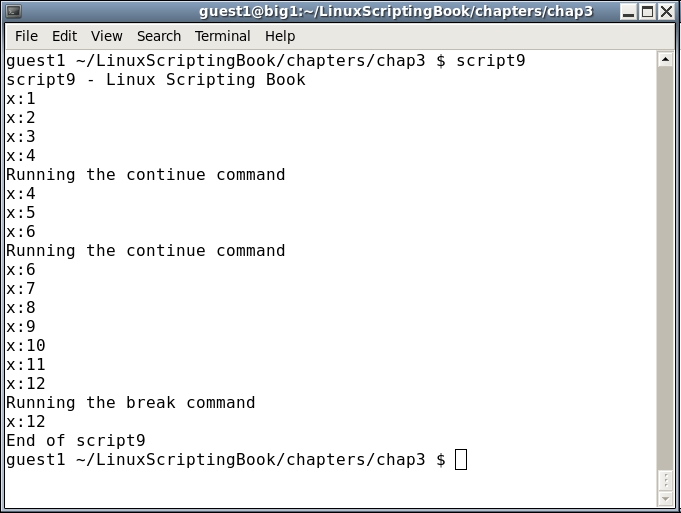
Run this on your system, and in another terminal cd to the /tmp directory. Run the command touch continue.txt and watch what happens. If you like you can do this multiple times (remember that up arrow recalls the previous command). Notice how the variable x does not get incremented when the continue command is hit. This is because the control goes immediately back to the while statement.
Now run the touch break.txt command. The script will end, and again, x has not been incremented. This is because break immediately causes the loop to end.
The break and continue commands are used quite often in scripts and so be sure to play with this one enough to really understand what is going on.