Table of Contents for
Linux Shell Scripting Bootcamp
 Linux Shell Scripting Bootcamp
Published by
Packt Publishing, 2017
Linux Shell Scripting Bootcamp
Published by
Packt Publishing, 2017
- Cover
- Table of Contents
- Linux Shell Scripting Bootcamp
- Linux Shell Scripting Bootcamp
- Credits
- About the Author
- Acknowledgement
- About the Reviewer
- www.PacktPub.com
- Customer Feedback
- Preface
- What you need for this book
- Who this book is for
- Conventions
- Reader feedback
- Customer support
- 1. Getting Started with Shell Scripting
- Demonstrating the use of scripts
- Summary
- 2. Working with Variables
- Validating parameters using conditional statements
- Comparison operators for strings
- Environment variables
- Summary
- 3. Using Loops and the sleep Command
- Screen manipulation
- Indenting your code
- Using the for statement
- Leaving a loop early
- The sleep command
- Watching a process
- Creating numbered backup files
- Summary
- 4. Creating and Calling Subroutines
- File redirection
- Command piping
- Subroutines
- Using parameters
- Making a current backup of your work
- Summary
- 5. Creating Interactive Scripts
- Summary
- 6. Automating Tasks with Scripts
- Summary
- 7. Working with Files
- Reading files
- Reading and writing files
- Reading and writing files interactively
- File checksums
- File encryption
- Summary
- 8. Working with wget and curl
- wget and recursion
- wget options
- curl
- Summary
- 9. Debugging Scripts
- Automatic backups
- More syntax errors
- Logic errors
- Using set to debug scripts
- Summary
- 10. Scripting Best Practices
- ssh and scp
- Find and use a good text editor
- Environment variables and aliases
- ssh prompt
- Testing an archive
- Progress indicator
- Creating new commands from a template
- Alerting the user
- Summary
- Index
The comparison for strings are different than for numbers. Here is a partial list:
|
Operator |
Explanation |
|---|---|
|
|
This stands for equal to |
|
|
This stands for not equal to |
|
|
This stands for greater than |
|
|
This stands for less than |
Now let's take a look at Script 3:
  1  #!/bin/sh
  2  #
  3  # 6/13/2017
  4  #
  5  echo "script3"
  6
  7  # String variables
  8  str1="Kirk"
  9  str2="Kirk"
 10  str3="Spock"
 11  str3="Dr. McCoy"
 12  str4="Engineer Scott"
 13  str5="A"
 14  str6="B"
 15
 16  echo str1=$str1 str2=$str2 str3=$str3 str4=$str4
 17
 18  if [ "$str1" = "$str2" ] ; then
 19   echo str1 equals str2
 20  else
 21   echo str1 does not equal str2
 22  fi
 23
 24  if [ "$str1" != "$str2" ] ; then
 25   echo str1 does not equal str2
 26  else
 27   echo str1 equals str2
 28  fi
 29
 30  if [ "$str1" = "$str3" ] ; then
 31   echo str1 equals str3
 32  else
 33   echo str1 does not equal str3
 34  fi
 35
 36  if [ "$str3" = "$str4" ] ; then
 37   echo str3 equals str4
 38  else
 39   echo str3 does not equal str4
 40  fi
 41
 42  echo str5=$str5 str6=$str6
 43
 44  if [ "$str5" \> "$str6" ] ; then        # must escape the >
 45   echo str5 is greater than str6
 46  else
 47   echo str5 is not greater than str6
 48  fi
 49
 50  if [[ "$str5" > "$str6" ]] ; then       # or use double brackets
 51   echo str5 is greater than str6
 52  else
 53   echo str5 is not greater than str6
 54  fi
 55
 56  if [[ "$str5" < "$str6" ]] ; then       # double brackets
 57   echo str5 is less than str6
 58  else
 59   echo str5 is not less than str6
 60  fi
 61
 62  if [ -n "$str1" ] ; then     # test if str1 is not null
 63   echo str1 is not null
 64  fi
 65
 66  if [ -z "$str7" ] ; then     # test if str7 is null
 67   echo str7 is null
 68  fi
 69  echo "End of script3"
 70
Here's the output from my system:
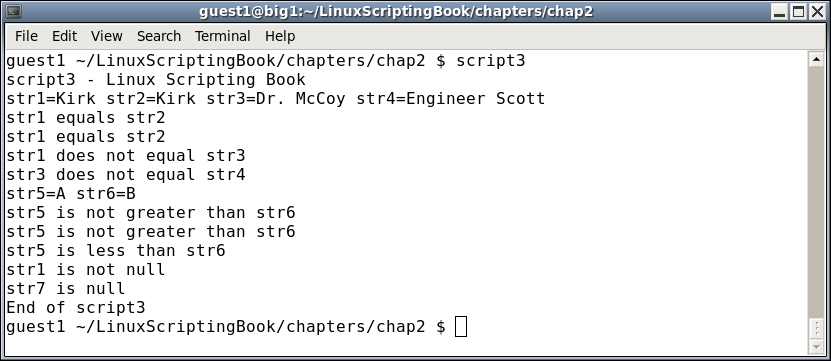
Lets go through this line by line:
- Lines
7-14set up the variables - Line
16displays their values - Line
18checks for equality - Line
24uses the not equal operator - The lines up to
50are self-explanatory - Line
44needs some clarification. In order to avoid a syntax error the>and<operators must be escaped - That is accomplished by using the backslash (or escape)
\character - Line
50shows how double brackets can be used to handle the greater than operator. As you can see in line58it works for the less than operator as well. My preference will be to use double brackets when needed. - Line
62shows how to check to see if a string isnot null. - And Line
66shows how to check to see if a string isnull.
Take a look at this script carefully to make sure it is clear to you. Also notice that str7 is shown to be null, but we didn't actually declare a str7. That is okay to do in a script, it will not generate an error. However, as a general rule of programming it is a good idea to declare all variables before they are used. Your code will be easier to understand and debug by you and others.
A scenario that comes up often in programming is when there are multiple conditions to test. For example, if something is true and something else is true take this action. This is accomplished by using the logical operators.
Here is Script 4 to show how logical operators are used:
#!/bin/sh
#
# 5/1/2017
#
echo "script4 - Linux Scripting Book"

if [ $# -ne 4 ] ; then
 echo "Usage: script4 number1 number2 number3 number4"
 echo "       Please enter 4 numbers."

 exit 255
fi

echo Parameters: $1 $2 $3 $4

echo Showing logical AND
if [[ $1 -eq $2 && $3 -eq $4 ]] ; then      # logical AND
 echo Clause 1
else
 echo Clause 2
fi

echo Showing logical OR
if [[ $1 -eq $2 || $3 -eq $4 ]] ; then      # logical OR
 echo Clause 1
else
 echo Clause 2
fi

echo "End of script4"
exit 0
Here's the output on my system:
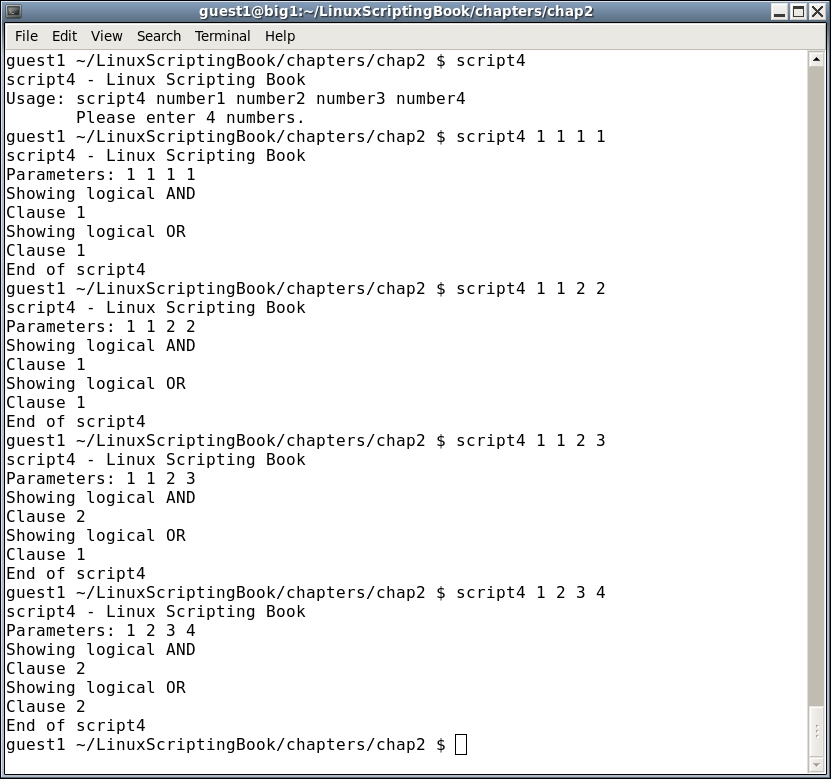
Run this script on your system using several different parameters. On each attempt, try to determine what the output will be and then run it. Do this as many times as it takes until you can get it right every time. Understanding this concept now will be very helpful as we get into more complicated scripts later.
Now let's look Script 5 to see how math can be performed:
#!/bin/sh
#
# 5/1/2017
#
echo "script5 - Linux Scripting Book"

num1=1
num2=2
num3=0
num4=0
sum=0

echo num1=$num1
echo num2=$num2

let sum=num1+num2
echo "The sum is: $sum"

let num1++
echo "num1 is now: $num1"

let num2--
echo "num2 is now: $num2"

let num3=5
echo num3=$num3

let num3=num3+10
echo "num3 is now: $num3"

let num3+=10
echo "num3 is now: $num3"

let num4=50
echo "num4=$num4"

let num4-=10
echo "num4 is now: $num4"

echo "End of script5"
And here is the output:
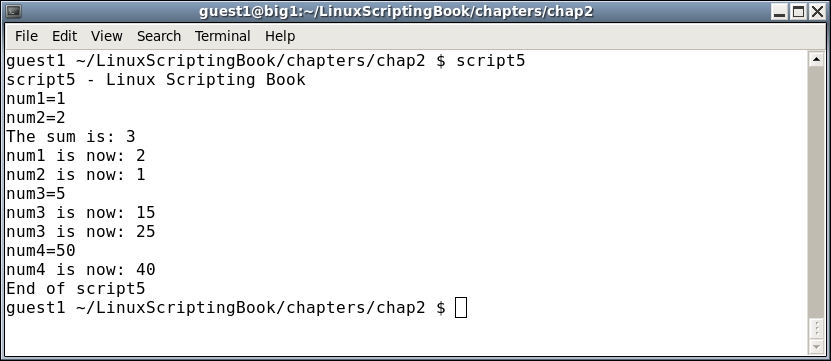
As you can see, the variables are set up as before. The let command is used to perform math. Note the $ prefix is not used:
let sum=num1+num2
Also note the shorthand way of doing some operations. For example, say you want to increment the var num1 by 1. You could do this as follows:
let num1=num1+1
Alternatively, you could use the shorthand notation:
let num1++
Run this script and change some of the values to get a feel for how the math operations work. We will go over this in much more detail in a later chapter.