Table of Contents for
Linux Shell Scripting Bootcamp
 Linux Shell Scripting Bootcamp
Published by
Packt Publishing, 2017
Linux Shell Scripting Bootcamp
Published by
Packt Publishing, 2017
- Cover
- Table of Contents
- Linux Shell Scripting Bootcamp
- Linux Shell Scripting Bootcamp
- Credits
- About the Author
- Acknowledgement
- About the Reviewer
- www.PacktPub.com
- Customer Feedback
- Preface
- What you need for this book
- Who this book is for
- Conventions
- Reader feedback
- Customer support
- 1. Getting Started with Shell Scripting
- Demonstrating the use of scripts
- Summary
- 2. Working with Variables
- Validating parameters using conditional statements
- Comparison operators for strings
- Environment variables
- Summary
- 3. Using Loops and the sleep Command
- Screen manipulation
- Indenting your code
- Using the for statement
- Leaving a loop early
- The sleep command
- Watching a process
- Creating numbered backup files
- Summary
- 4. Creating and Calling Subroutines
- File redirection
- Command piping
- Subroutines
- Using parameters
- Making a current backup of your work
- Summary
- 5. Creating Interactive Scripts
- Summary
- 6. Automating Tasks with Scripts
- Summary
- 7. Working with Files
- Reading files
- Reading and writing files
- Reading and writing files interactively
- File checksums
- File encryption
- Summary
- 8. Working with wget and curl
- wget and recursion
- wget options
- curl
- Summary
- 9. Debugging Scripts
- Automatic backups
- More syntax errors
- Logic errors
- Using set to debug scripts
- Summary
- 10. Scripting Best Practices
- ssh and scp
- Find and use a good text editor
- Environment variables and aliases
- ssh prompt
- Testing an archive
- Progress indicator
- Creating new commands from a template
- Alerting the user
- Summary
- Index
Another way to loop is to use the for statement. It is commonly used when working with files and other lists. The general syntax of a for loop is as follows:
 for variable in list
 do
     some commands
 done
The list can be a collection of strings, or a filename wildcard, and so on. We can take a look at this in the example given in the next section.
#!/bin/sh
#
# 5/4/2017
#
echo "script7 - Linux Scripting Book"

for i in jkl.c bob Linux "Hello there" 1 2 3
do
 echo -n "$i "
done

for i in script*             # returns the scripts in this directory
do
 echo $i
done

echo "End of script7"
exit 0
And the output on my system. This is my chap3 directory:
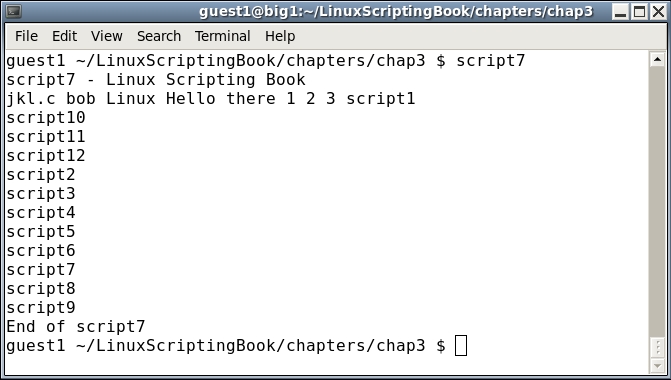
The next script shows how the for statement can be used with files:
#!/bin/sh
#
# 5/3/2017
#
echo "script8 - Linux Scripting Book"

if [ $# -eq 0 ] ; then
 echo "Please enter at least 1 parameter."
 exit 255
fi

for i in $*                  # the "$*" returns every parameter given
do                           # to the script
 echo -n "$i "
done

echo ""                      # carriage return
echo "End of script8"

exit 0
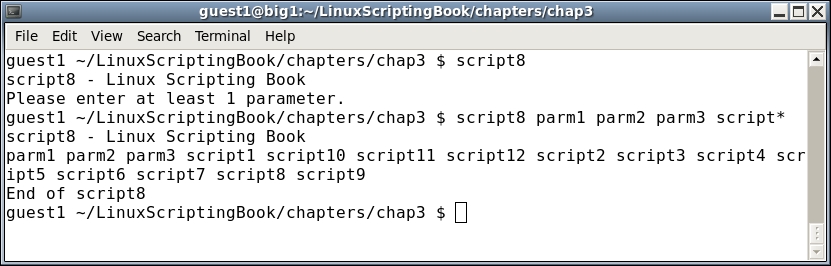
There are a few other things you can do with the for statement, consult the man page of Bash for more information.