Table of Contents for
Linux Shell Scripting Bootcamp
 Linux Shell Scripting Bootcamp
Published by
Packt Publishing, 2017
Linux Shell Scripting Bootcamp
Published by
Packt Publishing, 2017
- Cover
- Table of Contents
- Linux Shell Scripting Bootcamp
- Linux Shell Scripting Bootcamp
- Credits
- About the Author
- Acknowledgement
- About the Reviewer
- www.PacktPub.com
- Customer Feedback
- Preface
- What you need for this book
- Who this book is for
- Conventions
- Reader feedback
- Customer support
- 1. Getting Started with Shell Scripting
- Demonstrating the use of scripts
- Summary
- 2. Working with Variables
- Validating parameters using conditional statements
- Comparison operators for strings
- Environment variables
- Summary
- 3. Using Loops and the sleep Command
- Screen manipulation
- Indenting your code
- Using the for statement
- Leaving a loop early
- The sleep command
- Watching a process
- Creating numbered backup files
- Summary
- 4. Creating and Calling Subroutines
- File redirection
- Command piping
- Subroutines
- Using parameters
- Making a current backup of your work
- Summary
- 5. Creating Interactive Scripts
- Summary
- 6. Automating Tasks with Scripts
- Summary
- 7. Working with Files
- Reading files
- Reading and writing files
- Reading and writing files interactively
- File checksums
- File encryption
- Summary
- 8. Working with wget and curl
- wget and recursion
- wget options
- curl
- Summary
- 9. Debugging Scripts
- Automatic backups
- More syntax errors
- Logic errors
- Using set to debug scripts
- Summary
- 10. Scripting Best Practices
- ssh and scp
- Find and use a good text editor
- Environment variables and aliases
- ssh prompt
- Testing an archive
- Progress indicator
- Creating new commands from a template
- Alerting the user
- Summary
- Index
We'll see another script in the next section that uses a loop to put text on the screen:
#!/bin/sh
#
# 5/2/2017
#
echo "script4 - Linux Scripting Book"

if [ $# -ne 1 ] ; then
 echo "Usage: script4 string"
 echo "Will display the string on every line."
 exit 255
fi

tput clear                   # clear the screen

x=1
while [ $x -le $LINES ]
do
 echo "********** $1 **********"
 let x++
done

exit 0
Before executing this script run the following command:
echo $LINES
If the number of lines in that terminal is not displayed run the following command:
export LINES=$LINES
Then proceed to run the script. The following is the output on my system when run with script4 Linux:
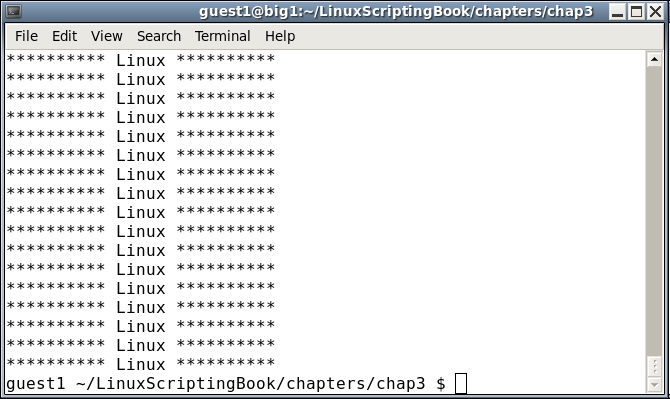
Okay, so I agree this might not be terribly useful, but it does show a few things. The LINES env var contains the current number of lines (or rows) in the current terminal. This can be useful for limiting output in more complex scripts and that will be shown in a later chapter. This example also shows how the screen can be manipulated in a script.
If you needed to export the LINES variable, you may want to put it in your .bashrc file and re-source it.
We'll take a look at another script in the next section:
#!/bin/sh
#
# 5/2/2017
#
# script5 - Linux Scripting Book

tput clear                   # clear the screen

row=1
while [ $row -le $LINES ]
do
 col=1
 while [ $col -le $COLUMNS ]
 do
  echo -n "#"
  let col++
 done
 echo ""                     # output a carriage return
 let row++
done

exit 0
This is similar to Script 4 in that it shows how to display output within the confines of the terminal. Note, you may have to export the COLUMNS env var like we did with the LINES var.
You probably noticed something a little different in this script. There is a while statement inside a while statement. This is called a nested loop and is used very frequently in programming.
We start by declaring row=1 and then begin the outer while loop. The col var is then set to 1 and then the inner loop is started. This inner loop is what displays the character on each column of the line. When the end of the line is reached, the loop ends and the echo statement outputs a carriage return. The row var is incremented, and then the process starts again. It ends after the last line.
By using the LINES and COLUMNS env vars only the actual screen is written to. You can test this by running the program and then expanding the terminal.
When using nested loops it can be easy to get mixed up about what goes where. Here is something I try to do every time. When I first realize a loop is going to be needed in a program (which can be a script, C, or Java, and so on), I code the loop body first like this:
 while [ condition ]
 do
    other statements will go here
 done
This way I don't forget the done statement and it's also lined up correctly. If I then need another loop I just do it again:
 while [ condition ]
 do
   while [ condition ]
   do
     other statements will go here
   done
 done
You can nest as many loops as you need.