Table of Contents for
Linux Shell Scripting Bootcamp
 Linux Shell Scripting Bootcamp
Published by
Packt Publishing, 2017
Linux Shell Scripting Bootcamp
Published by
Packt Publishing, 2017
- Cover
- Table of Contents
- Linux Shell Scripting Bootcamp
- Linux Shell Scripting Bootcamp
- Credits
- About the Author
- Acknowledgement
- About the Reviewer
- www.PacktPub.com
- Customer Feedback
- Preface
- What you need for this book
- Who this book is for
- Conventions
- Reader feedback
- Customer support
- 1. Getting Started with Shell Scripting
- Demonstrating the use of scripts
- Summary
- 2. Working with Variables
- Validating parameters using conditional statements
- Comparison operators for strings
- Environment variables
- Summary
- 3. Using Loops and the sleep Command
- Screen manipulation
- Indenting your code
- Using the for statement
- Leaving a loop early
- The sleep command
- Watching a process
- Creating numbered backup files
- Summary
- 4. Creating and Calling Subroutines
- File redirection
- Command piping
- Subroutines
- Using parameters
- Making a current backup of your work
- Summary
- 5. Creating Interactive Scripts
- Summary
- 6. Automating Tasks with Scripts
- Summary
- 7. Working with Files
- Reading files
- Reading and writing files
- Reading and writing files interactively
- File checksums
- File encryption
- Summary
- 8. Working with wget and curl
- wget and recursion
- wget options
- curl
- Summary
- 9. Debugging Scripts
- Automatic backups
- More syntax errors
- Logic errors
- Using set to debug scripts
- Summary
- 10. Scripting Best Practices
- ssh and scp
- Find and use a good text editor
- Environment variables and aliases
- ssh prompt
- Testing an archive
- Progress indicator
- Creating new commands from a template
- Alerting the user
- Summary
- Index
Now for a bonus here is a ready-to-run script that can be used to make numbered backup files. Before I came up with this (many years ago) I would go through the ritual of making the backup by hand. My numbering scheme was not always consistent, and I quickly realized it would be easier to have a script do it. This is something computers are really good at.
I call this script cbS. I wrote this so long ago I'm not even sure what it stands for. Maybe it was Computer Backup Script or something like that.
#!/bin/sh
#
echo "cbS by Lewis 5/4/2017"

if [ $# -eq 0 ] ; then
 echo "Usage: cbS filename(s) "
 echo " Will make a numbered backup of the files(s) given."
 echo " Files must be in the current directory."
 exit 255
fi

rc=0                         # return code, default is no error
for fn in $*                 # for each filename given on the command line
do
 if [ ! -f $fn ] ; then      # if not found
  echo "File $fn not found."
  rc=1                       # one or more files were not found
 else
  cnt=1                      # file counter
  loop1=0                    # loop flag
  while [ $loop1 -eq 0 ]
  do
   tmp=bak-$cnt.$fn
   if [ ! -f $tmp ] ; then
     cp $fn $tmp
     echo "File "$tmp" created."
     loop1=1                 # end the inner loop
   else
     let cnt++               # try the next one
   fi
  done
 fi
done

exit $rc                     # exit with return code
It starts with a Usage message as it needs at least one filename to work on.
Note that this command requires the files be in the current directory, so doing something like cbS /tmp/file1.txt will generate an error.
The rc variable is initialized to 0. If a file is not found, it will be set to 1.
Now let's look at the inner loop. The logic here is a backup file will be created from the original file using the cp command. The naming scheme for the backup file is bak-(number).original-filename where number is the next one in sequence. The code determines what the next number is by going through all of the bak-#.filename files until it doesn't find one. That one then becomes the new filename.
Get this one going on your system. Feel free to name it whatever you like, but be careful to name it something other than an existing Linux command. Use the which command to check.
Here is some example output on my system:
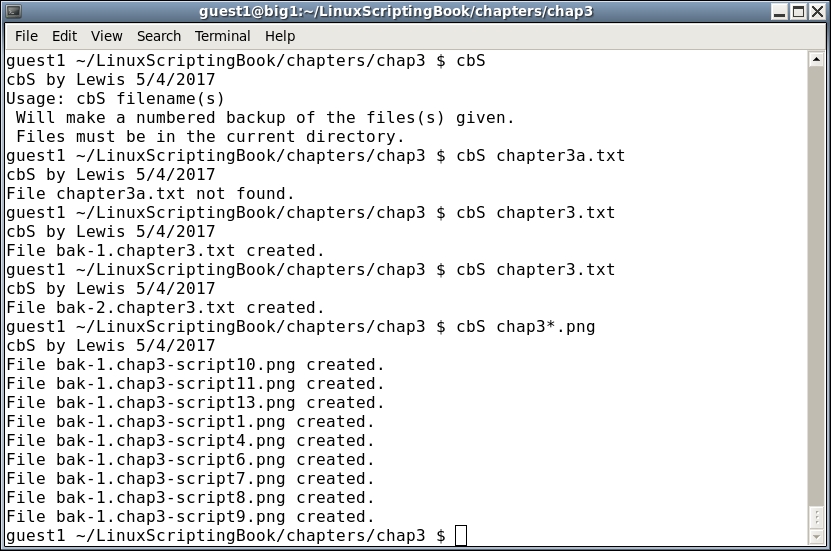
This script could be greatly improved upon. It could be made to work with paths/files, and the cp command should be checked for errors. This level of coding will be covered in a later chapter.