Table of Contents for
Linux Shell Scripting Bootcamp
 Linux Shell Scripting Bootcamp
Published by
Packt Publishing, 2017
Linux Shell Scripting Bootcamp
Published by
Packt Publishing, 2017
- Cover
- Table of Contents
- Linux Shell Scripting Bootcamp
- Linux Shell Scripting Bootcamp
- Credits
- About the Author
- Acknowledgement
- About the Reviewer
- www.PacktPub.com
- Customer Feedback
- Preface
- What you need for this book
- Who this book is for
- Conventions
- Reader feedback
- Customer support
- 1. Getting Started with Shell Scripting
- Demonstrating the use of scripts
- Summary
- 2. Working with Variables
- Validating parameters using conditional statements
- Comparison operators for strings
- Environment variables
- Summary
- 3. Using Loops and the sleep Command
- Screen manipulation
- Indenting your code
- Using the for statement
- Leaving a loop early
- The sleep command
- Watching a process
- Creating numbered backup files
- Summary
- 4. Creating and Calling Subroutines
- File redirection
- Command piping
- Subroutines
- Using parameters
- Making a current backup of your work
- Summary
- 5. Creating Interactive Scripts
- Summary
- 6. Automating Tasks with Scripts
- Summary
- 7. Working with Files
- Reading files
- Reading and writing files
- Reading and writing files interactively
- File checksums
- File encryption
- Summary
- 8. Working with wget and curl
- wget and recursion
- wget options
- curl
- Summary
- 9. Debugging Scripts
- Automatic backups
- More syntax errors
- Logic errors
- Using set to debug scripts
- Summary
- 10. Scripting Best Practices
- ssh and scp
- Find and use a good text editor
- Environment variables and aliases
- ssh prompt
- Testing an archive
- Progress indicator
- Creating new commands from a template
- Alerting the user
- Summary
- Index
If you only occasionally write scripts or programs then vi is probably good enough for you. However, if you get into some real in depth programming, be it in Bash, C, Java, or some other language you should very definitely check out some of the other text editors that are available on Linux. You will almost certainly become more productive.
As I mentioned before, I have been working with computers for a really long time. I started out using an editor on DOS called Edlin and it was pretty weak (but still better than punch cards). I eventually moved on and started using vi on AIX (IBM's version of UNIX). I got pretty good at using vi since we didn't have any other options yet. As time went on other choices became available and I started using the IBM Personal Editors. These were really easy to use, more efficient than vi, and had many more features. As I did more and more programming, I found that none of these editors could do everything I wanted and so I wrote my own in the C programming language. This was a long time ago under DOS, however, my editor has now been modified to run on Xenix, OS/2, AIX, Solaris, UNIX, FreeBSD, NetBSD, and of course Linux. It also works well on Windows under the Cygwin environment.
Any text editor should have the standard features such as copy, paste, move, insert, delete, split, join, find/replace, and so on. These should be easy to use and require not more than two keystrokes. The save command should only need one keystroke.
In addition, a good editor will also have one, more, or all of the following:
- Ability to edit more than one file at a time (file ring)
- Ability to switch to the next or previous file in the ring with a single keystroke
- Be able to show which files are in the ring and switch to any file instantly
- Ability to insert a file into the current file
- Be able to record and play back a remembered key sequence. This is sometimes referred to as a macro
- An undo/restore feature
- An auto file save option
- A locked files feature, to prevent editing the same file in another instance of the editor
- Absolutely no obvious shortcomings or bugs. This is mandatory
- Accept input via telepathy
Well, maybe I haven't quite figured out that last one yet. There are of course many, many more features that could be listed but I feel those are some of the most important.
Here's a screenshot of my editor showing an example of how the ring command might look:
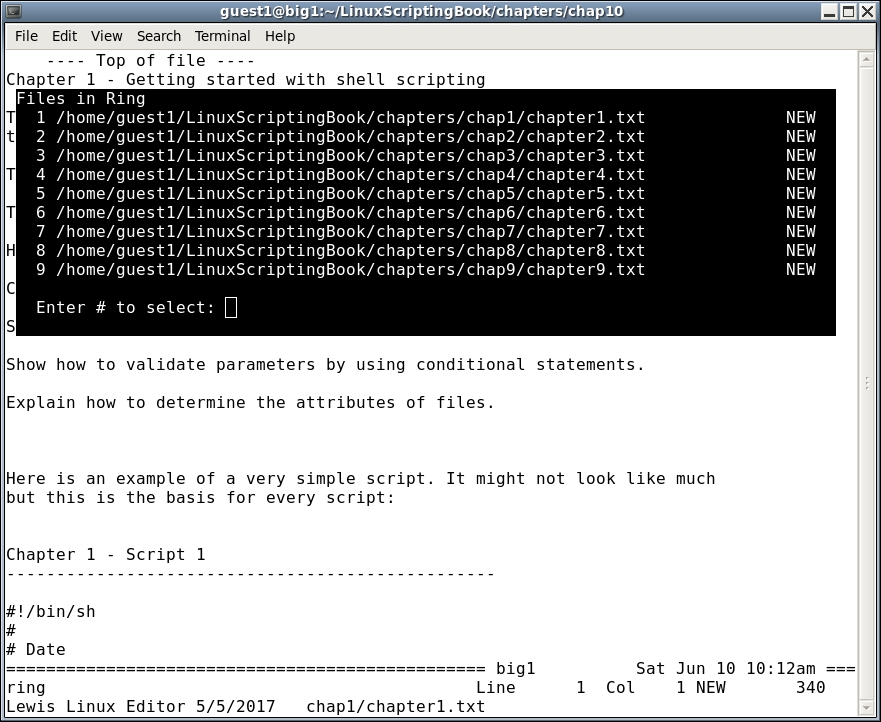
Many more features could be shown but that should be enough to get the point across. I will mention that vi is a fine editor and is used with success by probably the majority of UNIX/Linux people. However, in my experience if a lot of programming is being done the use of a different editor with more features will save you a lot of time. It's also quite a bit easier, and that makes the process even more fun.