Table of Contents for
Linux Shell Scripting Bootcamp
 Linux Shell Scripting Bootcamp
Published by
Packt Publishing, 2017
Linux Shell Scripting Bootcamp
Published by
Packt Publishing, 2017
- Cover
- Table of Contents
- Linux Shell Scripting Bootcamp
- Linux Shell Scripting Bootcamp
- Credits
- About the Author
- Acknowledgement
- About the Reviewer
- www.PacktPub.com
- Customer Feedback
- Preface
- What you need for this book
- Who this book is for
- Conventions
- Reader feedback
- Customer support
- 1. Getting Started with Shell Scripting
- Demonstrating the use of scripts
- Summary
- 2. Working with Variables
- Validating parameters using conditional statements
- Comparison operators for strings
- Environment variables
- Summary
- 3. Using Loops and the sleep Command
- Screen manipulation
- Indenting your code
- Using the for statement
- Leaving a loop early
- The sleep command
- Watching a process
- Creating numbered backup files
- Summary
- 4. Creating and Calling Subroutines
- File redirection
- Command piping
- Subroutines
- Using parameters
- Making a current backup of your work
- Summary
- 5. Creating Interactive Scripts
- Summary
- 6. Automating Tasks with Scripts
- Summary
- 7. Working with Files
- Reading files
- Reading and writing files
- Reading and writing files interactively
- File checksums
- File encryption
- Summary
- 8. Working with wget and curl
- wget and recursion
- wget options
- curl
- Summary
- 9. Debugging Scripts
- Automatic backups
- More syntax errors
- Logic errors
- Using set to debug scripts
- Summary
- 10. Scripting Best Practices
- ssh and scp
- Find and use a good text editor
- Environment variables and aliases
- ssh prompt
- Testing an archive
- Progress indicator
- Creating new commands from a template
- Alerting the user
- Summary
- Index
A fundamental problem with shell scripts is syntax errors don't usually show up until the line with the problem is parsed by the interpreter. Here's a common error that I still find myself doing more than I should. See if you can locate the problem by just reading the script:
#!/bin/sh
#
# 6/7/2017
#
echo "Chapter 9 - Script 3"

if [ $# -ne 1 ] ; then
 echo "Usage: script3 parameter"
 exit 255
fi

parm=$1
echo "parm: $parm"

if [ "$parm" = "home" ] ; then
 echo "parm is home."
elif if [ "$parm" = "cls" ] ; then
 echo "parm is cls."
elif [ "$parm" = "end" ] ; then
 echo "parm is end."
else
 echo "Unknown parameter: $parm"
fi

echo "End of script3"
exit 0
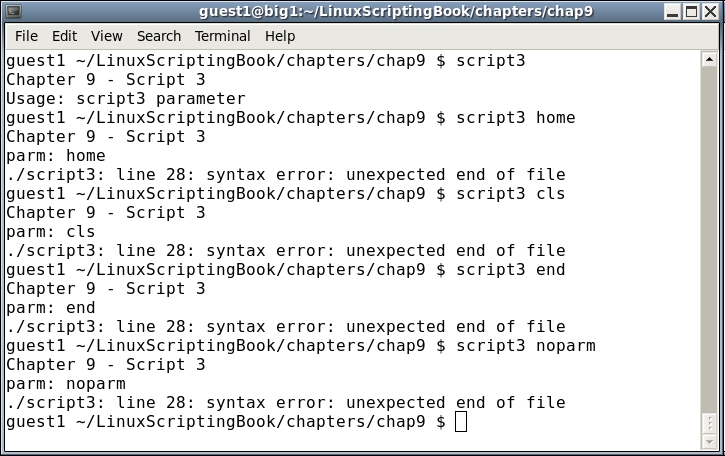
Did you find my mistake? When I code an if...elif...else statement, I tend to copy and paste the first if statement. I then prepend elif to the next statement but forget to remove the if. This gets me almost every time.
Look at how I ran this script. I started first with just the name of the script to invoke the Usage clause. You may find it interesting that the syntax error was not reported by the interpreter. That's because it never got down to that line. This can be a real problem with scripts, as it may run for days, weeks, or even years before running a part of code that has a syntax error in it and then failing. Keep this in mind when writing and testing your scripts.
Here is another quick example of a classic syntax error (classic in the sense that I just now made it again):
for i in *.txt
 echo "i: $i"
done
When run it outputs this:
./script-bad: line 8: syntax error near unexpected token `echo'
./script-bad: line 8: ` echo "i: $i"'
Can you find my mistake? If not look again. I forgot the do statement after the for statement. Bad Jim!
One of the easiest things to do wrong in a script is to forget the $ in front of a variable. This is particularly so if you code in other languages such as C or Java, because you don't prepend a $ to variables in those languages. The only real advice I can give here is if your script just doesn't seem to be doing anything right check all of your variables for the $. But be careful you don't go too far and start adding them where they don't belong!