Table of Contents for
Linux Shell Scripting Bootcamp
 Linux Shell Scripting Bootcamp
Published by
Packt Publishing, 2017
Linux Shell Scripting Bootcamp
Published by
Packt Publishing, 2017
- Cover
- Table of Contents
- Linux Shell Scripting Bootcamp
- Linux Shell Scripting Bootcamp
- Credits
- About the Author
- Acknowledgement
- About the Reviewer
- www.PacktPub.com
- Customer Feedback
- Preface
- What you need for this book
- Who this book is for
- Conventions
- Reader feedback
- Customer support
- 1. Getting Started with Shell Scripting
- Demonstrating the use of scripts
- Summary
- 2. Working with Variables
- Validating parameters using conditional statements
- Comparison operators for strings
- Environment variables
- Summary
- 3. Using Loops and the sleep Command
- Screen manipulation
- Indenting your code
- Using the for statement
- Leaving a loop early
- The sleep command
- Watching a process
- Creating numbered backup files
- Summary
- 4. Creating and Calling Subroutines
- File redirection
- Command piping
- Subroutines
- Using parameters
- Making a current backup of your work
- Summary
- 5. Creating Interactive Scripts
- Summary
- 6. Automating Tasks with Scripts
- Summary
- 7. Working with Files
- Reading files
- Reading and writing files
- Reading and writing files interactively
- File checksums
- File encryption
- Summary
- 8. Working with wget and curl
- wget and recursion
- wget options
- curl
- Summary
- 9. Debugging Scripts
- Automatic backups
- More syntax errors
- Logic errors
- Using set to debug scripts
- Summary
- 10. Scripting Best Practices
- ssh and scp
- Find and use a good text editor
- Environment variables and aliases
- ssh prompt
- Testing an archive
- Progress indicator
- Creating new commands from a template
- Alerting the user
- Summary
- Index
This next script reads a text file and creates a copy of it:
#!/bin/sh
#
# 6/1/2017
#
echo "Chapter 7 - Script 5"

if [ $# -ne 2 ] ; then
 echo "Usage: script5 infile outfile"
 echo " Copies text file infile to outfile."
 exit 255
fi

INFILE=$1
OUTFILE=$2

if [ ! -f $INFILE ] ; then
 echo "Error: File $INFILE does not exist."
 exit 100
fi

if [ $INFILE = $OUTFILE ] ; then
 echo "Error: Cannot copy to same file."
 exit 101
fi

rm $OUTFILE 2> /dev/null       # remove it
echo "Reading file $INFILE ..."

x=0
while IFS= read -r linevar     # use read to put line into linevar
do
  echo "$linevar" >> $OUTFILE  # append to file
  let x++
done < $INFILE                 # the file to use as input
echo "$x lines read."

diff $INFILE $OUTFILE          # use diff to check the output
rc=$?
if [ $rc -ne 0 ] ; then
 echo "Error, files do not match."
 exit 103
else
 echo "File $OUTFILE created."
fi

sum $INFILE $OUTFILE           # show the checksums

echo "End of script5"
exit $rc
Here is the screenshot for Script 5:
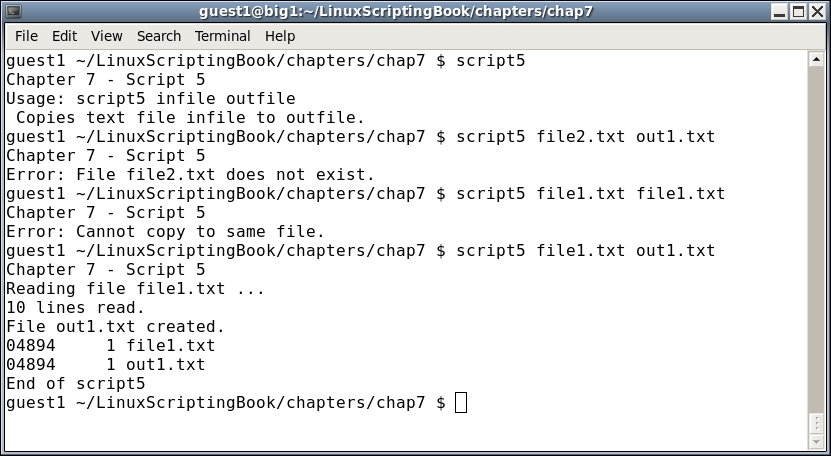
This shows how to read and write a text file in a script. The following explains each line:
- The script starts by checking if two parameters were given and if not the
Usagemessage is displayed. - It then checks if the input file exists and exits with code
100if it does not. - A check is made to insure the user is not trying to copy to the same file, because a syntax error at line 34 would have occurred. This code insures that will not happen.
- The output file is removed if it exists. This is because we want to copy to a new file and not append to an existing one.
- The
whileloop reads and writes the lines. A count is made of the number of lines inx. - When the loops ends the number of lines is output.
- As a sanity check, the
diffcommand is used to make sure the files are the same. - And as an added check the
sumcommand is run on the two files.