Table of Contents for
Linux Shell Scripting Bootcamp
 Linux Shell Scripting Bootcamp
Published by
Packt Publishing, 2017
Linux Shell Scripting Bootcamp
Published by
Packt Publishing, 2017
- Cover
- Table of Contents
- Linux Shell Scripting Bootcamp
- Linux Shell Scripting Bootcamp
- Credits
- About the Author
- Acknowledgement
- About the Reviewer
- www.PacktPub.com
- Customer Feedback
- Preface
- What you need for this book
- Who this book is for
- Conventions
- Reader feedback
- Customer support
- 1. Getting Started with Shell Scripting
- Demonstrating the use of scripts
- Summary
- 2. Working with Variables
- Validating parameters using conditional statements
- Comparison operators for strings
- Environment variables
- Summary
- 3. Using Loops and the sleep Command
- Screen manipulation
- Indenting your code
- Using the for statement
- Leaving a loop early
- The sleep command
- Watching a process
- Creating numbered backup files
- Summary
- 4. Creating and Calling Subroutines
- File redirection
- Command piping
- Subroutines
- Using parameters
- Making a current backup of your work
- Summary
- 5. Creating Interactive Scripts
- Summary
- 6. Automating Tasks with Scripts
- Summary
- 7. Working with Files
- Reading files
- Reading and writing files
- Reading and writing files interactively
- File checksums
- File encryption
- Summary
- 8. Working with wget and curl
- wget and recursion
- wget options
- curl
- Summary
- 9. Debugging Scripts
- Automatic backups
- More syntax errors
- Logic errors
- Using set to debug scripts
- Summary
- 10. Scripting Best Practices
- ssh and scp
- Find and use a good text editor
- Environment variables and aliases
- ssh prompt
- Testing an archive
- Progress indicator
- Creating new commands from a template
- Alerting the user
- Summary
- Index
Now let's look at the curl program as it is somewhat similar to wget. One of the main differences between wget and curl is how they handle the output.
The wget program by default displays some progress information on the screen and then downloads the index.html file. In contrast, curl normally displays the file itself on the screen.
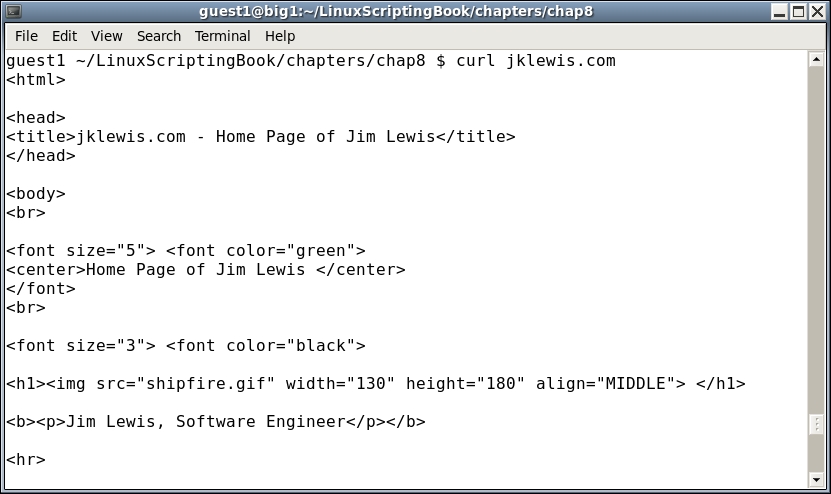
Here is an example of curl running on my system using my favorite website (screenshot shortened to save space):
Another way to get the output into a file is by using redirection like this:
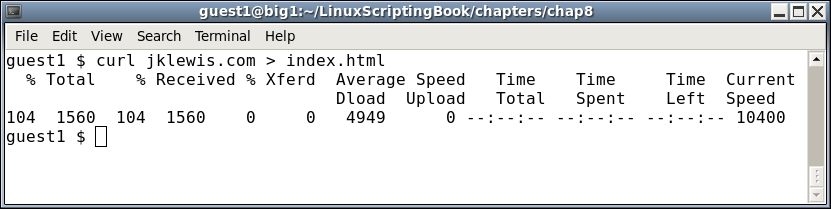
You will notice that when redirected to a file the transfer progress is displayed on the screen. Also note that any error output goes into the file if redirected and not the screen.
Here is a very brief list of the options available in curl:
|
Curl options |
Explanation |
|---|---|
|
|
Output filename |
|
|
Silent mode. Shows nothing, not even errors |
|
|
Show errors if in silent mode |
|
|
Verbose, useful for debugging |
There are many other options to curl, as well as several pages of return codes. For more information consult the curl man page.
And now here is a script showing how curl can be used to automatically get the current value of the Dow Jones Industrial Average:
#!/bin/sh
# 6/6/2017
# Chapter 8 - Script 2

URL="https://www.google.com/finance?cid=983582"
FN=outfile1.txt              # output file
TF=temp1.txt                 # temp file for grep

loop=1
while [ $loop -eq 1 ]
do
 rm $FN 2> /dev/null         # remove old file
 curl -o $FN $URL            # output to file
 rc=$?
 if [ $rc -ne 0 ] ; then
  echo "curl returned code: $rc"
  echo "outfile:"
  cat $FN

  exit 200
 fi

 echo ""                     # carriage return
 date
 grep "ref_983582_l" $FN > $TF
 echo -n "DJIA: "
 cat $TF | cut -c 25-33

 sleep 1h
done

exit 0
Here's what it looks like on my system. Normally you would probably leave the progress information out of the output by using the -s option but I thought it looked cool and so left it in:
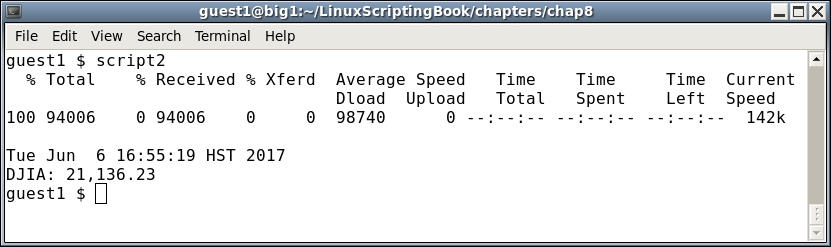
You can see that curl and wget work pretty much the same way. Remember when writing scripts such as these to keep in mind that the format of the page will almost certainly change from time to time so plan accordingly.