Table of Contents for
Linux Shell Scripting Bootcamp
 Linux Shell Scripting Bootcamp
Published by
Packt Publishing, 2017
Linux Shell Scripting Bootcamp
Published by
Packt Publishing, 2017
- Cover
- Table of Contents
- Linux Shell Scripting Bootcamp
- Linux Shell Scripting Bootcamp
- Credits
- About the Author
- Acknowledgement
- About the Reviewer
- www.PacktPub.com
- Customer Feedback
- Preface
- What you need for this book
- Who this book is for
- Conventions
- Reader feedback
- Customer support
- 1. Getting Started with Shell Scripting
- Demonstrating the use of scripts
- Summary
- 2. Working with Variables
- Validating parameters using conditional statements
- Comparison operators for strings
- Environment variables
- Summary
- 3. Using Loops and the sleep Command
- Screen manipulation
- Indenting your code
- Using the for statement
- Leaving a loop early
- The sleep command
- Watching a process
- Creating numbered backup files
- Summary
- 4. Creating and Calling Subroutines
- File redirection
- Command piping
- Subroutines
- Using parameters
- Making a current backup of your work
- Summary
- 5. Creating Interactive Scripts
- Summary
- 6. Automating Tasks with Scripts
- Summary
- 7. Working with Files
- Reading files
- Reading and writing files
- Reading and writing files interactively
- File checksums
- File encryption
- Summary
- 8. Working with wget and curl
- wget and recursion
- wget options
- curl
- Summary
- 9. Debugging Scripts
- Automatic backups
- More syntax errors
- Logic errors
- Using set to debug scripts
- Summary
- 10. Scripting Best Practices
- ssh and scp
- Find and use a good text editor
- Environment variables and aliases
- ssh prompt
- Testing an archive
- Progress indicator
- Creating new commands from a template
- Alerting the user
- Summary
- Index
This chapter shows how to debug Bash shell scripts.
Programming in any language, be it C, Java, FORTRAN, COBOL*, or Bash can be a lot of fun. However, what is often not fun is when something goes wrong, and when it takes an inordinate amount of time to find the problem and then solve it. This chapter will attempt to show the reader how to avoid some of the more common syntax and logic errors, and also how to find them when they occur.
*COBOL: Okay, I have to say that programming in COBOL was never fun!
The topics covered are in the chapter are:
- How to prevent some common syntax and logic errors.
- The shell debugging commands such as
set -xandset -v. - The other ways to set up debugging.
- How redirection can be used to debug in real time.
Nothing can be so frustrating than to be on a roll when coding your script or program and then have a syntax error pop up. In some cases the solution is so easy you find and solve it right away. In other cases it can take minutes or even hours. Here are a few pointers:
When coding a loop put the whole while...do...done structure in first. It is sometimes really easy to forget the ending done statement, especially if the code spans more than a page.
Take a look at Script 1:
#!/bin/sh
#
# 6/7/2017
#
echo "Chapter 9 - Script 1"

x=0
while [ $x -lt 5 ]
do
 echo "x: $x"
 let x++

y=0
while [ $y -lt 5 ]
do
 echo "y: $y"
 let y++
done

# more code here
# more code here

echo "End of script1"
exit 0
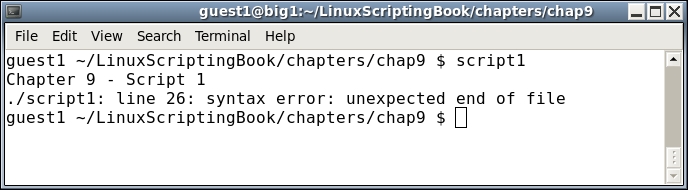
Look at this real closely, it says the error is at line 26. Wow, how can that be, when the file has only has 25 lines in it? The simple answer is that's just the way the Bash interpreter handles this type of situation. If you have not already found the bug it's actually at line 12. This is where the done statement should have been and by omitting it I intentionally caused the error. Now imagine if this had been a really long script. Depending on the circumstances it could take a long time to find the line that caused the problem.
Now take a look at Script 2, which is just Script 1 with some additional echo statements:
#!/bin/sh
#
# 6/7/2017
#
echo "Chapter 9 - Script 2"

echo "Start of x loop"
x=0
while [ $x -lt 5 ]
do
 echo "x: $x"
 let x++

echo "Start of y loop"
y=0
while [ $y -lt 5 ]
do
 echo "y: $y"
 let y++
done

# more code here
# more code here

echo "End of script2"
exit 0
Here is the output:
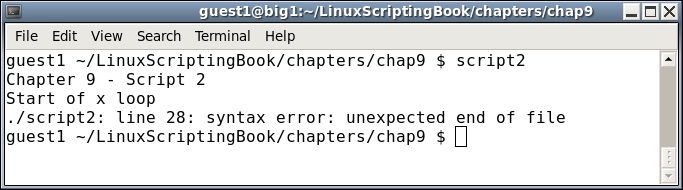
You can see that the echo statement Start of x loop was displayed. However, the second one, Start of y loop was not displayed. This gives you a good idea that the error is somewhere before the 2nd echo statement. In this case it is right before, but don't expect to be that lucky every time.