Table of Contents for
Linux Shell Scripting Bootcamp
 Linux Shell Scripting Bootcamp
Published by
Packt Publishing, 2017
Linux Shell Scripting Bootcamp
Published by
Packt Publishing, 2017
- Cover
- Table of Contents
- Linux Shell Scripting Bootcamp
- Linux Shell Scripting Bootcamp
- Credits
- About the Author
- Acknowledgement
- About the Reviewer
- www.PacktPub.com
- Customer Feedback
- Preface
- What you need for this book
- Who this book is for
- Conventions
- Reader feedback
- Customer support
- 1. Getting Started with Shell Scripting
- Demonstrating the use of scripts
- Summary
- 2. Working with Variables
- Validating parameters using conditional statements
- Comparison operators for strings
- Environment variables
- Summary
- 3. Using Loops and the sleep Command
- Screen manipulation
- Indenting your code
- Using the for statement
- Leaving a loop early
- The sleep command
- Watching a process
- Creating numbered backup files
- Summary
- 4. Creating and Calling Subroutines
- File redirection
- Command piping
- Subroutines
- Using parameters
- Making a current backup of your work
- Summary
- 5. Creating Interactive Scripts
- Summary
- 6. Automating Tasks with Scripts
- Summary
- 7. Working with Files
- Reading files
- Reading and writing files
- Reading and writing files interactively
- File checksums
- File encryption
- Summary
- 8. Working with wget and curl
- wget and recursion
- wget options
- curl
- Summary
- 9. Debugging Scripts
- Automatic backups
- More syntax errors
- Logic errors
- Using set to debug scripts
- Summary
- 10. Scripting Best Practices
- ssh and scp
- Find and use a good text editor
- Environment variables and aliases
- ssh prompt
- Testing an archive
- Progress indicator
- Creating new commands from a template
- Alerting the user
- Summary
- Index
Now let's talk about logic errors. These can be very hard to diagnose, and unfortunately I don't have any magical ways to avoid those. There are some things that can be pointed out however to help track them down.
A common problem with coding is what is called off by 1 errors. This was caused when computer language designers in the sixties decided to number things starting at 0 instead of 1. Computers will happily start counting anywhere you want them to and never complain at all, but most humans tend to do better when they start counting at 1. Most of my peers would probably disagree with this, but since I was the one who always had to fix their off by 1 defects I stand by my comments.
Let's look at the following very simple script:
#!/bin/sh
#
# 6/7/2017
#
echo "Chapter 9 - Script 4"

x=0
while [ $x -lt 5 ]
do
 echo "x: $x"
 let x++
done

echo "x after loop: $x"
let maxx=x

y=1
while [ $y -le 5 ]
do
 echo "y: $y"
 let y++
done

echo "y after loop: $y"
let maxy=y-1                 # must subtract 1

echo "Max. number of x: $maxx"
echo "Max. number of y: $maxy"

echo "End of script4"
exit 0
And the output:
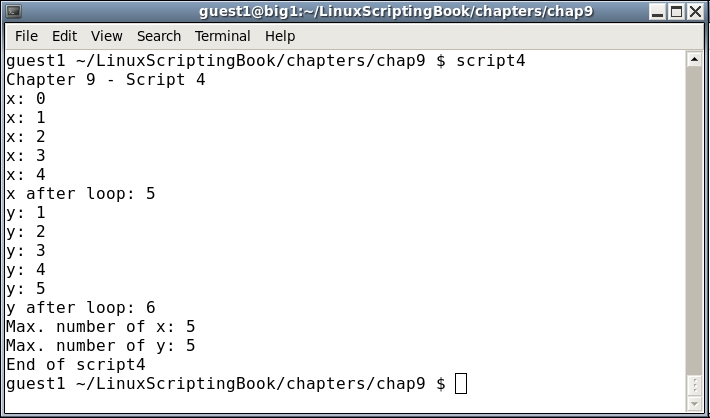
Look at the subtle differences between the two loops:
- In the
xloop the counting was started at0. xwas incremented while it was less than5.- The value of
xafter the loop was5. - The var
maxx, which is supposed to equal the number of iterations, is set tox. - In the y loop the counting was started at
1. ywas incremented while it was less than or equal to5.- The value of
yafter the loop was6. - The var
maxy, which is supposed to equal the number of iterations, is set toy-1.
If you already understand the above perfectly you will probably never have a problem with 1 off errors and that's great.
For the rest of us I suggest looking over this very carefully until you get it just right.